


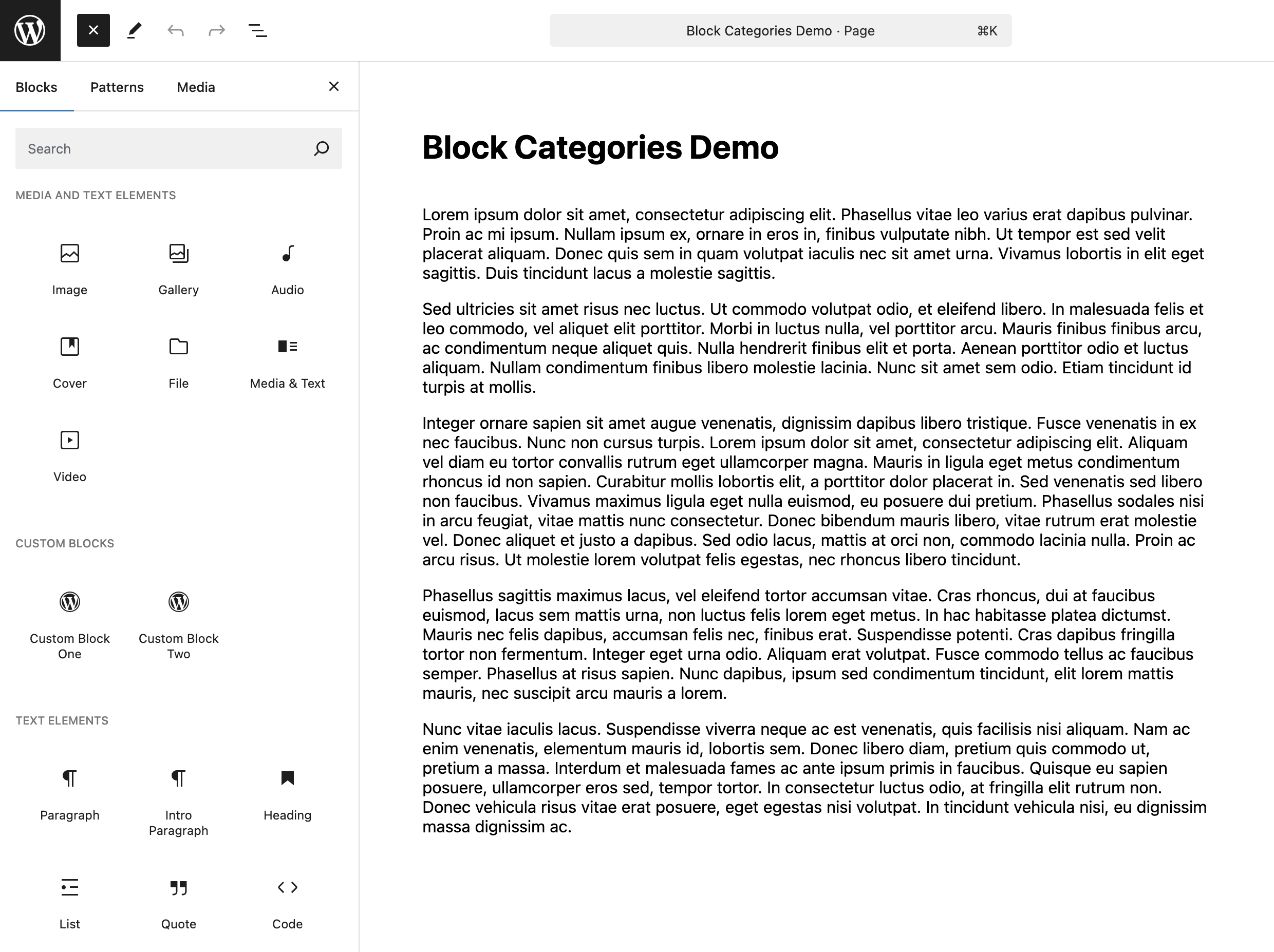
你大概注意到了,WordPress 区块按分类组织。但你知道吗?这些分类并非不可改变,你可以调整它们,让它们更符合自己的需求。
你可以重命名分类、调整顺序,也可以添加全新的分类,包括为自定义区块建立分类。你大概还能想到一些我们尚未考虑的用法。
所有这些,只需要一个钩子:block_categories_all。(block_categories_all)
这个钩子是一项用途广泛的工具,允许开发者自定义区块分类的组织方式。本文将介绍如何使用它,并编写函数添加、重排和重命名单个或多个区块分类。
开始之前要注意:每个示例函数都接受一个参数,预期为现有区块分类数组。本文将它命名为 $categories。
目录
添加分类
如果你构建自定义区块,可能希望把它们放在自定义分类中。自定义分类还可能有其他用途,例如组织具有自定义样式的部分。无论出于什么原因,下面介绍三种做法。
创建新分类
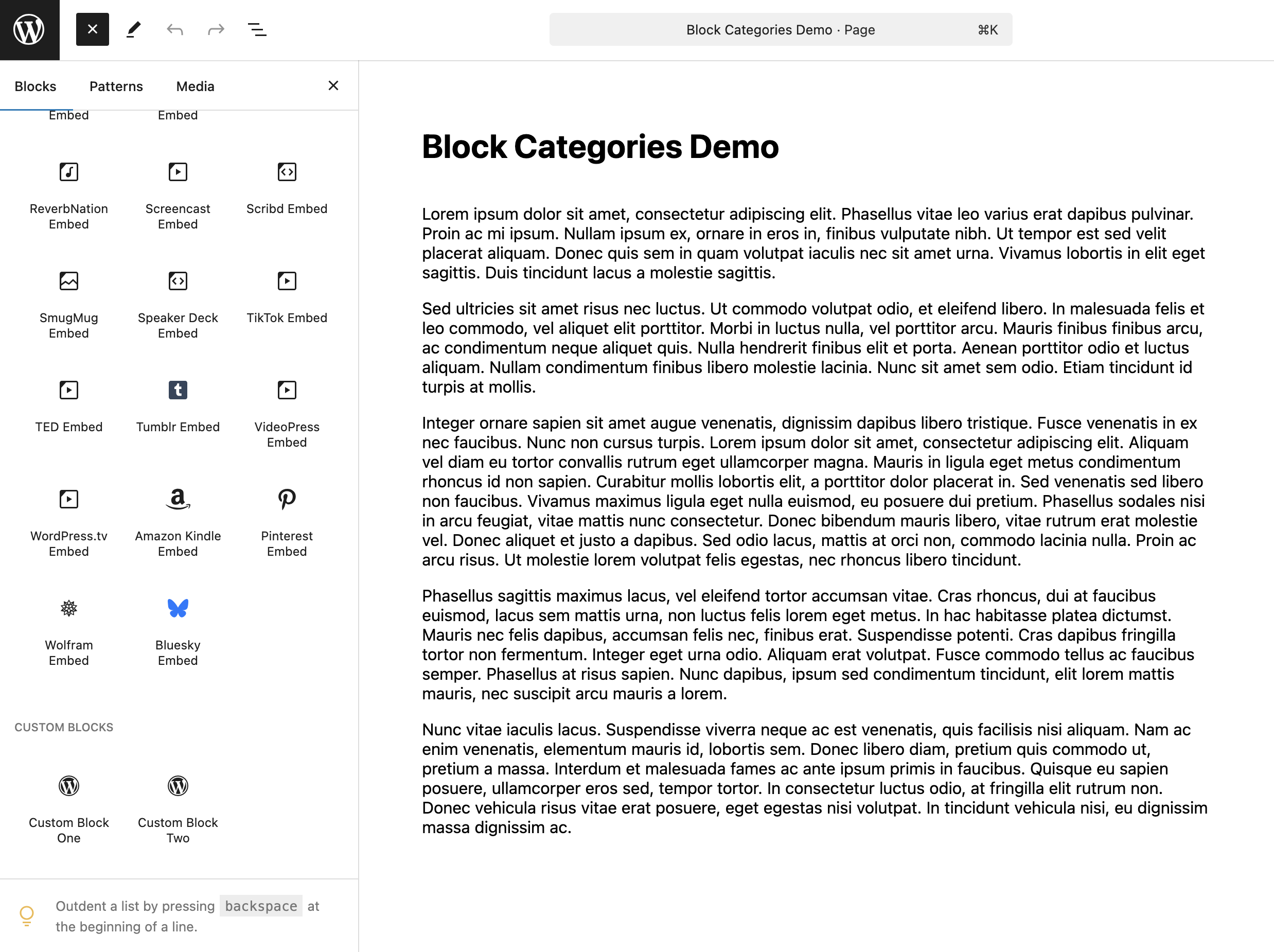
可以使用 array_merge,在现有分类数组的末尾添加名为 Custom Blocks 的新分类。
add_filter( 'block_categories_all', 'add_block_category', 10, 2 );

function add_block_category( $categories ) {
    $custom_category = array(
        array(
            'slug'  => 'custom-blocks',
            'title' => __( 'Custom Blocks', 'your-text-domain' ),
            'icon'  => null,
        ),
    );

    return array_merge( $categories, $custom_category );
}
首先创建接受一个参数的函数;请记住,它接收现有分类列表 $categories。在函数内部创建变量 $custom_category,给它赋予包含以下键值对的数组:
slug:分类的唯一标识符。title:分类显示的名称。icon:Dashicon 或自定义 SVG。
注意:据作者所知,目前没有地方使用或显示该图标,因此本例将它设置为 null。
然后用 array_merge 将 $custom_category 与现有分类列表合并。传入变量的顺序决定新分类位于 $categories 之前还是之后。
指定新分类的位置
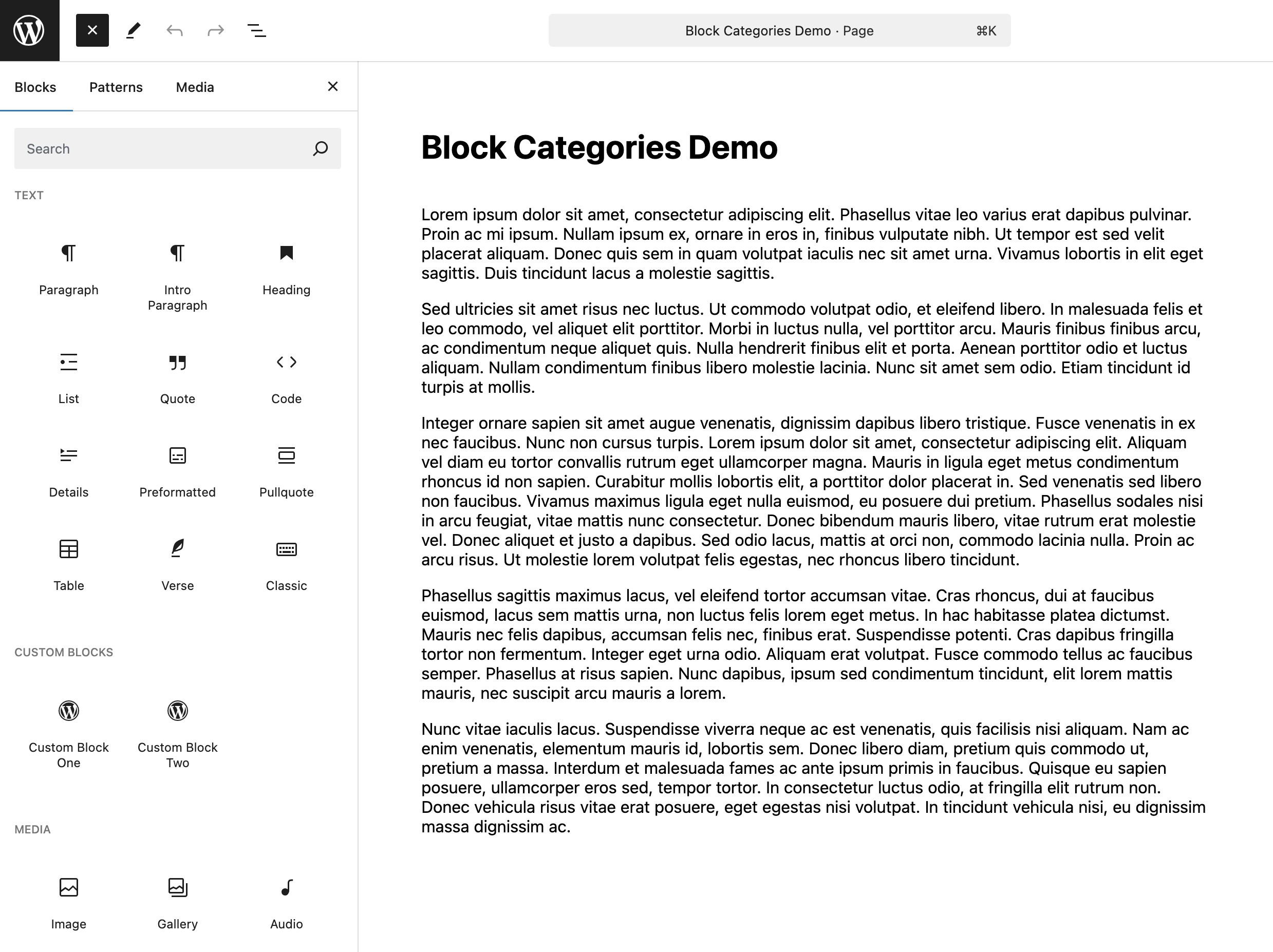
下面使用 array_splice,把名为 Custom Blocks 的新分类插入 $categories 的第二个位置,也就是索引 1。
add_filter( 'block_categories_all', 'add_order_block_category', 10, 2 );

function add_order_block_category( $categories ) {
    $custom_category = array(
        'slug'     => 'custom-blocks',
        'title'    => __( 'Custom Blocks', 'your-text-domain' ),
        'icon'     => null,
        'position' => 1,
    );

    // Extract position from the custom category array.
    $position = $custom_category['position'];

    // Remove position from the custom category array.
    unset( $custom_category['position'] );

    // Insert the custom category at the desired position.
    array_splice( $categories, $position, 0, array( $custom_category ) );

    return $categories;
}
与前例类似,先创建函数和新分类数组。不过这次增加一个 position 键,用它的值指定新分类在 $categories 中的位置。
然后提取位置,将其存入变量,供 array_splice 使用。使用之前,先用 unset 从分类数组中移除 position,因为分类本身不需要它。
最后使用接受四个参数的 array_splice:
- Array:要修改的数组。
- Offset:希望插入的位置。
- Length:偏移位置之后要删除的项目数量。
- Replacement:要添加到指定位置的元素数组。
调用时传入 $categories、新分类数组指定的位置、删除长度(这里为 0,因为不删除任何内容),最后传入新分类数组。
一次添加并定位多个新分类
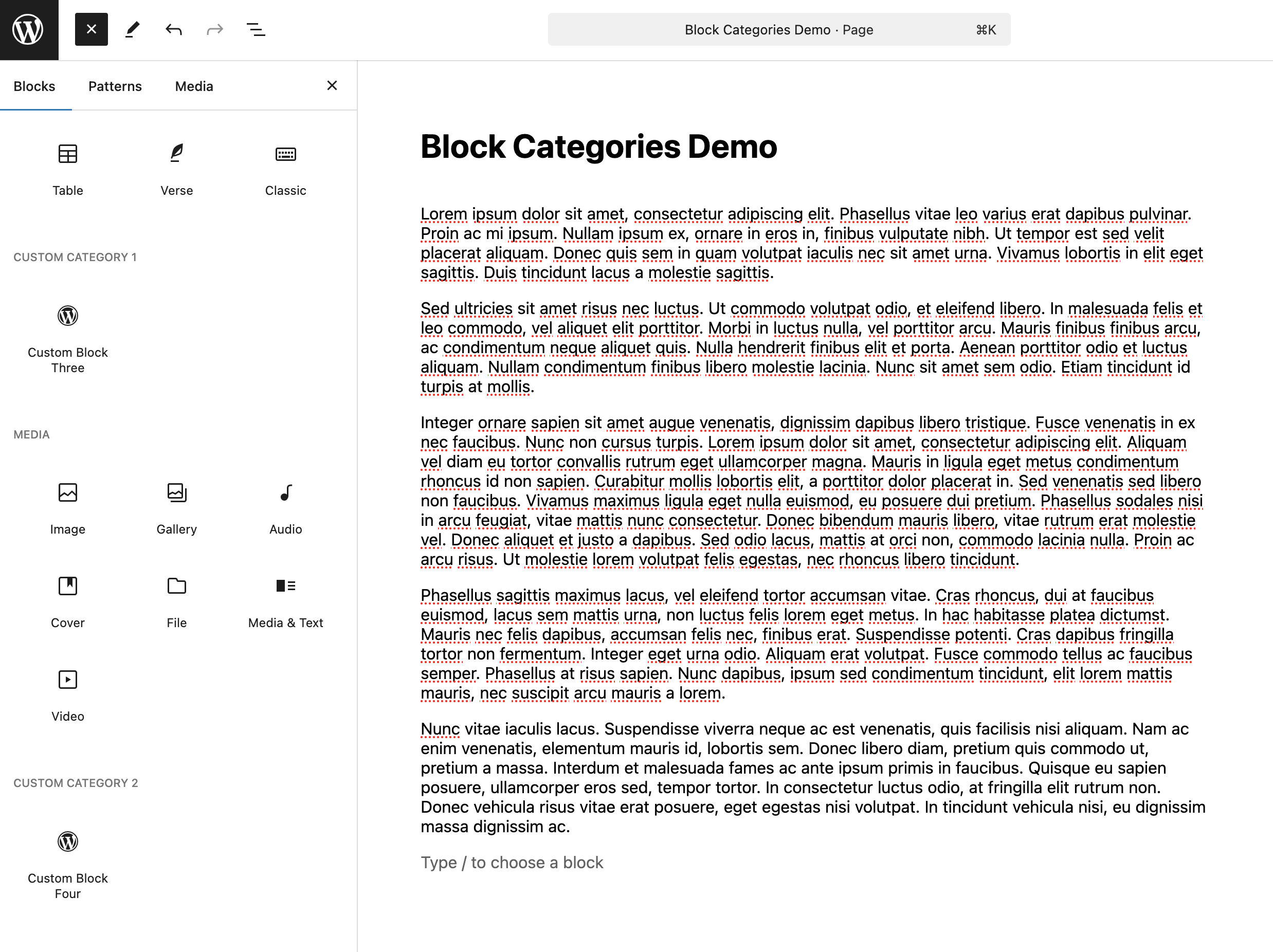
现在同时添加多个分类并安排位置。下面将两个自定义分类分别插入 $categories 的第二和第四个位置。
add_filter( 'block_categories_all', 'add_order_multiple_block_categories', 10, 2 );

function add_order_multiple_block_categories( $categories ) {
    $custom_categories = array(
        array(
            'slug'     => 'custom-category-1',
            'title'    => __( 'Custom Category 1', 'your-text-domain' ),
            'icon'     => null,
            'position' => 1,
        ),
        array(
            'slug'     => 'custom-category-2',
            'title'    => __( 'Custom Category 2', 'your-text-domain' ),
            'icon'     => null,
            'position' => 3,
        ),
    );

    $added_categories = array();

    // Prepare an associative array with positions as keys.
    foreach ( $custom_categories as $custom_category ) {
        $position = $custom_category['position'];
        unset( $custom_category['position'] );
        $added_categories[ $position ] = $custom_category;
    }

    // Sort the categories to insert by their positions/key.
    ksort( $added_categories );

    // Insert the sorted categories into the existing categories array.
    foreach ( $added_categories as $position => $custom_category ) {
        array_splice( $categories, $position, 0, array( $custom_category ) );
    }

    return $categories;
}
创建函数,并在其中建立名为 $custom_categories 的新分类数组,为每个项目指定位置。再创建空数组 $added_categories,用于下一步存储数据。
遍历 $custom_categories,提取并移除每个分类的 position,以新位置为键,将分类存入 $added_categories。然后使用 ksort,确保数组按键排序。
最后通过 foreach 遍历 $added_categories,把分类插入所需位置。原文文字在这里称使用 array_slice,并称最后通过 array_values 重新索引;但上方实际代码使用 array_splice,且没有单独调用 array_values。请以保留的实际示例代码为准。
重排分类
也可以使用 block_categories_all 调整区块编辑器中已有分类列表的顺序。无论移动单个分类还是重新排列多个分类,下面的方法都能提供更细致的控制。(block_categories_all)
重排单个分类
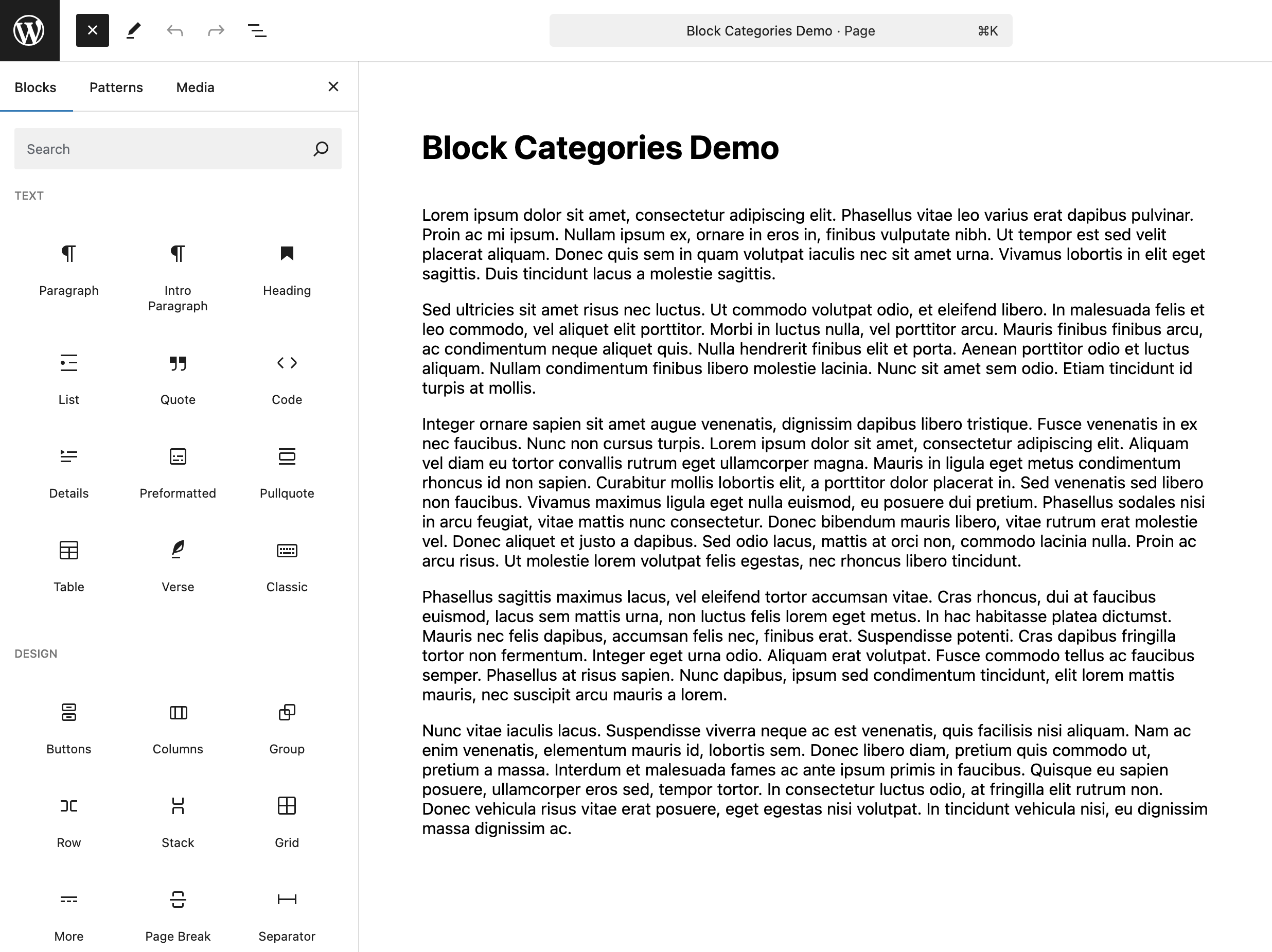
下面从现有数组中移除 Design 分类,再使用 PHP 的 array_splice 将它重新插入第二个位置。
add_filter( 'block_categories_all', 'reorder_design_category', 10, 2 );

function reorder_design_category( $categories ) {
    $design_category = null;
    $new_position    = 1;

    // Remove the design category from the existing categories.
    foreach ( $categories as $key => $category ) {
        if ( 'design' === $category['slug'] ) {
            $design_category = $category;
            unset( $categories[ $key ] );
            break;
        }
    }

    // If the design category exists, insert it at the new position.
    if ( $design_category ) {
        array_splice( $categories, $new_position, 0, array( $design_category ) );
    }

    // Reindex the array.
    return array_values( $categories );
}
在函数中先设置两个变量:$design_category 初始为 null,用于稍后存储 Design 分类或其他待移动分类;另一个变量指定新位置。原文将其称为 $position,示例实际名称是 $new_position。然后用 foreach 遍历已有分类,寻找匹配的 slug,将分类存入 $design_category,并通过 unset 从原列表中移除它。
检查变量是否存入了分类数据,并使用 array_splice 把分类插入目标位置,做法与之前添加分类相同。最后通过 array_values 重新索引,保证数组顺序正确。
重排多个分类
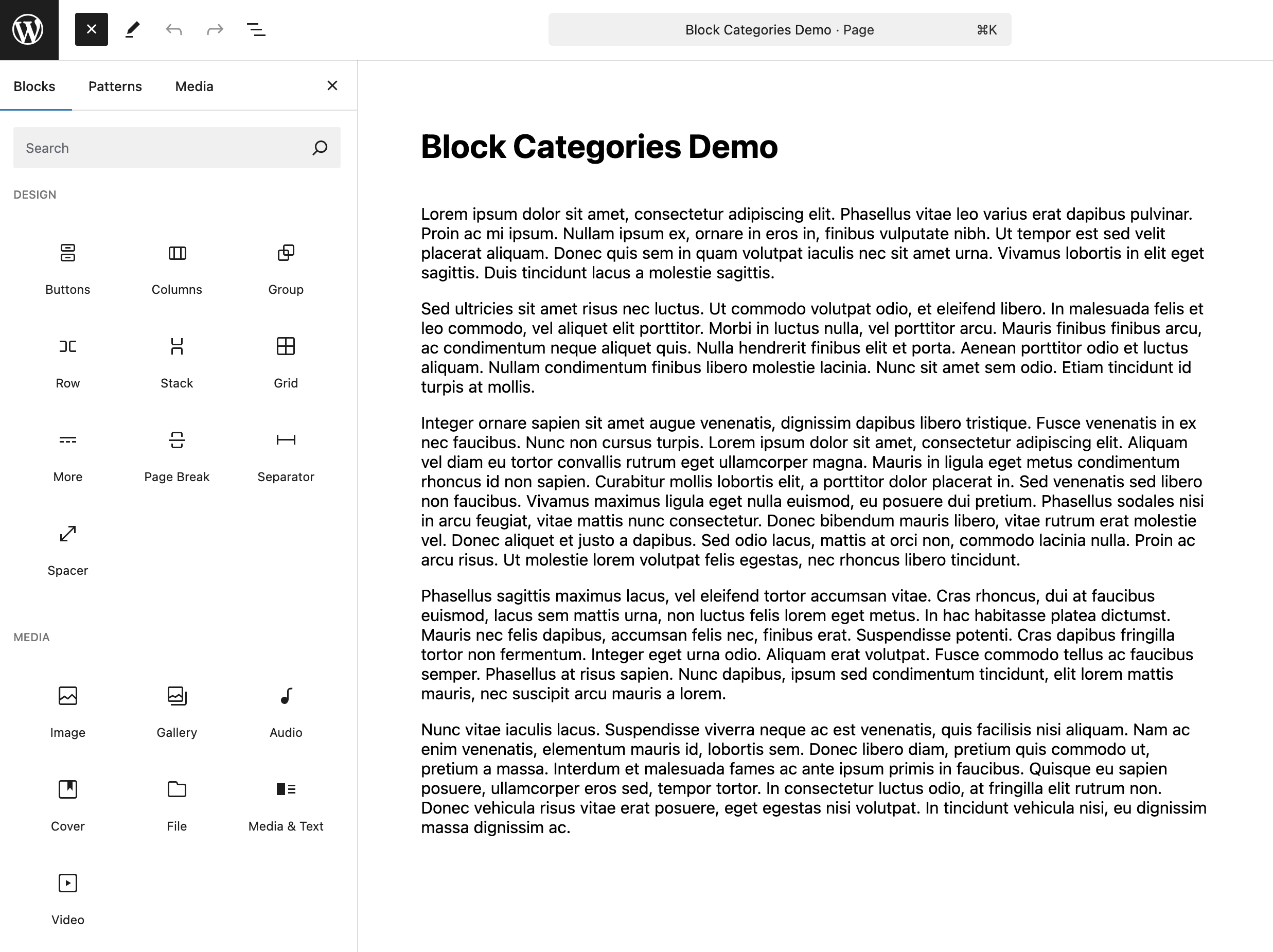
下面使用 array_splice 移除并重新插入 Design 和 Text 分类,使它们分别位于第一和第四个位置。
<?php
add_filter( 'block_categories_all', 'reorder_multiple_categories', 10, 2 );

function reorder_multiple_categories( $categories ) {
    $reorder_categories = array(
        'design' => 0,
        'text'   => 3,
    );

    $moved_categories = array();

    // Iterate through the existing categories and add/remove the ones to be reordered.
    foreach ( $categories as $key => $category ) {
        if ( array_key_exists( $category['slug'], $reorder_categories ) ) {
            $moved_categories[ $reorder_categories[ $category['slug'] ] ] = $category;
            unset( $categories[ $key ] );
        }
    }

    // Sort the moved categories by their new positions.
    ksort( $moved_categories );

    // Insert the moved categories at their new positions.
    foreach ( $moved_categories as $position => $category ) {
        array_splice( $categories, $position, 0, array( $category ) );
    }

    // Reindex the array.
    $categories = array_values( $categories );

    return $categories;
}
在函数内建立关联数组 $reorder_categories,以待重排分类的 slug 为键,以新位置为值。再创建空数组 $moved_categories,供下一步保存数据。
检查找到匹配分类后,将它放入 $moved_categories,以指定位置为键。unset 会从 $categories 中移除这个分类。
使用 ksort,按键对分类排序。
用 foreach 遍历 $moved_categories,通过 array_splice 将分类插入正确位置。最后使用 array_values 重新索引,让新 $categories 列表保持正确顺序。
重命名分类
还可以使用 block_categories_all 重命名区块编辑器中的分类列表。无论修改一个还是全部分类,下面的方法都能让你控制名称。(block_categories_all)
重命名单个分类
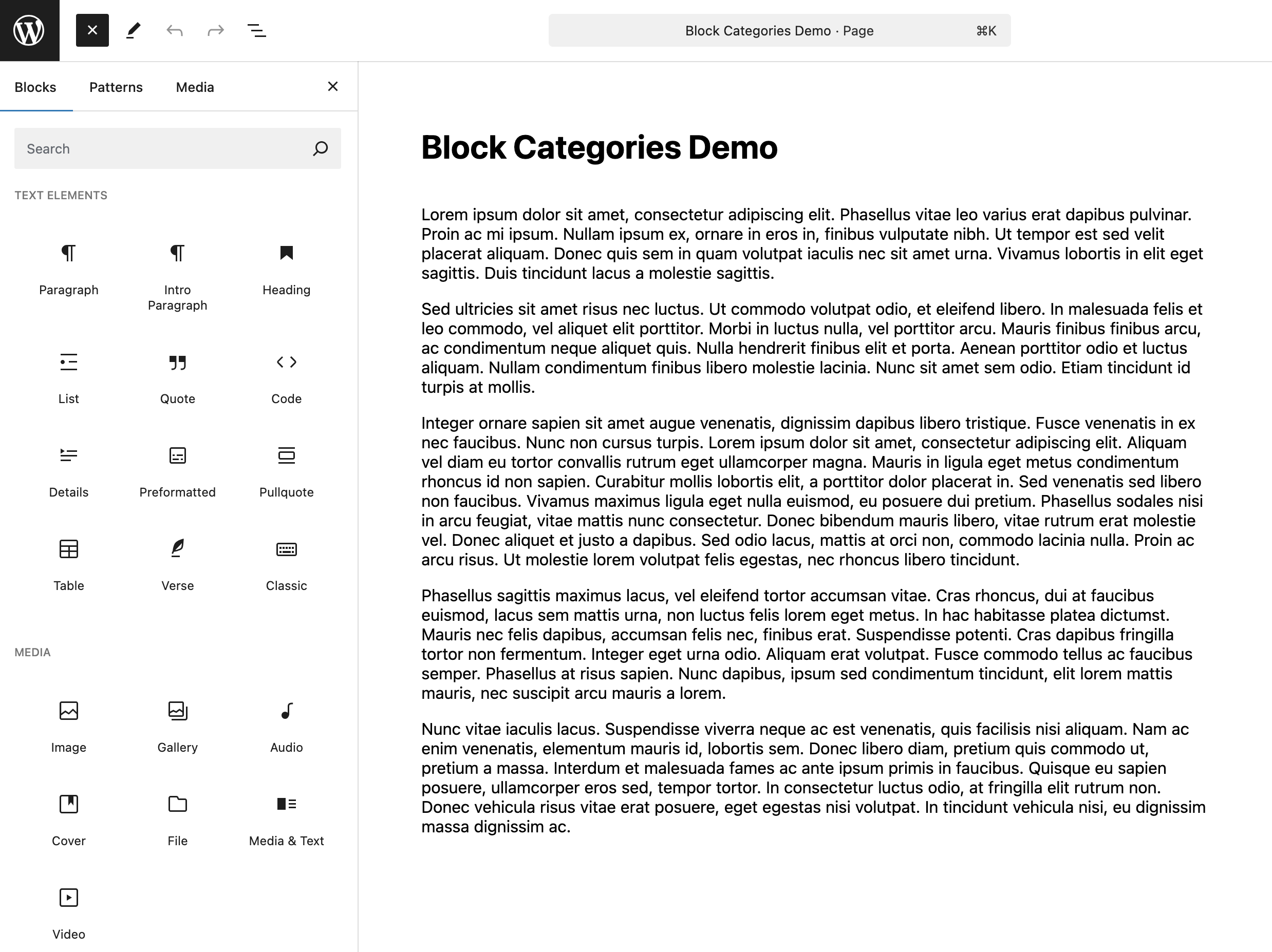
例如,你希望把 Text 分类改名为 Text Elements。
add_filter( 'block_categories_all', 'rename_text_category', 10, 2 );

function rename_text_category( $categories ) {
    foreach ( $categories as &$category ) {
        if ( $category['slug'] === 'text' ) {
            $category['title'] = __( 'Text Elements', 'your-text-domain' );
        }
    }

    return $categories;
}
用 foreach 遍历 $categories,寻找 slug 等于 text 的分类。找到后,将它的标题改为 Text Elements。
重命名多个分类
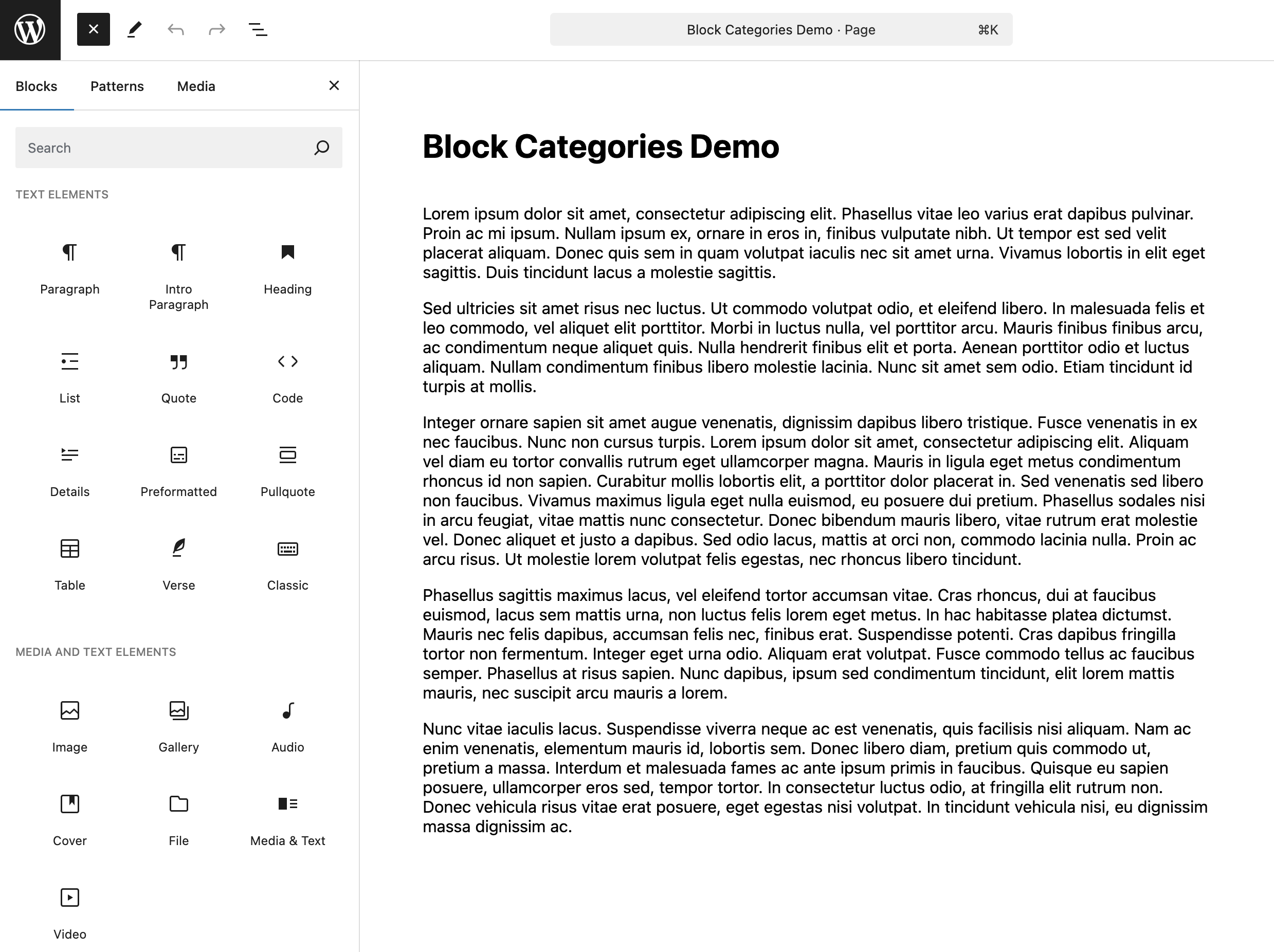
也可以把 Text 与 Media 分类分别改名为 Text Elements 与 Media and Text Elements。
add_filter( 'block_categories_all', 'rename_multiple_categories', 10, 2 );

function rename_multiple_categories( $categories ) {
    foreach ( $categories as &$category ) {
        if ( $category['slug'] === 'text' ) {
            $category['title'] = __( 'Text Elements', 'your-text-domain' );
        }
        if ( $category['slug'] === 'media' ) {
            $category['title'] = __( 'Media and Text Elements', 'your-text-domain' );
        }
    }

    return $categories;
}
在一个函数中重命名多个分类时,步骤与重命名单个分类相同;按需要增加对分类 slug 的检查即可。
整合所有操作
最后把这些能力整合起来:控制已有分类的名称与位置,同时添加新分类。
add_filter( 'block_categories_all', 'modify_block_categories', 10, 2 );

function modify_block_categories( $categories ) {
    $new_category_order = array(
        array(
            'slug'     => 'media',
            'title'    => __( 'Media and Text Elements', 'your-text-domain' ),
            'position' => 0,
        ),
        array(
            'slug'     => 'custom-blocks',
            'title'    => __( 'Custom Blocks', 'your-text-domain' ),
            'position' => 1,
        ),
        array(
            'slug'     => 'text',
            'title'    => __( 'Text Elements', 'your-text-domain' ),
            'position' => 2,
        ),
        array(
            'slug'     => 'embed',
            'position' => 3,
        ),
        array(
            'slug'     => 'design',
            'position' => 4,
        ),
    );

    // Create an associative array of block categories with the slug as the key.
    $current_block_categories = array_column( $categories, 'title', 'slug' );

    // Check if the new category order has a title set, otherwise use the default title.
    foreach ( $new_category_order as &$new_category ) {
        $new_category['title'] = $new_category['title'] ?? $current_block_categories[ $new_category['slug'] ] ?? __( 'Untitled', 'your-text-domain' );
    }

    // Create an array of slugs from the new category order.
    $new_category_slugs = array_column( $new_category_order, 'slug' );

    // Filter out the remaining block categories that are not in the new order.
    $remaining_categories = array_filter( $categories, function ( $category ) use ( $new_category_slugs ) {
        return ! in_array( $category['slug'], $new_category_slugs, true );
    } );

    // Merge the new category order with the remaining categories.
    return array_merge( $new_category_order, $remaining_categories );
}
首先定义 $new_category_order 数组,列出需要添加、重排或重命名的分类。每项必须有 slug 来标识;原文称 title 和 position 可按修改需求选填。
用 array_column 从 $categories 创建以 slug 为键的关联数组 $current_block_categories。遍历 $new_category_order,检查每项是否已设置新标题。没有设置时,根据 slug 从现有分类中取得标题;如果 slug 也未找到,使用 Untitled。
原文接着描述:遍历 $new_category_order,检查带新位置的分类,以位置为键放入 $moved_categories。不过,上方整合示例并未实现这一段操作。
原文继续描述用 ksort 按位置排序 $moved_categories,再以 foreach 和 array_slice 插入分类;这些步骤同样不在实际整合示例中。该示例直接以 $new_category_order 的数组顺序决定结果顺序,position 字段未用于排序。
接下来过滤剩余分类,以便重新合并。实际代码通过 array_column 创建 slug 数组 $new_category_slugs(原文文字称其为 $new_category_order),并用 array_filter 保留 slug 不在新顺序中的原分类,存入 $remaining_categories。原文文字对移除条件的描述与此实际保留条件不一致。
最后使用 array_merge,把新的分类顺序与 $remaining_categories 合并,返回完整的修改后分类列表。
结语
block_categories_all 让你按项目和用户的需要组织区块分类,支持他们创建内容的方式。(block_categories_all)
这些函数仅仅是起点。你会如何使用它们?是否有其他函数,或更有创意的组合方式?欢迎到原文评论区交流。









暂无评论内容