


许多组织使用 Docker 统一不同机器上的构建与测试环境,并高效部署应用。安装 Pipeline 和 Docker Pipeline 插件后,可以直接在 Jenkinsfile 中与 Docker 交互。
本文介绍 Jenkinsfile 中使用 Docker 的基础,Docker 本身的概念见 Docker 入门指南。
定制执行环境
Pipeline 可以为单个阶段或整个流水线使用 Docker 镜像,让用户定义所需工具,无需手动配置代理节点。只要工具能打包进容器,通常稍改 Jenkinsfile 就能使用。
本文示例必须安装 Docker Pipeline 插件。没有它,声明式流水线不能使用 docker agent,脚本式流水线也不能使用 docker.image(...).inside {}。
声明式 Jenkinsfile:
pipeline {
    agent {
        docker { image 'node:24.21.0-alpine3.24' }
    }
    stages {
        stage('Test') {
            steps {
                sh 'node --eval "console.log(process.platform,process.env.CI)"'
            }
        }
    }
}
脚本式 Jenkinsfile:
node {
    /* Requires the Docker Pipeline plugin to be installed */
    docker.image('node:24.21.0-alpine3.24').inside {
        stage('Test') {
            sh 'node --eval "console.log(process.platform,process.env.CI)"'
        }
    }
}
执行时,Jenkins 自动启动指定容器,并在其中运行步骤:
[Pipeline] stage
[Pipeline] { (Test)
[Pipeline] sh
[guided-tour] Running shell script
+ node --eval 'console.log(process.platform,process.env.CI)'
linux true
[Pipeline] }
[Pipeline] // stage
[Pipeline] }
额外参数
registryUrl 等额外参数见 agent 参数语法文档。
工作区同步
需要与其他阶段同步工作区时,使用 reuseNode true。否则,容器阶段可能在同一个或其他代理上运行,使用临时工作区。
默认流程是:选择代理,创建新的空工作区,克隆流水线代码,再将工作区挂载到容器。存在多个代理时,容器阶段可能在任意代理启动。
reuseNode=true 时,不创建新工作区,而是把当前代理的当前工作区挂入容器,并在同一节点启动,因此数据保持同步。
声明式:
pipeline {
    agent any
    stages {
        stage('Build') {
            agent {
                docker {
                    image 'gradle:8.14.0-jdk21-alpine'
                    // Run the container on the node specified at the
                    // top-level of the Pipeline, in the same workspace,
                    // rather than on a new node entirely:
                    reuseNode true
                }
            }
            steps {
                sh 'gradle -g gradle-user-home --version'
            }
        }
    }
}
脚本式的限制:
// Option "reuseNode true" currently unsupported in scripted pipeline缓存容器数据
构建工具常会下载外部依赖并缓存。容器初始文件系统干净,后续流水线可能无法复用磁盘缓存,导致变慢。
Pipeline 支持向 Docker 传递自定义参数,可以挂载卷,在代理上跨运行保存缓存。下面通过 Maven 容器复用 ~/.m2,避免重复下载。
声明式:
pipeline {
    agent {
        docker {
            image 'maven:3.9.9-eclipse-temurin-21'
            args '-v $HOME/.m2:/root/.m2'
        }
    }
    stages {
        stage('Build') {
            steps {
                sh 'mvn -B'
            }
        }
    }
}
脚本式:
node {
    /* Requires the Docker Pipeline plugin to be installed */
    docker.image('maven:3.9.16-eclipse-temurin-21-alpine').inside('-v $HOME/.m2:/root/.m2') {
        stage('Build') {
            sh 'mvn -B'
        }
    }
}
使用多个容器
代码库常同时依赖多种技术,例如 Java 后端与 JavaScript 前端。结合不同阶段与 agent 指令,一个 Jenkinsfile 就能使用多种环境。
声明式:
pipeline {
    agent none
    stages {
        stage('Back-end') {
            agent {
                docker { image 'maven:3.9.16-eclipse-temurin-21-alpine' }
            }
            steps {
                sh 'mvn --version'
            }
        }
        stage('Front-end') {
            agent {
                docker { image 'node:24.21.0-alpine3.24' }
            }
            steps {
                sh 'node --version'
            }
        }
    }
}
脚本式:
node {
    /* Requires the Docker Pipeline plugin to be installed */

    stage('Back-end') {
        docker.image('maven:3.9.16-eclipse-temurin-21-alpine').inside {
            sh 'mvn --version'
        }
    }

    stage('Front-end') {
        docker.image('node:24.21.0-alpine3.24').inside {
            sh 'node --version'
        }
    }
}
使用 Dockerfile
需要更定制的环境时,可从仓库中的 Dockerfile 构建并运行容器。agent { dockerfile true } 会构建新镜像,而不是从 Docker Hub 拉取现成镜像。
沿用前例,定制 Dockerfile:
FROM node:24.21.0-alpine3.24

RUN apk add -U subversion
将它提交到仓库根目录,再修改 Jenkinsfile:
pipeline {
    agent { dockerfile true }
    stages {
        stage('Test') {
            steps {
                sh 'node --version'
                sh 'svn --version'
            }
        }
    }
}
dockerfile 还支持其他选项,详情见 Pipeline Syntax。原文同时提供了以下 Dockerfile 与 Jenkins Pipeline 演示。
指定 Docker 标签
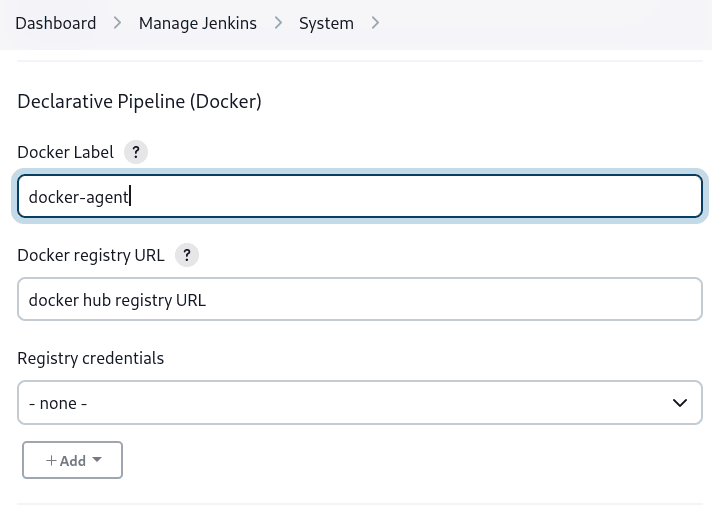
默认假设所有代理都能运行 Docker 流水线。如果有 macOS、Windows 或其他不能运行 Docker 守护进程的代理,这个假设可能不适用。
安装 Docker Pipeline 后,可以在“Manage Jenkins”全局设置或文件夹级别,通过 Label 指定使用哪些代理。
macOS 的 PATH
macOS 上 Docker 镜像的 PATH 默认不包含 /usr/local/bin。如果 Jenkins 要调用其中的程序,需要扩展 PATH。在 /usr/local/Cellar/jenkins-lts/XXX/homebrew.mxcl.jenkins-lts.plist 添加:
<key>EnvironmentVariables</key>
<dict>
<key>PATH</key>
<string><!-- insert revised path here --></string>
</dict>
PATH 使用冒号分隔目录,应包含:
/usr/local/bin/usr/bin/bin/usr/sbin/sbin/Applications/Docker.app/Contents/Resources/bin//Users/XXX/Library/Group\ Containers/group.com.docker/Applications/Docker.app/Contents/Resources/bin,XXX 替换为用户名。
然后运行 brew services restart jenkins-lts 重启。
脚本式流水线高级用法
运行 sidecar 容器
构建或测试依赖某项服务时,Docker Pipeline 可以在后台运行一个容器,同时在另一个环境中执行工作。每次流水线都能获得干净的 sidecar 服务。
假设集成测试依赖本地 MySQL,使用 withRun 启动:
node {
    checkout scm
    /*
     * In order to communicate with the MySQL server, this Pipeline explicitly
     * maps the port (`3306`) to a known port on the host machine.
     */
    docker.image('mysql:8-oracle').withRun('-e "MYSQL_ROOT_PASSWORD=my-secret-pw"' +
                                           ' -p 3306:3306') { c ->
        /* Wait until mysql service is up */
        sh 'while ! mysqladmin ping -h0.0.0.0 --silent; do sleep 1; done'
        /* Run some tests which require MySQL */
        sh 'make check'
    }
}
还可以同时使用两个容器,一个 MySQL sidecar,另一个通过容器链接提供执行环境:
node {
    checkout scm
    docker.image('mysql:8-oracle').withRun('-e "MYSQL_ROOT_PASSWORD=my-secret-pw"') { c ->
        docker.image('mysql:8-oracle').inside("--link ${c.id}:db") {
            /* Wait until mysql service is up */
            sh 'while ! mysqladmin ping -hdb --silent; do sleep 1; done'
        }
        docker.image('oraclelinux:9').inside("--link ${c.id}:db") {
            /*
             * Run some tests that require MySQL, and assume that it is
             * available on the host name `db`
             */
            sh 'make check'
        }
    }
}
withRun 暴露的对象通过 id 属性提供运行中容器 ID。把包含该 ID 的 Docker 参数传给 inside(),即可建立链接。
退出流水线前,也可以用 id 查看容器日志:
sh "docker logs ${c.id}"构建容器
Docker Pipeline 的 build() 可在流水线运行时,根据仓库中的 Dockerfile 创建镜像。它的返回对象还可用于后续调用:
node {
    checkout scm

    def customImage = docker.build("my-image:${env.BUILD_ID}")

    customImage.inside {
        sh 'make test'
    }
}
也可调用 push(),发布到 Docker Hub 或自定义仓库:
node {
    checkout scm
    def customImage = docker.build("my-image:${env.BUILD_ID}")
    customImage.push()
}
常见做法是为最近验证通过的镜像添加 latest 标签。push() 接受可选标签参数,因此可以将同一镜像推送为多个标签:
node {
    checkout scm
    def customImage = docker.build("my-image:${env.BUILD_ID}")
    customImage.push()

    customImage.push('latest')
}
build() 默认构建当前目录 Dockerfile,第二个参数可指定其他目录:
node {
    checkout scm
    def testImage = docker.build("test-image", "./dockerfiles/test") (1)

    testImage.inside {
        sh 'make test'
    }
}
标注 1:使用 ./dockerfiles/test/Dockerfile 构建 test-image。
第二个参数也可传递 docker build 选项。字符串最后必须是构建上下文目录。下面用 -f 覆盖 Dockerfile:
node {
    checkout scm
    def dockerfile = 'Dockerfile.test'
    def customImage = docker.build("my-image:${env.BUILD_ID}",
                                   "-f ${dockerfile} ./dockerfiles") (1)
}
标注 1:使用 ./dockerfiles/Dockerfile.test 构建 my-image:${env.BUILD_ID}。
使用远程 Docker 服务器
默认连接本地守护进程,通常通过 /var/run/docker.sock。要选择其他服务器,例如 Docker Swarm,使用 withServer(),传入 URI,并可附上 Jenkins 预先配置的 Docker 服务器证书凭据 ID:
node {
    checkout scm

    docker.withServer('tcp://swarm.example.com:2376', 'swarm-certs') {
        docker.image('mysql:8-oracle').withRun('-p 3306:3306') {
            /* do things */
        }
    }
}
inside() 与 build() 不能开箱即用地在 Docker Swarm 上正常工作。inside() 要求 Docker 服务器与 Jenkins 代理共享文件系统,以便挂载工作区。
目前插件与 Docker CLI 都不会自动识别服务器远程运行这一情况,典型症状是嵌套 sh 报错:
cannot create /…@tmp/durable-…/pid: Directory nonexistent如果 Jenkins 检测到代理本身在容器中运行,会自动向 inside 容器传入 –volumes-from,让它共享代理工作区。某些 Docker Swarm 版本还不支持自定义镜像仓库。
使用自定义镜像仓库
默认使用 Docker Hub。脚本式流水线可通过 withRegistry() 包裹步骤并传入自定义 URL:
node {
    checkout scm

    docker.withRegistry('https://registry.example.com') {

        docker.image('my-custom-image').inside {
            sh 'make test'
        }
    }
}
需要认证时,在 Jenkins 添加“Username/Password”凭据,再将凭据 ID 作为第二个参数:
node {
    checkout scm

    docker.withRegistry('https://registry.example.com', 'credentials-id') {

        def customImage = docker.build("my-image:${env.BUILD_ID}")

        /* Push the container to the custom Registry */
        customImage.push()
    }
}原文:Using Docker with Pipeline。作者/维护者:Jenkins 文档贡献者。本文为原文的中文译文;代码保留原文内容。










暂无评论内容