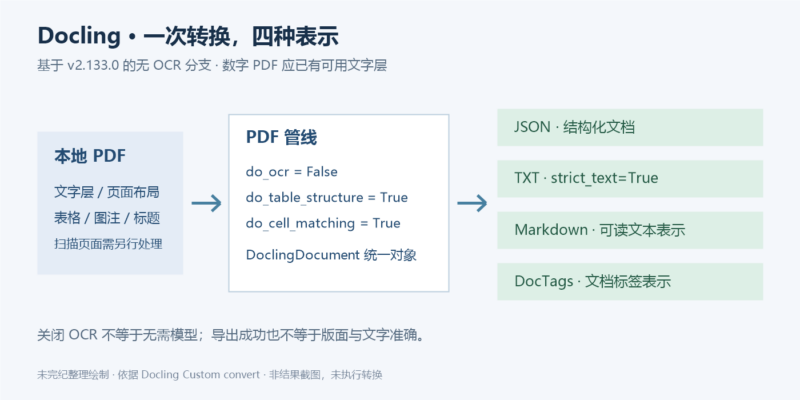



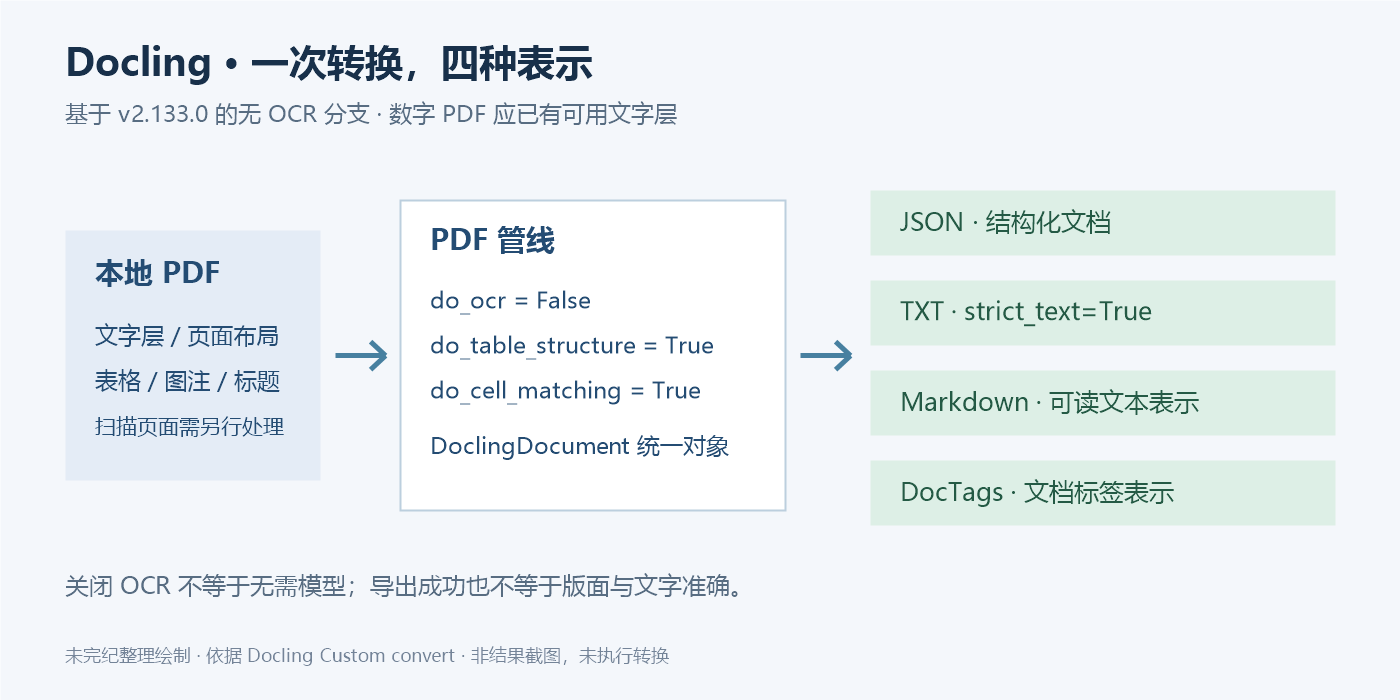
PDF 的页面外观和可供程序使用的文档结构并不是同一回事。文字可能分散在多个定位片段中,表格也不一定带有可直接读取的行列关系。Docling 的 PDF 流程把解析结果组织为统一的文档对象,再让同一份结果导出为不同格式。选择恰当的配置,比把所有识别选项都打开更重要。
本文依据官方 Custom convert 示例及 v2.133.0 对应脚本,只整理“Docling Parse without EasyOCR”分支:处理已有文字层的数字 PDF,关闭 OCR,保留版面与表格结构处理。其他 OCR 引擎、扫描件补救和硬件调优不属于本篇已核验流程。以下代码仅经静态审查,未安装依赖、下载权重或实际转换 PDF。
固定代码基线,区分依赖要求与已测试组合
本篇固定 docling==2.133.0 与 docling-core==2.98.0。对应源码声明 Python 范围为 >=3.10,<4.0,本地模型依赖要求 Torch >=2.2.2,<3.0.0。这并不意味着这个范围内任意操作系统、Python 与 GPU 组合都经过本文验证。应为自己的平台选择受支持的环境,并保存完整依赖解析结果。
# 在专用 Python 虚拟环境内执行;本文未运行
python -m pip install "docling==2.133.0" "docling-core==2.98.0"
这个版本的 docling 是元包,会安装 docling-slim[standard]==2.133.0,真正的 docling Python 模块由 docling-slim 提供。只固定这两个顶层版本,仍不等于锁定全部传递依赖。用于长期重现时,应另行保存锁文件、包来源与哈希;不要将这里的安装行称为完整的可复现环境。
原文把多种配置放在同一脚本里,通过注释切换,并明确要求一次只启用一组。网页和版本脚本的默认激活分支开启 OCR,还带有语言与自动设备选项。本篇不沿用那个默认分支:我们启用原文已经给出的无 OCR 配置,去掉无关 OCR 语言与硬件设置。
这三个选项分别决定什么
options = PdfPipelineOptions()
options.do_ocr = False
options.do_table_structure = True
options.table_structure_options = TableStructureOptions(
    do_cell_matching=True
)
do_ocr=False 表示不进行光学字符识别。适用前提是 PDF 的文字层可用,而不是仅凭文件扩展名判断。整页扫描图、损坏的文字编码或混合型 PDF 可能缺字;关闭 OCR 后,不能指望系统自动替这些页面补出文字。
do_table_structure=True 保留表格结构识别;do_cell_matching=True 是原文 Docling Parse 无 OCR 分支采用的单元格匹配设置。原文另一个 PyPdfium 无 OCR 分支使用不同的匹配选择,不能把两组配置任意拼接后仍称作原示例。
转换器通过 format_options 为 InputFormat.PDF 指定 PdfFormatOption。本篇沿用原文该分支的默认 PDF 后端,不另传 backend。如果切换到示例中的 PyPdfium 后端,除了参数变化,还需要导入相应类;那属于另一组应独立验证的流程。
输入文件与模型资源都要有明确来源
原脚本从代码仓库的 tests/data/pdf/sources/2206.01062.pdf 读取测试材料。该编号对应公开论文 DocLayNet: A Large Human-Annotated Dataset for Document-Layout Analysis。只安装 Python 包并不保证这个仓库测试文件存在;可自行准备一份获得使用许可且带文字层的本地 PDF,再把路径传入示例。
关闭 OCR 不等于完全不使用模型,也不等于首次执行就能离线。版面和表格识别仍可能需要取得模型文件。Heron 模型卡将其列为 Docling 的默认版面分析模型,许可为 Apache-2.0;docling-models v2.3.0 模型卡包含 TableFormer,标注 CDLA-Permissive-2.0。代码许可、模型许可和输入 PDF 的权利条件应分别保留。本次只读取这些资料,没有下载、加载或验证权重获取链,也不把模型卡的性能表当成这份 PDF 的质量保证。
一份便于复核的完整改写示例
下面代码保留原文转换器和四种导出调用,调整了输入、计时和输出管理。它接收本地文件,使用新建的独立输出目录,避免原文固定 scratch/文件名 加 "w" 模式可能覆盖上一次结果的问题。文件后缀检查只用于减少误选文件,不构成 PDF 安全验证。
# Based on Docling custom_convert.py v2.133.0.
# Copyright The Docling Contributors — MIT License.
# Modified for this article on 2026-10-05; MIT notice is reproduced below.
import argparse
import json
import logging
import tempfile
import time
from pathlib import Path

from docling.datamodel.base_models import InputFormat
from docling.datamodel.pipeline_options import PdfPipelineOptions, TableStructureOptions
from docling.document_converter import DocumentConverter, PdfFormatOption

log = logging.getLogger(__name__)

def main():
    parser = argparse.ArgumentParser(
        description="Convert a local digital PDF without OCR."
    )
    parser.add_argument("pdf", type=Path)
    parser.add_argument("--output-parent", type=Path, default=Path("scratch"))
    args = parser.parse_args()
    logging.basicConfig(level=logging.INFO)

    input_path = args.pdf.expanduser().resolve(strict=True)
    if not input_path.is_file() or input_path.suffix.lower() != ".pdf":
        parser.error("pdf must be an existing local PDF file")

    # Activate the original 'Docling Parse without EasyOCR' option only.
    options = PdfPipelineOptions()
    options.do_ocr = False
    options.do_table_structure = True
    options.table_structure_options = TableStructureOptions(do_cell_matching=True)
    converter = DocumentConverter(
        format_options={InputFormat.PDF: PdfFormatOption(pipeline_options=options)}
    )

    started = time.perf_counter()
    result = converter.convert(input_path)
    elapsed = time.perf_counter() - started
    log.info("convert() returned after %.2f seconds", elapsed)
    log.info("Conversion status: %s", result.status)

    # Each run receives a new directory; do not overwrite earlier exports.
    output_parent = args.output_parent.expanduser().resolve()
    output_parent.mkdir(parents=True, exist_ok=True)
    output_dir = Path(tempfile.mkdtemp(prefix="docling-", dir=output_parent))
    outputs = {
        ".json": json.dumps(
            result.document.export_to_dict(), ensure_ascii=False, indent=2
        ),
        ".txt": result.document.export_to_markdown(strict_text=True),
        ".md": result.document.export_to_markdown(),
        ".doctags": result.document.export_to_doctags(),
    }
    for suffix, content in outputs.items():
        destination = output_dir / (input_path.stem + suffix)
        with destination.open("x", encoding="utf-8") as stream:
            stream.write(content)
    log.info("Exports written to %s; review status and content before use", output_dir)

if __name__ == "__main__":
    main()
保存为 convert_digital_pdf.py 后,可在准备好的隔离环境使用以下形式。input.pdf 是需要自行提供的文件名,本文未提供该样本文件:
python convert_digital_pdf.py ./input.pdf --output-parent ./scratch日志记录转换状态,但示例不会把“返回了对象”自动认定为内容完整。运行者仍需检查失败或部分成功信息,并审阅导出文件。遇到异常时 Python 会报告错误;若已经进入导出阶段,可能留下部分文件,应把该次目录视为未完成结果,不混进后续数据集。
四种输出应怎样理解
| 输出 | 原文调用 | 适合核对的内容 |
|---|---|---|
| JSON | export_to_dict() 后 JSON 序列化 |
保留统一文档对象的结构化表示,适合程序处理和检查文档元素。本篇额外使用缩进及 ensure_ascii=False,便于阅读中文。 |
| 纯文本 | export_to_markdown(strict_text=True) |
通过 Markdown 导出器的纯文本模式输出,便于检查文本是否缺失;不要误称为第二次独立 PDF 解析。 |
| Markdown | export_to_markdown() |
用于人工阅读和后续文本流程,应检查标题层次、阅读顺序、表格与公式表现。 |
| DocTags | export_to_doctags() |
文档标签表示;它有自己的结构用途,并不是 HTML,也不应当作网页直接执行或嵌入。 |
所有输出都来自同一个转换结果,因此四个文件同时存在并不能形成相互独立的正确性证明。正文、表格、脚注、跨栏阅读顺序和特殊字符仍应对照原 PDF 抽查。尤其要确认数字 PDF 中夹杂的扫描页面有没有被遗漏。
耗时记录与安全边界
原文在 convert() 前后调用 time.time();本文改用更适合测量时间间隔的 time.perf_counter()。转换器初始化在计时区间之外,导出也在之外,而首次转换可能触发惰性初始化或模型准备。这个数字只能说明所标记区间的耗时,不能未经控制变量就作为模型吞吐量或不同硬件的比较结论。本篇没有生成任何耗时数字。
本次静态阅读未在所刊脚本中发现 shell 拼接、eval 或硬编码凭证。输入路径经本地文件检查,输出目录由程序新建,文件用独占创建模式写入,减少误覆盖。但 PDF 解析器、图像库和模型依赖仍是独立的攻击面;不可信文件应在无凭证、无个人文件和无生产挂载的资源受限环境处理。公开输出前还要检查 PDF 中是否有不该传播的数据,以及 Markdown 中来自原文的外部链接。没有发现某类问题不等于证明无漏洞。
来源、代码许可与署名
原示例由 Docling project 维护,未确认该教程有单独个人署名。代码版权为 Copyright The Docling Contributors,使用 MIT License;本篇所刊代码根据 v2.133.0 示例改写,修改日期为 2026-10-05。改动为启用已有无 OCR 分支、接收本地路径、单调计时、状态日志、新建输出目录和独占写入。完整 MIT 许可及无担保声明见下方,来源副本为 LICENSE-MIT.txt,另见 原始 LICENSE。
模型资料:Heron(Apache-2.0)、docling-models v2.3.0(CDLA-Permissive-2.0)。本文未分发模型权重;原创流程图由未完纪整理绘制。
版权与许可全文
MIT License

Copyright The Docling Contributors

Permission is hereby granted, free of charge, to any person obtaining a copy
of this software and associated documentation files (the "Software"), to deal
in the Software without restriction, including without limitation the rights
to use, copy, modify, merge, publish, distribute, sublicense, and/or sell
copies of the Software, and to permit persons to whom the Software is
furnished to do so, subject to the following conditions:
The above copyright notice and this permission notice shall be included in all
copies or substantial portions of the Software.
THE SOFTWARE IS PROVIDED "AS IS", WITHOUT WARRANTY OF ANY KIND, EXPRESS OR
IMPLIED, INCLUDING BUT NOT LIMITED TO THE WARRANTIES OF MERCHANTABILITY,
FITNESS FOR A PARTICULAR PURPOSE AND NONINFRINGEMENT. IN NO EVENT SHALL THE
AUTHORS OR COPYRIGHT HOLDERS BE LIABLE FOR ANY CLAIM, DAMAGES OR OTHER
LIABILITY, WHETHER IN AN ACTION OF CONTRACT, TORT OR OTHERWISE, ARISING FROM,
OUT OF OR IN CONNECTION WITH THE SOFTWARE OR THE USE OR OTHER DEALINGS IN THE
SOFTWARE.










暂无评论内容