


原文:https://mlflow.org/cookbook/mlflow-mcp-server/。作者/维护方:MLflow 官方网站(原页未署个人作者)。中文翻译整理与校注:未完纪;源文核对日期:2026-10-05。
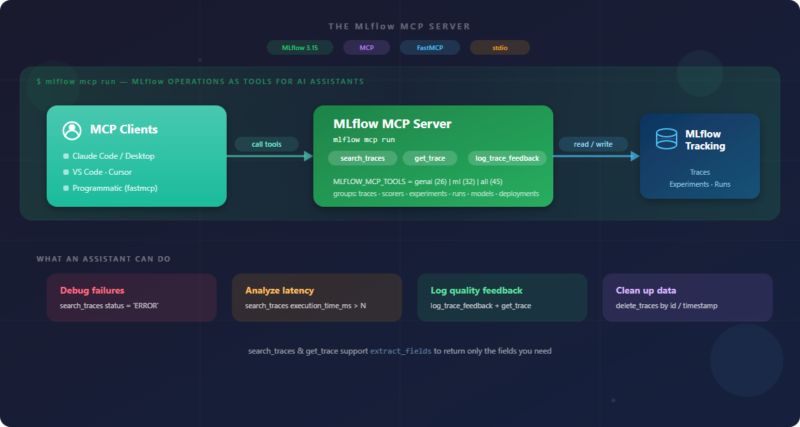
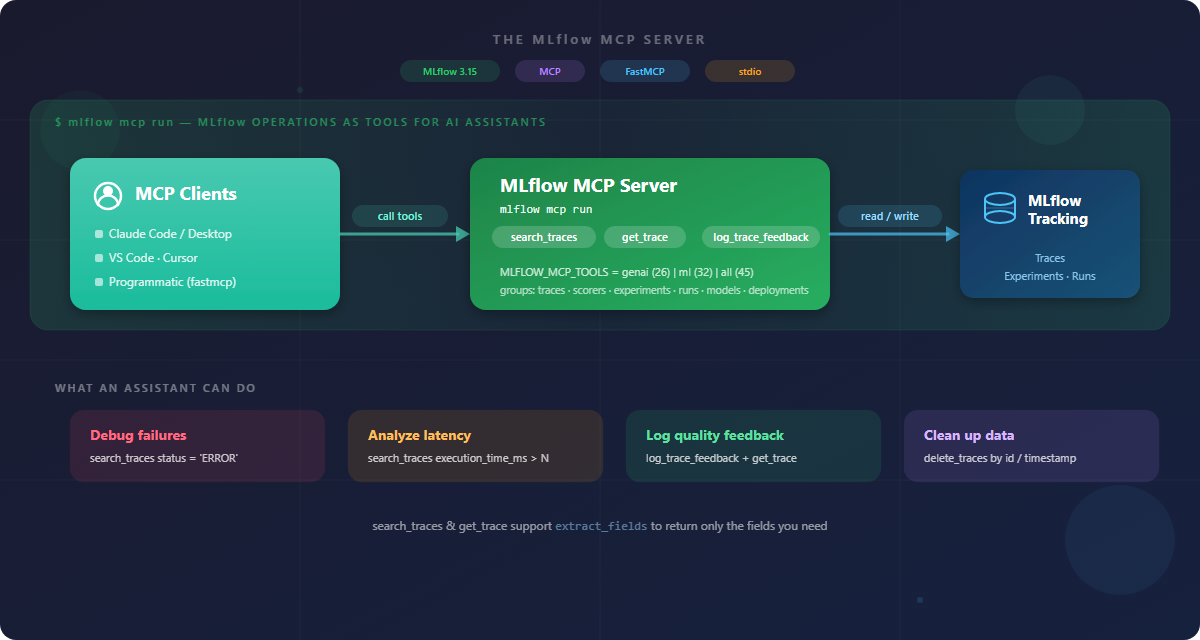
MLflow 的 MCP Server 把追踪、实验和运行记录等操作变成 AI 助手可以调用的工具。启动 mlflow mcp run 后,客户端通过 MCP 的统一接口搜索失败请求、找出慢请求、读取 span,或给一条 trace 写入质量反馈。本文按官方 Cookbook 的完整流程展开,并保留其代码;其中涉及版本、身份与删除数据的边界,另作校注。
原文标题为 MLflow MCP Server: Debug, Analyze, and Annotate Traces from Any AI Assistant,页面日期为 2026-09-05。页面未提供可确认的个人作者署名,维护及发布方是 MLflow 官方网站。
准备一个本地演示实验
原文给出的安装要求是:
pip install "mlflow[mcp]>=3.5.1"
接着在另一个终端启动 tracking server,并让它保持运行:
mlflow server --backend-store-uri sqlite:///mlflow.db --port 5000
这两条命令分别安装软件并启动服务,第二条会使用本地 mlflow.db 保存数据。本文没有执行它们。演示应使用独立目录与实验,避免与已有追踪数据混在一起。源码只写 >=3.5.1,没有固定版本;MCP Server 的最低引入版本不代表后文每个工具名、字段和分类都能在 3.5.1 使用。实际复现应固定一组兼容的 MLflow、FastMCP 与 Python 版本,并先检查 list_tools() 返回的 schema。
配置 Python SDK 和 MCP 子进程使用同一 tracking 地址,再选中名为 mcp-server-demo 的实验:
import os
import sys
import mlflow
from packaging.version import Version

TRACKING_URI = "http://localhost:5000"
os.environ["MLFLOW_TRACKING_URI"] = TRACKING_URI  # the MCP server subprocess reads this
mlflow.set_tracking_uri(TRACKING_URI)

experiment = mlflow.set_experiment("mcp-server-demo")

assert Version(mlflow.__version__) >= Version("3.5.1"), (
    f"The MLflow MCP Server needs MLflow >= 3.5.1 (found {mlflow.__version__})."
)
print(f"Experiment: {experiment.name} (id={experiment.experiment_id})")
# Example: Experiment: mcp-server-demo (id=1)
os.environ 中的 MLFLOW_TRACKING_URI 供稍后启动的子进程读取,mlflow.set_tracking_uri 则配置当前 Python 进程。set_experiment 可能复用同名实验,因此它不是“必定只包含本次数据”的保证。版本断言只检查下限;示例打印的实验 ID 也是示意值。
生成七条不调用模型的追踪
为了让工具有数据可查,原例使用普通的 @mlflow.trace 函数生成几种典型情况:正常的 LLM span、刻意等待约 1.3 秒的 TASK、主动抛出异常的 TOOL、包含检索和生成子 span 的 RAG CHAIN、带部署标签的追踪,以及手工记录 token 数的 CHAT_MODEL。这里的 LLM 名称只是 span 类型;函数返回固定字符串,不需要模型服务或 API key。
import time
from mlflow.entities import SpanType


@mlflow.trace(span_type=SpanType.LLM)
def answer(question: str) -> str:
    """A healthy (OK) trace tagged as an LLM span. We attach feedback to one later."""
    return f"Here is a helpful answer to: {question}"


@mlflow.trace(span_type=SpanType.TASK)
def slow_report() -> str:
    """An OK but deliberately slow (~1.3s) trace for the latency workflow."""
    time.sleep(1.3)
    return "generated a large report"


@mlflow.trace(span_type=SpanType.TOOL)
def flaky_tool() -> str:
    """Raises on purpose so MLflow records the trace with ERROR status."""
    raise RuntimeError("simulated downstream failure")


@mlflow.trace(span_type=SpanType.RETRIEVER)
def retrieve(question: str) -> list[str]:
    """A RETRIEVER child of the RAG trace below."""
    return ["doc: MLflow Tracing records spans", "doc: spans nest into a trace"]


@mlflow.trace(span_type=SpanType.LLM)
def generate(question: str, docs: list[str]) -> str:
    """An LLM child of the RAG trace."""
    return f"Based on {len(docs)} documents: here is the answer to '{question}'."


@mlflow.trace(span_type=SpanType.CHAIN)
def rag_answer(question: str) -> str:
    """A small RAG pipeline: a CHAIN parent with RETRIEVER and LLM children."""
    docs = retrieve(question)
    return generate(question, docs)


@mlflow.trace(span_type=SpanType.LLM)
def production_query(question: str) -> str:
    """Attaches custom tags so we can filter by deployment context."""
    mlflow.update_current_trace(tags={"environment": "production", "user_tier": "premium"})
    return f"Production answer to: {question}"


@mlflow.trace(span_type=SpanType.CHAT_MODEL)
def chat_with_usage(question: str) -> str:
    """Records token usage on its span; rolls up to trace.info.token_usage."""
    span = mlflow.get_current_active_span()
    span.set_attribute(
        "mlflow.chat.tokenUsage",
        {"input_tokens": 42, "output_tokens": 58, "total_tokens": 100},
    )
    return f"Chat answer to: {question}"
rag_answer 是根 span,内部依次调用 retrieve 和 generate。production_query 设置了 environment=production 与 user_tier=premium,这些只是合成演示标签,不表示代码真的请求了生产系统。chat_with_usage 设置输入 42、输出 58、总计 100 个 token,同样是手工写入的示例数值,不能当作实际模型计量。
随后运行这些函数,并在需要立刻检索或保留 ID 时刷新异步 trace 日志:
# A healthy trace we'll attach feedback to later.
answer("What is MLflow Tracing?")
mlflow.flush_trace_async_logging()
ok_trace_id = mlflow.get_last_active_trace_id()

# More OK / slow / error traces.
answer("How do I evaluate an agent?")
slow_report()
try:
    flaky_tool()
except RuntimeError:
    pass  # the failure is captured in the trace as an ERROR

# A nested RAG trace -- capture its id to inspect the span hierarchy later.
rag_answer("How does MLflow tracing work?")
mlflow.flush_trace_async_logging()
rag_trace_id = mlflow.get_last_active_trace_id()

# A tagged production trace and a chat trace with token usage.
production_query("What is my order status?")
chat_with_usage("Summarize the MCP docs.")
mlflow.flush_trace_async_logging()
chat_trace_id = mlflow.get_last_active_trace_id()

print(f"Seeded 7 traces in experiment {experiment.experiment_id}")
# Example: Seeded 7 traces in experiment 1
这里产生七条根 trace:两次正常回答、一次慢任务、一次失败工具、一次 RAG、一次带标签的请求和一次带 token 属性的聊天。flaky_tool 的异常被捕获,MLflow 仍会把错误状态写入追踪。代码保留 ok_trace_id、rag_trace_id 和 chat_trace_id,供后文精确读取。注释中的 “Seeded 7 traces” 来自上游演示,不是本文的运行证明。
通过 stdio 连接 MCP,并先列出工具
mlflow mcp run 使用 stdio:客户端启动一个子进程,通过标准输入输出管道交换 JSON-RPC 消息。这个传输本身不需要为 MCP 新开监听端口,子进程通常随客户端会话结束。但 MCP 进程仍然需要访问 tracking server;如果 tracking 地址是远程服务,它照样会发生网络通信。
MLFLOW_MCP_TOOLS 控制工具类别。减少工具数量可以降低助手接收工具定义的 token 开销。以下数量是原文版本中的示例,实际以 list_tools() 为准:
| 配置值 | 类别 | 原文数量 |
|---|---|---|
| genai(默认) | traces、scorers、experiments、runs | 26 |
| ml | experiments、runs、models、deployments | 32 |
| all | 上述全部 | 45 |
| 逗号分隔的类别 | 例如 traces,scorers | 随选择变化 |
原例使用 FastMCP,定义每次打开客户端、调用一个工具并取回文本的辅助函数。Notebook 或已有事件循环的 REPL 使用 nest_asyncio;普通 .py 脚本则应按注释去掉该导入及 apply()。这些辅助包也需要存在于所选环境中。
import asyncio
import nest_asyncio
from fastmcp import Client
from fastmcp.client.transports import StdioTransport

# In a notebook or REPL an event loop is already running; nest_asyncio lets us
# call asyncio.run() inside it. Omit this line (and the import) in a plain .py script.
nest_asyncio.apply()


def mcp_transport(tools: str = "genai") -> StdioTransport:
    """Launch `mlflow mcp run` over stdio with a chosen MLFLOW_MCP_TOOLS set."""
    return StdioTransport(
        command=sys.executable,  # `python -m mlflow`; no dependency on `mlflow` being on PATH
        args=["-m", "mlflow", "mcp", "run"],
        env={**os.environ, "MLFLOW_MCP_TOOLS": tools},
    )


def mcp(tool: str, arguments: dict | None = None, tools: str = "genai") -> str:
    """Call one MLflow MCP tool and return its text output."""
    async def _call():
        async with Client(mcp_transport(tools)) as client:
            result = await client.call_tool(tool, arguments or {})
            return result.content[0].text

    return asyncio.run(_call())


async def _list_tools():
    async with Client(mcp_transport("genai")) as client:
        return await client.list_tools()


tools = asyncio.run(_list_tools())
print(f"{len(tools)} tools exposed with MLFLOW_MCP_TOOLS=genai")
# Example: 26 tools exposed with MLFLOW_MCP_TOOLS=genai
# search_traces, get_trace, delete_traces, set_trace_tag, log_trace_feedback,
# get_trace_assessment, evaluate_traces, list_scorers, create_experiment,
# search_experiments, list_runs, create_run, link_traces_to_run, ...
辅助函数使用当前 sys.executable 启动 python -m mlflow,避免 PATH 指向别的 MLflow。它把父进程环境传给子进程,因此不应在不可信客户端下继承无关敏感变量。代码还假设返回内容的第一项一定有 text;健壮客户端应先检查工具错误和内容类型,再处理所有需要的内容块。它每次调用都会建立新会话,适合教学,但并非高吞吐会话管理方案。
权限边界:genai 和 traces 不是只读权限。原列表就包含 delete_traces、log_trace_feedback、创建实验与运行等写操作。工具类别限制不能替代 tracking 服务端权限控制。应使用最小权限凭据、限定实验,并让客户端对写入或删除操作进行明确审批。
查找失败请求
助手可以把“找出这个实验中的失败 trace”转为一次 search_traces 调用。filter_string 使用 MLflow 追踪搜索语法,extract_fields 限制返回的字段,避免把整条追踪都放进响应。
print(mcp("search_traces", {
    "experiment_id": experiment.experiment_id,
    "filter_string": "status = 'ERROR'",
    "extract_fields": "info.trace_id,info.state,info.request_preview",
}))
# Example:
# info.trace_id                        info.state    info.request_preview
# -----------------------------------  ------------  --------------------
# tr-f3912f13ffa051dd0cab558a42b32989  ERROR         {}
过滤条件中的 status 与输出列中的 info.state 处在不同接口位置,不应因名字不一样而自行替换。上游示例返回一个 ERROR trace,并用精简表格显示 ID、状态和请求预览。
查找执行超过一秒的追踪
慢请求使用毫秒阈值过滤。返回列名为 info.execution_duration_ms,原文展示的格式化输出是 1.3s:
print(mcp("search_traces", {
    "experiment_id": experiment.experiment_id,
    "filter_string": "execution_time_ms > 1000",
    "extract_fields": "info.trace_id,info.execution_duration_ms",
}))
# Example:
# info.trace_id                        info.execution_duration_ms
# -----------------------------------  --------------------------
# tr-0cc558dc15db559253da5d9b4917f8ce  1.3s
这个结果对应刻意 sleep(1.3) 的模拟任务,不是一次真实模型或数据库性能测试。将同样的查询用到实际实验时,还需要确认时间范围、采样策略和请求类型。
写入质量反馈,然后回读确认
log_trace_feedback 为 trace 增加一条 assessment,可用于记录人工评审或模型评审结果。该工具的 value 以 JSON 编码字符串传入,所以数值 0.9 写成字符串 "0.9"。写入后,再用 get_trace 只取 assessments 字段,检查保存的名称、来源、分值和理由。
print(mcp("log_trace_feedback", {
    "trace_id": ok_trace_id,
    "name": "relevance",
    "value": "0.9",              # JSON-encoded value
    "source_type": "HUMAN",
    "source_id": "reviewer@example.com",
    "rationale": "Answer is on-topic and accurate.",
}))
# Example: Logged feedback 'relevance' to trace tr-a3a3... Assessment ID: a-f2f8...

print(mcp("get_trace", {
    "trace_id": ok_trace_id,
    "extract_fields": "info.assessments.*",
}))
# Example (abridged):
# {"info": {"assessments": [{"assessment_name": "relevance",
#   "source": {"source_type": "HUMAN", "source_id": "reviewer@example.com"},
#   "feedback": {"value": 0.9}, "rationale": "Answer is on-topic and accurate."}]}}
身份校注:上面的 source_type="HUMAN"、reviewer@example.com 和“答案切题且准确”的理由均是原文占位演示。没有真实人工评审时,不能用这组字段伪装已经有人审阅;应使用实际来源及版本支持的来源类型,并明确这是合成数据。回读只能确认记录了什么,不能证明评价内容正确。
按标签定位、展开 span 层级、读取 token 属性
默认 genai 工具集还包括实验和运行管理。下面列出最多五个实验:
print(mcp("search_experiments", {"max_results": 5}))
再按环境标签找出前面人工标记为 production 的追踪:
print(mcp("search_traces", {
    "experiment_id": experiment.experiment_id,
    "filter_string": "tags.environment = 'production'",
    "extract_fields": "info.trace_id,info.tags.environment,info.tags.user_tier",
}))
# Example:
# info.trace_id                        info.tags.environment    info.tags.user_tier
# -----------------------------------  -----------------------  -------------------
# tr-e7415d0d5886aeab90c82dc0b13558d7  production               premium
RAG 的根 span 没有父级,RETRIEVER 与 LLM 子 span 的 parent_span_id 指回根节点。读取名称、span ID 和父 ID,就能还原调用关系:
print(mcp("get_trace", {
    "trace_id": rag_trace_id,
    "extract_fields": "data.spans.*.name,data.spans.*.span_id,data.spans.*.parent_span_id",
}))
# Example (abridged): rag_answer (root) -> retrieve, generate (both parented to rag_answer)
token 用量保存在 span 的标准属性 mlflow.chat.tokenUsage 中。原例说明字段选择器可以返回完整 attributes 映射,但不能直接用带点的属性键完成这一层精确选择;因此先读取属性,再对其中的 JSON 编码字符串解码。
import json

detail = mcp("get_trace", {
    "trace_id": chat_trace_id,
    "extract_fields": "data.spans.*.attributes",
})

for span in json.loads(detail)["data"]["spans"]:
    raw_usage = span.get("attributes", {}).get("mlflow.chat.tokenUsage")
    if raw_usage:
        print(json.loads(raw_usage))
        # Example: {'input_tokens': 42, 'output_tokens': 58, 'total_tokens': 100}
这段读取逻辑依赖原文工具版本返回的编码形式。如果实际 schema 或返回对象已经给出字典,应按实际类型处理,避免重复 JSON 解码。在 Python SDK 中,mlflow.get_trace(id).info.token_usage 是更直接的访问方式;MCP 工具则让只有外部工具接口的助手也能访问同一类数据。
注册到 AI 客户端
实际使用时通常不必手写客户端。注册服务后,助手可以根据自然语言调用工具。MLFLOW_TRACKING_URI 可以指向本地服务器、远程 URL,或 Databricks。Databricks 场景还需配置 DATABRICKS_HOST 和 DATABRICKS_TOKEN,但不要把真实 token 写进会提交到项目仓库的 MCP 配置。
原文给出的命令使用 claude CLI:
claude mcp add mlflow-mcp -e MLFLOW_TRACKING_URI=http://localhost:5000 \
  -- uv run --with "mlflow[mcp]>=3.5.1" mlflow mcp run
该 CLI 示例适用于有相应命令支持的 Claude Code 环境;原文将 Code/Desktop 放在同一标题下,不应据此断言 Desktop 的所有版本都接受这一 CLI 配置方式。下面则是原文项目级 .mcp.json 的配置结构:
{
  "mcpServers": {
    "mlflow-mcp": {
      "command": "uv",
      "args": ["run", "--with", "mlflow[mcp]>=3.5.1", "mlflow", "mcp", "run"],
      "env": {
        "MLFLOW_TRACKING_URI": "http://localhost:5000",
        "MLFLOW_MCP_TOOLS": "genai"
      }
    }
  }
}
原文提到 VS Code 使用 servers 顶层键,Cursor 使用 .cursor/mcp.json。具体客户端版本可能还要求不同位置、类型字段或信任确认,应按该客户端当前文档核对,不要只机械复制顶层键。这里的 uv run --with 还可能在启动时解析或下载依赖,演示中的最低版本约束同样需要替换为经过确认的版本锁定策略。
注册成功后,可以请求“找出实验 1 最近一小时的失败追踪”“列出执行超过一秒的最慢请求”,或“为指定 trace 记录 0.85 的相关性分数并写明理由”。时间范围、排序和写入对象应落实到真实工具参数;一句自然语言不能替代对调用范围的核对。连接外部 AI 助手、远程 tracking 或调用评价工具,还可能涉及模型费用与追踪内容外发;无 API key 的结论只适用于前面的合成种子函数。
原文的清理操作:默认不执行
delete_traces 可以按 trace ID 或最大时间戳删除数据。原文为了重置演示环境,使用“当前实验中,截至现在的全部追踪”作为删除范围:
原文破坏性清理示例,仅供审阅,不属于建议执行步骤
import time

print(mcp("delete_traces", {
    "experiment_id": experiment.experiment_id,
    "max_timestamp_millis": int(time.time() * 1000),
}))
# Example: Deleted 7 trace(s) from experiment 1.
如果 mcp-server-demo 已经存在,这条命令会包括其中早于本次演示的追踪,不能保证只删除刚生成的七条。本文将它从默认执行流程移除,保留在折叠的原例中以完整交代源文。需要清理时,应先备份,再核对本次实际生成的 ID 和当前工具 schema,按这些 ID 精确删除。原例只保留了三条 ID,不足以构成全部七条的安全清理清单;本次也未执行任何删除。
这套流程能确认什么
按原教程复现后,可以用同一套 MCP 接口检索失败与慢请求、查看标签和 span 关系、读取 token 字段,并写入一条反馈后回读确认。工具集选择减少暴露给助手的工具定义,字段选择缩小单次响应;真正的数据访问范围和写权限仍要由服务端与客户端策略控制。
进一步阅读原文链接的 MLflow MCP Server 文档、Search Traces Reference,以及 MLflow Tracing 的生产可观测性指南。本文是完整中文整理与静态技术审查,没有安装依赖、启动服务、连接客户端、生成 trace、写入反馈或删除数据。代码中的结果注释全部为上游示例。
来源与权利说明
来源:MLflow 官方 Cookbook 原文;© 2025 MLflow Project, a Series of LF Projects, LLC。原页未给出可确认的个人作者,也未见独立的文章转载许可文本,因此不把 MLflow 软件仓库的开源许可自动解释为文章与配图许可。源图原样保存并保留归属;没有伪造客户端界面或运行截图。










暂无评论内容