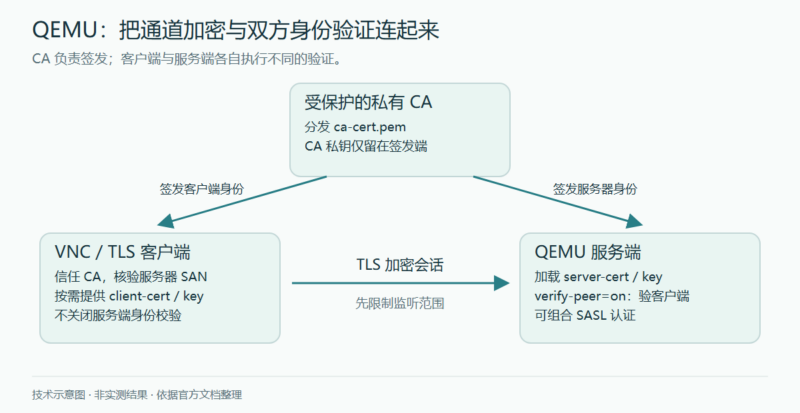



QEMU 的 VNC 服务把虚拟机图形控制台放到网络上。连接者获得的不只是画面,还可能操作来宾系统,因此必须同时回答三个问题:谁能连到端口,连接是否加密,以及服务端如何确认客户端的身份。本文合并 QEMU 手册的 VNC security 与 TLS setup for network services,保留 VNC 认证方式、证书签发、通用 TLS 配置、多证书兼容与预共享密钥的完整操作脉络。
原文维护者:QEMU 文档贡献者。此次核对日期为 2026 年 10 月 5 日;master 页面标示版本 11.1.50,属于持续更新的开发文档,实际部署应核对已安装版本与 GnuTLS 功能。命令均仅作静态说明,未在本次写作中运行;带有 [...OPTIONS...] 或示例域名的内容必须替换,不能直接作为完整启动配置。
先缩小可访问范围,再选认证方式
没有 VNC 密码时,只开放受权限保护的 Unix socket
最简单的 VNC 配置没有认证。原文建议这类配置只监听 Unix domain socket,让本机文件系统权限控制访问。只有对 socket 路径具备相应读写权限的本机用户才能连接。目录权限也应收紧,避免其他用户替换或访问 socket。
qemu-system-x86_64 [...OPTIONS...] \
  -vnc unix:/home/joebloggs/.qemu-myvm-vnc
需要远程接入时,原文提出通过 netcat 与 SSH 建立安全隧道。SSH 提供远端认证和通道加密,socket 本身并不会凭空获得这些能力;隧道入口同样需要访问控制。
传统 VNC 密码的限制
传统 VNC 协议只支持 8 个字符的密码,攻击者可以反复连接尝试破解,因此不能把它当作高强度保护。仅使用这种密码时,VNC 应限制在 loopback 或 Unix socket。它依赖 DES,在 FIPS 140-2 合规模式下不受支持。
启用 password=on 后,还必须通过 QEMU monitor 设置密码;设置完成前,客户端连接都会被拒绝。原文示例使用 -vnc :1,可能监听非 loopback 地址。下面明确改为本机地址,显示编号 :1 通常对应 TCP 5901;实际监听情况仍须按部署检查。
qemu-system-x86_64 [...OPTIONS...] \
  -vnc 127.0.0.1:1,password=on -monitor stdio
(qemu) change vnc password
Password: ****
(qemu)
monitor 具有管理虚拟机的能力,不应作为普通用户可访问的公开控制面。
用 X.509 为 VNC 建立 TLS 会话
QEMU 的 VNC 服务实现 VeNCrypt 扩展,可使用 TLS 加密会话,并借助 X.509 证书验证身份。客户端必须支持相应扩展;“客户端支持 VNC”不代表一定支持本例的 TLS、证书及 SASL 组合。没有可信身份认证的加密连接仍可能遭受中间人攻击。
只验证服务器与验证双方,是两种配置
下例加载服务器证书,但明确关闭服务器对客户端证书的检查。客户端仍应验证服务器证书及连接名;服务端则允许没有客户端证书的连接。它能提供经过服务端身份验证的加密通道,却没有客户端认证,不能写成双向 TLS。
qemu-system-x86_64 [...OPTIONS...] \
  -object tls-creds-x509,id=tls0,dir=/etc/pki/qemu,endpoint=server,verify-peer=off \
  -vnc 127.0.0.1:1,tls-creds=tls0 -monitor stdio
该目录至少需要 ca-cert.pem、server-cert.pem 和 server-key.pem。非特权用户可使用私有目录,如 $HOME/.pki/qemu。服务器私钥应设置为 0600,仅允许所属用户读取。这里保留 verify-peer=off 是为了说明原文配置的边界;实际开放远程访问前,应另有明确的客户端认证措施。
若使用内部私有 CA,可要求每个客户端提供证书,并由服务器使用 CA 证书验证。只需把 verify-peer 改为 on:
qemu-system-x86_64 [...OPTIONS...] \
  -object tls-creds-x509,id=tls0,dir=/etc/pki/qemu,endpoint=server,verify-peer=on \
  -vnc 127.0.0.1:1,tls-creds=tls0 -monitor stdio
原文还给出客户端证书与 VNC 密码组合的方式。它增加一道认证检查,但没有改变传统 VNC 密码长度和 DES 的局限,也不能仅凭“两层认证”就断言达到某种多因素认证标准。
qemu-system-x86_64 [...OPTIONS...] \
  -object tls-creds-x509,id=tls0,dir=/etc/pki/qemu,endpoint=server,verify-peer=on \
  -vnc 127.0.0.1:1,tls-creds=tls0,password=on -monitor stdio
(qemu) change vnc password
Password: ****
(qemu)
SASL:把认证接入现有身份体系
SASL 是可扩展的认证框架,可以按部署选用 PAM、GSSAPI/Kerberos、LDAP、SQL 数据库、一次性密钥等机制。认证强度取决于实际机制和后端配置;并非安装 SASL 就自动获得所有能力。某些机制还能协商 SSF 安全层,对数据流进行加密。
如果所选机制提供足够强的会话加密,可使用以下配置。原文随后明确指出,在不使用 TLS 的情形下,符合其现代安全要求的推荐机制是 GSSAPI;不能把该启动命令套到任意机制上。
qemu-system-x86_64 [...OPTIONS...] \
  -vnc 127.0.0.1:1,sasl=on -monitor stdio
若机制本身不提供会话加密,应与 TLS 和 X.509 配合,以免凭据暴露。以下是原文保留客户端证书验证并同时启用 SASL 的组合:
qemu-system-x86_64 [...OPTIONS...] \
  -object tls-creds-x509,id=tls0,dir=/etc/pki/qemu,endpoint=server,verify-peer=on \
  -vnc 127.0.0.1:1,tls-creds=tls0,sasl=on -monitor stdio
在 Linux 上配置 Cyrus SASL
原文以 Cyrus SASL 为例,默认服务配置文件为 /etc/sasl2/qemu.conf。非特权用户可设置 SASL_CONF_PATH,让 QEMU 在其他目录查找服务配置。其他实现或平台需核对相应位置和插件支持。
没有 TLS 时,原文推荐 GSSAPI:
mech_list: gssapi
keytab: /etc/qemu/krb5.tab
管理员需要在 KDC 中为服务器创建 Kerberos principal,例如 qemu/somehost.example.com@EXAMPLE.COM,把域名替换为运行 QEMU 的完整主机名,把 realm 替换为实际 Kerberos 域。keytab 含认证材料,必须按密钥保护。旧版手册曾提及 DIGEST-MD5,但它存在 RFC 6331 说明的严重缺陷,本文不再推荐使用。
已经由 TLS 加密会话、且需要用户名与密码认证时,可采用 SCRAM-SHA-256:
mech_list: scram-sha-256
sasldb_path: /etc/qemu/passwd.db
使用 saslpasswd2 向密码库添加账户。QEMU 原文提醒,该 passwd.db 保存明文密码,文件及其备份均需要严格限制访问。SCRAM-SHA-256 不提供会话加密;除 GSSAPI 外,原文要求其他 SASL 机制与 TLS 组合。是否可用仍取决于服务端插件、客户端实现和具体机制协商。
建立一套通用于 QEMU 网络服务的证书
通用 TLS 手册不仅覆盖 VNC,也覆盖 TCP 字符设备、NBD 服务端与客户端、迁移服务端与客户端。QEMU 要求以 PEM 格式提供证书和私钥,证书还应包含合适的 v3 basic constraints、key purpose、key usage 和 subject alternative name(SAN)扩展。GnuTLS 的 certtool 可生成这些材料,也可以使用已有证书管理服务。
最低要求是建立 CA 并为每台服务器签发证书;若用证书认证客户端,也要为客户端签发证书。只面对内部网络时,原文认为可使用自签名的私有 CA,减少外部 CA 误签带来的依赖,但其安全性仍以妥善保护根密钥和分发信任根为前提。如果直接向浏览器开放 VNC WebSocket,公共受信任 CA 可减少安装自定义信任根的工作。
文件名决定加载哪些身份
简单部署可把文件置于 /etc/pki/qemu 或 $HOME/.pki/qemu。不同子系统需要不同身份时,应分子目录。传统文件名如下:
| 文件 | 用途 |
|---|---|
ca-cert.pem |
客户端与服务器均必需的 CA 证书。 |
ca-crl.pem |
服务器端可选的证书撤销列表。 |
server-cert.pem、server-key.pem |
服务器证书和私钥,服务器端必需。 |
client-cert.pem、client-key.pem |
客户端身份材料;文件加载表中为可选,但服务端要求证书认证时需要提供。 |
dh-params.pem |
服务器端旧有可选 DH 参数文件;该功能已弃用。 |
从 QEMU 10.2.0 起,可以再加载最多四组带索引的身份:server-cert-0.pem / server-key-0.pem 至 -3.pem,客户端同理。它们可以替代传统文件,也可与传统文件并存。传统文件先加载,再按 0 到 3 读取;遇到第一个缺失索引就停止。多组证书均兼容一次握手时,优先使用先加载的那组。
这个顺序使新旧算法可以逐步过渡:新实例优先使用更强的算法,同时仍能与较旧操作系统上的 QEMU 互通,对跨版本在线迁移尤其有意义。它不是自动续期机制,证书有效期、用途、撤销信息与双方密码策略仍需独立维护。
建立 CA
每个组织或组织单元通常只需建立一次 CA。以下模板保留原文关键字段;新增 umask 077,使新生成的私钥默认不对其他用户开放。这些操作应在专门的签发主机上完成。
umask 077
certtool --generate-privkey > ca-key.pem
cat > ca.info <<'EOF'
cn = Name of your organization
ca
cert_signing_key
EOF
certtool --generate-self-signed \
  --load-privkey ca-key.pem \
  --template ca.info \
  --outfile ca-cert.pem
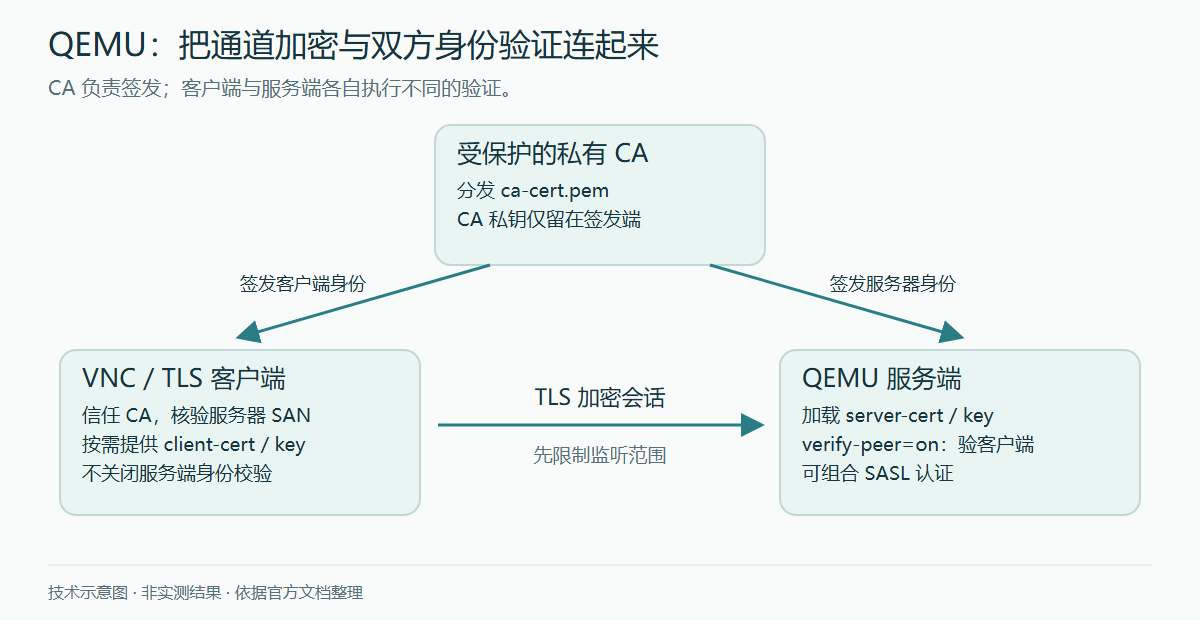
ca 把 basic constraints 标记为 CA;cert_signing_key 声明签发证书的密钥用途。将 ca-cert.pem 分发给需要信任此 CA 的客户端和服务器。不要分发 ca-key.pem:CA 私钥应只留在负责签发证书的受保护主机,一旦泄露,整条信任链就失去可靠性。
签发服务器证书
客户端收到服务器证书后,会同时检查签发链与连接时使用的主机名或 IP。SAN 中没有匹配项时,应终止连接。建议同时列出完整域名与确实会使用的短主机名;只有长期固定、且客户端确实会直接连接的 IP 才应加入。支持 IPv4 与 IPv6。只依赖 CN 的旧方式已经弃用,应提供 SAN。
以下沿用原文的主机名与地址作为模板数据,必须替换为自己控制的实际名称和地址:
cat > server-hostNNN.info <<'EOF'
organization = Name of your organization
cn = hostNNN.foo.example.com
dns_name = hostNNN
dns_name = hostNNN.foo.example.com
ip_address = 10.0.1.87
ip_address = 192.8.0.92
ip_address = 2620:0:cafe::87
ip_address = 2001:24::92
tls_www_server
signing_key
EOF
certtool --generate-privkey > server-hostNNN-key.pem
certtool --generate-certificate \
  --load-ca-certificate ca-cert.pem \
  --load-ca-privkey ca-key.pem \
  --load-privkey server-hostNNN-key.pem \
  --template server-hostNNN.info \
  --outfile server-hostNNN-cert.pem
dns_name 与 ip_address 写入 SAN;tls_www_server 声明服务器用途;signing_key 声明会话中的签名用途。除了 VNC WebSocket,QEMU 的这些服务通常不是 HTTP 服务器,但仍应使用服务器证书用途。把生成的服务器证书和私钥安全传输到目标主机,在相应目录分别命名为 server-cert.pem、server-key.pem,私钥权限为 0600。
签发客户端证书与双角色证书
X.509 凭据默认启用客户端证书验证。因此在默认配置下,每个客户端也要获得证书,其中组织、地区和名称等信息应足以在本 CA 管理范围内识别该客户端。原文的签发模板如下:
cat > client-hostNNN.info <<'EOF'
country = GB
state = London
locality = City Of London
organization = Name of your organization
cn = hostNNN.foo.example.com
tls_www_client
signing_key
EOF
certtool --generate-privkey > client-hostNNN-key.pem
certtool --generate-certificate \
  --load-ca-certificate ca-cert.pem \
  --load-ca-privkey ca-key.pem \
  --load-privkey client-hostNNN-key.pem \
  --template client-hostNNN.info \
  --outfile client-hostNNN-cert.pem
客户端证书不需要上述用于匹配服务器连接地址的 SAN 字段;tls_www_client 声明客户端用途。把文件安全传到相应客户端,分别保存为 client-cert.pem、client-key.pem,私钥仍为 0600。
迁移或 NBD 场景中,一台主机可能先作为服务器接受连接,之后又作为客户端向外连接。原文允许为这类双重角色签发一张同时包含两种用途的证书:
cat > both-hostNNN.info <<'EOF'
country = GB
state = London
locality = City Of London
organization = Name of your organization
cn = hostNNN.foo.example.com
dns_name = hostNNN
dns_name = hostNNN.foo.example.com
ip_address = 10.0.1.87
ip_address = 192.8.0.92
ip_address = 2620:0:cafe::87
ip_address = 2001:24::92
tls_www_server
tls_www_client
signing_key
EOF
certtool --generate-privkey > both-hostNNN-key.pem
certtool --generate-certificate \
  --load-ca-certificate ca-cert.pem \
  --load-ca-privkey ca-key.pem \
  --load-privkey both-hostNNN-key.pem \
  --template both-hostNNN.info \
  --outfile both-hostNNN-cert.pem
在目标主机上,这一证书和密钥需要分别以服务器文件名及客户端文件名保存。即使材料相同,QEMU 中客户端与服务端的凭据对象仍需分开加载。
把凭据对象接入网络后端
通过 -object tls-creds-x509 创建凭据对象,用唯一的 id 标识。dir 指定 PEM 目录;endpoint=server 或 endpoint=client 决定加载哪一组文件。同一端点角色的凭据可供 VNC、迁移、NBD、字符设备等多个后端共用。
# 服务器:默认验证客户端证书
qemu-system-x86_64 [...OPTIONS...] \
  -object tls-creds-x509,id=tls0,dir=/etc/pki/qemu,endpoint=server

# 客户端:加载客户端凭据,保持服务端验证开启
qemu-system-x86_64 [...OPTIONS...] \
  -object tls-creds-x509,id=tls0,dir=/etc/pki/qemu,endpoint=client
支持 TLS 的后端用 tls-creds 引用这个 ID。原文用 -vnc 0.0.0.0:0,tls-creds=tls0 展示引用语法;这意味着向所有 IPv4 接口监听,不能直接用于未受保护的网络。前面的完整示例已经把凭据对象与 VNC 绑定,并收紧为 loopback。确实需要远程直连时,应指定实际管理网地址,配合防火墙和明确的客户端认证。
通用 TLS 页的说明文字使用了 verify 一词,VNC 的实际对象示例使用 verify-peer。本文命令统一采用 verify-peer,部署时以安装版参数为准。客户端不应关闭服务器证书验证;服务端只有在另有可靠客户端认证机制时,才考虑关闭客户端证书验证,例如由 SASL 承担认证。
预生成 DH 参数文件 dh-params.pem 已被标记为弃用,未来会移除。省略时,参数将按 RFC 7919 自动协商,不应把旧文件当成所有部署都必须手工准备的步骤。
多证书与后量子算法的过渡
足够新的 GnuTLS、操作系统密码策略与 QEMU 配置配合后,可以在 TLS 服务中使用后量子密码算法。原文区分两种部署方式。纯后量子模式只配置一组符合要求的证书,只能与同样支持相关算法的对端互通。过渡模式同时配置传统与后量子证书,双方都支持时优先协商后量子算法,否则回退到传统算法。原文把这种证书兼容部署称为 hybrid mode,它不等于单凭多张证书就完成了混合密钥交换。
兼容回退存在降级风险;已知双方都具备所需能力时,原文更偏向纯后量子模式。是否获得整个会话的后量子保护,需要同时核对证书签名、密钥交换、算法策略和双方实现;一张 ML-DSA 证书本身不能证明整条通信都具备这一性质。
生成算法明确的私钥
原文列出 ML-DSA-44、ML-DSA-65、ML-DSA-87;没有额外要求时,它选 ML-DSA-65 作为示例默认值。改变私钥生成命令即可,其他 certtool 步骤会根据密钥类型确定行为:
certtool --generate-privkey --key-type=mldsa65 \
  > client-hostNNN-key.pem
服务器、根 CA 和中间 CA 密钥同样适用。过渡部署应让后量子证书先加载,例如 server-cert.pem 用于后量子、server-cert-0.pem 用于传统算法;也可以让 -0 为后量子、-1 为传统算法。配套私钥必须保持相同编号,且不能在索引中间留空。
显式禁用后量子算法的兼容示例
原文也保留了覆盖系统策略、禁用特定签名和密钥交换组的示例。这是兼容或诊断手段,会降低相关算法能力,不是推荐的安全增强设置:
NO_MLDSA="-SIGN-ML-DSA-65:-SIGN-ML-DSA-44:-SIGN-ML-DSA-87"
NO_MLKEM="-GROUP-X25519-MLKEM768:-GROUP-SECP256R1-MLKEM768:-GROUP-SECP384R1-MLKEM1024"
qemu-nbd --object \
  "tls-creds-x509,id=tls0,endpoint=server,dir=/path/to/certs,priority=@SYSTEM:$NO_MLDSA:$NO_MLKEM"
这是对象参数片段,还缺少导出磁盘等 NBD 启动参数。算法名称与 @SYSTEM 策略支持取决于具体 GnuTLS 和操作系统,不能将一段字符串视为跨平台保证。
不使用证书时:TLS 预共享密钥
TLS-PSK 用共享秘密代替证书,设置可能更简单,但规模扩大后,密钥分发、轮换与撤销更难管理。原文用 GnuTLS 的 psktool 生成包含用户名与随机密钥的 keys.psk。下面把原文的临时目录改为专用私有目录,并增加严格的创建权限:
umask 077
mkdir -m 0700 "$HOME/.qemu-psk"
psktool -u rich -p "$HOME/.qemu-psk/keys.psk"
该文件就是认证秘密,只应通过安全渠道提供给授权对端。原文以 NBD 演示服务端加载:
qemu-nbd \
  -t -x / \
  --object tls-creds-psk,id=tls0,endpoint=server,dir=/path/to/private/keys \
  --tls-creds tls0 \
  image.qcow2
这里 -t 保持服务持续运行,-x / 设定导出名。原文命令没有加入只读或显式监听地址,可能暴露可写磁盘导出;用于真实磁盘前必须决定导出权限和绑定地址,不能仅因启用了 TLS 就开放任意访问。客户端用同一密钥材料和用户名连接:
qemu-img info \
  --object tls-creds-psk,id=tls0,dir=/path/to/private/keys,username=rich,endpoint=client \
  --image-opts \
  file.driver=nbd,file.host=localhost,file.port=10809,file.tls-creds=tls0,file.export=/
未指定用户名时,QEMU 客户端默认使用 qemu。服务端与客户端应分别使用自己安全保存的目录。这一段来自通用 TLS 文档的 NBD 例子,并不意味着所有 VNC 客户端都支持 TLS-PSK。
部署前应核对什么
这套配置的关键在于职责是否连得起来:监听地址决定谁有机会接入,TLS 及客户端的证书校验确认加密通道通向谁,客户端证书或 SASL 决定谁获准使用控制台。私钥权限、SAN、有效期、撤销列表、客户端 VeNCrypt 支持及双方算法策略都必须吻合。本文只完成文档与代码的静态核对,没有生成任何密钥、启动监听服务或执行认证测试,因此不把这些示例称为已经验证可部署的配置。
原文与本手册按 GNU GPL 第 2 版 发布,© Copyright 2026, The QEMU Project Developers.中文翻译及编辑标注:未完纪,2026-10-05。安全修订已在对应段落说明。
版权与许可全文
以下保留本页涉及的来源材料或示例代码的版权、许可条件与免责声明;各自适用范围依原声明。中文翻译及编辑标注:未完纪,2026-10-05。
GPL-2
                    GNU GENERAL PUBLIC LICENSE
                       Version 2, June 1991

 Copyright (C) 1989, 1991 Free Software Foundation, Inc.,
 <https://fsf.org/>
 Everyone is permitted to copy and distribute verbatim copies
 of this license document, but changing it is not allowed.

                            Preamble

  The licenses for most software are designed to take away your
freedom to share and change it.  By contrast, the GNU General Public
License is intended to guarantee your freedom to share and change free
software--to make sure the software is free for all its users.  This
General Public License applies to most of the Free Software
Foundation's software and to any other program whose authors commit to
using it.  (Some other Free Software Foundation software is covered by
the GNU Lesser General Public License instead.)  You can apply it to
your programs, too.

  When we speak of free software, we are referring to freedom, not
price.  Our General Public Licenses are designed to make sure that you
have the freedom to distribute copies of free software (and charge for
this service if you wish), that you receive source code or can get it
if you want it, that you can change the software or use pieces of it
in new free programs; and that you know you can do these things.

  To protect your rights, we need to make restrictions that forbid
anyone to deny you these rights or to ask you to surrender the rights.
These restrictions translate to certain responsibilities for you if you
distribute copies of the software, or if you modify it.

  For example, if you distribute copies of such a program, whether
gratis or for a fee, you must give the recipients all the rights that
you have.  You must make sure that they, too, receive or can get the
source code.  And you must show them these terms so they know their
rights.

  We protect your rights with two steps: (1) copyright the software, and
(2) offer you this license which gives you legal permission to copy,
distribute and/or modify the software.

  Also, for each author's protection and ours, we want to make certain
that everyone understands that there is no warranty for this free
software.  If the software is modified by someone else and passed on, we
want its recipients to know that what they have is not the original, so
that any problems introduced by others will not reflect on the original
authors' reputations.

  Finally, any free program is threatened constantly by software
patents.  We wish to avoid the danger that redistributors of a free
program will individually obtain patent licenses, in effect making the
program proprietary.  To prevent this, we have made it clear that any
patent must be licensed for everyone's free use or not licensed at all.

  The precise terms and conditions for copying, distribution and
modification follow.

                    GNU GENERAL PUBLIC LICENSE
   TERMS AND CONDITIONS FOR COPYING, DISTRIBUTION AND MODIFICATION

  0. This License applies to any program or other work which contains
a notice placed by the copyright holder saying it may be distributed
under the terms of this General Public License.  The "Program", below,
refers to any such program or work, and a "work based on the Program"
means either the Program or any derivative work under copyright law:
that is to say, a work containing the Program or a portion of it,
either verbatim or with modifications and/or translated into another
language.  (Hereinafter, translation is included without limitation in
the term "modification".)  Each licensee is addressed as "you".

Activities other than copying, distribution and modification are not
covered by this License; they are outside its scope.  The act of
running the Program is not restricted, and the output from the Program
is covered only if its contents constitute a work based on the
Program (independent of having been made by running the Program).
Whether that is true depends on what the Program does.

  1. You may copy and distribute verbatim copies of the Program's
source code as you receive it, in any medium, provided that you
conspicuously and appropriately publish on each copy an appropriate
copyright notice and disclaimer of warranty; keep intact all the
notices that refer to this License and to the absence of any warranty;
and give any other recipients of the Program a copy of this License
along with the Program.

You may charge a fee for the physical act of transferring a copy, and
you may at your option offer warranty protection in exchange for a fee.

  2. You may modify your copy or copies of the Program or any portion
of it, thus forming a work based on the Program, and copy and
distribute such modifications or work under the terms of Section 1
above, provided that you also meet all of these conditions:

    a) You must cause the modified files to carry prominent notices
    stating that you changed the files and the date of any change.

    b) You must cause any work that you distribute or publish, that in
    whole or in part contains or is derived from the Program or any
    part thereof, to be licensed as a whole at no charge to all third
    parties under the terms of this License.

    c) If the modified program normally reads commands interactively
    when run, you must cause it, when started running for such
    interactive use in the most ordinary way, to print or display an
    announcement including an appropriate copyright notice and a
    notice that there is no warranty (or else, saying that you provide
    a warranty) and that users may redistribute the program under
    these conditions, and telling the user how to view a copy of this
    License.  (Exception: if the Program itself is interactive but
    does not normally print such an announcement, your work based on
    the Program is not required to print an announcement.)

These requirements apply to the modified work as a whole.  If
identifiable sections of that work are not derived from the Program,
and can be reasonably considered independent and separate works in
themselves, then this License, and its terms, do not apply to those
sections when you distribute them as separate works.  But when you
distribute the same sections as part of a whole which is a work based
on the Program, the distribution of the whole must be on the terms of
this License, whose permissions for other licensees extend to the
entire whole, and thus to each and every part regardless of who wrote it.

Thus, it is not the intent of this section to claim rights or contest
your rights to work written entirely by you; rather, the intent is to
exercise the right to control the distribution of derivative or
collective works based on the Program.

In addition, mere aggregation of another work not based on the Program
with the Program (or with a work based on the Program) on a volume of
a storage or distribution medium does not bring the other work under
the scope of this License.

  3. You may copy and distribute the Program (or a work based on it,
under Section 2) in object code or executable form under the terms of
Sections 1 and 2 above provided that you also do one of the following:

    a) Accompany it with the complete corresponding machine-readable
    source code, which must be distributed under the terms of Sections
    1 and 2 above on a medium customarily used for software interchange; or,

    b) Accompany it with a written offer, valid for at least three
    years, to give any third party, for a charge no more than your
    cost of physically performing source distribution, a complete
    machine-readable copy of the corresponding source code, to be
    distributed under the terms of Sections 1 and 2 above on a medium
    customarily used for software interchange; or,

    c) Accompany it with the information you received as to the offer
    to distribute corresponding source code.  (This alternative is
    allowed only for noncommercial distribution and only if you
    received the program in object code or executable form with such
    an offer, in accord with Subsection b above.)

The source code for a work means the preferred form of the work for
making modifications to it.  For an executable work, complete source
code means all the source code for all modules it contains, plus any
associated interface definition files, plus the scripts used to
control compilation and installation of the executable.  However, as a
special exception, the source code distributed need not include
anything that is normally distributed (in either source or binary
form) with the major components (compiler, kernel, and so on) of the
operating system on which the executable runs, unless that component
itself accompanies the executable.

If distribution of executable or object code is made by offering
access to copy from a designated place, then offering equivalent
access to copy the source code from the same place counts as
distribution of the source code, even though third parties are not
compelled to copy the source along with the object code.

  4. You may not copy, modify, sublicense, or distribute the Program
except as expressly provided under this License.  Any attempt
otherwise to copy, modify, sublicense or distribute the Program is
void, and will automatically terminate your rights under this License.
However, parties who have received copies, or rights, from you under
this License will not have their licenses terminated so long as such
parties remain in full compliance.

  5. You are not required to accept this License, since you have not
signed it.  However, nothing else grants you permission to modify or
distribute the Program or its derivative works.  These actions are
prohibited by law if you do not accept this License.  Therefore, by
modifying or distributing the Program (or any work based on the
Program), you indicate your acceptance of this License to do so, and
all its terms and conditions for copying, distributing or modifying
the Program or works based on it.

  6. Each time you redistribute the Program (or any work based on the
Program), the recipient automatically receives a license from the
original licensor to copy, distribute or modify the Program subject to
these terms and conditions.  You may not impose any further
restrictions on the recipients' exercise of the rights granted herein.
You are not responsible for enforcing compliance by third parties to
this License.

  7. If, as a consequence of a court judgment or allegation of patent
infringement or for any other reason (not limited to patent issues),
conditions are imposed on you (whether by court order, agreement or
otherwise) that contradict the conditions of this License, they do not
excuse you from the conditions of this License.  If you cannot
distribute so as to satisfy simultaneously your obligations under this
License and any other pertinent obligations, then as a consequence you
may not distribute the Program at all.  For example, if a patent
license would not permit royalty-free redistribution of the Program by
all those who receive copies directly or indirectly through you, then
the only way you could satisfy both it and this License would be to
refrain entirely from distribution of the Program.

If any portion of this section is held invalid or unenforceable under
any particular circumstance, the balance of the section is intended to
apply and the section as a whole is intended to apply in other
circumstances.

It is not the purpose of this section to induce you to infringe any
patents or other property right claims or to contest validity of any
such claims; this section has the sole purpose of protecting the
integrity of the free software distribution system, which is
implemented by public license practices.  Many people have made
generous contributions to the wide range of software distributed
through that system in reliance on consistent application of that
system; it is up to the author/donor to decide if he or she is willing
to distribute software through any other system and a licensee cannot
impose that choice.

This section is intended to make thoroughly clear what is believed to
be a consequence of the rest of this License.

  8. If the distribution and/or use of the Program is restricted in
certain countries either by patents or by copyrighted interfaces, the
original copyright holder who places the Program under this License
may add an explicit geographical distribution limitation excluding
those countries, so that distribution is permitted only in or among
countries not thus excluded.  In such case, this License incorporates
the limitation as if written in the body of this License.

  9. The Free Software Foundation may publish revised and/or new versions
of the General Public License from time to time.  Such new versions will
be similar in spirit to the present version, but may differ in detail to
address new problems or concerns.

Each version is given a distinguishing version number.  If the Program
specifies a version number of this License which applies to it and "any
later version", you have the option of following the terms and conditions
either of that version or of any later version published by the Free
Software Foundation.  If the Program does not specify a version number of
this License, you may choose any version ever published by the Free Software
Foundation.

  10. If you wish to incorporate parts of the Program into other free
programs whose distribution conditions are different, write to the author
to ask for permission.  For software which is copyrighted by the Free
Software Foundation, write to the Free Software Foundation; we sometimes
make exceptions for this.  Our decision will be guided by the two goals
of preserving the free status of all derivatives of our free software and
of promoting the sharing and reuse of software generally.

                            NO WARRANTY

  11. BECAUSE THE PROGRAM IS LICENSED FREE OF CHARGE, THERE IS NO WARRANTY
FOR THE PROGRAM, TO THE EXTENT PERMITTED BY APPLICABLE LAW.  EXCEPT WHEN
OTHERWISE STATED IN WRITING THE COPYRIGHT HOLDERS AND/OR OTHER PARTIES
PROVIDE THE PROGRAM "AS IS" WITHOUT WARRANTY OF ANY KIND, EITHER EXPRESSED
OR IMPLIED, INCLUDING, BUT NOT LIMITED TO, THE IMPLIED WARRANTIES OF
MERCHANTABILITY AND FITNESS FOR A PARTICULAR PURPOSE.  THE ENTIRE RISK AS
TO THE QUALITY AND PERFORMANCE OF THE PROGRAM IS WITH YOU.  SHOULD THE
PROGRAM PROVE DEFECTIVE, YOU ASSUME THE COST OF ALL NECESSARY SERVICING,
REPAIR OR CORRECTION.

  12. IN NO EVENT UNLESS REQUIRED BY APPLICABLE LAW OR AGREED TO IN WRITING
WILL ANY COPYRIGHT HOLDER, OR ANY OTHER PARTY WHO MAY MODIFY AND/OR
REDISTRIBUTE THE PROGRAM AS PERMITTED ABOVE, BE LIABLE TO YOU FOR DAMAGES,
INCLUDING ANY GENERAL, SPECIAL, INCIDENTAL OR CONSEQUENTIAL DAMAGES ARISING
OUT OF THE USE OR INABILITY TO USE THE PROGRAM (INCLUDING BUT NOT LIMITED
TO LOSS OF DATA OR DATA BEING RENDERED INACCURATE OR LOSSES SUSTAINED BY
YOU OR THIRD PARTIES OR A FAILURE OF THE PROGRAM TO OPERATE WITH ANY OTHER
PROGRAMS), EVEN IF SUCH HOLDER OR OTHER PARTY HAS BEEN ADVISED OF THE
POSSIBILITY OF SUCH DAMAGES.

                     END OF TERMS AND CONDITIONS

            How to Apply These Terms to Your New Programs

  If you develop a new program, and you want it to be of the greatest
possible use to the public, the best way to achieve this is to make it
free software which everyone can redistribute and change under these terms.

  To do so, attach the following notices to the program.  It is safest
to attach them to the start of each source file to most effectively
convey the exclusion of warranty; and each file should have at least
the "copyright" line and a pointer to where the full notice is found.

    <one line to give the program's name and a brief idea of what it does.>
    Copyright (C) <year>  <name of author>

    This program is free software; you can redistribute it and/or modify
    it under the terms of the GNU General Public License as published by
    the Free Software Foundation; either version 2 of the License, or
    (at your option) any later version.

    This program is distributed in the hope that it will be useful,
    but WITHOUT ANY WARRANTY; without even the implied warranty of
    MERCHANTABILITY or FITNESS FOR A PARTICULAR PURPOSE.  See the
    GNU General Public License for more details.

    You should have received a copy of the GNU General Public License along
    with this program; if not, see <https://www.gnu.org/licenses/>.

Also add information on how to contact you by electronic and paper mail.

If the program is interactive, make it output a short notice like this
when it starts in an interactive mode:

    Gnomovision version 69, Copyright (C) year name of author
    Gnomovision comes with ABSOLUTELY NO WARRANTY; for details type `show w'.
    This is free software, and you are welcome to redistribute it
    under certain conditions; type `show c' for details.

The hypothetical commands `show w' and `show c' should show the appropriate
parts of the General Public License.  Of course, the commands you use may
be called something other than `show w' and `show c'; they could even be
mouse-clicks or menu items--whatever suits your program.

You should also get your employer (if you work as a programmer) or your
school, if any, to sign a "copyright disclaimer" for the program, if
necessary.  Here is a sample; alter the names:

  Yoyodyne, Inc., hereby disclaims all copyright interest in the program
  `Gnomovision' (which makes passes at compilers) written by James Hacker.

  <signature of Moe Ghoul>, 1 April 1989
  Moe Ghoul, President of Vice

This General Public License does not permit incorporating your program into
proprietary programs.  If your program is a subroutine library, you may
consider it more useful to permit linking proprietary applications with the
library.  If this is what you want to do, use the GNU Lesser General
Public License instead of this License.










暂无评论内容