


WordPress 的区块锁定 API(Block Locking API)允许开发者通过限制移动和删除来控制区块编辑。这一 API 很适合维持模板与区块样板的设计一致性,同时仍让用户定制内容中的其他元素。
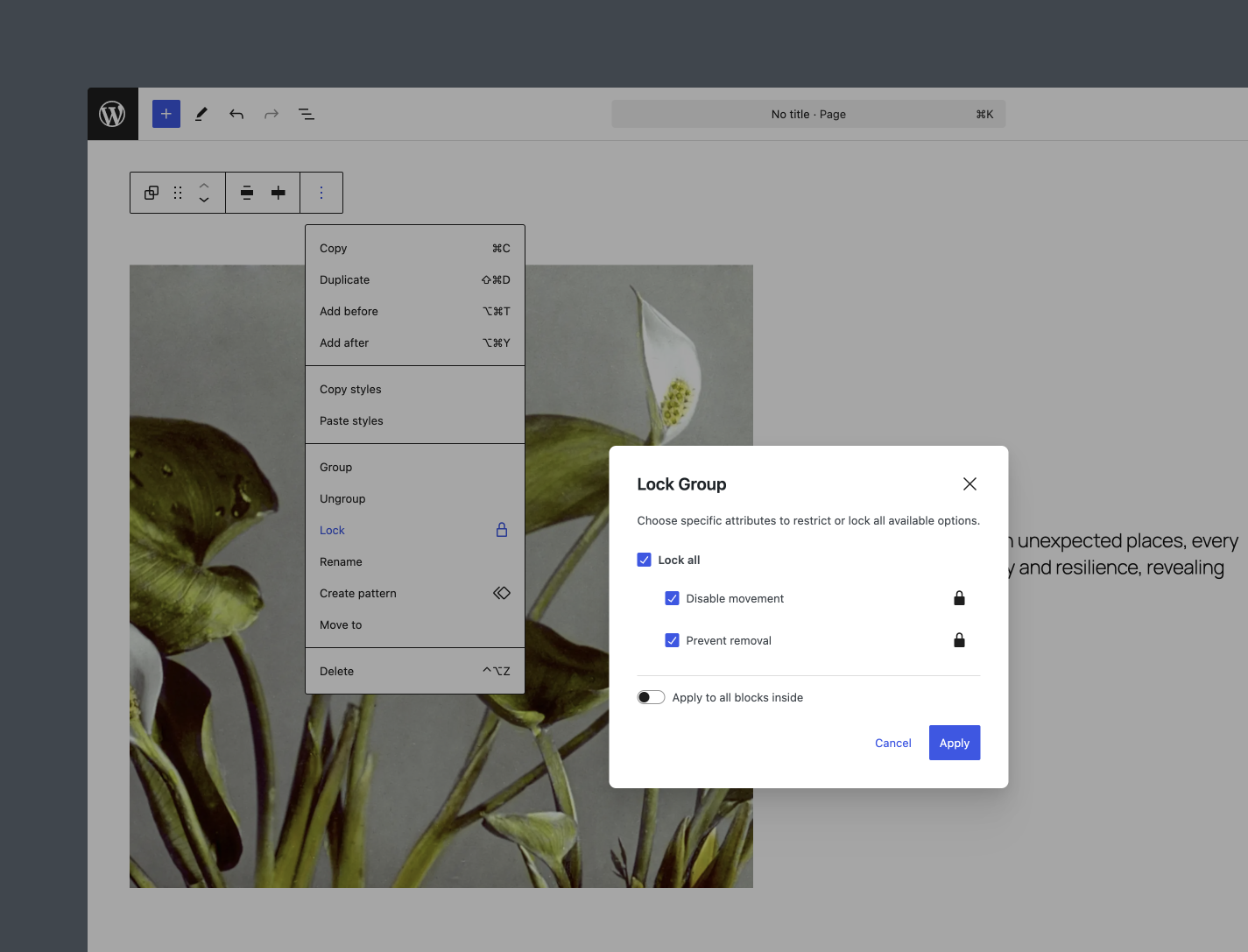
锁定区块
如上图所示,你可以在编辑器界面中直接锁定区块。此外,也可以使用区块标记中的 lock 属性,以编程方式锁定区块。例如:
<!-- wp:paragraph {"lock":{"move":true,"remove":true}} -->
    <p>This Paragraph block is locked and cannot be moved or deleted.</p>
<!-- /wp:paragraph -->在这段标记中,move: true 阻止移动区块,remove: true 阻止删除区块。在主题或插件中构建模板与区块样板时,这种方式尤其有用。
阻止解锁
区块锁定 API 有助于保持设计一致性,但默认情况下,任何用户都可以锁定和解锁区块;这不一定符合你的需求。编辑器中的 canLockBlocks 设置控制这一功能。
通过 PHP 过滤器 block_editor_settings_all 将 canLockBlocks 设为 false,即可全局禁用锁定与解锁界面:
add_filter( 'block_editor_settings_all', function( $settings, $context ) {
    $settings['canLockBlocks'] = false; // Disable locking/unlocking for all users

    return $settings;
}, 10, 2 );
如果需要更精细的控制,例如仅在编辑文章时阻止非管理员解锁区块,可以加入条件逻辑:
add_filter( 'block_editor_settings_all', function( $settings, $context ) {
    if (
        isset( $context->post ) &&
        'post' === $context->post->post_type &&
        ! current_user_can( 'edit_theme_options' )
    ) {
        $settings['canLockBlocks'] = false; // Disable locking/unlocking for non-administrators editing posts
    }

    return $settings;
}, 10, 2 );
这些条件的含义如下:
$context->post:确保过滤器运行在某篇具体文章的上下文中。这段代码不是为站点编辑器设计的。'post' === $context->post->post_type:将限制范围限定为post文章类型。! current_user_can( 'edit_theme_options' ):检查当前用户是否不具备edit_theme_options能力;默认情况下,只有管理员拥有该能力。
禁用代码编辑器
将 canLockBlocks 设为 false 会禁用锁定界面,但用户在技术上仍可打开代码编辑器,从被锁定的区块中删除 lock 属性。为避免这种情况,也可以使用 codeEditingEnabled 设置禁用代码编辑器。
add_filter( 'block_editor_settings_all', function( $settings, $context ) {
    if (
        isset( $context->post ) &&
        'post' === $context->post->post_type &&
        ! current_user_can( 'edit_theme_options' )
    ) {
        $settings['canLockBlocks'] = false; // Disable locking/unlocking for non-administrators editing posts.
        $settings[ 'codeEditingEnabled' ] = false; // Disable access to the Code Editor.
    }

    return $settings;
}, 10, 2 );
要使用这段代码,将其加入主题的 functions.php 文件或自定义插件。
更多资源
- 区块锁定 API(文档)
- 定制编辑器体验(文档)
- 定制 WordPress 编辑体验的 15 种方式(文章)
感谢 @bph 和 @welcher 审阅本代码片段并提出反馈。
来源:如何锁定 WordPress 区块并阻止解锁。作者:Nick Diego(2024年12月9日)。原文版权归原作者或所属机构所有。
© 版权声明
文章版权归作者所有,未经允许请勿转载。
THE END









暂无评论内容