


In [1]: import pandas as pd

In [2]: import matplotlib.pyplot as plt
-
空气质量数据
本教程使用 OpenAQ 提供、通过 py-openaq 包下载的 NO₂ 与直径小于 2.5 微米的颗粒物空气质量数据。
air_quality_no2_long.csv数据集包含巴黎、安特卫普和伦敦的 FR04014、BETR801 与 London Westminster 监测站的 NO₂ 数值。查看原始数据。In [3]: air_quality = pd.read_csv("data/air_quality_no2_long.csv") In [4]: air_quality = air_quality.rename(columns={"date.utc": "datetime"}) In [5]: air_quality.head() Out[5]: city country datetime location parameter value unit 0 Paris FR 2019-06-21 00:00:00+00:00 FR04014 no2 20.0 µg/m³ 1 Paris FR 2019-06-20 23:00:00+00:00 FR04014 no2 21.8 µg/m³ 2 Paris FR 2019-06-20 22:00:00+00:00 FR04014 no2 26.5 µg/m³ 3 Paris FR 2019-06-20 21:00:00+00:00 FR04014 no2 24.9 µg/m³ 4 Paris FR 2019-06-20 20:00:00+00:00 FR04014 no2 21.4 µg/m³In [6]: air_quality.city.unique() Out[6]: <ArrowStringArray> ['Paris', 'Antwerpen', 'London'] Length: 3, dtype: str
使用 pandas 的日期时间属性
- 希望将 datetime 列中的日期作为日期时间对象处理,而不是普通文本。
最初,
datetime中的值是字符串,无法执行日期时间操作,例如提取年份或星期几。to_datetime函数让 pandas 解析字符串,将它们转换为日期时间对象。pandas 将这类类似于标准库datetime.datetime的对象称为pandas.Timestamp。原文叙述使用datetime64[ns, UTC],而本页保留的源示例输出使用datetime64[us, UTC];两者分别表示纳秒与微秒精度。In [7]: air_quality["datetime"] = pd.to_datetime(air_quality["datetime"]) In [8]: air_quality["datetime"] Out[8]: 0 2019-06-21 00:00:00+00:00 1 2019-06-20 23:00:00+00:00 2 2019-06-20 22:00:00+00:00 3 2019-06-20 21:00:00+00:00 4 2019-06-20 20:00:00+00:00 ... 2063 2019-05-07 06:00:00+00:00 2064 2019-05-07 04:00:00+00:00 2065 2019-05-07 03:00:00+00:00 2066 2019-05-07 02:00:00+00:00 2067 2019-05-07 01:00:00+00:00 Name: datetime, Length: 2068, dtype: datetime64[us, UTC]
提示
许多数据集的一列会包含日期时间信息。pandas.read_csv() 和 pandas.read_json() 等输入函数可以在读取时进行日期转换:向 parse_dates 参数传入一个列表,列出需要作为 Timestamp 读取的列。(pandas.read_csv() · pandas.read_json())
pd.read_csv("../data/air_quality_no2_long.csv", parse_dates=["date.utc"])
列名说明:原始 CSV 的日期列名是 date.utc,因此读取原文件时应使用 parse_dates=["date.utc"],随后可按上面的示例重命名为 datetime。原文此处写作 parse_dates=["datetime"];只有输入文件中的列已命名为 datetime 时,才能使用该写法。
这些 pandas.Timestamp 对象有什么用?下面通过几个例子说明它们的价值。(pandas.Timestamp)
当前时间序列数据集的开始日期与结束日期是什么?
In [9]: air_quality["datetime"].min(), air_quality["datetime"].max()
Out[9]:
(Timestamp('2019-05-07 01:00:00+0000', tz='UTC'),
 Timestamp('2019-06-21 00:00:00+0000', tz='UTC'))
使用 pandas.Timestamp 表示日期时间后,就能基于日期信息进行计算和比较。因此,可以求出时间序列覆盖的时长:(pandas.Timestamp)
In [10]: air_quality["datetime"].max() - air_quality["datetime"].min()
Out[10]: Timedelta('44 days 23:00:00')
结果是 pandas.Timedelta 对象,类似于 Python 标准库中表示时间间隔的 datetime.timedelta。(pandas.Timedelta)
用户指南中关于时间相关概念的章节,介绍了 pandas 支持的各种时间概念。(时间相关概念)
- 在 DataFrame 中添加一列,仅存储测量发生的月份。
以 Timestamp 对象表示日期时,pandas 提供了许多时间相关属性,例如月份、年份、季度等。这些属性都可以通过 dt 访问器获取。
In [11]: air_quality["month"] = air_quality["datetime"].dt.month

In [12]: air_quality.head()
Out[12]:
    city country                  datetime  ... value   unit  month
0  Paris      FR 2019-06-21 00:00:00+00:00  ...  20.0  µg/m³      6
1  Paris      FR 2019-06-20 23:00:00+00:00  ...  21.8  µg/m³      6
2  Paris      FR 2019-06-20 22:00:00+00:00  ...  26.5  µg/m³      6
3  Paris      FR 2019-06-20 21:00:00+00:00  ...  24.9  µg/m³      6
4  Paris      FR 2019-06-20 20:00:00+00:00  ...  21.4  µg/m³      6

[5 rows x 8 columns]
日期与时间组成部分的概览表列出了已有日期属性。有关使用 dt 访问器返回日期时间属性的详细介绍,请参阅专门介绍 dt 访问器的章节。(日期与时间组成部分概览表 · dt 访问器)
- 对于每个监测地点,一周中各天的平均 NO₂ 浓度分别是多少?
还记得统计计算教程中 groupby 提供的“拆分—应用—合并”模式吗?这里要为每个星期几、每个监测地点计算统计值,例如 NO₂ 均值。按星期分组时,使用 Timestamp 的 weekday 属性:星期一为 0,星期日为 6;该属性也可以通过 dt 访问器获取。同时按地点和星期几分组,就可以分别计算每个组合的均值。
注意:本例仅使用很短的时间序列,分析结果不具备长期代表性!
In [13]: air_quality.groupby( ....: [air_quality["datetime"].dt.weekday, "location"])["value"].mean() ....: Out[13]: datetime location 0 BETR801 27.875000 FR04014 24.856250 London Westminster 23.969697 1 BETR801 22.214286 FR04014 30.999359 ... 5 FR04014 25.266154 London Westminster 24.977612 6 BETR801 21.896552 FR04014 23.274306 London Westminster 24.859155 Name: value, Length: 21, dtype: float64(统计计算教程)
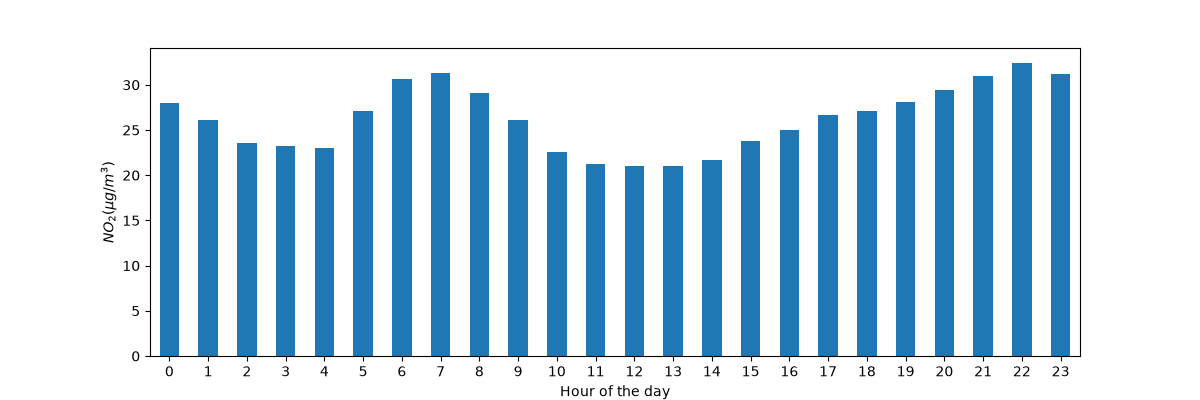
- 将全部监测站合在一起,绘制时间序列中一天内典型的 NO₂ 变化模式。换句话说,每个小时的平均值是多少?
与前例类似,要计算每个小时的统计值,例如 NO₂ 均值,可以再次使用“拆分—应用—合并”。这次使用 Timestamp 的 hour 日期时间属性,同样通过 dt 访问器获取。
In [14]: fig, axs = plt.subplots(figsize=(12, 4))

In [15]: air_quality.groupby(air_quality["datetime"].dt.hour)["value"].mean().plot(
   ....:     kind='bar', rot=0, ax=axs
   ....: )
   ....:
Out[15]: <Axes: xlabel='datetime'>

In [16]: plt.xlabel("Hour of the day");  # custom x label using Matplotlib

In [17]: plt.ylabel("$NO_2 (µg/m^3)$");
将日期时间用作索引
在重塑数据教程中,我们介绍了 pivot():将表格重塑为每个监测地点分别占据一列的形式。(重塑数据教程 · pivot())
In [18]: no_2 = air_quality.pivot(index="datetime", columns="location", values="value")

In [19]: no_2.head()
Out[19]:
location                   BETR801  FR04014  London Westminster
datetime
2019-05-07 01:00:00+00:00     50.5     25.0                23.0
2019-05-07 02:00:00+00:00     45.0     27.7                19.0
2019-05-07 03:00:00+00:00      NaN     50.4                19.0
2019-05-07 04:00:00+00:00      NaN     61.9                16.0
2019-05-07 05:00:00+00:00      NaN     72.4                 NaN
提示
透视转换后,日期时间信息成为表格的索引。一般而言,可以通过 set_index 函数把某列设为索引。
日期时间索引 DatetimeIndex 提供了强大功能。例如,无需 dt 访问器,就可以直接从索引获取时间序列属性:
In [20]: no_2.index.year, no_2.index.weekday
Out[20]:
(Index([2019, 2019, 2019, 2019, 2019, 2019, 2019, 2019, 2019, 2019,
        ...
        2019, 2019, 2019, 2019, 2019, 2019, 2019, 2019, 2019, 2019],
       dtype='int32', name='datetime', length=1033),
 Index([1, 1, 1, 1, 1, 1, 1, 1, 1, 1,
        ...
        3, 3, 3, 3, 3, 3, 3, 3, 3, 4],
       dtype='int32', name='datetime', length=1033))
其他优点还包括便捷地选取时间区间,以及在图表中使用适合的时间刻度。下面将这些能力应用于数据。
- 绘制各监测站从 5 月 20 日到 5 月 21 日结束的 NO₂ 数值。
向 DatetimeIndex 提供能够解析为日期时间的字符串,就可以选择指定的数据子集。
In [21]: no_2["2019-05-20":"2019-05-21"].plot();
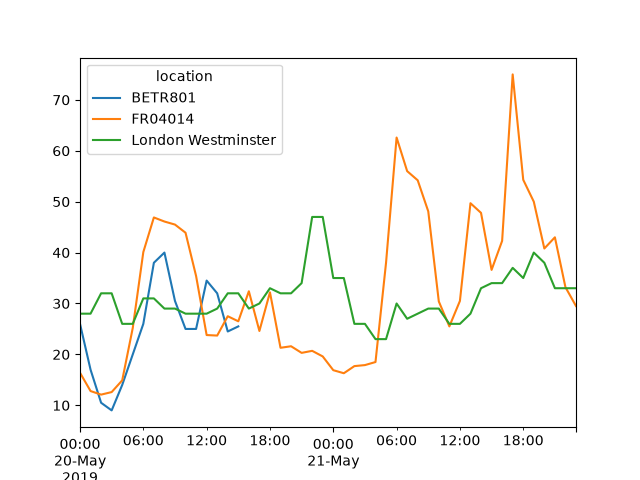
时间序列索引章节进一步介绍了 DatetimeIndex,以及使用字符串进行切片的方法。(时间序列索引)
将时间序列重采样为另一种频率
- 将当前逐小时的时间序列聚合为各监测站逐月的最大值。
对于具有日期时间索引的时间序列,resample() 能将其重采样为另一种频率,这是非常强大的能力。例如,可以将逐秒数据转换为每 5 分钟的数据。
In [22]: monthly_max = no_2.resample("MS").max()

In [23]: monthly_max
Out[23]:
location                   BETR801  FR04014  London Westminster
datetime
2019-05-01 00:00:00+00:00     74.5     97.0                97.0
2019-06-01 00:00:00+00:00     52.5     84.7                52.0
resample() 方法类似于 groupby 操作:(resample())
- 使用定义目标频率的字符串(原文示例为 M、5H 等)提供基于时间的分组。
- 需要指定 mean、max 等聚合函数。
版本说明:原始文档页面标注 pandas 3.0.6。上文 M、5H 是原文叙述中的别名举例;复现时请按所用 pandas 版本核对频率别名。此页代码示例使用 MS、D,日期时间精度和输出形式也可能随版本变化。
定义时间序列频率时可用的别名,见偏移量别名概览表。(频率别名概览表)
若已定义频率,可以通过 freq 属性取得时间序列的频率:
In [24]: monthly_max.index.freq
Out[24]: <MonthBegin>
- 绘制各监测站逐日平均 NO₂ 浓度的图表。
In [25]: no_2.resample("D").mean().plot(style="-o", figsize=(10, 5));
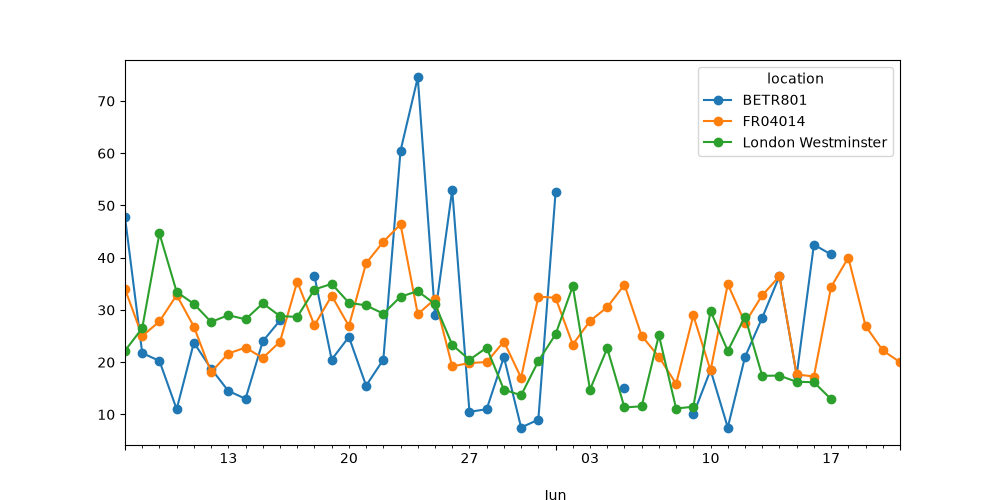
用户指南的重采样章节详细介绍了时间序列重采样的功能。(重采样)
记住这些要点
- 有效的日期字符串可以通过 to_datetime 函数转换为日期时间对象,也可以在读取数据时完成转换。
- pandas 的日期时间对象支持计算、逻辑操作,并通过 dt 访问器提供方便的日期相关属性。
- DatetimeIndex 直接包含这些日期相关属性,并支持方便的切片操作。
- 重采样是改变时间序列频率的强大方法。
时间序列与日期功能相关页面提供了完整概览。(时间序列与日期功能)
来源:pandas 文档 — How to handle time series data with ease,pandas development team。中文译文。示例输出与图表来自原文;完整 BSD 3-Clause 许可如下。
BSD 3-Clause 完整许可
BSD 3-Clause License
Copyright (c) 2008-2011, AQR Capital Management, LLC, Lambda Foundry, Inc. and PyData Development Team
All rights reserved.Copyright (c) 2011-2026, Open source contributors.
Redistribution and use in source and binary forms, with or without
modification, are permitted provided that the following conditions are met:* Redistributions of source code must retain the above copyright notice, this
list of conditions and the following disclaimer.* Redistributions in binary form must reproduce the above copyright notice,
this list of conditions and the following disclaimer in the documentation
and/or other materials provided with the distribution.* Neither the name of the copyright holder nor the names of its
contributors may be used to endorse or promote products derived from
this software without specific prior written permission.THIS SOFTWARE IS PROVIDED BY THE COPYRIGHT HOLDERS AND CONTRIBUTORS “AS IS”
AND ANY EXPRESS OR IMPLIED WARRANTIES, INCLUDING, BUT NOT LIMITED TO, THE
IMPLIED WARRANTIES OF MERCHANTABILITY AND FITNESS FOR A PARTICULAR PURPOSE ARE
DISCLAIMED. IN NO EVENT SHALL THE COPYRIGHT HOLDER OR CONTRIBUTORS BE LIABLE
FOR ANY DIRECT, INDIRECT, INCIDENTAL, SPECIAL, EXEMPLARY, OR CONSEQUENTIAL
DAMAGES (INCLUDING, BUT NOT LIMITED TO, PROCUREMENT OF SUBSTITUTE GOODS OR
SERVICES; LOSS OF USE, DATA, OR PROFITS; OR BUSINESS INTERRUPTION) HOWEVER
CAUSED AND ON ANY THEORY OF LIABILITY, WHETHER IN CONTRACT, STRICT LIABILITY,
OR TORT (INCLUDING NEGLIGENCE OR OTHERWISE) ARISING IN ANY WAY OUT OF THE USE
OF THIS SOFTWARE, EVEN IF ADVISED OF THE POSSIBILITY OF SUCH DAMAGE.











暂无评论内容