


本页介绍在服务端组件和客户端组件中获取数据,以及如何流式输出依赖未缓存数据的组件。
获取数据
服务端组件
服务端组件可以使用任意异步 I/O 获取数据,例如 fetch API,或 ORM、数据库。
使用 fetch API
将组件声明为异步函数,并等待 fetch 调用。文件:app/blog/page.tsx。
export default async function Page() {
  const data = await fetch('https://api.vercel.app/blog')
  const posts = await data.json()
  return (
    <ul>
      {posts.map((post) => (
        <li key={post.id}>{post.title}</li>
      ))}
    </ul>
  )
}
需要了解:
- React 组件树中相同的
fetch请求默认会被记忆化,因此可以直接在需要数据的组件中请求,避免逐层传递属性。详见记忆化。 fetch默认不缓存结果,并会在请求完成前阻止页面渲染。可用 use cache缓存结果,或把请求组件放在 Suspense边界中,在请求时流式输出新数据。详见缓存。- 开发时可记录
fetch调用以辅助观察和调试,参阅 logging API。
使用 ORM 或数据库
服务端组件在服务器上渲染,凭据和查询逻辑不会进入客户端包,因此可以使用 ORM 或数据库客户端执行查询。文件:app/blog/page.tsx。
import { db, posts } from '@/lib/db'

export default async function Page() {
  const allPosts = await db.select().from(posts)
  return (
    <ul>
      {allPosts.map((post) => (
        <li key={post.id}>{post.title}</li>
      ))}
    </ul>
  )
}仍须确保请求经过正确的身份验证和授权。安全访问数据的实践见数据安全指南。
流式渲染
在服务端组件中获取数据时,服务器为每次请求读取并渲染数据。慢请求可能阻塞整个路由,直到全部数据返回。把页面拆成较小部分,逐步从服务器发给客户端,可改善初次加载体验,这就是流式渲染。HTTP 约定、基础设施因素及性能取舍见流式渲染指南。
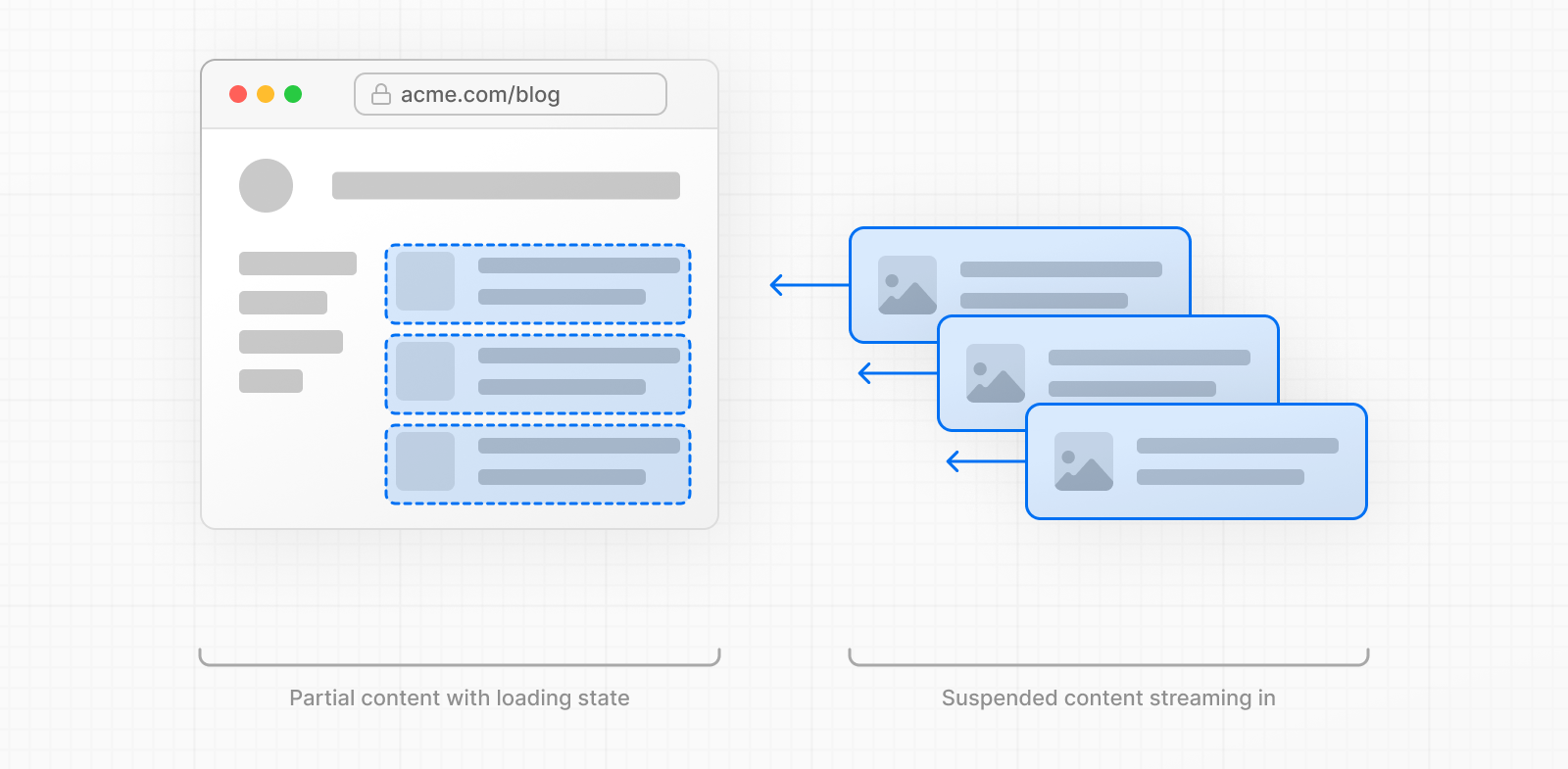
有两种方式:用 loading.js 包裹页面,或用 <Suspense> 包裹组件。
机器人和爬虫与浏览器的处理方式不同:Next.js 会等待数据读取结束后发送完整页面,而非逐步流式发送。参阅机器人和爬虫。
使用 loading.js
在页面同一目录创建 loading.js,可在数据读取期间为整个页面提供流式渲染。例如,针对 app/blog/page.js,把加载文件放入 app/blog。

文件:app/blog/loading.tsx。
export default function Loading() {
  // Define the Loading UI here
  return <div>Loading...</div>
}
导航时,页面尚在渲染,用户便能立即看到布局和加载状态。渲染完成后,新的内容会自动替换加载界面。

内部结构中,loading.js 嵌套在 layout.js 内,并自动用 <Suspense> 边界包裹 page.js 及其子级。
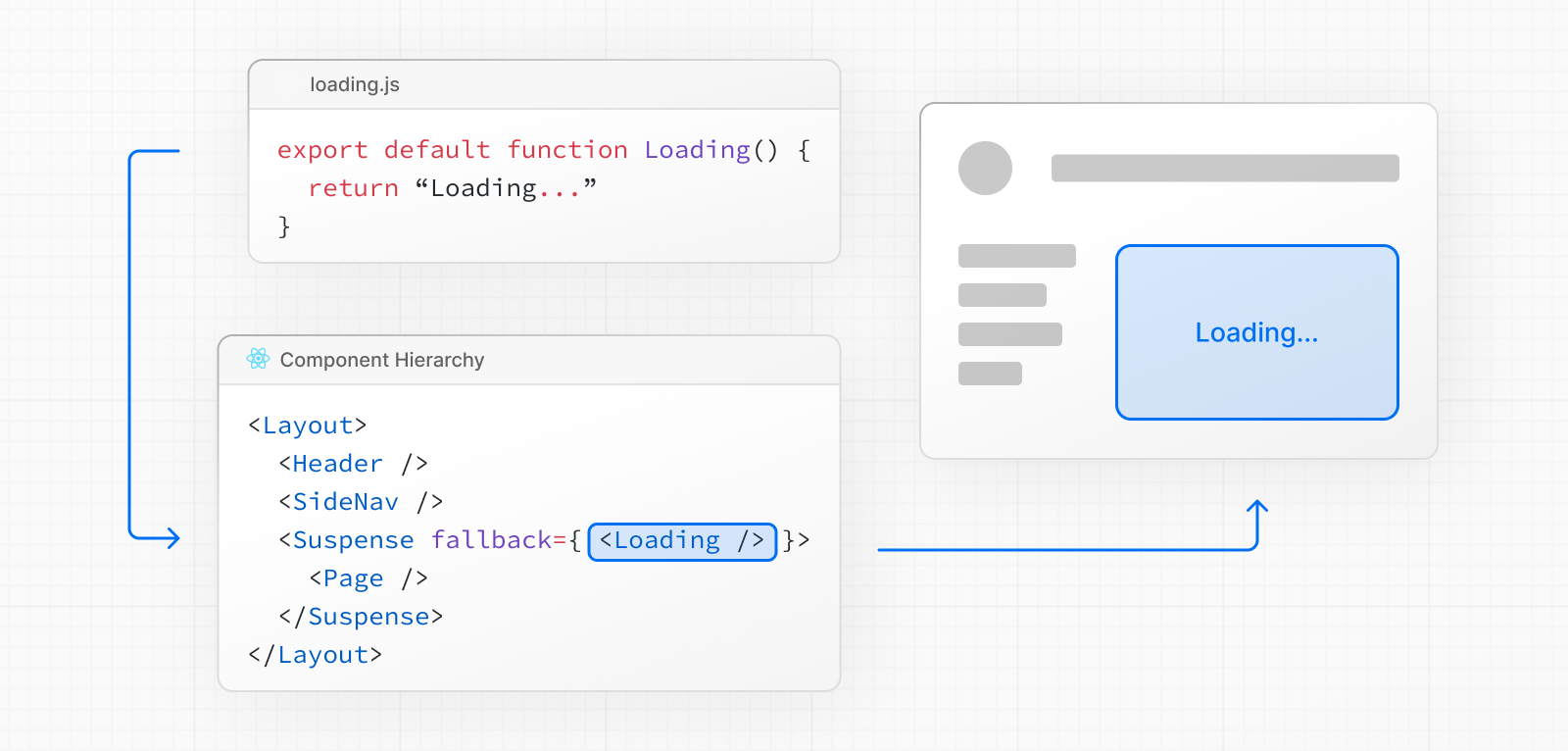
因此,如果布局访问未缓存数据或运行时数据,如 cookies()、headers()、未缓存请求,同一路由段的 loading.js 不会为该布局提供回退界面;导航会等待布局渲染完成。Cache Components会通过构建时报错,引导开发者避免这种情况。
解决方式是把未缓存访问放进自己的 <Suspense> 边界并设置回退界面,或把读取移到 page.js,使 loading.js 能覆盖它。详见 loading.js。因此,虽然加载文件适合路由段流式渲染,原文建议把 Suspense 放得更靠近运行时或未缓存数据访问。
使用 Suspense
Suspense 能更细致地决定哪些部分流式输出:边界外的页面内容可立即展示,边界内的博文列表随后输出。文件:app/blog/page.tsx。
import { Suspense } from 'react'
import BlogList from '@/components/BlogList'
import BlogListSkeleton from '@/components/BlogListSkeleton'

export default function BlogPage() {
  return (
    <div>
      {/* This content will be sent to the client immediately */}
      <header>
        <h1>Welcome to the Blog</h1>
        <p>Read the latest posts below.</p>
      </header>
      <main>
        {/* If there's any dynamic content inside this boundary, it will be streamed in */}
        <Suspense fallback={<BlogListSkeleton />}>
          <BlogList />
        </Suspense>
      </main>
    </div>
  )
}
设计有意义的加载状态
即时加载状态是在导航后立即展示的回退界面。原文建议使它有实际含义,帮助用户理解应用正在响应。例如使用骨架屏、加载指示器,或未来画面中较小但有意义的内容,如封面图、标题。开发时可通过 React Devtools预览和检查组件加载状态。
客户端组件
客户端获取数据可使用 React 的 use API,或 SWR、React Query等社区库。
通过 use API 流式传递数据
先在服务端组件发起请求,把 Promise 作为属性传给客户端组件。文件:app/blog/page.tsx。
import Posts from '@/app/ui/posts'
import { Suspense } from 'react'

export default function Page() {
  // Don't await the data fetching function
  const posts = getPosts()

  return (
    <Suspense fallback={<div>Loading...</div>}>
      <Posts posts={posts} />
    </Suspense>
  )
}
然后在客户端使用 use 读取 Promise。文件:app/ui/posts.tsx。
'use client'
import { use } from 'react'

export default function Posts({
  posts,
}: {
  posts: Promise<{ id: string; title: string }[]>
}) {
  const allPosts = use(posts)

  return (
    <ul>
      {allPosts.map((post) => (
        <li key={post.id}>{post.title}</li>
      ))}
    </ul>
  )
}
这里的 Posts 位于 Suspense 边界内,因此 Promise 等待期间显示回退界面。可以在服务器用 await 等待 Promise,也可在客户端用 use() 读取。参阅 React 关于何时在服务端或客户端解析 Promise的说明。
要让多个客户端组件共享同一个 Promise,可通过 context 提供,而不是逐个传属性。详见在 Context Provider 中使用 use。
社区库
SWR 和 React Query 各自定义了缓存、流式处理等功能的语义。以下是 SWR 示例,文件:app/blog/page.tsx。
'use client'
import useSWR from 'swr'

const fetcher = (url) => fetch(url).then((r) => r.json())

export default function BlogPage() {
  const { data, error, isLoading } = useSWR(
    'https://api.vercel.app/blog',
    fetcher
  )

  if (isLoading) return <div>Loading...</div>
  if (error) return <div>Error: {error.message}</div>

  return (
    <ul>
      {data.map((post: { id: string; title: string }) => (
        <li key={post.id}>{post.title}</li>
      ))}
    </ul>
  )
}
直接在浏览器读取、从服务端提供初始数据,以及协调库缓存与 Next.js 服务端/客户端缓存,见客户端数据获取。
示例
顺序获取
如果一个请求依赖另一个请求返回的数据,就属于顺序获取。例如 Playlists 需要艺术家的 ID,只有 getArtist() 完成后才能读取列表。文件:app/artist/[username]/page.tsx。
export default async function Page({
  params,
}: {
  params: Promise<{ username: string }>
}) {
  const { username } = await params
  // Get artist information
  const artist = await getArtist(username)

  return (
    <>
      <h1>{artist.name}</h1>
      {/* Show fallback UI while the Playlists component is loading */}
      <Suspense fallback={<div>Loading...</div>}>
        {/* Pass the artist ID to the Playlists component */}
        <Playlists artistID={artist.id} />
      </Suspense>
    </>
  )
}

async function Playlists({ artistID }: { artistID: string }) {
  // Use the artist ID to fetch playlists
  const playlists = await getArtistPlaylists(artistID)

  return (
    <ul>
      {playlists.map((playlist) => (
        <li key={playlist.id}>{playlist.name}</li>
      ))}
    </ul>
  )
}
此例的 Suspense 可在艺术家数据到达后流式显示播放列表,但页面最初仍等待艺术家数据。要立即展示加载状态,可用 Suspense 包裹整个页面,例如使用 loading.js。第一个请求会阻塞后续工作,应尽量让它快速完成;无法进一步优化且数据不频繁变化时,可以考虑缓存。
并行获取
并行获取会尽早发起多个请求,使其同时进行。默认情况下,布局和页面并行渲染,各段尽早开始读取。但同一组件内依次写下多个 await,仍可能形成串行。例如下例中,专辑请求等待艺术家请求结束。文件:app/artist/[username]/page.tsx。
import { getArtist, getAlbums } from '@/app/lib/data'

export default async function Page({ params }) {
  // These requests will be sequential
  const { username } = await params
  const artist = await getArtist(username)
  const albums = await getAlbums(username)
  return <div>{artist.name}</div>
}
先调用请求函数,再用 Promise.all统一等待;fetch 调用时请求就开始。文件:app/artist/[username]/page.tsx。
import Albums from './albums'

async function getArtist(username: string) {
  const res = await fetch(`https://api.example.com/artist/${username}`)
  return res.json()
}

async function getAlbums(username: string) {
  const res = await fetch(`https://api.example.com/artist/${username}/albums`)
  return res.json()
}

export default async function Page({
  params,
}: {
  params: Promise<{ username: string }>
}) {
  const { username } = await params

  // Initiate requests
  const artistData = getArtist(username)
  const albumsData = getAlbums(username)

  const [artist, albums] = await Promise.all([artistData, albumsData])

  return (
    <>
      <h1>{artist.name}</h1>
      <Albums list={albums} />
    </>
  )
}
使用 Promise.all 时,只要一个请求失败,整个操作就会失败。可根据所需错误处理方式改用 Promise.allSettled。
使用 React.cache 复用数据
对于 ORM、数据库查询等不使用 fetch 的数据访问,把函数包在 React.cache中,使同一请求内多个组件共享结果。文件:app/lib/user.ts。
import { cache } from 'react'
import { db, eq, users } from '@/lib/db'

export const getUser = cache(async (id: string) => {
  return db.query.users.findFirst({
    where: eq(users.id, id),
  })
})服务端组件可以直接调用该函数。文件:app/dashboard/page.tsx。
import { getUser } from '../lib/user'

export default async function DashboardPage() {
  const user = await getUser('1')

  if (!user) {
    return null
  }

  return <h1>Dashboard for {user.name}</h1>
}
同一请求内,以相同 ID 调用会返回相同的记忆化结果。React.cache 的范围仅限当前请求,各请求拥有独立范围,不共享结果。
预加载数据
如果组件在其他阻塞工作之后才渲染,即使输入早已可用,它的数据请求也会开始得太晚。预加载提前启动请求,让它与其他工作并行,避免请求瀑布。
在阻塞工作前调用读取函数而不加 await,再由消费数据的组件调用同一函数。读取函数必须对相同调用去重,才能复用预加载请求:
fetch的相同请求自动记忆化。- ORM 或数据库读取使用 React.cache 包裹。
- 开启 Cache Components 时,在函数中添加 use cache。如果读取
cookies()或headers()等请求 API,则使用 use cache: private。
生产环境中,私有 Cache Function 的匹配调用可在同一请求内复用结果,使组件重用提前启动的读取,而不把结果放进跨请求的服务端缓存。
把预加载函数与消费数据的组件放在一起,便于移动或删除组件时发现依赖。文件:app/item/[id]/item.tsx。
async function getItem(id: string) {
  const res = await fetch(`https://api.example.com/items/${id}`)
  return res.json()
}

export const preload = (id: string) => {
  void getItem(id)
}

export default async function Item({ id }: { id: string }) {
  const item = await getItem(id)
  return <div>{item.name}</div>
}
在另一个阻塞请求前调用 preload(),尽早开始读取。文件:app/item/[id]/page.tsx。
import Item, { preload } from './item'
import { checkIsAvailable } from '@/app/lib/data'

export default async function Page({
  params,
}: {
  params: Promise<{ id: string }>
}) {
  const { id } = await params

  preload(id)
  const isAvailable = await checkIsAvailable(id)

  return isAvailable ? <Item id={id} /> : null
}
条目请求会在 checkIsAvailable() 执行期间继续进行。如果页面渲染 Item,相同的 fetch 调用便复用 preload 已启动的请求。
后续阅读
JavaScript 示例附录
使用 fetch API:app/blog/page.js
export default async function Page() {
  const data = await fetch('https://api.vercel.app/blog')
  const posts = await data.json()
  return (
    <ul>
      {posts.map((post) => (
        <li key={post.id}>{post.title}</li>
      ))}
    </ul>
  )
}
使用 ORM 或数据库:app/blog/page.js
import { db, posts } from '@/lib/db'

export default async function Page() {
  const allPosts = await db.select().from(posts)
  return (
    <ul>
      {allPosts.map((post) => (
        <li key={post.id}>{post.title}</li>
      ))}
    </ul>
  )
}
加载状态:app/blog/loading.js
export default function Loading() {
  // Define the Loading UI here
  return <div>Loading...</div>
}
使用 Suspense:app/blog/page.js
import { Suspense } from 'react'
import BlogList from '@/components/BlogList'
import BlogListSkeleton from '@/components/BlogListSkeleton'
export default function BlogPage() {
  return (
    <div>
      {/* This content will be sent to the client immediately */}
      <header>
        <h1>Welcome to the Blog</h1>
        <p>Read the latest posts below.</p>
      </header>
      <main>
        {/* If there's any dynamic content inside this boundary, it will be streamed in */}
        <Suspense fallback={<BlogListSkeleton />}>
          <BlogList />
        </Suspense>
      </main>
    </div>
  )
}
向客户端传递 Promise:app/blog/page.js
import Posts from '@/app/ui/posts'
import { Suspense } from 'react'

export default function Page() {
  // Don't await the data fetching function
  const posts = getPosts()

  return (
    <Suspense fallback={<div>Loading...</div>}>
      <Posts posts={posts} />
    </Suspense>
  )
}
使用 use 读取 Promise:app/ui/posts.js
'use client'
import { use } from 'react'
export default function Posts({ posts }) {
  const allPosts = use(posts)

  return (
    <ul>
      {allPosts.map((post) => (
        <li key={post.id}>{post.title}</li>
      ))}
    </ul>
  )
}
使用 SWR:app/blog/page.js
'use client'

import useSWR from 'swr'
const fetcher = (url) => fetch(url).then((r) => r.json())

export default function BlogPage() {
  const { data, error, isLoading } = useSWR(
    'https://api.vercel.app/blog',
    fetcher
  )

  if (isLoading) return <div>Loading...</div>
  if (error) return <div>Error: {error.message}</div>

  return (
    <ul>
      {data.map((post) => (
        <li key={post.id}>{post.title}</li>
      ))}
    </ul>
  )
}
顺序获取关联数据:app/artist/[username]/page.js
export default async function Page({ params }) {
  const { username } = await params
  // Get artist information
  const artist = await getArtist(username)
  return (
    <>
      <h1>{artist.name}</h1>
      {/* Show fallback UI while the Playlists component is loading */}
      <Suspense fallback={<div>Loading...</div>}>
        {/* Pass the artist ID to the Playlists component */}
        <Playlists artistID={artist.id} />
      </Suspense>
    </>
  )
}

async function Playlists({ artistID }) {
  // Use the artist ID to fetch playlists
  const playlists = await getArtistPlaylists(artistID)
  return (
    <ul>
      {playlists.map((playlist) => (
        <li key={playlist.id}>{playlist.name}</li>
      ))}
    </ul>
  )
}
并行获取数据:app/artist/[username]/page.js
import Albums from './albums'

async function getArtist(username) {
  const res = await fetch(`https://api.example.com/artist/${username}`)
  return res.json()
}

async function getAlbums(username) {
  const res = await fetch(`https://api.example.com/artist/${username}/albums`)
  return res.json()
}
export default async function Page({ params }) {
  const { username } = await params

  // Initiate requests
  const artistData = getArtist(username)
  const albumsData = getAlbums(username)

  const [artist, albums] = await Promise.all([artistData, albumsData])

  return (
    <>
      <h1>{artist.name}</h1>
      <Albums list={albums} />
    </>
  )
}
使用 React.cache 复用查询:app/lib/user.js
import { cache } from 'react'
import { db, eq, users } from '@/lib/db'

export const getUser = cache(async (id) => {
  return db.query.users.findFirst({
    where: eq(users.id, id),
  })
})
在服务器组件中读取用户:app/dashboard/page.js
import { getUser } from '../lib/user'

export default async function DashboardPage() {
  const user = await getUser('1')

  if (!user) {
    return null
  }

  return <h1>Dashboard for {user.name}</h1>
}
预加载函数与组件:app/item/[id]/item.js
async function getItem(id) {
  const res = await fetch(`https://api.example.com/items/${id}`)
  return res.json()
}

export const preload = (id) => {
  void getItem(id)
}

export default async function Item({ id }) {
  const item = await getItem(id)
  return <div>{item.name}</div>
}
在阻塞请求前启动预加载:app/item/[id]/page.js
import Item, { preload } from './item'
import { checkIsAvailable } from '@/app/lib/data'

export default async function Page({ params }) {
  const { id } = await params

  preload(id)
  const isAvailable = await checkIsAvailable(id)

  return isAvailable ? <Item id={id} /> : null
}
来源:Vercel, Inc. 与 Next.js 文档贡献者,Fetching Data 官方原文。正文译自官方默认 TypeScript 视图,保留其全部实质章节和 14 个代码块;附录补充同一篇官方文档源码中的 13 个 JavaScript 示例。说明文字译为中文,代码保持原样;官方图形保留原文引用。
官网编辑链接关联 文档源码;仓库 MIT 许可明确涵盖附属文档。本稿进行了中文翻译与排版整理,不代表 Vercel 背书。许可原文如下:
The MIT License (MIT)
Copyright (c) 2025 Vercel, Inc.
Permission is hereby granted, free of charge, to any person obtaining a copy of this software and associated documentation files (the “Software”), to deal in the Software without restriction, including without limitation the rights to use, copy, modify, merge, publish, distribute, sublicense, and/or sell copies of the Software, and to permit persons to whom the Software is furnished to do so, subject to the following conditions: The above copyright notice and this permission notice shall be included in all copies or substantial portions of the Software. THE SOFTWARE IS PROVIDED “AS IS”, WITHOUT WARRANTY OF ANY KIND, EXPRESS OR IMPLIED, INCLUDING BUT NOT LIMITED TO THE WARRANTIES OF MERCHANTABILITY, FITNESS FOR A PARTICULAR PURPOSE AND NONINFRINGEMENT. IN NO EVENT SHALL THE AUTHORS OR COPYRIGHT HOLDERS BE LIABLE FOR ANY CLAIM, DAMAGES OR OTHER LIABILITY, WHETHER IN AN ACTION OF CONTRACT, TORT OR OTHERWISE, ARISING FROM, OUT OF OR IN CONNECTION WITH THE SOFTWARE OR THE USE OR OTHER DEALINGS IN THE SOFTWARE.
文中第一人称、实验、运行记录与测量结果均归原作者或原文示例。











暂无评论内容