


如何读取和写入表格数据?
In [1]: import pandas as pd本教程使用的数据
本教程使用以 CSV 保存的 Titanic 数据集,包含以下列:
PassengerId:每位乘客的编号。Survived:乘客是否生还,0表示否,1表示是。Pclass:三种船票等级之一,即1、2、3等。Name:乘客姓名。Sex:乘客性别。Age:乘客年龄,以年计。SibSp:船上兄弟姐妹或配偶的数量。Parch:船上父母或子女的数量。Ticket:船票号码。Fare:票价。Cabin:船舱号码。Embarked:登船港口。
我想分析 CSV 文件中的 Titanic 乘客数据
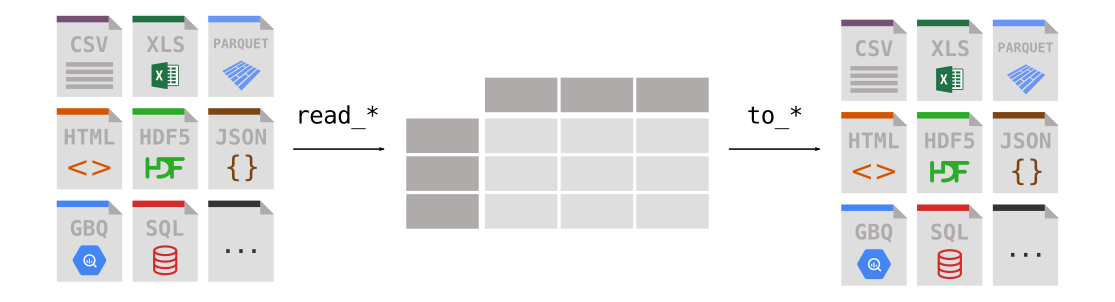
In [2]: titanic = pd.read_csv("data/titanic.csv")pandas 提供 read_csv(),把 CSV 文件中的数据读入 pandas DataFrame。pandas 原生支持许多文件格式及数据源,例如 CSV、Excel、SQL、JSON、Parquet;读取函数都使用 read_* 前缀。
读取后一定要检查数据。显示 DataFrame 时,默认展示前5行和后5行:
In [3]: titanic
Out[3]:
     PassengerId  Survived  Pclass  ...     Fare Cabin  Embarked
0              1         0       3  ...   7.2500   NaN         S
1              2         1       1  ...  71.2833   C85         C
2              3         1       3  ...   7.9250   NaN         S
3              4         1       1  ...  53.1000  C123         S
4              5         0       3  ...   8.0500   NaN         S
..           ...       ...     ...  ...      ...   ...       ...
886          887         0       2  ...  13.0000   NaN         S
887          888         1       1  ...  30.0000   B42         S
888          889         0       3  ...  23.4500   NaN         S
889          890         1       1  ...  30.0000  C148         C
890          891         0       3  ...   7.7500   NaN         Q

[891 rows x 12 columns]
我想查看 pandas DataFrame 的前8行
In [4]: titanic.head(8)
Out[4]:
   PassengerId  Survived  Pclass  ...     Fare Cabin  Embarked
0            1         0       3  ...   7.2500   NaN         S
1            2         1       1  ...  71.2833   C85         C
2            3         1       3  ...   7.9250   NaN         S
3            4         1       1  ...  53.1000  C123         S
4            5         0       3  ...   8.0500   NaN         S
5            6         0       3  ...   8.4583   NaN         Q
6            7         0       1  ...  51.8625   E46         S
7            8         0       3  ...  21.0750   NaN         S

[8 rows x 12 columns]
要查看 DataFrame 的前 N 行,使用 head(),并传入所需行数,本例为8。
注意:如果希望查看最后 N 行,pandas 也提供 tail()。例如 titanic.tail(10) 返回最后10行。
通过请求 pandas 的 dtypes 属性,可以检查每列被识别成什么数据类型:
In [5]: titanic.dtypes
Out[5]:
PassengerId      int64
Survived         int64
Pclass           int64
Name               str
Sex                str
Age            float64
SibSp            int64
Parch            int64
Ticket             str
Fare           float64
Cabin              str
Embarked           str
dtype: object
这里列出了各列使用的数据类型。该 DataFrame 中的数据包括整数(int64)、浮点数(float64)和字符串;原文说明将字符串称作 object,当前原文输出则显示为 str。
注意:请求 dtypes 时不使用括号 ()!dtypes 是 DataFrame 与 Series 的属性。属性不需要括号,表示对象的某种特征;方法需要括号,会对 DataFrame 或 Series 执行操作,正如第一篇教程所介绍的。
同事希望将 Titanic 数据作为电子表格取得
注意:如果要使用 to_excel() 与 read_excel(),需要按安装文档中 Excel 文件部分的说明安装 Excel 读写依赖。
In [6]: titanic.to_excel("titanic.xlsx", sheet_name="passengers", index=False)read_* 函数用于把数据读入 pandas,to_* 方法用于保存数据。to_excel()将数据保存为 Excel 文件。本例将工作表命名为 passengers,而不是默认的 Sheet1。设置 index=False,可以不把行索引标签保存进电子表格。
对应的读取函数 read_excel() 会把数据重新加载到 DataFrame:
In [7]: titanic = pd.read_excel("titanic.xlsx", sheet_name="passengers")In [8]: titanic.head()
Out[8]:
PassengerId Survived Pclass ... Fare Cabin Embarked
0 1 0 3 ... 7.2500 NaN S
1 2 1 1 ... 71.2833 C85 C
2 3 1 3 ... 7.9250 NaN S
3 4 1 1 ... 53.1000 C123 S
4 5 0 3 ... 8.0500 NaN S
[5 rows x 12 columns]我希望查看 DataFrame 的技术概览
In [9]: titanic.info()
<class 'pandas.DataFrame'>
RangeIndex: 891 entries, 0 to 890
Data columns (total 12 columns):
 #   Column       Non-Null Count  Dtype
---  ------       --------------  -----
 0   PassengerId  891 non-null    int64
 1   Survived     891 non-null    int64
 2   Pclass       891 non-null    int64
 3   Name         891 non-null    str
 4   Sex          891 non-null    str
 5   Age          714 non-null    float64
 6   SibSp        891 non-null    int64
 7   Parch        891 non-null    int64
 8   Ticket       891 non-null    str
 9   Fare         891 non-null    float64
 10  Cabin        204 non-null    str
 11  Embarked     889 non-null    str
dtypes: float64(2), int64(5), str(5)
memory usage: 118.7 KBinfo()提供 DataFrame 的技术信息。下面更详细地解释输出:
- 对象确实是一个
DataFrame。 - 有891个条目,即891行。
- 每行有一个行标签,也称为
index,值从0到890。 - 表有12列。大多数列的每行都有值,即891个值都是
non-null。部分列有缺失值,其non-null数量少于891。 Name、Sex、Cabin、Embarked包含文本数据,即字符串(原文说明也称作object)。其他列是数值数据,有些是整数,有些是实数或浮点数。- 各列的数据类型,包括字符、整数等,通过
dtypes汇总列出。 - 还会提供保存这个
DataFrame所需的大致 RAM 用量。
记住
- 从许多不同文件格式或数据源将数据读入 pandas,由
read_*函数支持。 - 将数据从 pandas 导出,由各种
to_*方法支持。 head、tail、info方法和dtypes属性适合进行初步检查。
完整的 pandas 输入输出能力概览,参阅用户指南中的读取器和写入器函数。
原文:How do I read and write tabular data?,pandas 3.0.6 文档。作者:pandas 文档贡献者。本文为中文翻译,保留原文输入、输出及历史文字中的类型称呼。© 2008-2011 AQR Capital Management, LLC、Lambda Foundry, Inc.、PyData Development Team;© 2011-2026 开源贡献者。采用 BSD 3-Clause 许可,完整许可随本文保留。
完整许可证原文
BSD 3-Clause License

Copyright (c) 2008-2011, AQR Capital Management, LLC, Lambda Foundry, Inc. and PyData Development Team
All rights reserved.

Copyright (c) 2011-2026, Open source contributors.

Redistribution and use in source and binary forms, with or without
modification, are permitted provided that the following conditions are met:

* Redistributions of source code must retain the above copyright notice, this
  list of conditions and the following disclaimer.
* Redistributions in binary form must reproduce the above copyright notice,
  this list of conditions and the following disclaimer in the documentation
  and/or other materials provided with the distribution.

* Neither the name of the copyright holder nor the names of its
  contributors may be used to endorse or promote products derived from
  this software without specific prior written permission.
THIS SOFTWARE IS PROVIDED BY THE COPYRIGHT HOLDERS AND CONTRIBUTORS "AS IS"
AND ANY EXPRESS OR IMPLIED WARRANTIES, INCLUDING, BUT NOT LIMITED TO, THE
IMPLIED WARRANTIES OF MERCHANTABILITY AND FITNESS FOR A PARTICULAR PURPOSE ARE
DISCLAIMED. IN NO EVENT SHALL THE COPYRIGHT HOLDER OR CONTRIBUTORS BE LIABLE
FOR ANY DIRECT, INDIRECT, INCIDENTAL, SPECIAL, EXEMPLARY, OR CONSEQUENTIAL
DAMAGES (INCLUDING, BUT NOT LIMITED TO, PROCUREMENT OF SUBSTITUTE GOODS OR
SERVICES; LOSS OF USE, DATA, OR PROFITS; OR BUSINESS INTERRUPTION) HOWEVER
CAUSED AND ON ANY THEORY OF LIABILITY, WHETHER IN CONTRACT, STRICT LIABILITY,
OR TORT (INCLUDING NEGLIGENCE OR OTHERWISE) ARISING IN ANY WAY OUT OF THE USE
OF THIS SOFTWARE, EVEN IF ADVISED OF THE POSSIBILITY OF SUCH DAMAGE.










暂无评论内容