


编写 Node-RED Function 节点
Function 节点可以运行 JavaScript 代码,处理经过它的消息。消息以名为 msg 的对象传入;按照约定,msg.payload 属性保存消息正文。其他节点可能向消息添加自己的属性,这些属性应在相应节点的文档中说明。
编写函数
Function 节点中输入的代码构成函数体。最简单的函数原样返回消息:
return msg;如果函数返回 null,就不会继续传递消息,流程在此结束。函数必须返回消息对象;返回数字或字符串会导致错误。
返回的对象不必与传入的对象相同,也可以新建对象:
const newMsg = { payload: msg.payload.length };
return newMsg;
注意:新建消息对象会丢失收到的消息上的其他属性,可能破坏某些流程。例如 HTTP In/Response 流程要求端到端保留 msg.req 和 msg.res。通常应修改传入消息的属性,然后返回同一个消息对象。
可以使用 node.warn() 在侧栏显示警告,辅助调试:
node.warn("my value xyz = " + xyz);更多内容见下文“记录日志”。
多个输出
函数编辑对话框允许修改输出数量。存在多个输出时,可以返回消息数组,把消息发往相应输出。
这样便能按条件选择输出。例如,将 topic 为 banana 的消息发往第二个输出,其他消息发往第一个输出:
if (msg.topic === "banana") {
   return [ null, msg ];
} else {
   return [ msg, null ];
}
下面的例子从第一个输出原样发送原消息,从第二个输出发送包含 payload 长度的消息:
const newMsg = { payload: msg.payload.length };
return [msg, newMsg];
处理任意数量的输出
node.outputCount 包含此 Function 节点配置的输出数量。因此,可以编写通用函数,适应编辑对话框中设置的不同输出数量。下面将收到的消息随机分配到一个输出:
// Create an array same length as there are outputs
const messages = new Array(node.outputCount)
// Choose random output number to send the message to
const chosenOutputIndex = Math.floor(Math.random() * node.outputCount);
// Send the message only to chosen output
messages[chosenOutputIndex] = msg;
// Return the array containing chosen output
return messages;
之后只需在编辑对话框中修改输出数量,不必修改函数本身。
多条消息
在返回数组中再放入消息数组,就能从同一个输出发送多条消息。下游节点会按返回顺序逐条收到这些消息。
下面将 msg1、msg2、msg3 发往第一个输出,将 msg4 发往第二个输出:
const msg1 = { payload:"first out of output 1" };
const msg2 = { payload:"second out of output 1" };
const msg3 = { payload:"third out of output 1" };
const msg4 = { payload:"only message from output 2" };
return [ [ msg1, msg2, msg3 ], msg4 ];
下面将收到的 payload 拆成单词,为每个单词返回一条消息:
const outputMsgs = [];
const words = msg.payload.split(" ");
for (const w in words) {
    outputMsgs.push({payload:words[w]});
}
return [ outputMsgs ];
异步发送消息
如果函数必须先执行异步操作再发送消息,就不能在函数末尾直接返回该消息。应调用 node.send(),传入要发送的消息。它接受的消息排列方式与前面介绍的返回值相同。例如:
doSomeAsyncWork(msg, function(result) {
    msg.payload = result;
    node.send(msg);
});
return;
Function 节点会克隆传给 node.send 的每个消息对象,以免重复使用的对象被意外修改。Node-RED 1.0 之前,传入的第一条消息不会被克隆,其余消息会被克隆。
将第二个参数设为 false,可以要求运行时不要克隆传入的第一条消息。当消息含有无法克隆的内容,或需要降低发送消息的性能开销时,可以这样做:
node.send(msg,false);完成消息处理
Function 节点异步处理消息时,运行时不会自动知道处理何时完成。应在适当时机调用 node.done(),让运行时正确追踪消息在系统中的处理情况:
doSomeAsyncWork(msg, function(result) {
    msg.payload = result;
    node.send(msg);
    node.done();
});
return;
启动时运行代码
从 1.1.0 起,Function 节点提供 On Start 标签页(1.3.0 之前名为 Setup)。这里的代码会在每次节点启动时运行,可用于建立函数所需的状态。
例如,初始化主函数会使用的本地上下文值:
if (context.get("counter") === undefined) {
    context.set("counter", 0)
}
如果启动函数必须先完成异步工作才能处理消息,可以返回 Promise。在启动函数完成之前收到的消息会排队,等节点准备好后再处理。
清理资源
函数使用异步回调时,每次流程重新部署可能都需要清理未完成的请求或关闭连接。可以采用两种方式。
添加 close 事件处理器:
node.on('close', function() {
    // tidy up any async code here - shutdown connections and so on.
});
或者,在节点编辑对话框的 On Stop 标签页中编写清理代码。
记录日志
节点需要向控制台记录信息时,可以使用以下函数:
node.log("Something happened");
node.warn("Something happened you should know about");
node.error("Oh no, something bad happened");
控制台输出的位置取决于操作系统和 Node-RED 的启动方式。从命令行启动时,日志就在该控制台;作为系统服务运行时,可能写入系统日志;使用 PM2 等应用运行时,日志由该应用自己的方式展示。在树莓派上,安装脚本会添加 node-red-log 命令,用来显示日志。
warn 和 error 消息也会发送到流程编辑器右侧的调试标签页。更细粒度的日志可以使用 node.trace() 和 node.debug();如果没有配置记录这些级别的日志器,就看不到它们。
处理错误
如果函数遇到应当终止当前流程的错误,就不应返回任何内容。要触发同一标签页中的 Catch 节点,应调用 node.error,并把原消息作为第二个参数:
node.error("hit an error", msg);保存数据
除了 msg 对象,函数还可以在上下文存储中保存数据。更多说明见 Node-RED 上下文文档。
Function 节点提供三个用于访问上下文的预定义变量:
context:节点本地上下文。flow:流程作用域上下文。global:全局作用域上下文。
以下示例使用 flow,同样适用于 context 和 global。这些预定义变量是 Function 节点的功能;自行创建节点时,请参阅创建节点指南。
访问上下文有同步和异步两种方式。内置上下文存储同时支持两种方式;某些存储仅支持异步访问,同步访问会抛出错误。
获取上下文值:
let myCount = flow.get("count");设置上下文值:
flow.set("count", 123);下面统计函数运行次数:
// initialise the counter to 0 if it doesn't exist already
let count = context.get('count')||0;
count += 1;
// store the value back
context.set('count',count);
// make it part of the outgoing msg object
msg.count = count;
return msg;
获取或设置多个值
也可以一次获取或设置多个值:
let values = flow.get(["count", "colour", "temperature"]);
// values[0] is the 'count' value
// values[1] is the 'colour' value
// values[2] is the 'temperature' value
flow.set(["count", "colour", "temperature"], [123, "red", "12.5"]);此时,任何缺失的值都会设为 null。
异步访问上下文
如果上下文存储要求异步访问,get 和 set 需要额外的回调参数:
// Get single value
flow.get("count", function(err, myCount) { ... });

// Get multiple values
flow.get(["count", "colour"], function(err, count, colour) { ... })

// Set single value
flow.set("count", 123, function(err) { ... })

// Set multiple values
flow.set(["count", "colour"], [123, "red"], function(err) { ... })
回调的第一个参数 err 仅在访问上下文发生错误时设置。前面的计数示例改用异步访问后为:
context.get('count', function(err, count) {
    if (err) {
        node.error(err, msg);
    } else {
        // initialise the counter to 0 if it doesn't exist already
        count = count || 0;
        count += 1;
        // store the value back
        context.set('count',count, function(err) {
            if (err) {
                node.error(err, msg);
            } else {
                // make it part of the outgoing msg object
                msg.count = count;
                // send the message
                node.send(msg);
            }
        });
    }
});
多个上下文存储
从 0.19 起,可以配置多个上下文存储,例如同时使用 memory 和 file 存储。get/set 接受一个可选参数,指定使用哪一个存储:
// Get value - sync
let myCount = flow.get("count", "storeName");

// Get value - async
flow.get("count", "storeName", function(err, myCount) { ... });

// Set value - sync
flow.set("count", 123, "storeName");

// Set value - async
flow.set("count", 123, "storeName", function(err) { ... })
必要时,上面示例中的 storeName 可以使用变量。
全局上下文
Node-RED 启动时,可以向全局上下文预先填入对象。在主 settings.js 文件的 functionGlobalContext 属性中定义这些对象,也可由此加载额外模块。
添加状态
Function 节点与其他节点一样,可以显示自己的状态。调用 node.status 即可设置:
node.status({fill:"red",shape:"ring",text:"disconnected"});
node.status({fill:"green",shape:"dot",text:"connected"});
node.status({text:"Just text status"});
node.status({}); // to clear the status可接受的参数见节点状态文档。Status 节点可以捕获这些状态更新。
加载额外模块
使用 functionGlobalContext
不能直接在 Function 节点中加载额外的 Node 模块。必须在 settings.js 中加载,并添加到 functionGlobalContext。
例如,在 settings.js 中添加以下设置,即可让所有函数使用内置 os 模块:
functionGlobalContext: {
    osModule:require('os')
}
随后,在函数中通过 global.get('osModule') 引用该模块。
设置文件中加载的模块必须安装在设置文件所在目录。对大多数用户,这就是默认用户目录 ~/.node-red:
cd ~/.node-red
npm install name_of_3rd_party_module
使用 functionExternalModules
在 settings.js 中把 functionExternalModules 设为 true 后,Function 节点编辑对话框会提供模块列表,可以添加此节点应能使用的额外模块,并指定代码中引用该模块的变量名。
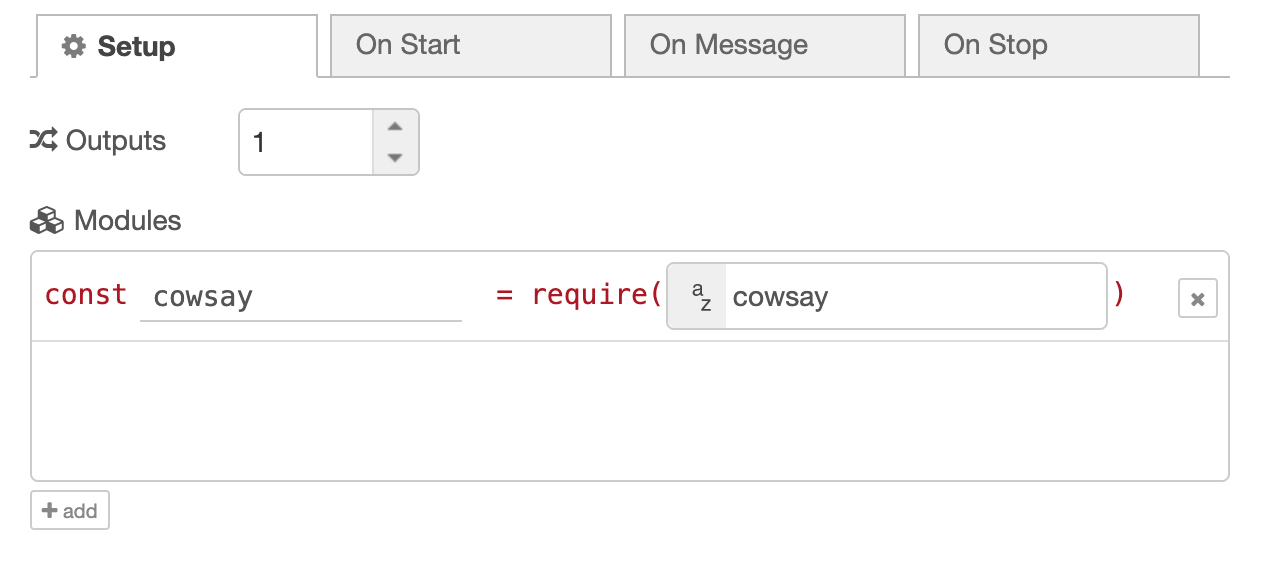
部署节点时,这些模块会自动安装到 ~/.node-red/node_modules/。
处理超时
可以在 Setup 标签页为 Function 节点设置超时,单位为秒。此值规定运行时允许函数执行多久,超过后抛出错误。默认值为 0,表示不设置超时。
注意:超时功能仅适用于同步代码。
调用 Link 节点
此功能从 Node-RED 5 开始提供。Function 节点可以内联调用其他流程,并在收到响应后继续执行。
如果需要复用工具流程,又不希望处理纯流程方式带来的状态管理,这会很有用。例如,要在 Function 节点中操作数据库,不必自行编写全部数据库代码:可以使用现有数据库节点建立流程,然后从函数直接调用该流程。
Link In/Return 流程
用 Link 节点创建工具流程:

把 link out 节点的选项设为 return to calling link node。
使用 node.linkcall
Function 节点通过 node.linkcall 调用 Link 节点:
// Set a query for the sqlite node to use
msg.topic = 'select * from orders';
// Call the `database-query` link node and await a response
const result = await node.linkcall('database-query', msg);

// result.payload contains the result of the database query
node.linkcall(target, message, options)
target:要调用的link in节点的字符串标识,可使用节点id或name。- 消息参数:传给该流程的消息对象。
options:可选对象,包含timeout(调用超时,单位毫秒,默认5000,即 5 秒)和clone(发送前是否克隆消息,默认true)。
API 参考
Function 节点中可以使用以下对象。
node
| API | 用途 |
|---|---|
node.id |
Function 节点的 ID |
node.name |
Function 节点的名称 |
node.outputCount |
配置的输出数量 |
node.log(..) |
记录普通日志 |
node.warn(..) |
记录警告日志 |
node.error(..) |
记录错误日志 |
node.debug(..) |
记录调试日志 |
node.trace(..) |
记录跟踪日志 |
node.on(..) |
注册事件处理器 |
node.status(..) |
更新节点状态 |
node.send(..) |
发送消息 |
node.done(..) |
标记消息处理完成 |
node.linkcall(..) |
调用 link in 节点并等待响应;5.0 新增 |
context
context.get(..):获取节点作用域的上下文属性。context.set(..):设置节点作用域的上下文属性。context.keys(..):返回节点作用域所有上下文属性的键列表。context.flow:与flow相同。context.global:与global相同。
flow
flow.get(..):获取流程作用域的上下文属性。flow.set(..):设置流程作用域的上下文属性。flow.keys(..):返回流程作用域所有上下文属性的键列表。
global
global.get(..):获取全局作用域的上下文属性。global.set(..):设置全局作用域的上下文属性。global.keys(..):返回全局作用域所有上下文属性的键列表。
RED
RED.util.cloneMessage(..) 安全克隆消息对象,以便重复使用。
env
env.get(..) 获取环境变量。
其他模块和函数
还可以使用以下模块和函数:
Buffer:Node.js 的Buffer模块。console:Node.js 的console模块;记录日志时优先使用node.log。util:Node.js 的util模块。setTimeout/clearTimeout:JavaScript 超时定时器函数。setInterval/clearInterval:JavaScript 间隔定时器函数。
Function 节点停止或重新部署时,会自动清除所有尚未结束的超时和间隔定时器。
来源:Writing Functions,Node-RED 官方文档。版权归 OpenJS Foundation 及贡献者所有。本文翻译自原文,技术标识与示例保持原样。
文档仓库采用 Apache License 2.0。原始版权通知:Copyright 2016 JS Foundation and other contributors;Copyright 2013, 2016 IBM Corp。许可全文:Apache License 2.0。文档按许可条款提供,不附带明示或默示担保。











暂无评论内容