


CrowdSec重放模式
CrowdSec不仅可以监控实时日志,也可以重放旧日志文件,即重放/取证模式。它适合测试场景、检测误报和漏报,或生成某段历史时期的报告。
在这种模式下,CrowdSec读取日志并提取时间戳,让场景和桶按照日志中的时间评估。桶溢出产生的告警会像其他告警一样推送到API,但采用日志时间戳,因此可以按原始时间线查看。
重放日志文件时,运行:
sudo crowdsec -c /etc/crowdsec/user.yaml -dsn file:///path/to/your/log/file.log -type log_file_type-dsn指定待处理日志文件,-type类似于采集配置中的label类型字段。例如:
sudo crowdsec -c /etc/crowdsec/user.yaml -dsn file:///var/log/nginx/2019.log -type nginx
sudo crowdsec -c /etc/crowdsec/user.yaml -dsn file:///var/log/sshd-2019.log -type syslog
sudo crowdsec -c /etc/crowdsec/user.yaml -dsn "journalctl://filters=_SYSTEMD_UNIT=ssh.service" -type syslog
以取证模式运行时,告警既输出到标准输出,也写入数据库:
$ sudo crowdsec -c /etc/crowdsec/user.yaml -dsn file:///var/log/nginx/nginx-2019.log.1 -type nginx
...
INFO[13-11-2020 13:05:23] Ip 123.206.50.249 performed 'crowdsecurity/http-probing' (11 events over 6s) at 2019-01-01 01:37:32 +0100 CET
INFO[13-11-2020 13:05:23] Ip 123.206.50.249 performed 'crowdsecurity/http-backdoors-attempts' (2 events over 1s) at 2019-01-01 01:37:33 +0100 CET
INFO[13-11-2020 13:05:24] (14baeedafc1e44c08b806fc0c1cd92c4/crowdsec) crowdsecurity/http-probing by ip 123.206.50.249 (CN) : 1h ban on Ip 123.206.50.249
INFO[13-11-2020 13:05:24] (14baeedafc1e44c08b806fc0c1cd92c4/crowdsec) crowdsecurity/http-backdoors-attempts by ip 123.206.50.249 (CN) : 1h ban on Ip 123.206.50.249
...
告警进入数据库后,就能通过Metabase或cscli查看。
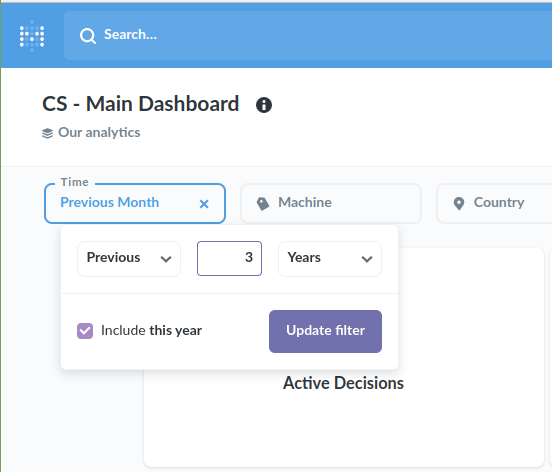
使用Metabase时,在主仪表板的时间选择器中选择相应时期即可:
警告:
取证模式下,crowdsec-agent依赖crowdsecurity/dateparse-enrich解析日期格式。支持的格式见CrowdSec Hub中的对应条目。
还可以通过--transform指定表达式,在将每一行送入解析器之前执行。例如,从S3桶读取CloudTrail日志时,需要让每条CloudTrail记录生成一个事件:
sudo crowdsec -c /etc/crowdsec/user.yaml --dsn s3://my_cloudtrail_bucket/AWSLogs/ACCOUNT_ID/CloudTrail/REGION/YEAR/MONTH/DAY/CLOUDTRAIL_FILE.json.gz\?max_buffer_size=1048576 --type aws-cloudtrail --transform 'map(JsonExtractSlice(evt.Line.Raw, "Records"), ToJsonString(#))'该表达式解析JSON数组Records,为每个数组元素生成一个事件,并将各事件转换成字符串返回。
max_buffer_size控制可读取的单行最大长度。
向现有数据库注入告警
如果CrowdSec/Local API已经运行,且希望把事件注入现有数据库,可以直接运行:
sudo crowdsec -dsn file://logs/nginx/access.log -type nginx -no-apiCrowdSec会处理logs/nginx/access.log,并把告警推送到默认配置文件/etc/crowdsec/config.yaml中配置的Local API,参见其中的api.client.credentials_path。
向新数据库注入告警:本地没有运行中的实例
如果当前没有服务运行,可以直接运行CrowdSec:
sudo crowdsec -dsn file://logs/nginx/access.log -type nginxCrowdSec会启动Local API,并处理logs/nginx/access.log。
向新数据库注入告警:本地已有运行中的实例
如果本地实例正在运行,又不想污染现有数据库,可以配置独立的Local API与数据库。
先复制现有配置,再编辑副本:
$ sudo cp /etc/crowdsec/config.yaml ./forensic.yaml
$ emacs ./forensic.yaml
修改Local API和数据库配置,确保不会污染现有数据:
$ emacs ./forensic.yaml
...
db_config:
  type: sqlite
  # we edit the db_path to point to a different SQLite database
  db_path: /var/lib/crowdsec/data/crowdsec_alt.db
  # let's comment out the auto-flush (database garbage collection)
  #flush:
  #   max_items: 5000
  #   max_age: 7d
...
api:
  client:
    # we edit credentials_path to point to a local file
    credentials_path: /tmp/local_api_credentials.yaml
  server:
    # we edit the listen_uri so that it doesn't try to listen on the same port as the existing Local API
    listen_uri: 127.0.0.1:8081
这些改动可以确保:
-
使用不同的SQLite数据库路径,避免与已有本地实例冲突。
-
改用独立的本地API凭据文件,将机器注册到临时Local API。
-
使用不同的Local API监听地址,避免端口冲突。
-
注释
flush配置,避免数据库垃圾回收删除正在导入的旧事件。
创建新数据库并注册机器:
$ touch /tmp/local_api_credentials.yaml
$ cscli -c forensic.yaml machines add --auto
INFO[0000] Machine '...' created successfully
INFO[0000] API credentials dumped to '/tmp/local_api_credentials.yaml'
$ cat /tmp/local_api_credentials.yaml
url: http://127.0.0.1:8081
login: ...
password: ...
现在可以启动新的Local API和CrowdSec:
$ crowdsec -c ./forensic.yaml -dsn file://github/crowdsec/OLDS/LOGS/nginx/10k_ACCESS_LOGS.log -type nginx
...
INFO[15-11-2020 10:09:20] Ip x.x.x.x performed 'crowdsecurity/http-bad-user-agent' (2 events over 0s) at 2017-10-21 13:58:38 +0200 CEST
INFO[15-11-2020 10:09:20] Ip y.y.y.y performed 'crowdsecurity/http-probing' (11 events over 0s) at 2017-10-23 12:00:34 +0200 CEST
...
还可以启动专用仪表板查看这些数据:
$ cscli -c forensic.yaml dashboard setup
INFO[0000] /var/lib/crowdsec/data/metabase.db exists, skip.
INFO[0000] Pulling docker image metabase/metabase:v0.37.0.2
...
INFO[0001] creating container '/crowdsec-metabase'
INFO[0002] waiting for metabase to be up (can take up to a minute)
.........
INFO[0040] Metabase is ready
    URL       : 'http://127.0.0.1:3000'
    username  : 'crowdsec@crowdsec.net'
    password  : ...
向新数据库注入告警:开发环境
从新下载的发布包开始:
$ tar xvzf crowdsec-release.tgz
$ cd crowdsec-v1.0.0-rc
$ ./test_env.sh
$ cd tests
安装所需的集合:
$ ./cscli -c dev.yaml collections install crowdsecurity/nginx随后处理日志:
$ ./crowdsec -c dev.yaml -dsn file://github/crowdsec/OLDS/LOGS/nginx/10k_ACCESS_LOGS.log -type nginx
INFO[0000] single file mode : log_media=stdout daemonize=true
INFO[15-11-2020 11:18:27] Crowdsec v1.0.0-rc-0ecb142dfffc89b019b6d9044cb7cc5569d12c70
INFO[15-11-2020 11:18:38] Ip x.x.x.x performed 'crowdsecurity/http-sensitive-files' (5 events over 4s) at 2017-10-23 12:35:54 +0200 CEST
INFO[15-11-2020 11:18:39] (test/crowdsec) crowdsecurity/http-probing by ip x.x.x.x (DE) : 1h ban on Ip x.x.x.x
保持CrowdSec运行,就能查询本地API:
$ ./cscli -c dev.yaml alerts list
+----+--------------------+---------------------------------------+---------+--------------+-----------+--------------------------------+
| ID |       VALUE        |                REASON                 | COUNTRY |      AS      | DECISIONS |           CREATED AT           |
+----+--------------------+---------------------------------------+---------+--------------+-----------+--------------------------------+
| 28 | Ip:x.x.x.x  | crowdsecurity/http-crawl-non_statics  | DE      |  Linode, LLC | ban:1     | 2017-10-23 12:36:48 +0200      |
|    |                    |                                       |         |              |           | +0200                          |
| 27 | Ip:x.x.x.x  | crowdsecurity/http-sensitive-files    | DE      |  Linode, LLC | ban:1     | 2017-10-23 12:35:50 +0200      |
|    |                    |                                       |         |              |           | +0200                          |
或者启动仪表板查看数据:
$ sudo ./cscli dashboard setup
...
INFO[0002] waiting for metabase to be up (can take up to a minute)
........
来源与版权
原文:CrowdSec重放模式。中文译文。版权归© 2026 CrowdSec, Inc.,保留所有权利。代码、命令及日志中的版本信息保留原文。











暂无评论内容