


原文维护与发布:Docling project。主文为 Hybrid chunking,并合并 Advanced chunking & serialization。原页未见可确认的个人作者署名。
一、混合分块
概览
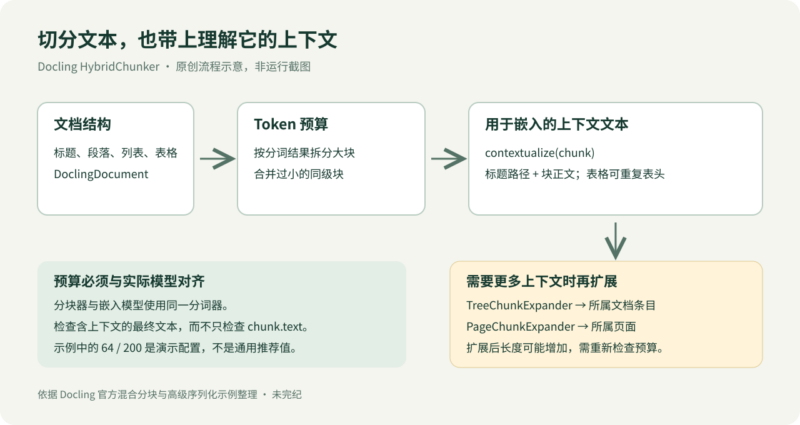
混合分块在基于文档结构的层级分块之上,进一步加入对分词结果的感知与调整。
更多细节参见混合分块器说明。
准备环境
%pip install -qU pip docling transformers
Note: you may need to restart the kernel to use updated packages.
DOC_SOURCE = "../../tests/data/md/sources/wiki.md"
基本用法
首先转换文档:
from docling.document_converter import DocumentConverter

doc = DocumentConverter().convert(source=DOC_SOURCE).document
对于基本的分块场景,只需实例化 HybridChunker,它会使用默认参数。
from docling.chunking import HybridChunker

chunker = HybridChunker()
chunk_iter = chunker.chunk(dl_doc=doc)
Token indices sequence length is longer than the specified maximum sequence length for this model (531 > 512). Running this sequence through the model will result in indexing errors
👉 注意:如上所示,使用
HybridChunker有时会触发 transformers 库的警告,但原文指出,这属于“误报”。详情参见官方 FAQ。
请注意,通常应当送入嵌入模型的是 contextualize() 方法返回的、已经补充上下文的文本:
for i, chunk in enumerate(chunk_iter):
    print(f"=== {i} ===")
    print(f"chunk.text:\n{f'{chunk.text[:300]}…'!r}")

    enriched_text = chunker.contextualize(chunk=chunk)
    print(f"chunker.contextualize(chunk):\n{f'{enriched_text[:300]}…'!r}")

    print()
=== 0 ===
chunk.text:
'International Business Machines Corporation (using the trademark IBM), nicknamed Big Blue, is an American multinational technology company headquartered in Armonk, New York and present in over 175 countries.\nIt is a publicly traded company and one of the 30 companies in the Dow Jones Industrial Aver…'
chunker.contextualize(chunk):
'IBM\nInternational Business Machines Corporation (using the trademark IBM), nicknamed Big Blue, is an American multinational technology company headquartered in Armonk, New York and present in over 175 countries.\nIt is a publicly traded company and one of the 30 companies in the Dow Jones Industrial …'

=== 1 ===
chunk.text:
'IBM debuted in the microcomputer market in 1981 with the IBM Personal Computer, — its DOS software provided by Microsoft, — which became the basis for the majority of personal computers to the present day.[12] The company later also found success in the portable space with the ThinkPad. Since the 19…'
chunker.contextualize(chunk):
'IBM\nIBM debuted in the microcomputer market in 1981 with the IBM Personal Computer, — its DOS software provided by Microsoft, — which became the basis for the majority of personal computers to the present day.[12] The company later also found success in the portable space with the ThinkPad. Since th…'

=== 2 ===
chunk.text:
'IBM originated with several technological innovations developed and commercialized in the late 19th century. Julius E. Pitrap patented the computing scale in 1885;[17] Alexander Dey invented the dial recorder (1888);[18] Herman Hollerith patented the Electric Tabulating Machine (1889);[19] and Willa…'
chunker.contextualize(chunk):
'IBM\n1910s–1950s\nIBM originated with several technological innovations developed and commercialized in the late 19th century. Julius E. Pitrap patented the computing scale in 1885;[17] Alexander Dey invented the dial recorder (1888);[18] Herman Hollerith patented the Electric Tabulating Machine (1889…'

=== 3 ===
chunk.text:
'Collectively, the companies manufactured a wide array of machinery for sale and lease, ranging from commercial scales and industrial time recorders, meat and cheese slicers, to tabulators and punched cards. Thomas J. Watson, Sr., fired from the National Cash Register Company by John Henry Patterson,…'
chunker.contextualize(chunk):
'IBM\n1910s–1950s\nCollectively, the companies manufactured a wide array of machinery for sale and lease, ranging from commercial scales and industrial time recorders, meat and cheese slicers, to tabulators and punched cards. Thomas J. Watson, Sr., fired from the National Cash Register Company by John …'

=== 4 ===
chunk.text:
'He implemented sales conventions, "generous sales incentives, a focus on customer service, an insistence on well-groomed, dark-suited salesmen and had an evangelical fervor for instilling company pride and loyalty in every worker".[25][26] His favorite slogan, "THINK", became a mantra for each compa…'
chunker.contextualize(chunk):
'IBM\n1910s–1950s\nHe implemented sales conventions, "generous sales incentives, a focus on customer service, an insistence on well-groomed, dark-suited salesmen and had an evangelical fervor for instilling company pride and loyalty in every worker".[25][26] His favorite slogan, "THINK", became a mantr…'

=== 5 ===
chunk.text:
'In 1961, IBM developed the SABRE reservation system for American Airlines and introduced the highly successful Selectric typewriter.…'
chunker.contextualize(chunk):
'IBM\n1960s–1980s\nIn 1961, IBM developed the SABRE reservation system for American Airlines and introduced the highly successful Selectric typewriter.…'
配置分词
为了更细致地控制分块,可以像下面这样设置分词参数。
在 RAG 或检索场景中,务必确保分块器与嵌入模型使用相同的分词器。
👉 可以按以下示例使用 HuggingFace transformers 分词器:
from docling_core.transforms.chunker.tokenizer.huggingface import HuggingFaceTokenizer
from transformers import AutoTokenizer

from docling.chunking import HybridChunker

EMBED_MODEL_ID = "sentence-transformers/all-MiniLM-L6-v2"
MAX_TOKENS = 64  # set to a small number for illustrative purposes

tokenizer = HuggingFaceTokenizer(
    tokenizer=AutoTokenizer.from_pretrained(EMBED_MODEL_ID),
    max_tokens=MAX_TOKENS,  # optional, by default derived from `tokenizer` for HF case
)
👉 也可以按以下示例使用 OpenAI 分词器。要使用这段代码,需要取消注释,并安装 docling-core[chunking-openai]:
# import tiktoken

# from docling_core.transforms.chunker.tokenizer.openai import OpenAITokenizer

# tokenizer = OpenAITokenizer(
#     tokenizer=tiktoken.encoding_for_model("gpt-4o"),
#     max_tokens=128 * 1024,  # context window length required for OpenAI tokenizers
# )
现在可以实例化分块器:
chunker = HybridChunker(
    tokenizer=tokenizer,
    merge_peers=True,  # optional, defaults to True
)
chunk_iter = chunker.chunk(dl_doc=doc)
chunks = list(chunk_iter)
观察下面的输出块时,有几点需要注意:
-只要可能,就让加入元数据后的序列化文本符合 64 Token 的限制(原文指向第 2 块)。
-必要时会提前停止;例如停在 63 Token,因为继续切分会碰到逗号(原文指向第 6 块)。
-只要可能,就合并过小的同级块(见第 0 块)。
-合并后紧接着的“尾部”块仍可能很小(见第 8 块)。
for i, chunk in enumerate(chunks):
    print(f"=== {i} ===")
    txt_tokens = tokenizer.count_tokens(chunk.text)
    print(f"chunk.text ({txt_tokens} tokens):\n{chunk.text!r}")

    ser_txt = chunker.contextualize(chunk=chunk)
    ser_tokens = tokenizer.count_tokens(ser_txt)
    print(f"chunker.contextualize(chunk) ({ser_tokens} tokens):\n{ser_txt!r}")

    print()
=== 0 ===
chunk.text (55 tokens):
'International Business Machines Corporation (using the trademark IBM), nicknamed Big Blue, is an American multinational technology company headquartered in Armonk, New York and present in over 175 countries.\nIt is a publicly traded company and one of the 30 companies in the Dow Jones Industrial Average.'
chunker.contextualize(chunk) (56 tokens):
'IBM\nInternational Business Machines Corporation (using the trademark IBM), nicknamed Big Blue, is an American multinational technology company headquartered in Armonk, New York and present in over 175 countries.\nIt is a publicly traded company and one of the 30 companies in the Dow Jones Industrial Average.'

=== 1 ===
chunk.text (45 tokens):
'IBM is the largest industrial research organization in the world, with 19 research facilities across a dozen countries, having held the record for most annual U.S. patents generated by a business for 29 consecutive years from 1993 to 2021.'
chunker.contextualize(chunk) (46 tokens):
'IBM\nIBM is the largest industrial research organization in the world, with 19 research facilities across a dozen countries, having held the record for most annual U.S. patents generated by a business for 29 consecutive years from 1993 to 2021.'

=== 2 ===
chunk.text (56 tokens):
'IBM was founded in 1911 as the Computing-Tabulating-Recording Company (CTR), a holding company of manufacturers of record-keeping and measuring systems. It was renamed "International Business Machines" in 1924 and soon became the leading manufacturer of punch-card tabulating systems.'
chunker.contextualize(chunk) (57 tokens):
'IBM\nIBM was founded in 1911 as the Computing-Tabulating-Recording Company (CTR), a holding company of manufacturers of record-keeping and measuring systems. It was renamed "International Business Machines" in 1924 and soon became the leading manufacturer of punch-card tabulating systems.'

=== 3 ===
chunk.text (51 tokens):
"During the 1960s and 1970s, the IBM mainframe, exemplified by the System/360, was the world's dominant computing platform, with the company producing 80 percent of computers in the U.S. and 70 percent of computers worldwide.[11]"
chunker.contextualize(chunk) (52 tokens):
"IBM\nDuring the 1960s and 1970s, the IBM mainframe, exemplified by the System/360, was the world's dominant computing platform, with the company producing 80 percent of computers in the U.S. and 70 percent of computers worldwide.[11]"

=== 4 ===
chunk.text (59 tokens):
'IBM debuted in the microcomputer market in 1981 with the IBM Personal Computer, — its DOS software provided by Microsoft, — which became the basis for the majority of personal computers to the present day.[12] The company later also found success in the portable space with the ThinkPad.'
chunker.contextualize(chunk) (60 tokens):
'IBM\nIBM debuted in the microcomputer market in 1981 with the IBM Personal Computer, — its DOS software provided by Microsoft, — which became the basis for the majority of personal computers to the present day.[12] The company later also found success in the portable space with the ThinkPad.'

=== 5 ===
chunk.text (36 tokens):
'Since the 1990s, IBM has concentrated on computer services, software, supercomputers, and scientific research; it sold its microcomputer division to Lenovo in 2005.'
chunker.contextualize(chunk) (37 tokens):
'IBM\nSince the 1990s, IBM has concentrated on computer services, software, supercomputers, and scientific research; it sold its microcomputer division to Lenovo in 2005.'

=== 6 ===
chunk.text (29 tokens):
'IBM continues to develop mainframes, and its supercomputers have consistently ranked among the most powerful in the world in the 21st century.'
chunker.contextualize(chunk) (30 tokens):
'IBM\nIBM continues to develop mainframes, and its supercomputers have consistently ranked among the most powerful in the world in the 21st century.'

=== 7 ===
chunk.text (59 tokens):
"As one of the world's oldest and largest technology companies, IBM has been responsible for several technological innovations, including the automated teller machine (ATM), dynamic random-access memory (DRAM), the floppy disk, the hard disk drive, the magnetic stripe card, the relational database,"
chunker.contextualize(chunk) (60 tokens):
"IBM\nAs one of the world's oldest and largest technology companies, IBM has been responsible for several technological innovations, including the automated teller machine (ATM), dynamic random-access memory (DRAM), the floppy disk, the hard disk drive, the magnetic stripe card, the relational database,"

=== 8 ===
chunk.text (12 tokens):
'the SQL programming language, and the UPC barcode.'
chunker.contextualize(chunk) (13 tokens):
'IBM\nthe SQL programming language, and the UPC barcode.'

=== 9 ===
chunk.text (59 tokens):
'The company has made inroads in advanced computer chips, quantum computing, artificial intelligence, and data infrastructure.[13][14][15] IBM employees and alumni have won various recognitions for their scientific research and inventions, including six Nobel Prizes and six Turing Awards.[16]'
chunker.contextualize(chunk) (60 tokens):
'IBM\nThe company has made inroads in advanced computer chips, quantum computing, artificial intelligence, and data infrastructure.[13][14][15] IBM employees and alumni have won various recognitions for their scientific research and inventions, including six Nobel Prizes and six Turing Awards.[16]'

=== 10 ===
chunk.text (19 tokens):
'IBM originated with several technological innovations developed and commercialized in the late 19th century. Julius E.'
chunker.contextualize(chunk) (23 tokens):
'IBM\n1910s–1950s\nIBM originated with several technological innovations developed and commercialized in the late 19th century. Julius E.'

=== 11 ===
chunk.text (44 tokens):
'Pitrap patented the computing scale in 1885;[17] Alexander Dey invented the dial recorder (1888);[18] Herman Hollerith patented the Electric Tabulating Machine (1889);[19]'
chunker.contextualize(chunk) (48 tokens):
'IBM\n1910s–1950s\nPitrap patented the computing scale in 1885;[17] Alexander Dey invented the dial recorder (1888);[18] Herman Hollerith patented the Electric Tabulating Machine (1889);[19]'

=== 12 ===
chunk.text (31 tokens):
"and Willard Bundy invented a time clock to record workers' arrival and departure times on a paper tape (1889).[20] On June 16,"
chunker.contextualize(chunk) (35 tokens):
"IBM\n1910s–1950s\nand Willard Bundy invented a time clock to record workers' arrival and departure times on a paper tape (1889).[20] On June 16,"

=== 13 ===
chunk.text (39 tokens):
'1911, their four companies were amalgamated in New York State by Charles Ranlett Flint forming a fifth company, the Computing-Tabulating-Recording Company (CTR) based in Endicott,'
chunker.contextualize(chunk) (43 tokens):
'IBM\n1910s–1950s\n1911, their four companies were amalgamated in New York State by Charles Ranlett Flint forming a fifth company, the Computing-Tabulating-Recording Company (CTR) based in Endicott,'

=== 14 ===
chunk.text (55 tokens):
'New York.[1][21] The five companies had 1,300 employees and offices and plants in Endicott and Binghamton, New York;\nDayton, Ohio; Detroit, Michigan; Washington, D.C.; and Toronto, Canada.[22]'
chunker.contextualize(chunk) (59 tokens):
'IBM\n1910s–1950s\nNew York.[1][21] The five companies had 1,300 employees and offices and plants in Endicott and Binghamton, New York;\nDayton, Ohio; Detroit, Michigan; Washington, D.C.; and Toronto, Canada.[22]'

=== 15 ===
chunk.text (42 tokens):
'Collectively, the companies manufactured a wide array of machinery for sale and lease, ranging from commercial scales and industrial time recorders, meat and cheese slicers, to tabulators and punched cards. Thomas J.'
chunker.contextualize(chunk) (46 tokens):
'IBM\n1910s–1950s\nCollectively, the companies manufactured a wide array of machinery for sale and lease, ranging from commercial scales and industrial time recorders, meat and cheese slicers, to tabulators and punched cards. Thomas J.'

=== 16 ===
chunk.text (50 tokens):
'Watson, Sr., fired from the National Cash Register Company by John Henry Patterson, called on Flint and, in 1914, was offered a position at CTR.[23] Watson joined CTR as general manager and then, 11 months later,'
chunker.contextualize(chunk) (54 tokens):
'IBM\n1910s–1950s\nWatson, Sr., fired from the National Cash Register Company by John Henry Patterson, called on Flint and, in 1914, was offered a position at CTR.[23] Watson joined CTR as general manager and then, 11 months later,'

=== 17 ===
chunk.text (50 tokens):
"was made President when antitrust cases relating to his time at NCR were resolved.[24] Having learned Patterson's pioneering business practices, Watson proceeded to put the stamp of NCR onto CTR's companies.[23]:\u200a105"
chunker.contextualize(chunk) (54 tokens):
"IBM\n1910s–1950s\nwas made President when antitrust cases relating to his time at NCR were resolved.[24] Having learned Patterson's pioneering business practices, Watson proceeded to put the stamp of NCR onto CTR's companies.[23]:\u200a105"

=== 18 ===
chunk.text (59 tokens):
'He implemented sales conventions, "generous sales incentives, a focus on customer service, an insistence on well-groomed, dark-suited salesmen and had an evangelical fervor for instilling company pride and loyalty in every worker".[25][26] His favorite slogan,'
chunker.contextualize(chunk) (63 tokens):
'IBM\n1910s–1950s\nHe implemented sales conventions, "generous sales incentives, a focus on customer service, an insistence on well-groomed, dark-suited salesmen and had an evangelical fervor for instilling company pride and loyalty in every worker".[25][26] His favorite slogan,'

=== 19 ===
chunk.text (49 tokens):
'"THINK", became a mantra for each company\'s employees.[25] During Watson\'s first four years, revenues reached $9 million ($158 million today) and the company\'s operations expanded to Europe, South America,'
chunker.contextualize(chunk) (53 tokens):
'IBM\n1910s–1950s\n"THINK", became a mantra for each company\'s employees.[25] During Watson\'s first four years, revenues reached $9 million ($158 million today) and the company\'s operations expanded to Europe, South America,'

=== 20 ===
chunk.text (60 tokens):
'Asia and Australia.[25] Watson never liked the clumsy hyphenated name "Computing-Tabulating-Recording Company" and chose to replace it with the more expansive title "International Business Machines" which had previously been used as the name of CTR\'s Canadian Division;[27]'
chunker.contextualize(chunk) (64 tokens):
'IBM\n1910s–1950s\nAsia and Australia.[25] Watson never liked the clumsy hyphenated name "Computing-Tabulating-Recording Company" and chose to replace it with the more expansive title "International Business Machines" which had previously been used as the name of CTR\'s Canadian Division;[27]'

=== 21 ===
chunk.text (29 tokens):
'the name was changed on February 14,\n1924.[28] By 1933, most of the subsidiaries had been merged into one company, IBM.'
chunker.contextualize(chunk) (33 tokens):
'IBM\n1910s–1950s\nthe name was changed on February 14,\n1924.[28] By 1933, most of the subsidiaries had been merged into one company, IBM.'

=== 22 ===
chunk.text (22 tokens):
'In 1961, IBM developed the SABRE reservation system for American Airlines and introduced the highly successful Selectric typewriter.'
chunker.contextualize(chunk) (26 tokens):
'IBM\n1960s–1980s\nIn 1961, IBM developed the SABRE reservation system for American Airlines and introduced the highly successful Selectric typewriter.'
分割表格时重复表头
对包含表格的文档分块时,HybridChunker 可以在每一块中重复表头,以保留上下文。这对内容需要跨多个块的宽表尤其有用。
下面使用一个包含客户数据的 CSV 文件演示。
# Convert a CSV file with a wide table
CSV_SOURCE = "../../tests/data/csv/sources/csv-comma.csv"

csv_result = DocumentConverter().convert(source=CSV_SOURCE)
csv_doc = csv_result.document

print(f"Document has {len(list(csv_doc.iterate_items()))} items")
print("\nFirst few lines of the CSV table:")
print(csv_doc.export_to_markdown()[:500])
Document has 1 items

First few lines of the CSV table:
|   Index | Customer Id     | First Name   | Last Name   | Company                         | City              | Country                    | Phone 1                | Phone 2               | Email                       | Subscription Date   | Website                     |
|---------|-----------------|--------------|-------------|---------------------------------|-------------------|----------------------------|------------------------|-----------------------|-----------------------------|-------
现在启用表头重复,对这张表进行分块。这里使用较小的 Token 上限,强制把表格拆成多个块。
from docling_core.transforms.chunker.hierarchical_chunker import (
    ChunkingDocSerializer,
    ChunkingSerializerProvider,
)
from docling_core.transforms.serializer.markdown import (
    MarkdownParams,
    MarkdownTableSerializer,
)


# Create a custom serializer provider that uses Markdown for tables
class MDTableSerializerProvider(ChunkingSerializerProvider):
    def get_serializer(self, doc):
        return ChunkingDocSerializer(
            doc=doc,
            table_serializer=MarkdownTableSerializer(),
            params=MarkdownParams(compact_tables=True),
        )


small_tokenizer = HuggingFaceTokenizer(
    tokenizer=AutoTokenizer.from_pretrained(EMBED_MODEL_ID),
    max_tokens=200,
)

chunker_with_headers = HybridChunker(
    tokenizer=small_tokenizer,
    repeat_table_header=True,  # Repeat headers in each chunk
    serializer_provider=MDTableSerializerProvider(),  # Use Markdown table format
)

csv_chunks = list(chunker_with_headers.chunk(csv_doc))

print(f"Total chunks created: {len(csv_chunks)}\n")

# Display the first few chunks to show header repetition
for i, chunk in enumerate(csv_chunks[:3], 1):
    print(f"{'=' * 60}")
    print(f"Chunk {i}:")
    print(f"{'=' * 60}")
    chunk_text = chunk.text
    # Show first 300 characters of each chunk
    preview = chunk_text[:300] + "..." if len(chunk_text) > 300 else chunk_text
    print(preview)
    print(f"\nTokens: {small_tokenizer.count_tokens(chunk_text)}")
    print(f"Has table header: {chunk_text.startswith('|')}\n")
Total chunks created: 5

============================================================
Chunk 1:
============================================================
| Index | Customer Id | First Name | Last Name | Company | City | Country | Phone 1 | Phone 2 | Email | Subscription Date | Website |
| - | - | - | - | - | - | - | - | - | - | - | - || 1 | DD37Cf93aecA6Dc | Sheryl | Baxter | Rasmussen Group | East Leonard | Chile | 229.077.5154 | 397.884.0519x718 | ...

Tokens: 131
Has table header: True

============================================================
Chunk 2:
============================================================
| Index | Customer Id | First Name | Last Name | Company | City | Country | Phone 1 | Phone 2 | Email | Subscription Date | Website |
| - | - | - | - | - | - | - | - | - | - | - | - || 2 | 1Ef7b82A4CAAD10 | Preston | Lozano, Dr | Vega-Gentry | East Jimmychester | Djibouti | 5153435776 | 686-620-1820...

Tokens: 132
Has table header: True

============================================================
Chunk 3:
============================================================
| Index | Customer Id | First Name | Last Name | Company | City | Country | Phone 1 | Phone 2 | Email | Subscription Date | Website |
| - | - | - | - | - | - | - | - | - | - | - | - || 3 | 6F94879bDAfE5a6 | Roy | Berry | Murillo-Perry | Isabelborough | Antigua and Barbuda | +1-539-402-0259 | (496)97...

Tokens: 141
Has table header: True
每一块都以表头行开始,从而保留各列含义的上下文。这在以下场景尤其重要:
- 把文本块送入嵌入模型,以进行语义搜索
- 在下游任务中分别独立处理每个块
- 处理自然跨越多个块的宽表
若要进一步控制宽表中的表头处理,包括 omit_header_on_overflow 参数,请参见按行分块示例。
二、进阶:分块与序列化
概览
本笔记本演示如何自定义分块过程中使用的序列化策略。
准备数据与工具
这里使用一份包含图片标注的文档:
from docling_core.types.doc.document import DoclingDocument

SOURCE = "./data/2408.09869v3_enriched.json"

doc = DoclingDocument.load_from_json(SOURCE)
下面定义分块器;更多细节可参阅前面的混合分块部分:
from docling_core.transforms.chunker.hybrid_chunker import HybridChunker
from docling_core.transforms.chunker.tokenizer.base import BaseTokenizer
from docling_core.transforms.chunker.tokenizer.huggingface import HuggingFaceTokenizer
from transformers import AutoTokenizer

EMBED_MODEL_ID = "sentence-transformers/all-MiniLM-L6-v2"

tokenizer: BaseTokenizer = HuggingFaceTokenizer(
    tokenizer=AutoTokenizer.from_pretrained(EMBED_MODEL_ID),
)
chunker = HybridChunker(tokenizer=tokenizer)
Warning: You are sending unauthenticated requests to the HF Hub. Please set a HF_TOKEN to enable higher rate limits and faster downloads.
print(f"{tokenizer.get_max_tokens()=}")
tokenizer.get_max_tokens()=256
接着定义一些辅助方法:
from typing import Iterable, Optional

from docling_core.transforms.chunker.base import BaseChunk
from docling_core.transforms.chunker.hierarchical_chunker import DocChunk
from docling_core.types.doc.labels import DocItemLabel
from rich.console import Console
from rich.panel import Panel

console = Console(
    width=200,  # for getting Markdown tables rendered nicely
)


def find_n_th_chunk_with_label(
    iter: Iterable[BaseChunk], n: int, label: DocItemLabel
) -> Optional[DocChunk]:
    num_found = -1
    for i, chunk in enumerate(iter):
        doc_chunk = DocChunk.model_validate(chunk)
        for it in doc_chunk.meta.doc_items:
            if it.label == label:
                num_found += 1
                if num_found == n:
                    return i, chunk
    return None, None


def print_chunk(chunks, chunk_pos):
    chunk = chunks[chunk_pos]
    ctx_text = chunker.contextualize(chunk=chunk)
    num_tokens = tokenizer.count_tokens(text=ctx_text)
    doc_items_refs = [it.self_ref for it in chunk.meta.doc_items]
    title = f"{chunk_pos=} {num_tokens=} {doc_items_refs=}"
    console.print(Panel(ctx_text, title=title))
表格序列化
使用默认策略
下面使用默认序列化策略,查看第一个包含表格的块:
chunker = HybridChunker(tokenizer=tokenizer)

chunk_iter = chunker.chunk(dl_doc=doc)

chunks = list(chunk_iter)
i, chunk = find_n_th_chunk_with_label(chunks, n=0, label=DocItemLabel.TABLE)
print_chunk(
    chunks=chunks,
    chunk_pos=i,
)
[transformers] Token indices sequence length is longer than the specified maximum sequence length for this model (2942 > 512). Running this sequence through the model will result in indexing errors
╭───────────────────────────────────────────────────────────────────── chunk_pos=17 num_tokens=261 doc_items_refs=['#/tables/0'] ──────────────────────────────────────────────────────────────────────╮
│ Docling Technical Report                                                                                                                                                                             │
│ 4 Performance                                                                                                                                                                                        │
│ Table 1: Runtime characteristics of Docling with the standard model pipeline and settings, on our test dataset of 225 pages, on two different systems. OCR is disabled. We show the time-to-solution │
│ (TTS), computed throughput in pages per second, and the peak memory used (resident set size) for both the Docling-native PDF backend and for the pypdfium backend, using 4 and 16 threads.           │
│ Apple M3 Max, Thread budget. = 4. Apple M3 Max, native backend.TTS = 177 s 167 s. Apple M3 Max, native backend.Pages/s = 1.27 1.34. Apple M3 Max, native backend.Mem = 6.20 GB. Apple M3 Max,        │
│ pypdfium backend.TTS = 103 s 92 s. Apple M3 Max, pypdfium backend.Pages/s = 2.18 2.45. Apple M3 Max, pypdfium backend.Mem = 2.56 GB. (16 cores) Intel(R) Xeon E5-2690, Thread budget. = 16 4 16. (16 │
│ cores) Intel(R) Xeon E5-2690, native                                                                                                                                                                 │
╰──────────────────────────────────────────────────────────────────────────────────────────────────────────────────────────────────────────────────────────────────────────────────────────────────────╯
配置不同的策略
我们可以配置另一种序列化策略。下面的示例指定了一个不同的表格序列化器,用 Markdown 序列化表格,取代默认使用的三元组表示法:
from docling_core.transforms.chunker.hierarchical_chunker import (
    ChunkingDocSerializer,
    ChunkingSerializerProvider,
)
from docling_core.transforms.serializer.markdown import MarkdownTableSerializer


class MDTableSerializerProvider(ChunkingSerializerProvider):
    def get_serializer(self, doc):
        return ChunkingDocSerializer(
            doc=doc,
            table_serializer=MarkdownTableSerializer(),  # configuring a different table serializer
        )


chunker = HybridChunker(
    tokenizer=tokenizer,
    serializer_provider=MDTableSerializerProvider(),
)

chunk_iter = chunker.chunk(dl_doc=doc)

chunks = list(chunk_iter)
i, chunk = find_n_th_chunk_with_label(chunks, n=0, label=DocItemLabel.TABLE)
print_chunk(
    chunks=chunks,
    chunk_pos=i,
)
╭───────────────────────────────────────────────────────────────────── chunk_pos=17 num_tokens=262 doc_items_refs=['#/tables/0'] ──────────────────────────────────────────────────────────────────────╮
│ Docling Technical Report                                                                                                                                                                             │
│ 4 Performance                                                                                                                                                                                        │
│ Table 1: Runtime characteristics of Docling with the standard model pipeline and settings, on our test dataset of 225 pages, on two different systems. OCR is disabled. We show the time-to-solution │
│ (TTS), computed throughput in pages per second, and the peak memory used (resident set size) for both the Docling-native PDF backend and for the pypdfium backend, using 4 and 16 threads.           │
│                                                                                                                                                                                                      │
│ | CPU                              | Thread budget   | native backend   | native backend   | native backend   | pypdfium backend   | pypdfium backend   | pypdfium backend   |                       │
│                                                                                                                                                                                                      │
│ |----------------------------------|-----------------|------------------|------------------|------------------|-------------                                                                         │
╰──────────────────────────────────────────────────────────────────────────────────────────────────────────────────────────────────────────────────────────────────────────────────────────────────────╯
图片序列化
使用默认策略
下面查看第一个包含图片的块。
即使使用默认策略,也可以修改相关参数,例如为图片使用哪一种占位符:
from docling_core.transforms.serializer.markdown import MarkdownParams


class ImgPlaceholderSerializerProvider(ChunkingSerializerProvider):
    def get_serializer(self, doc):
        return ChunkingDocSerializer(
            doc=doc,
            params=MarkdownParams(
                image_placeholder="<!-- image -->",
            ),
        )


chunker = HybridChunker(
    tokenizer=tokenizer,
    serializer_provider=ImgPlaceholderSerializerProvider(),
)

chunk_iter = chunker.chunk(dl_doc=doc)

chunks = list(chunk_iter)
i, chunk = find_n_th_chunk_with_label(chunks, n=0, label=DocItemLabel.PICTURE)
print_chunk(
    chunks=chunks,
    chunk_pos=i,
)
╭───────────────────────────────────────────────── chunk_pos=0 num_tokens=133 doc_items_refs=['#/pictures/0', '#/texts/2', '#/texts/3', '#/texts/4'] ──────────────────────────────────────────────────╮
│ Docling Technical Report                                                                                                                                                                             │
│ <!-- image -->                                                                                                                                                                                       │
│                                                                                                                                                                                                      │
│ In this image we can see a cartoon image of a duck holding a paper.                                                                                                                                  │
│ Version 1.0                                                                                                                                                                                          │
│ Christoph Auer Maksym Lysak Ahmed Nassar Michele Dolfi Nikolaos Livathinos Panos Vagenas Cesar Berrospi Ramis Matteo Omenetti Fabian Lindlbauer Kasper Dinkla Lokesh Mishra Yusik Kim Shubham Gupta  │
│ Rafael Teixeira de Lima Valery Weber Lucas Morin Ingmar Meijer Viktor Kuropiatnyk Peter W. J. Staar                                                                                                  │
│ AI4K Group, IBM Research R¨ uschlikon, Switzerland                                                                                                                                                   │
╰──────────────────────────────────────────────────────────────────────────────────────────────────────────────────────────────────────────────────────────────────────────────────────────────────────╯
使用自定义策略
下面定义并使用一个自定义图片序列化策略,利用图片标注生成文本:
from typing import Any

from docling_core.transforms.serializer.base import (
    BaseDocSerializer,
    SerializationResult,
)
from docling_core.transforms.serializer.common import create_ser_result
from docling_core.transforms.serializer.markdown import MarkdownPictureSerializer
from docling_core.types.doc.document import PictureItem
from typing_extensions import override


class AnnotationPictureSerializer(MarkdownPictureSerializer):
    @override
    def serialize(
        self,
        *,
        item: PictureItem,
        doc_serializer: BaseDocSerializer,
        doc: DoclingDocument,
        **kwargs: Any,
    ) -> SerializationResult:
        text_parts: list[str] = []

        if item.meta is not None:
            if item.meta.classification is not None:
                main_pred = item.meta.classification.get_main_prediction()
                if main_pred is not None:
                    text_parts.append(f"Picture type: {main_pred.class_name}")

            if item.meta.molecule is not None:
                text_parts.append(f"SMILES: {item.meta.molecule.smi}")

            if item.meta.description is not None:
                text_parts.append(f"Picture description: {item.meta.description.text}")

        text_res = "\n".join(text_parts)
        text_res = doc_serializer.post_process(text=text_res)
        return create_ser_result(text=text_res, span_source=item)
class ImgAnnotationSerializerProvider(ChunkingSerializerProvider):
    def get_serializer(self, doc: DoclingDocument):
        return ChunkingDocSerializer(
            doc=doc,
            picture_serializer=AnnotationPictureSerializer(),  # configuring a different picture serializer
        )


chunker = HybridChunker(
    tokenizer=tokenizer,
    serializer_provider=ImgAnnotationSerializerProvider(),
)

chunk_iter = chunker.chunk(dl_doc=doc)

chunks = list(chunk_iter)
i, chunk = find_n_th_chunk_with_label(chunks, n=0, label=DocItemLabel.PICTURE)
print_chunk(
    chunks=chunks,
    chunk_pos=i,
)
╭───────────────────────────────────────────────── chunk_pos=0 num_tokens=144 doc_items_refs=['#/pictures/0', '#/texts/2', '#/texts/3', '#/texts/4'] ──────────────────────────────────────────────────╮
│ Docling Technical Report                                                                                                                                                                             │
│ Picture description: In this image we can see a cartoon image of a duck holding a paper.                                                                                                             │
│                                                                                                                                                                                                      │
│ In this image we can see a cartoon image of a duck holding a paper.                                                                                                                                  │
│ Version 1.0                                                                                                                                                                                          │
│ Christoph Auer Maksym Lysak Ahmed Nassar Michele Dolfi Nikolaos Livathinos Panos Vagenas Cesar Berrospi Ramis Matteo Omenetti Fabian Lindlbauer Kasper Dinkla Lokesh Mishra Yusik Kim Shubham Gupta  │
│ Rafael Teixeira de Lima Valery Weber Lucas Morin Ingmar Meijer Viktor Kuropiatnyk Peter W. J. Staar                                                                                                  │
│ AI4K Group, IBM Research R¨ uschlikon, Switzerland                                                                                                                                                   │
╰──────────────────────────────────────────────────────────────────────────────────────────────────────────────────────────────────────────────────────────────────────────────────────────────────────╯
处理嵌套在图片中的 OCR 文本
Docling 转换 PDF 时,默认会对图片执行 OCR。图片中识别出的文字会保存为 TextItem 对象,嵌套在 DoclingDocument 中相应的 PictureItem 下。
不过,HybridChunker 默认会跳过这些嵌套文本,因为默认序列化器设置了 traverse_pictures=False。这是有意为之:图片 OCR 往往产生质量较低、排列混乱的字符,可能干扰 RAG 等下游应用。此外,把文档序列化为文本(例如 Markdown)会将文档结构展开成线性文本;噪声一旦混入,便无法再与有意义的正文区分。
但在某些文档中,图片里的文字确实有价值,应当纳入文本块。这时可以在自定义序列化器中设置 traverse_pictures=True,主动启用这一行为。
下面的示例使用 ViDoRe V3 Physics 数据集中一份文档的第 16 页。这一页包含会产生大量 OCR 处理结果的图片。¹
from docling.document_converter import DocumentConverter

SOURCE = "https://huggingface.co/datasets/vidore/vidore_v3_physics/resolve/main/pdfs/Autrement_Ch-6b-Les-reseaux-dautomates.pdf"

converter = DocumentConverter()
result = converter.convert(source=SOURCE, page_range=(16, 16))
ocr_doc = result.document

print(f"Number of pictures: {len(ocr_doc.pictures)}")
print(f"Number of text items: {len(ocr_doc.texts)}")
Loading weights:   0%|          | 0/770 [00:00<?, ?it/s]


Number of pictures: 3
Number of text items: 18718
请注意,单页就产生了大量 TextItem 对象。这是因为 OCR 识别到了其中一张图片里密集排列的 1 和 0。可以查看一个样本,了解这些噪声的样子:
print([item.text for item in ocr_doc.texts[10:30]])
['0', '0', '0', '0', '0', '0', '0', '0', '0', '0', '0', '0', '0', '0', '0', '0', '0', '0', '0', '0']
默认行为:跳过图片下的 OCR 文本
使用默认序列化器时,HybridChunker 会静默跳过嵌套在 PictureItem 节点下的所有文本,只对真正属于文档正文的文字分块:
import time

from docling_core.transforms.chunker import HybridChunker

chunker_default = HybridChunker()

start = time.time()
chunks_default = list(chunker_default.chunk(ocr_doc))
elapsed = round(time.time() - start, 2)

print(f"Created {len(chunks_default)} chunk(s) in {elapsed}s.")
for chunk in chunks_default:
    print(repr(chunk.text)[:200])
Created 2 chunk(s) in 0.33s.
'Wolfram (1983): étude systématique des automates logiques à 1 dimension'
'- Conduit à un état homogène (attracteur point fixe); ex  0, 32, 160 & 232\n- Structures périodiques : 4, 108, 218 & 250.\n- Structures chaotiques : 22, 30, 126, 150, 182\n- Structures complexes, non
主动启用:纳入图片中的 OCR 文本
若要纳入图片下嵌套的 OCR 文本,可传入一个启用了 traverse_pictures=True 的自定义序列化器提供器:
from docling_core.transforms.chunker.hierarchical_chunker import (
    ChunkingDocSerializer,
    ChunkingSerializerProvider,
)
from docling_core.transforms.serializer.markdown import MarkdownParams


class TraversePicturesProvider(ChunkingSerializerProvider):
    def get_serializer(self, doc):
        params = MarkdownParams(traverse_pictures=True)
        return ChunkingDocSerializer(doc=doc, params=params)


chunker_traverse = HybridChunker(serializer_provider=TraversePicturesProvider())

start = time.time()
num_chunks_traverse = len(list(chunker_traverse.chunk(ocr_doc)))
elapsed = round(time.time() - start, 2)

print(f"Created {num_chunks_traverse} chunk(s) in {elapsed}s.")
Created 76 chunk(s) in 17.41s.
在上面的示例中,单个图片页产生的 OCR 文本使分块数量远多于默认情况;其中大部分对于 RAG 流程而言只是噪声。
💡 只有在确定图片里的文字有意义、且质量足够干净时,才使用这一选项。
¹ 本示例使用的文档是 Bernard Remaud 所著的 Un peu de Science pour comprendre le monde moderne Saison 3 – Autrement。文件来自 Hugging Face 托管的 ViDoRe V3 Physics 数据集。
扩展文本块
本节演示如何扩展文本块,将其所属文档条目或页面中的额外上下文纳入其中。当我们希望文本块包含完整的语义单元,或下游任务需要更多上下文时,这种做法很有用。
扩展到所属 DocItem
可以扩展一个文本块,使其包含所属文档条目的全部内容。这样就能确保文本块包含完整的语义单元,例如完整段落、章节、列表或表格,而不是被截断的一部分。
from docling_core.transforms.chunker.chunk_expander import TreeChunkExpander

# Create a chunk expander for expanding to containing doc items
tree_expander = TreeChunkExpander()
serializer = MDTableSerializerProvider().get_serializer(doc=doc)

# Reuse the chunks from the previous table serialization example
# Find a chunk that contains a table (reusing the variable 'i' from earlier)
table_chunk_idx, table_chunk = find_n_th_chunk_with_label(
    chunks, n=0, label=DocItemLabel.TABLE
)

# Expand the chunk to include the full containing doc item (complete table)
expanded_chunk = tree_expander.expand(
    chunk=table_chunk, dl_doc=doc, serializer=serializer
)

# Compare original and expanded chunks
print("Original chunk (partial table):")
print_chunk(chunks=chunks, chunk_pos=table_chunk_idx)

print("\nExpanded chunk (complete table in containing doc item):")
ctx_text = chunker.contextualize(chunk=expanded_chunk)
num_tokens = tokenizer.count_tokens(text=ctx_text)
title = f"chunk_pos={table_chunk_idx} (expanded) {num_tokens=}"
console.print(Panel(ctx_text, title=title))
Original chunk (partial table):
╭───────────────────────────────────────────────────────────────────── chunk_pos=17 num_tokens=261 doc_items_refs=['#/tables/0'] ──────────────────────────────────────────────────────────────────────╮
│ Docling Technical Report                                                                                                                                                                             │
│ 4 Performance                                                                                                                                                                                        │
│ Table 1: Runtime characteristics of Docling with the standard model pipeline and settings, on our test dataset of 225 pages, on two different systems. OCR is disabled. We show the time-to-solution │
│ (TTS), computed throughput in pages per second, and the peak memory used (resident set size) for both the Docling-native PDF backend and for the pypdfium backend, using 4 and 16 threads.           │
│ Apple M3 Max, Thread budget. = 4. Apple M3 Max, native backend.TTS = 177 s 167 s. Apple M3 Max, native backend.Pages/s = 1.27 1.34. Apple M3 Max, native backend.Mem = 6.20 GB. Apple M3 Max,        │
│ pypdfium backend.TTS = 103 s 92 s. Apple M3 Max, pypdfium backend.Pages/s = 2.18 2.45. Apple M3 Max, pypdfium backend.Mem = 2.56 GB. (16 cores) Intel(R) Xeon E5-2690, Thread budget. = 16 4 16. (16 │
│ cores) Intel(R) Xeon E5-2690, native                                                                                                                                                                 │
╰──────────────────────────────────────────────────────────────────────────────────────────────────────────────────────────────────────────────────────────────────────────────────────────────────────╯
Expanded chunk (complete table in containing doc item):
╭─────────────────────────────────────────────────────────────────────────────── chunk_pos=17 (expanded) num_tokens=431 ───────────────────────────────────────────────────────────────────────────────╮
│ Docling Technical Report                                                                                                                                                                             │
│ 4 Performance                                                                                                                                                                                        │
│ Table 1: Runtime characteristics of Docling with the standard model pipeline and settings, on our test dataset of 225 pages, on two different systems. OCR is disabled. We show the time-to-solution │
│ (TTS), computed throughput in pages per second, and the peak memory used (resident set size) for both the Docling-native PDF backend and for the pypdfium backend, using 4 and 16 threads.           │
│                                                                                                                                                                                                      │
│ | CPU                              | Thread budget   | native backend   | native backend   | native backend   | pypdfium backend   | pypdfium backend   | pypdfium backend   |                       │
│ |----------------------------------|-----------------|------------------|------------------|------------------|--------------------|--------------------|--------------------|                       │
│ |                                  |                 | TTS              | Pages/s          | Mem              | TTS                | Pages/s            | Mem                |                       │
│ | Apple M3 Max                     | 4               | 177 s 167 s      | 1.27 1.34        | 6.20 GB          | 103 s 92 s         | 2.18 2.45          | 2.56 GB            |                       │
│ | (16 cores) Intel(R) Xeon E5-2690 | 16 4 16         | 375 s 244 s      | 0.60 0.92        | 6.16 GB          | 239 s 143 s        | 0.94 1.57          | 2.42 GB            |                       │
│                                                                                                                                                                                                      │
╰──────────────────────────────────────────────────────────────────────────────────────────────────────────────────────────────────────────────────────────────────────────────────────────────────────╯
扩展到所属页面
也可以扩展文本块,纳入其所在页面的全部内容。这对需要完整页面上下文的问答任务,以及页面边界本身具有语义意义的文档尤其有用。
from docling_core.transforms.chunker.chunk_expander import PageChunkExpander

# Create a chunk expander for expanding to containing pages
page_expander = PageChunkExpander()

# Reuse the table chunk from the previous example
# Expand it to include all content from the containing page
expanded_chunk = page_expander.expand(
    chunk=table_chunk, dl_doc=doc, serializer=serializer
)

# Compare original and expanded chunks
print("Original chunk (partial table):")
print_chunk(chunks=chunks, chunk_pos=table_chunk_idx)

print("\nExpanded chunk (full page containing the table):")
ctx_text = chunker.contextualize(chunk=expanded_chunk)
num_tokens = tokenizer.count_tokens(text=ctx_text)
title = f"chunk_pos={table_chunk_idx} (expanded to page) {num_tokens=}"
console.print(Panel(ctx_text, title=title))
Original chunk (partial table):
╭───────────────────────────────────────────────────────────────────── chunk_pos=17 num_tokens=261 doc_items_refs=['#/tables/0'] ──────────────────────────────────────────────────────────────────────╮
│ Docling Technical Report                                                                                                                                                                             │
│ 4 Performance                                                                                                                                                                                        │
│ Table 1: Runtime characteristics of Docling with the standard model pipeline and settings, on our test dataset of 225 pages, on two different systems. OCR is disabled. We show the time-to-solution │
│ (TTS), computed throughput in pages per second, and the peak memory used (resident set size) for both the Docling-native PDF backend and for the pypdfium backend, using 4 and 16 threads.           │
│ Apple M3 Max, Thread budget. = 4. Apple M3 Max, native backend.TTS = 177 s 167 s. Apple M3 Max, native backend.Pages/s = 1.27 1.34. Apple M3 Max, native backend.Mem = 6.20 GB. Apple M3 Max,        │
│ pypdfium backend.TTS = 103 s 92 s. Apple M3 Max, pypdfium backend.Pages/s = 2.18 2.45. Apple M3 Max, pypdfium backend.Mem = 2.56 GB. (16 cores) Intel(R) Xeon E5-2690, Thread budget. = 16 4 16. (16 │
│ cores) Intel(R) Xeon E5-2690, native                                                                                                                                                                 │
╰──────────────────────────────────────────────────────────────────────────────────────────────────────────────────────────────────────────────────────────────────────────────────────────────────────╯
Expanded chunk (full page containing the table):
╭────────────────────────────────────────────────────────────────────────── chunk_pos=17 (expanded to page) num_tokens=1209 ───────────────────────────────────────────────────────────────────────────╮
│ Docling Technical Report                                                                                                                                                                             │
│ 4 Performance                                                                                                                                                                                        │
│ torch runtimes backing the Docling pipeline. We will deliver updates on this topic at in a future version of this report.                                                                            │
│                                                                                                                                                                                                      │
│ Table 1: Runtime characteristics of Docling with the standard model pipeline and settings, on our test dataset of 225 pages, on two different systems. OCR is disabled. We show the time-to-solution │
│ (TTS), computed throughput in pages per second, and the peak memory used (resident set size) for both the Docling-native PDF backend and for the pypdfium backend, using 4 and 16 threads.           │
│                                                                                                                                                                                                      │
│ | CPU                              | Thread budget   | native backend   | native backend   | native backend   | pypdfium backend   | pypdfium backend   | pypdfium backend   |                       │
│ |----------------------------------|-----------------|------------------|------------------|------------------|--------------------|--------------------|--------------------|                       │
│ |                                  |                 | TTS              | Pages/s          | Mem              | TTS                | Pages/s            | Mem                |                       │
│ | Apple M3 Max                     | 4               | 177 s 167 s      | 1.27 1.34        | 6.20 GB          | 103 s 92 s         | 2.18 2.45          | 2.56 GB            |                       │
│ | (16 cores) Intel(R) Xeon E5-2690 | 16 4 16         | 375 s 244 s      | 0.60 0.92        | 6.16 GB          | 239 s 143 s        | 0.94 1.57          | 2.42 GB            |                       │
│                                                                                                                                                                                                      │
│ ## 5 Applications                                                                                                                                                                                    │
│                                                                                                                                                                                                      │
│ Thanks to the high-quality, richly structured document conversion achieved by Docling, its output qualifies for numerous downstream applications. For example, Docling can provide a base for        │
│ detailed enterprise document search, passage retrieval or classification use-cases, or support knowledge extraction pipelines, allowing specific treatment of different structures in the document,  │
│ such as tables, figures, section structure or references. For popular generative AI application patterns, such as retrieval-augmented generation (RAG), we provide quackling , an open-source        │
│ package which capitalizes on Docling's feature-rich document output to enable document-native optimized vector embedding and chunking. It plugs in seamlessly with LLM frameworks such as LlamaIndex │
│ [8]. Since Docling is fast, stable and cheap to run, it also makes for an excellent choice to build document-derived datasets. With its powerful table structure recognition, it provides            │
│ significant benefit to automated knowledge-base construction [11, 10]. Docling is also integrated within the open IBM data prep kit [6], which implements scalable data transforms to build          │
│ large-scale multi-modal training datasets.                                                                                                                                                           │
│                                                                                                                                                                                                      │
│ ## 6 Future work and contributions                                                                                                                                                                   │
│                                                                                                                                                                                                      │
│ Docling is designed to allow easy extension of the model library and pipelines. In the future, we plan to extend Docling with several more models, such as a figure-classifier model, an             │
│ equationrecognition model, a code-recognition model and more. This will help improve the quality of conversion for specific types of content, as well as augment extracted document metadata with    │
│ additional information. Further investment into testing and optimizing GPU acceleration as well as improving the Docling-native PDF backend are on our roadmap, too.                                 │
│                                                                                                                                                                                                      │
│ We encourage everyone to propose or implement additional features and models, and will gladly take your inputs and contributions under review . The codebase of Docling is open for use and          │
│ contribution, under the MIT license agreement and in alignment with our contributing guidelines included in the Docling repository. If you use Docling in your projects, please consider citing this │
│ technical report.                                                                                                                                                                                    │
│                                                                                                                                                                                                      │
│ ## References                                                                                                                                                                                        │
│                                                                                                                                                                                                      │
│ - [1] J. AI. Easyocr: Ready-to-use ocr with 80+ supported languages. https://github.com/ JaidedAI/EasyOCR , 2024. Version: 1.7.0.                                                                    │
│ - [2] J. Ansel, E. Yang, H. He, N. Gimelshein, A. Jain, M. Voznesensky, B. Bao, P. Bell, D. Berard, E. Burovski, G. Chauhan, A. Chourdia, W. Constable, A. Desmaison, Z. DeVito, E. Ellison, W.      │
│ Feng, J. Gong, M. Gschwind, B. Hirsh, S. Huang, K. Kalambarkar, L. Kirsch, M. Lazos, M. Lezcano, Y. Liang, J. Liang, Y. Lu, C. Luk, B. Maher, Y. Pan, C. Puhrsch, M. Reso, M. Saroufim, M. Y.        │
│ Siraichi, H. Suk, M. Suo, P. Tillet, E. Wang, X. Wang, W. Wen, S. Zhang, X. Zhao, K. Zhou, R. Zou, A. Mathews, G. Chanan, P. Wu, and S. Chintala. Pytorch 2: Faster                                  │
╰──────────────────────────────────────────────────────────────────────────────────────────────────────────────────────────────────────────────────────────────────────────────────────────────────────╯
译后静态审查说明
本次只核对公开教程、代码写法与版本声明。原文示例中的 max_tokens=64、max_tokens=200 仅为演示;实际应用应与目标嵌入模型匹配,并计算包含标题和其他上下文后的最终文本。表格示例里的 chunk_text.startswith('|') 仅检查 Markdown 行起始符,不能单独证明每一块重复了完全正确的表头。
未实测项包括依赖安装、模型下载、Token 计数、分块数量、表头重复、OCR 质量、处理耗时与扩展后的内容。示例中的客户字段、历史技术报告与性能数值均作为源文输出保留;不构成当前事实、性能承诺或本地验证结果。
来源:混合分块原文、高级分块与序列化原文、Docling 2.133.0 版本元数据、docling-core 2.98.0 HybridChunker 源码。
示例代码许可证
随示例代码保留 Docling 项目的版权与许可通知,来源:Docling v2.133.0 LICENSE。
MIT License

Copyright The Docling Contributors

Permission is hereby granted, free of charge, to any person obtaining a copy
of this software and associated documentation files (the "Software"), to deal
in the Software without restriction, including without limitation the rights
to use, copy, modify, merge, publish, distribute, sublicense, and/or sell
copies of the Software, and to permit persons to whom the Software is
furnished to do so, subject to the following conditions:
The above copyright notice and this permission notice shall be included in all
copies or substantial portions of the Software.
THE SOFTWARE IS PROVIDED "AS IS", WITHOUT WARRANTY OF ANY KIND, EXPRESS OR
IMPLIED, INCLUDING BUT NOT LIMITED TO THE WARRANTIES OF MERCHANTABILITY,
FITNESS FOR A PARTICULAR PURPOSE AND NONINFRINGEMENT. IN NO EVENT SHALL THE
AUTHORS OR COPYRIGHT HOLDERS BE LIABLE FOR ANY CLAIM, DAMAGES OR OTHER
LIABILITY, WHETHER IN AN ACTION OF CONTRACT, TORT OR OTHERWISE, ARISING FROM,
OUT OF OR IN CONNECTION WITH THE SOFTWARE OR THE USE OR OTHER DEALINGS IN THE
SOFTWARE.










暂无评论内容