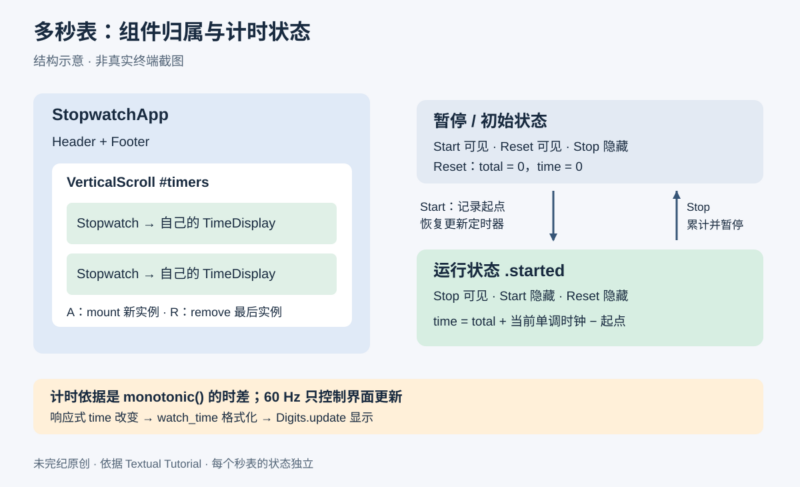



原文:Textual Tutorial,Textual 官方教程,页面未署个人作者。本文完整保留应用从骨架到动态增删的技术步骤;原文为逐行讲解而重复展示的同一段代码合并展示一次,所有阶段的独立完整代码与解释均保留。最后补入官方仓库中与最终 Python 文件配套的样式文件,补充部分明确标注。
“如果你希望人们动手创造,就让这件事变得有趣。”
—— Will McGugan,Rich 与 Textual 的创作者
学完这个教程,你应能对 Textual 应用开发建立扎实的理解。原文另附覆盖相同内容的视频系列。
我们要做什么
我们将构建一个秒表应用:屏幕显示一列秒表,每个秒表都有启动、停止和重置按钮;用户还可以按需要添加或移除秒表。这是一个简单但功能完整的应用,你也可以把它分发给别人使用。
原文成品演示的右下角有 ^p palette 提示,它代表命令面板(Command Palette)。可以把它理解为应用专用的命令入口。
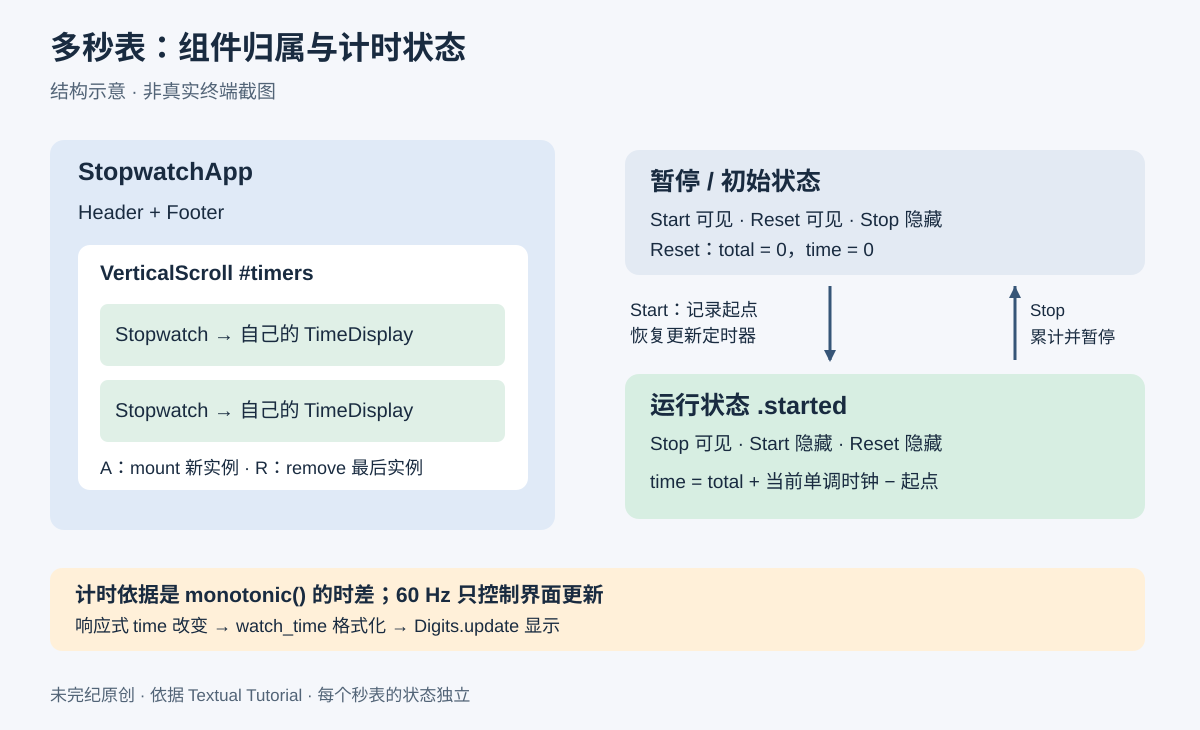
获取代码与运行前提
若想先试用成品,再对照代码学习,首先按官方入门说明安装 Textual,然后获取 Textual 仓库。原文提供三种等价方式,选择与你的 Git 环境相符的一种即可。
HTTPS:
git clone https://github.com/Textualize/textual.gitSSH:
git clone git@github.com:Textualize/textual.gitGitHub CLI:
gh repo clone Textualize/textual克隆完成后,进入 docs/examples/tutorial 并运行 stopwatch.py:
cd textual/docs/examples/tutorial
python stopwatch.py编辑补充:本次读取的入门页要求 Python 3.9 或更新版本,提供 pip install textual,开发工具另装 pip install textual-dev。这些是滚动文档的要求,安装时仍应核对所选发行版的 Python 版本约束,并在独立环境中管理依赖。本文没有执行安装、克隆或运行命令。
先简要了解类型提示
Textual 中的类型提示完全可选。教程示例使用了类型提示,你可以自行决定是否在自己的项目中加入。Textualize 很喜欢 Python 类型提示:它能够表达数据、参数和返回值的类型,让 mypy 等工具在运行代码前发现一部分错误。
下面是一个带类型提示的函数:
def repeat(text: str, count: int) -> str:
    """Repeat a string a given number of times."""
return text * count参数类型写在冒号之后:text: str 表示 text 应为字符串,count: int 表示 count 应为整数。返回值类型写在 -> 之后,-> str: 表示函数返回字符串。
从 App 类开始
构建 Textual 应用的第一步,是导入并继承 App。下面这个基本应用类,是秒表应用的起点。保存为 stopwatch01.py:
from textual.app import App, ComposeResult
from textual.widgets import Footer, Header


class StopwatchApp(App):
    """A Textual app to manage stopwatches."""

    BINDINGS = [("d", "toggle_dark", "Toggle dark mode")]

    def compose(self) -> ComposeResult:
        """Create child widgets for the app."""
        yield Header()
        yield Footer()

    def action_toggle_dark(self) -> None:
        """An action to toggle dark mode."""
        self.theme = (
            "textual-dark" if self.theme == "textual-light" else "textual-light"
        )


if __name__ == "__main__":
    app = StopwatchApp()
    app.run()
运行后,按 D 可切换明暗主题;按 Ctrl+Q 退出应用,返回命令提示符。
逐项理解应用骨架
第一行导入所有 Textual 应用的基类 App,第二行导入两个内置组件:Footer 在屏幕底部显示已绑定的按键,Header 在顶部显示标题。组件是可复用的界面单元,负责管理屏幕的一部分;本教程后面会创建自己的组件。
App 类是应用大部分逻辑所在的位置,负责加载配置、设置组件、处理按键等工作。上述类定义了以下内容:
BINDINGS是一组元组,用于把按键绑定到应用动作。每个元组依次包含按键、动作名和简短说明。这里把 D 绑定到toggle_dark。详见按键绑定说明。compose()用组件构造界面。该方法可以返回组件列表,但通常逐个yield组件更容易,因此它成为生成器。这里分别产生一个Header()和Footer()。action_toggle_dark()定义一个动作方法。动作方法以action_加动作名命名;上面的绑定告诉 Textual,按下 D 就调用它。这里在textual-light和textual-dark两个主题间切换。详见动作说明。
最后几行创建应用实例并调用 run(),让终端进入应用模式,直到按 Ctrl+Q 退出。它们放在 __name__ == "__main__" 判断中,因此既能用 python stopwatch01.py 直接运行文件,也能把它作为更大项目的一部分导入。
用组件设计界面
Textual 提供大量内置组件。本应用还需要新的组件,可以通过继承、组合现成组件来构建。先画出界面草图,明确想达到的布局,再开始实现。
创建自定义秒表组件
一个 Stopwatch 由四个子组件组成:Start 按钮、Stop 按钮、Reset 按钮,以及计时显示。先搭出骨架,功能稍后再补。保存为 stopwatch02.py:
from textual.app import App, ComposeResult
from textual.containers import HorizontalGroup, VerticalScroll
from textual.widgets import Button, Digits, Footer, Header


class TimeDisplay(Digits):
    """A widget to display elapsed time."""


class Stopwatch(HorizontalGroup):
    """A stopwatch widget."""

    def compose(self) -> ComposeResult:
        """Create child widgets of a stopwatch."""
        yield Button("Start", id="start", variant="success")
        yield Button("Stop", id="stop", variant="error")
        yield Button("Reset", id="reset")
        yield TimeDisplay("00:00:00.00")


class StopwatchApp(App):
    """A Textual app to manage stopwatches."""

    BINDINGS = [("d", "toggle_dark", "Toggle dark mode")]

    def compose(self) -> ComposeResult:
        """Create child widgets for the app."""
        yield Header()
        yield Footer()
        yield VerticalScroll(Stopwatch(), Stopwatch(), Stopwatch())

    def action_toggle_dark(self) -> None:
        """An action to toggle dark mode."""
        self.theme = (
            "textual-dark" if self.theme == "textual-light" else "textual-light"
        )


if __name__ == "__main__":
    app = StopwatchApp()
app.run()代码新导入了两个组件:Button 用作按钮,Digits 用于显示时间;还从 textual.containers 导入 HorizontalGroup 和 VerticalScroll。顾名思义,容器是包含其他组件的组件,这里用它们确定界面的总体布局。
TimeDisplay 目前只是继承 Digits,没有添加功能,稍后再完善。Stopwatch 继承 HorizontalGroup,把子组件排成一行;它的 compose() 添加的就是草图中的四部分。如果要构建自己的复合组件,可进一步阅读组件协调说明。
按钮参数
Button 构造器接收显示标签,这里分别是 "Start"、"Stop"、"Reset"。另外两个参数有不同职责:
id是标识符,用来在代码中区分按钮,也用于应用样式。variant选择默认样式;"success"让按钮显示绿色,"error"让按钮显示红色。
组合组件
StopwatchApp.compose() 新增的一行产生一个 VerticalScroll。内容放不下时,它会提供滚动,并处理 Up、Down、Page Down、Page Up、Home、End 等滚动按键。
能够包含其他组件的容器,通常接收子组件作为位置参数。因此 yield VerticalScroll(Stopwatch(), Stopwatch(), Stopwatch()) 创建了一个包含三个秒表的滚动容器。
此时运行 stopwatch02.py,秒表的各个元素已经出现,但外观还不像草图,因为新组件尚未设置样式。
编写 Textual CSS
每个组件都有一个 styles 对象,其中的属性会影响显示效果。例如,把组件设成蓝底白字:
self.styles.background = "blue"
self.styles.color = "white"
虽然可以这样设置所有样式,但通常没有必要。Textual 支持 CSS(层叠样式表),这也是浏览器使用的技术。CSS 文件作为数据文件由应用加载,其中描述哪些样式应应用到哪些组件。
Textual 使用的 CSS 方言比 Web CSS 简化很多,也更容易学习。CSS 有利于反复调整界面,并支持实时编辑:修改样式后可以查看变化,无须重新启动应用。
下面给应用添加 CSS 文件。保存 Python 为 stopwatch03.py:
from textual.app import App, ComposeResult
from textual.containers import HorizontalGroup, VerticalScroll
from textual.widgets import Button, Digits, Footer, Header


class TimeDisplay(Digits):
    """A widget to display elapsed time."""


class Stopwatch(HorizontalGroup):
    """A stopwatch widget."""

    def compose(self) -> ComposeResult:
        """Create child widgets of a stopwatch."""
        yield Button("Start", id="start", variant="success")
        yield Button("Stop", id="stop", variant="error")
        yield Button("Reset", id="reset")
        yield TimeDisplay("00:00:00.00")


class StopwatchApp(App):
    """A Textual app to manage stopwatches."""

    CSS_PATH = "stopwatch03.tcss"
    BINDINGS = [("d", "toggle_dark", "Toggle dark mode")]

    def compose(self) -> ComposeResult:
        """Create child widgets for the app."""
        yield Header()
        yield Footer()
        yield VerticalScroll(Stopwatch(), Stopwatch(), Stopwatch())

    def action_toggle_dark(self) -> None:
        """An action to toggle dark mode."""
        self.theme = (
            "textual-dark" if self.theme == "textual-light" else "textual-light"
        )


if __name__ == "__main__":
    app = StopwatchApp()
    app.run()
新增的类变量 CSS_PATH 告诉 Textual,在应用启动时加载下面的 stopwatch03.tcss:
Stopwatch {
    background: $boost;
    height: 5;
    margin: 1;
    min-width: 50;
    padding: 1;
}

TimeDisplay {
    text-align: center;
    color: $foreground-muted;
    height: 3;
}

Button {
    width: 16;
}

#start {
    dock: left;
}

#stop {
    dock: left;
    display: none;
}

#reset {
    dock: right;
}
重新运行后,外观会明显改变,更接近最初的草图。
理解样式规则
CSS 文件由多个声明块组成。第一个块的选择器是 Stopwatch,表示把花括号内的样式应用到秒表组件:
background: $boost使用内置主题中预定义的颜色;$表示主题变量。也可以写颜色名如blue,或rgb(20,46,210)。height: 5将组件高度设为 5 行文本。margin: 1在组件周围保留 1 个单元格的外边距,使列表中的秒表之间留有间隔。min-width: 50将最小宽度设为 50 个字符单元格。padding: 1在子组件周围保留 1 个单元格的内边距。
TimeDisplay 块让文字居中,设置文字颜色,并把高度设为 3 行。Button 块将按钮宽度设为 16 个字符单元格。
最后三个选择器以 # 开头,表示匹配组件的 id。例如 id="start" 对应 #start。dock 让组件停靠在指定边缘:启动和停止按钮靠左,重置按钮靠右。
#stop 的 display: none; 告诉 Textual 不显示停止按钮,因为秒表没有运行时不应显示它。同样,运行时也不应显示启动按钮。接下来用动态样式处理这件事。
用 CSS 类表示运行状态
Stopwatch 有两种状态:默认状态显示 Start 和 Reset;启动后显示 Stop,并以绿色背景表示它正在运行。
这可以用 CSS 类实现。CSS 类与 Python 类不同,它更像附在组件上的标签,用于改变组件样式。一个组件可以拥有多个 CSS 类,也可以在运行时添加、移除这些类。
把以下完整规则保存为 stopwatch04.tcss:
Stopwatch {
    background: $boost;
    height: 5;
    margin: 1;
    min-width: 50;
    padding: 1;
}

TimeDisplay {
    text-align: center;
    color: $foreground-muted;
    height: 3;
}

Button {
    width: 16;
}

#start {
    dock: left;
}

#stop {
    dock: left;
    display: none;
}

#reset {
    dock: right;
}

.started {
    background: $success-muted;
    color: $text;
}

.started TimeDisplay {
    color: $foreground;
}

.started #start {
    display: none
}

.started #stop {
    display: block
}

.started #reset {
    visibility: hidden
}
新增规则以 .started 开头。点号表示这是名为 started 的 CSS 类选择器;只有匹配该类的组件才会采用相应规则。
有些规则包含由空格连接的两个选择器。空格表示:第二个选择器匹配的组件,需要位于第一个选择器匹配的容器之内。例如:
.started #start {
    display: none
}
.started 匹配带 started 类的组件,#start 匹配启动按钮。组合起来,就是“如果秒表已启动,隐藏其中的启动按钮”。display: none 会让匹配组件不参与显示;重置按钮则使用 visibility: hidden,隐藏时仍保留原有布局空间。
通过按钮添加和移除类
修改 CSS 类是一种方便的外观更新方式,不必在 Python 中加入许多显示控制代码。使用 add_class() 和 remove_class(),把启动状态连到按钮上。
保存为 stopwatch04.py:
from textual.app import App, ComposeResult
from textual.containers import HorizontalGroup, VerticalScroll
from textual.widgets import Button, Digits, Footer, Header


class TimeDisplay(Digits):
    """A widget to display elapsed time."""


class Stopwatch(HorizontalGroup):
    """A stopwatch widget."""

    def on_button_pressed(self, event: Button.Pressed) -> None:
        """Event handler called when a button is pressed."""
        if event.button.id == "start":
            self.add_class("started")
        elif event.button.id == "stop":
            self.remove_class("started")

    def compose(self) -> ComposeResult:
        """Create child widgets of a stopwatch."""
        yield Button("Start", id="start", variant="success")
        yield Button("Stop", id="stop", variant="error")
        yield Button("Reset", id="reset")
        yield TimeDisplay("00:00:00.00")


class StopwatchApp(App):
    """A Textual app to manage stopwatches."""

    CSS_PATH = "stopwatch04.tcss"
    BINDINGS = [("d", "toggle_dark", "Toggle dark mode")]

    def compose(self) -> ComposeResult:
        """Create child widgets for the app."""
        yield Header()
        yield Footer()
        yield VerticalScroll(Stopwatch(), Stopwatch(), Stopwatch())

    def action_toggle_dark(self) -> None:
        """An action to toggle dark mode."""
        self.theme = (
            "textual-dark" if self.theme == "textual-light" else "textual-light"
        )


if __name__ == "__main__":
    app = StopwatchApp()
    app.run()
on_button_pressed 是事件处理方法。Textual 会在按键、鼠标点击等事件发生时调用对应处理方法;命名规则是 on_ 加事件名称,因此这里处理的是按钮按下事件。详细机制见消息处理方法说明。
此时运行代码,点击第一个按钮即可切换两种外观状态。处理方法添加或移除 started 类时,Textual 会重新应用 CSS 并更新显示。但计时功能还没有接上。
响应式属性:让时间驱动显示
Textual 中一个反复出现的特点是:很少需要显式刷新组件。虽然可以调用 refresh() 显示新数据,Textual 更倾向于通过响应式属性自动完成更新。
响应式属性用起来与 __init__ 中设置的普通属性相似,但 Textual 可以检测到它们被重新赋值,并提供其他响应能力。要添加响应式属性,导入 reactive,然后在类作用域中创建实例。
给计时显示加入响应式属性,计算并显示经过的时间。保存为 stopwatch05.py:
from time import monotonic

from textual.app import App, ComposeResult
from textual.containers import HorizontalGroup, VerticalScroll
from textual.reactive import reactive
from textual.widgets import Button, Digits, Footer, Header


class TimeDisplay(Digits):
    """A widget to display elapsed time."""

    start_time = reactive(monotonic)
    time = reactive(0.0)

    def on_mount(self) -> None:
        """Event handler called when widget is added to the app."""
        self.set_interval(1 / 60, self.update_time)

    def update_time(self) -> None:
        """Method to update the time to the current time."""
        self.time = monotonic() - self.start_time

    def watch_time(self, time: float) -> None:
        """Called when the time attribute changes."""
        minutes, seconds = divmod(time, 60)
        hours, minutes = divmod(minutes, 60)
        self.update(f"{hours:02,.0f}:{minutes:02.0f}:{seconds:05.2f}")


class Stopwatch(HorizontalGroup):
    """A stopwatch widget."""

    def on_button_pressed(self, event: Button.Pressed) -> None:
        """Event handler called when a button is pressed."""
        if event.button.id == "start":
            self.add_class("started")
        elif event.button.id == "stop":
            self.remove_class("started")

    def compose(self) -> ComposeResult:
        """Create child widgets of a stopwatch."""
        yield Button("Start", id="start", variant="success")
        yield Button("Stop", id="stop", variant="error")
        yield Button("Reset", id="reset")
        yield TimeDisplay()


class StopwatchApp(App):
    """A Textual app to manage stopwatches."""

    CSS_PATH = "stopwatch04.tcss"
    BINDINGS = [("d", "toggle_dark", "Toggle dark mode")]

    def compose(self) -> ComposeResult:
        """Create child widgets for the app."""
        yield Header()
        yield Footer()
        yield VerticalScroll(Stopwatch(), Stopwatch(), Stopwatch())

    def action_toggle_dark(self) -> None:
        """An action to toggle dark mode."""
        self.theme = (
            "textual-dark" if self.theme == "textual-light" else "textual-light"
        )


if __name__ == "__main__":
    app = StopwatchApp()
    app.run()
TimeDisplay 新增两个响应式属性:start_time 保存计时开始时刻,以秒为单位;time 保存要显示的累计时长。它们都可通过 self 访问,如同在 __init__ 中赋值过一样;给属性赋值时,组件会自动更新。
monotonic 来自标准库 time。它类似 time.time,但系统时钟被调整时不会倒退,适合计算经过的时间。
reactive 的第一个参数可以是默认值,也可以是返回默认值的可调用对象。start_time 的默认值传入的是函数 monotonic,不是立即调用的结果;当 TimeDisplay 加入应用时,该函数用于初始化当前时刻。time 的默认值是浮点数 0.0。
on_mount 在组件首次加入应用时调用。这里通过 set_interval() 创建定时器,让 self.update_time 每秒调用 60 次。update_time 计算从启动到现在的时长,并赋给 self.time。
若方法名以 watch_ 加某个响应式属性名命名,该属性变化时就会调用此方法,这种方法称为监视方法。因此更新 self.time 时,watch_time 会把时间拆成时、分、秒,格式化为字符串,再通过 self.update 更新显示。这个过程自动发生,因此不再需要向 TimeDisplay 传入初始显示字符串。
这一步的效果是:秒表从组件创建后开始显示经过的时间。定时器已经能更新界面,但按钮还需要接到各自计时器,才能独立操作。
接通启动、停止与重置
在 TimeDisplay 中增加几个方法,就能分别控制每个秒表。保存为 stopwatch06.py:
from time import monotonic

from textual.app import App, ComposeResult
from textual.containers import HorizontalGroup, VerticalScroll
from textual.reactive import reactive
from textual.widgets import Button, Digits, Footer, Header


class TimeDisplay(Digits):
    """A widget to display elapsed time."""

    start_time = reactive(monotonic)
    time = reactive(0.0)
    total = reactive(0.0)

    def on_mount(self) -> None:
        """Event handler called when widget is added to the app."""
        self.update_timer = self.set_interval(1 / 60, self.update_time, pause=True)

    def update_time(self) -> None:
        """Method to update time to current."""
        self.time = self.total + (monotonic() - self.start_time)

    def watch_time(self, time: float) -> None:
        """Called when the time attribute changes."""
        minutes, seconds = divmod(time, 60)
        hours, minutes = divmod(minutes, 60)
        self.update(f"{hours:02,.0f}:{minutes:02.0f}:{seconds:05.2f}")

    def start(self) -> None:
        """Method to start (or resume) time updating."""
        self.start_time = monotonic()
        self.update_timer.resume()

    def stop(self) -> None:
        """Method to stop the time display updating."""
        self.update_timer.pause()
        self.total += monotonic() - self.start_time
        self.time = self.total

    def reset(self) -> None:
        """Method to reset the time display to zero."""
        self.total = 0
        self.time = 0


class Stopwatch(HorizontalGroup):
    """A stopwatch widget."""

    def on_button_pressed(self, event: Button.Pressed) -> None:
        """Event handler called when a button is pressed."""
        button_id = event.button.id
        time_display = self.query_one(TimeDisplay)
        if button_id == "start":
            time_display.start()
            self.add_class("started")
        elif button_id == "stop":
            time_display.stop()
            self.remove_class("started")
        elif button_id == "reset":
            time_display.reset()

    def compose(self) -> ComposeResult:
        """Create child widgets of a stopwatch."""
        yield Button("Start", id="start", variant="success")
        yield Button("Stop", id="stop", variant="error")
        yield Button("Reset", id="reset")
        yield TimeDisplay()


class StopwatchApp(App):
    """A Textual app to manage stopwatches."""

    CSS_PATH = "stopwatch04.tcss"
    BINDINGS = [("d", "toggle_dark", "Toggle dark mode")]

    def compose(self) -> ComposeResult:
        """Called to add widgets to the app."""
        yield Header()
        yield Footer()
        yield VerticalScroll(Stopwatch(), Stopwatch(), Stopwatch())

    def action_toggle_dark(self) -> None:
        """An action to toggle dark mode."""
        self.theme = (
            "textual-dark" if self.theme == "textual-light" else "textual-light"
        )


if __name__ == "__main__":
    app = StopwatchApp()
    app.run()
这一版的变化如下:
- 新增响应式属性
total,保存之前各次启动到停止区间累计的时长。 set_interval加入pause=True,让定时器初始处于暂停状态。暂停时不会回调,必须调用resume()后才开始更新,因此按 Start 前不会计时。update_time将本次运行区间的时长加到total上,保留之前已经计过的时间。- 保存
set_interval返回的Timer对象,之后通过它恢复或暂停更新。 - 增加
start()、stop()和reset()。
start() 记录本轮起点并恢复定时器;stop() 暂停定时器,把本轮经过时间加进总数,再同步显示;reset() 将总数和显示值都归零。
Stopwatch 中的按钮处理方法也增加了对显示组件的控制:
    def on_button_pressed(self, event: Button.Pressed) -> None:
        """Event handler called when a button is pressed."""
        button_id = event.button.id
        time_display = self.query_one(TimeDisplay)
        if button_id == "start":
            time_display.start()
            self.add_class("started")
        elif button_id == "stop":
            time_display.stop()
            self.remove_class("started")
        elif button_id == "reset":
            time_display.reset()
第一行读取被按按钮的 id,以决定响应动作。第二行通过 self.query_one(TimeDisplay) 取得当前秒表内部的时间显示组件,然后调用与按钮相符的方法。启动时添加 started 类,停止时移除该类,CSS 会同步更新外观。
运行这一版,即可分别操作三个秒表。剩下的最后一项功能,是在应用运行时添加和移除秒表。
动态添加和移除组件
目前应用通过 compose() 在启动时创建组件。运行期间若要增加新组件或移除不再需要的组件,可以分别调用 mount() 与 remove()。
下面是最终的 stopwatch.py:
from time import monotonic

from textual.app import App, ComposeResult
from textual.containers import HorizontalGroup, VerticalScroll
from textual.reactive import reactive
from textual.widgets import Button, Digits, Footer, Header


class TimeDisplay(Digits):
    """A widget to display elapsed time."""

    start_time = reactive(monotonic)
    time = reactive(0.0)
    total = reactive(0.0)

    def on_mount(self) -> None:
        """Event handler called when widget is added to the app."""
        self.update_timer = self.set_interval(1 / 60, self.update_time, pause=True)

    def update_time(self) -> None:
        """Method to update time to current."""
        self.time = self.total + (monotonic() - self.start_time)

    def watch_time(self, time: float) -> None:
        """Called when the time attribute changes."""
        minutes, seconds = divmod(time, 60)
        hours, minutes = divmod(minutes, 60)
        self.update(f"{hours:02,.0f}:{minutes:02.0f}:{seconds:05.2f}")

    def start(self) -> None:
        """Method to start (or resume) time updating."""
        self.start_time = monotonic()
        self.update_timer.resume()

    def stop(self):
        """Method to stop the time display updating."""
        self.update_timer.pause()
        self.total += monotonic() - self.start_time
        self.time = self.total

    def reset(self):
        """Method to reset the time display to zero."""
        self.total = 0
        self.time = 0


class Stopwatch(HorizontalGroup):
    """A stopwatch widget."""

    def on_button_pressed(self, event: Button.Pressed) -> None:
        """Event handler called when a button is pressed."""
        button_id = event.button.id
        time_display = self.query_one(TimeDisplay)
        if button_id == "start":
            time_display.start()
            self.add_class("started")
        elif button_id == "stop":
            time_display.stop()
            self.remove_class("started")
        elif button_id == "reset":
            time_display.reset()

    def compose(self) -> ComposeResult:
        """Create child widgets of a stopwatch."""
        yield Button("Start", id="start", variant="success")
        yield Button("Stop", id="stop", variant="error")
        yield Button("Reset", id="reset")
        yield TimeDisplay()


class StopwatchApp(App):
    """A Textual app to manage stopwatches."""

    CSS_PATH = "stopwatch.tcss"

    BINDINGS = [
        ("d", "toggle_dark", "Toggle dark mode"),
        ("a", "add_stopwatch", "Add"),
        ("r", "remove_stopwatch", "Remove"),
    ]

    def compose(self) -> ComposeResult:
        """Called to add widgets to the app."""
        yield Header()
        yield Footer()
        yield VerticalScroll(Stopwatch(), Stopwatch(), Stopwatch(), id="timers")

    def action_add_stopwatch(self) -> None:
        """An action to add a timer."""
        new_stopwatch = Stopwatch()
        self.query_one("#timers").mount(new_stopwatch)
        new_stopwatch.scroll_visible()

    def action_remove_stopwatch(self) -> None:
        """Called to remove a timer."""
        timers = self.query("Stopwatch")
        if timers:
            timers.last().remove()

    def action_toggle_dark(self) -> None:
        """An action to toggle dark mode."""
        self.theme = (
            "textual-dark" if self.theme == "textual-light" else "textual-light"
        )


if __name__ == "__main__":
    app = StopwatchApp()
    app.run()
最终版有四项变化:滚动容器增加 id="timers";新增 action_add_stopwatch;新增 action_remove_stopwatch;为这些动作增加按键绑定。
action_add_stopwatch 创建新的 Stopwatch,通过 query_one("#timers") 按 ID 找到容器,再把新组件挂载进去。随后 scroll_visible() 在需要时滚动容器,让新秒表进入可见范围。
action_remove_stopwatch 使用选择器 "Stopwatch" 查询全部秒表;如果查询结果非空,取 last(),再调用 remove() 移除最后一个。因此它移除的是列表末尾的秒表,而不是当前聚焦的秒表;移除会丢弃该实例的计时状态。
运行 stopwatch.py,按 A 添加新秒表,按 R 移除最后一个,按 D 切换主题。
编辑补充:把最终样式文件一并保存
最终代码把 CSS_PATH 改成了 "stopwatch.tcss",所以不能只保留前面的 stopwatch04.tcss。原教程正文没有在最终代码之后重新展开该文件。这里按官方仓库的配套文件补全,在 stopwatch.py 同目录保存如下内容为 stopwatch.tcss。
与前一阶段相比,最终样式显式写出 layout: horizontal;,其余主要状态规则保持一致。下面不是凭空补出的占位样式,而是已读取的官方配套文件:
Stopwatch {
    layout: horizontal;
    background: $boost;
    height: 5;
    min-width: 50;
    margin: 1;
    padding: 1;
}

TimeDisplay {
    text-align: center;
    color: $foreground-muted;
    height: 3;
}

Button {
    width: 16;
}

#start {
    dock: left;
}

#stop {
    dock: left;
    display: none;
}
#reset {
    dock: right;
}

.started {
    background: $success-muted;
    color: $text;
}

.started TimeDisplay {
    color: $foreground;
}

.started #start {
    display: none
}

.started #stop {
    display: block
}

.started #reset {
    visibility: hidden
}
接下来可以做什么
你已经走完第一个 Textual 应用从结构、样式到响应和动态组件的开发过程。若喜欢边写代码边学习,可以继续修改 stopwatch.py,或浏览其他示例;要了解更复杂的终端界面,继续阅读完整开发指南。
版本与静态审查说明
本次于 2026-10-05 读取滚动文档。教程页显示 2025-05-11,但未说明这是首发还是更新日期,因此不将其当作确定的首次发表日。教程使用 HorizontalGroup、Digits、主题字符串及当前 CSS 变量;这些接口和样式可能随版本演变,原文没有提供固定版本锁文件,当前环境兼容性未实测。
编辑补充:每秒 60 次是显示更新调度频率,不代表硬实时精度;实际耗时由单调时钟差计算,避免简单地按回调次数累加。大量新增秒表会同时增加定时器与界面刷新开销。当前 UI 在运行时隐藏 Reset、在暂停时隐藏 Stop,以维持预期调用顺序;reset() 本身没有重设运行起点,start()、stop() 也没有“重复调用无副作用”的保护。若以后增加快捷键或外部调用,应明确管理运行状态,不能绕开这些界面约束后仍假定行为不变。本文保留原实现,没有把未经验证的重构混入原代码。
示例应用没有文件删除、凭据读取或网络传输逻辑。获取代码和安装依赖的命令会连接公共代码/包服务,读者应检查来源和版本;本文没有运行这些命令,也没有实测计时、按键、终端布局或异步挂载滚动行为。代码已作静态审查,但这不等于运行测试通过。
原文归属:Textual 官方文档,Copyright © Textualize, Inc;文中引言署名 Will McGugan。中文翻译及原创图:未完纪。以下保留项目许可证。
代码许可证保留
来源:Textual MIT 许可证。
MIT License

Copyright (c) 2021 Will McGugan

Permission is hereby granted, free of charge, to any person obtaining a copy of this software and associated documentation files (the "Software"), to deal in the Software without restriction, including without limitation the rights to use, copy, modify, merge, publish, distribute, sublicense, and/or sell copies of the Software, and to permit persons to whom the Software is furnished to do so, subject to the following conditions:

The above copyright notice and this permission notice shall be included in all copies or substantial portions of the Software.

THE SOFTWARE IS PROVIDED "AS IS", WITHOUT WARRANTY OF ANY KIND, EXPRESS OR IMPLIED, INCLUDING BUT NOT LIMITED TO THE WARRANTIES OF MERCHANTABILITY, FITNESS FOR A PARTICULAR PURPOSE AND NONINFRINGEMENT. IN NO EVENT SHALL THE AUTHORS OR COPYRIGHT HOLDERS BE LIABLE FOR ANY CLAIM, DAMAGES OR OTHER LIABILITY, WHETHER IN AN ACTION OF CONTRACT, TORT OR OTHERWISE, ARISING FROM, OUT OF OR IN CONNECTION WITH THE SOFTWARE OR THE USE OR OTHER DEALINGS IN THE SOFTWARE.









暂无评论内容