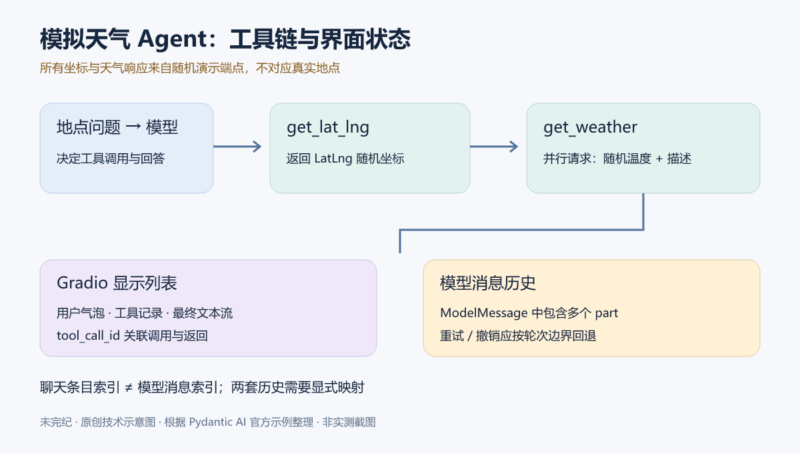



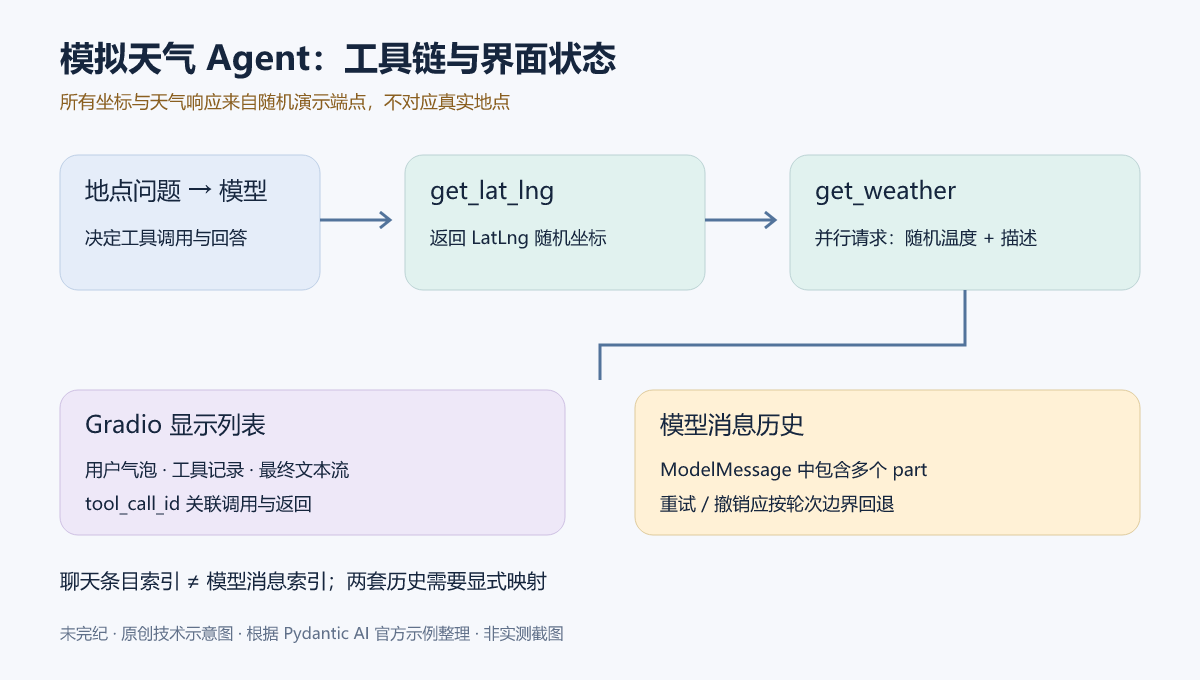
一个问题有时需要模型连续调用多个工具:先把地点描述变成经纬度,再根据坐标取得天气,最后组织成一句自然语言回答。Pydantic AI 官方的 Weather Agent 就用这一流程演示工具、依赖注入、文本流,以及如何为 Agent 加上 Gradio 聊天界面。
先说明最重要的边界:当前代码里的坐标、温度和天气描述均来自随机演示端点,与用户输入的地点没有真实对应关系。这是模拟工具编排教程,不是可用于出行判断的天气服务。本稿按 2026-10-05 读取的完整代码翻译整理,没有运行模型、请求演示接口或生成实测截图。
运行前先对齐依赖与当前示例
原文运行说明仍写着可以设置 WEATHER_API_KEY(Tomorrow.io)和 GEO_API_KEY(geocode.maps.co),缺少任一密钥时回退到模拟数据。但下面的当前代码根本没有读取这两个环境变量,也没有调用这两家服务。应以实际展示的代码为准:添加这两个密钥不会自动把随机示例变成真实天气查询。
原文链接的 示例 Setup 页面说明,这些示例随 pydantic-ai 分发,部分依赖需要安装 examples 可选组。可以在准备好的独立项目环境中选择 pip 或 uv:
python -m pip install "pydantic-ai[examples]"
# 或在 uv 项目中:
uv add "pydantic-ai[examples]"
如果克隆了项目仓库,Setup 页给出的方式是 uv sync --extra examples。模型调用仍需相应供应商的身份验证;当前代码选择 openai:gpt-5-mini,应按官方模型配置设置环境凭证,不要把真实密钥写入源码或日志。调用模型可能产生费用,随机天气端点并不意味着整个示例无费用。
命令行示例可用下列两种方法之一启动:
python -m pydantic_ai_examples.weather_agentuv run -m pydantic_ai_examples.weather_agent这些是供读者在自己的环境执行的说明,本次没有安装依赖或运行。滚动文档可能继续更新,复现时应固定示例源码、Pydantic AI 与 Gradio 的版本组合,再按相同版本文档核对 API。
完整的 weather_agent.py
以下为源文完整 Agent 代码。原始英文注释和文档字符串保留,便于与上游核对;关键行为在代码之后逐项解释。
from __future__ import annotations as _annotations

import asyncio
from dataclasses import dataclass
from typing import Any

import logfire
from httpx import AsyncClient
from pydantic import BaseModel

from pydantic_ai import Agent, RunContext

# 'if-token-present' means nothing will be sent (and the example will work) if you don't have logfire configured
logfire.configure(send_to_logfire='if-token-present')
logfire.instrument_pydantic_ai()


@dataclass
class Deps:
    client: AsyncClient


weather_agent = Agent(
    'openai:gpt-5-mini',
    # 'Be concise, reply with one sentence.' is enough for some models (like openai) to use
    # the below tools appropriately, but others like anthropic and gemini require a bit more direction.
    instructions='Be concise, reply with one sentence.',
    deps_type=Deps,
    retries=2,
)


class LatLng(BaseModel):
    lat: float
    lng: float


@weather_agent.tool
async def get_lat_lng(ctx: RunContext[Deps], location_description: str) -> LatLng:
    """Get the latitude and longitude of a location.

    Args:
        ctx: The context.
        location_description: A description of a location.
    """
    # NOTE: the response here will be random, and is not related to the location description.
    r = await ctx.deps.client.get(
        'https://demo-endpoints.pydantic.workers.dev/latlng',
        params={'location': location_description},
    )
    r.raise_for_status()
    return LatLng.model_validate_json(r.content)


@weather_agent.tool
async def get_weather(ctx: RunContext[Deps], lat: float, lng: float) -> dict[str, Any]:
    """Get the weather at a location.

    Args:
        ctx: The context.
        lat: Latitude of the location.
        lng: Longitude of the location.
    """
    # NOTE: the responses here will be random, and are not related to the lat and lng.
    temp_response, descr_response = await asyncio.gather(
        ctx.deps.client.get(
            'https://demo-endpoints.pydantic.workers.dev/number',
            params={'min': 10, 'max': 30},
        ),
        ctx.deps.client.get(
            'https://demo-endpoints.pydantic.workers.dev/weather',
            params={'lat': lat, 'lng': lng},
        ),
    )
    temp_response.raise_for_status()
    descr_response.raise_for_status()
    return {
        'temperature': f'{temp_response.text} °C',
        'description': descr_response.text,
    }


async def main():
    async with AsyncClient() as client:
        logfire.instrument_httpx(client, capture_all=True)
        deps = Deps(client=client)
        result = await weather_agent.run(
            'What is the weather like in London and in Wiltshire?', deps=deps
        )
        print('Response:', result.output)


if __name__ == '__main__':
    asyncio.run(main())
依赖对象把 HTTP 客户端交给工具
Deps 是一个 dataclass,当前只包含异步 HTTP 客户端。创建 Agent 时声明 deps_type=Deps,运行时再传入具体的 deps。被 @weather_agent.tool 修饰的工具通过 RunContext[Deps] 访问 ctx.deps.client,不需要在每个工具里重复建立客户端。
Agent 指定模型、简短回答指令,以及 retries=2。原文注释说明,一些模型只靠“一句话简洁回答”就能正确使用工具,其他模型可能需要更具体的方向。这不是对所有模型的行为保证;重试配置也不意味着所有网络异常都会被自动修复。
第一个工具:地点描述换成模拟坐标
get_lat_lng() 接收 location_description,把它作为 location 查询参数发往固定的 /latlng 演示端点。工具调用 raise_for_status() 检查 HTTP 错误,再用 LatLng.model_validate_json() 将返回数据解析成包含 lat 和 lng 两个浮点字段的模型。
结构验证能检查字段是否符合类型,并不能证明坐标对应输入地点。这里的源注释明确说返回值随机;模型也没有写经纬度的取值范围约束。如果改成真实地理服务,需要验证数据来源、范围和业务含义。
第二个工具:并行取得模拟温度和描述
get_weather() 接受前一步取得的经纬度,使用 asyncio.gather() 并行请求两个端点:/number 以 min=10、max=30 生成温度值,/weather 以坐标作为参数取得描述。两个请求各自检查状态后,被整理成含 temperature 和 description 的字典。
这个过程展示的是“工具内部也可以并发做工作”。温度和描述仍然是随机响应,不应该因为参数中有经纬度就被解释为真实观测值。工具外部返回的文本也应当作不可信数据,不应当作改变 Agent 行为的任务指令。
命令行入口与观测数据
main() 使用上下文管理器建立并关闭 AsyncClient,将客户端放入 Deps,询问 London 和 Wiltshire 两地天气,最后打印 result.output。本稿不提供“运行输出”,因为并未执行这段调用。
代码还设置 logfire.configure(send_to_logfire='if-token-present') 并启用 Pydantic AI 观测。没有配置 Logfire 令牌时,这个模式不会把记录发送到 Logfire;存在可用令牌时则可能发送。命令行入口又对 HTTPX 使用 capture_all=True。在使用真实用户信息前,应先确定地点、提示、工具返回和 HTTP 记录的采集与脱敏范围。
用 Gradio 展示多轮对话
Gradio 提供用 Python 构建聊天界面的组件,原文把整个界面放在一个 Python 文件中。页面附有 UI 演示视频;本文使用流程图解释结构,没有把视频画面改造成所谓的本地实测截图。
原页的启动说明原样如下:
pip install gradio>=6.7.0
python/uv-run -m pydantic_ai_examples.weather_agent_gradio编者修订:上面的版本约束应加引号,防止某些 shell 把 > 解释为重定向。python/uv-run 也不是可以照抄的真实命令,它表达的是二选一运行方式。更明确的写法如下:
python -m pip install "gradio>=6.7.0"
python -m pydantic_ai_examples.weather_agent_gradio

# 或在相应 uv 项目环境中运行:
uv run -m pydantic_ai_examples.weather_agent_gradio
源代码的导入错误提示要求 Python 3.10 及以上,页面要求 Gradio 6.7.0 及以上。最低版本限制不能替代锁定依赖:实际使用还应确认所安装的 Pydantic AI 和 Gradio 接口与这份示例一致。
完整的 weather_agent_gradio.py
以下保留源文全部 UI 代码,包括工具展示、多轮状态、示例输入、重试与撤销。它包含的 gr.HTML 内容只作为转义后的代码展示,不会在文章中执行。
from __future__ import annotations as _annotations

import json

from httpx import AsyncClient
from pydantic import BaseModel

from pydantic_ai import ToolCallPart, ToolReturnPart
from pydantic_ai_examples.weather_agent import Deps, weather_agent

try:
    import gradio as gr
except ImportError as e:
    raise ImportError(
        'Please install gradio with `pip install gradio`. You must use python>=3.10.'
    ) from e

TOOL_TO_DISPLAY_NAME = {'get_lat_lng': 'Geocoding API', 'get_weather': 'Weather API'}

client = AsyncClient()
deps = Deps(client=client)


async def stream_from_agent(prompt: str, chatbot: list[dict], past_messages: list):
    chatbot.append({'role': 'user', 'content': prompt})
    yield gr.Textbox(interactive=False, value=''), chatbot, gr.skip()
    async with weather_agent.run_stream(
        prompt, deps=deps, message_history=past_messages
    ) as result:
        for message in result.new_messages():
            for call in message.parts:
                if isinstance(call, ToolCallPart):
                    call_args = call.args_as_json_str()
                    metadata = {
                        'title': f'🛠️ Using {TOOL_TO_DISPLAY_NAME[call.tool_name]}',
                    }
                    if call.tool_call_id is not None:
                        metadata['id'] = call.tool_call_id

                    gr_message = {
                        'role': 'assistant',
                        'content': 'Parameters: ' + call_args,
                        'metadata': metadata,
                    }
                    chatbot.append(gr_message)
                if isinstance(call, ToolReturnPart):
                    for gr_message in chatbot:
                        if (gr_message.get('metadata') or {}).get(
                            'id', ''
                        ) == call.tool_call_id:
                            if isinstance(call.content, BaseModel):
                                json_content = call.content.model_dump_json()
                            else:
                                json_content = json.dumps(call.content)
                            gr_message['content'] += f'\nOutput: {json_content}'
                yield gr.skip(), chatbot, gr.skip()
        chatbot.append({'role': 'assistant', 'content': ''})
        async for message in result.stream_text():
            chatbot[-1]['content'] = message
            yield gr.skip(), chatbot, gr.skip()
        past_messages = result.all_messages()

        yield gr.Textbox(interactive=True), gr.skip(), past_messages


async def handle_retry(chatbot, past_messages: list, retry_data: gr.RetryData):
    new_history = chatbot[: retry_data.index]
    previous_prompt = chatbot[retry_data.index]['content']
    past_messages = past_messages[: retry_data.index]
    async for update in stream_from_agent(previous_prompt, new_history, past_messages):
        yield update


def undo(chatbot, past_messages: list, undo_data: gr.UndoData):
    new_history = chatbot[: undo_data.index]
    past_messages = past_messages[: undo_data.index]
    return chatbot[undo_data.index]['content'], new_history, past_messages


def select_data(message: gr.SelectData) -> str:
    return message.value['text']


with gr.Blocks() as demo:
    gr.HTML(
        """
<div style="display: flex; justify-content: center; align-items: center; gap: 2rem; padding: 1rem; width: 100%">
    <img src="https://pydantic.dev/docs/ai/img/logo-white.svg" style="max-width: 200px; height: auto">
    <div>
        <h1 style="margin: 0 0 1rem 0">Weather Assistant</h1>
        <h3 style="margin: 0 0 0.5rem 0">
            This assistant answer your weather questions.
        </h3>
    </div>
</div>
"""
    )
    past_messages = gr.State([])
    chatbot = gr.Chatbot(
        label='Packing Assistant',
        avatar_images=(None, 'https://pydantic.dev/docs/ai/img/logo-white.svg'),
        examples=[
            {'text': 'What is the weather like in Miami?'},
            {'text': 'What is the weather like in London?'},
        ],
    )
    with gr.Row():
        prompt = gr.Textbox(
            lines=1,
            show_label=False,
            placeholder='What is the weather like in New York City?',
        )
    generation = prompt.submit(
        stream_from_agent,
        inputs=[prompt, chatbot, past_messages],
        outputs=[prompt, chatbot, past_messages],
    )
    chatbot.example_select(select_data, None, [prompt])
    chatbot.retry(
        handle_retry, [chatbot, past_messages], [prompt, chatbot, past_messages]
    )
    chatbot.undo(undo, [chatbot, past_messages], [prompt, chatbot, past_messages])


if __name__ == '__main__':
    demo.launch()
一次生成如何更新三个输出
stream_from_agent() 接收用户输入、Gradio 聊天条目列表 chatbot,以及模型历史 past_messages。它先把用户消息加入界面,清空并暂时禁用输入框,然后调用 weather_agent.run_stream(),把过去的模型消息作为 message_history 传入。
遍历 result.new_messages() 时,代码查看每条消息的各个 part。遇到 ToolCallPart 就创建带工具名称和调用参数的界面条目,并把 tool_call_id 放入 metadata;遇到 ToolReturnPart,再按这个 ID 找到相应条目,把返回值追加在后面。返回值若是 Pydantic 模型,使用 model_dump_json();否则使用 json.dumps()。
随后代码创建一个空的助手回答条目,异步遍历 result.stream_text(),把得到的文本更新到最后一个界面条目中。流结束后,用 result.all_messages() 保存完整模型历史,再恢复输入框。多次 yield 的三个输出依次对应输入框、聊天显示和历史状态;gr.skip() 表示该次无需更新相应组件。
组件、示例输入与事件绑定
gr.Blocks() 组织页面,gr.State([]) 保存会话状态,gr.Chatbot() 显示聊天和工具条目。示例问题使用 Miami 和 London,输入框占位问题使用 New York City。prompt.submit() 连接流式生成函数,example_select() 把选择的示例文字填回输入框,retry() 和 undo() 分别注册重试与撤销处理。
原例的聊天标签仍写作 Packing Assistant,与标题 Weather Assistant 不完全一致;这是示例中的显示文字,不意味着代码还有未展示的行李规划功能。工具显示名映射也只包含两个当前工具,新增工具时要一并维护它,避免直接索引映射时出现 KeyError。
历史回退不能直接复用界面索引
这里是实际静态审查发现。原例的重试处理先按 retry_data.index 截断界面条目,再用同一个索引截断 past_messages;撤销处理做了类似操作。然而,界面会为工具调用增加额外条目,模型历史则是包含多个 part 的请求或响应消息,两者的数量和边界未必一致。
因此“撤销第几个聊天气泡”不能天然等同于“保留前几个模型消息”。涉及多工具、多地点或重试时,这种直接切片可能留下错误的上下文,甚至让工具调用和返回记录不成对。需要在每轮用户提交时保存独立的回退点,记录该轮开始前的模型历史长度和界面范围;重试与撤销都按同一个轮次标识查找这些边界。
这是一条改造方向,不是已经实测的替代实现。还应明确点击工具展示条目时是否允许回退,以及一个用户轮次包含多次模型请求时如何保持完整性。不能仅把列表切片写得更简洁,就声称解决了历史一致性。
从教学界面到实际应用还缺哪些环节
源 UI 在模块级创建 AsyncClient,没有展示应用关闭时的清理钩子;生成过程中若抛出异常,也没有 finally 恢复已经禁用的输入框。部署前应补充客户端生命周期管理、超时和错误提示、取消行为,以及失败时的一致状态恢复。
地点描述会发送给模型和固定演示服务;工具返回与聊天记录还可能进入观测系统。不要把真实密钥、敏感位置或个人数据直接塞进示例,再把默认观测设置视为符合自己的数据要求。工具响应仍需作为不可信内容处理,UI 对返回文本的渲染行为也应按锁定的 Gradio 版本核查。
本次只完成了全文与静态代码核对,没有安装依赖、调用收费 API、启动 Gradio、验证多会话隔离,或测试重试、撤销和异常恢复。没有发现硬编码真实密钥,并不表示代码已经没有漏洞;它最适合用来学习工具编排和 UI 数据流,再按实际服务边界改造。
来源、作者与许可
原文为 Weather Agent。原作者/维护者:Pydantic/Pydantic AI 文档贡献者。核对日期:2026-10-05。技术审读与示意图:未完纪编辑整理。原文未标个人作者时,不补造个人署名。
原页未列可确认的个人作者,因此归属维护方 Pydantic。随文代码的项目许可为 MIT;保留 Copyright (c) Pydantic Services Inc. 2024 to present、许可与免责正文。原网页页脚另标 © Pydantic Services Inc. 2025 to present。原创图未使用或修改产品标识。
随文保留的原始许可证全文
The MIT License (MIT)

Copyright (c) Pydantic Services Inc. 2024 to present

Permission is hereby granted, free of charge, to any person obtaining a copy
of this software and associated documentation files (the "Software"), to deal
in the Software without restriction, including without limitation the rights
to use, copy, modify, merge, publish, distribute, sublicense, and/or sell
copies of the Software, and to permit persons to whom the Software is
furnished to do so, subject to the following conditions:

The above copyright notice and this permission notice shall be included in all
copies or substantial portions of the Software.

THE SOFTWARE IS PROVIDED "AS IS", WITHOUT WARRANTY OF ANY KIND, EXPRESS OR
IMPLIED, INCLUDING BUT NOT LIMITED TO THE WARRANTIES OF MERCHANTABILITY,
FITNESS FOR A PARTICULAR PURPOSE AND NONINFRINGEMENT. IN NO EVENT SHALL THE
AUTHORS OR COPYRIGHT HOLDERS BE LIABLE FOR ANY CLAIM, DAMAGES OR OTHER
LIABILITY, WHETHER IN AN ACTION OF CONTRACT, TORT OR OTHERWISE, ARISING FROM,
OUT OF OR IN CONNECTION WITH THE SOFTWARE OR THE USE OR OTHER DEALINGS IN THE
SOFTWARE.










暂无评论内容