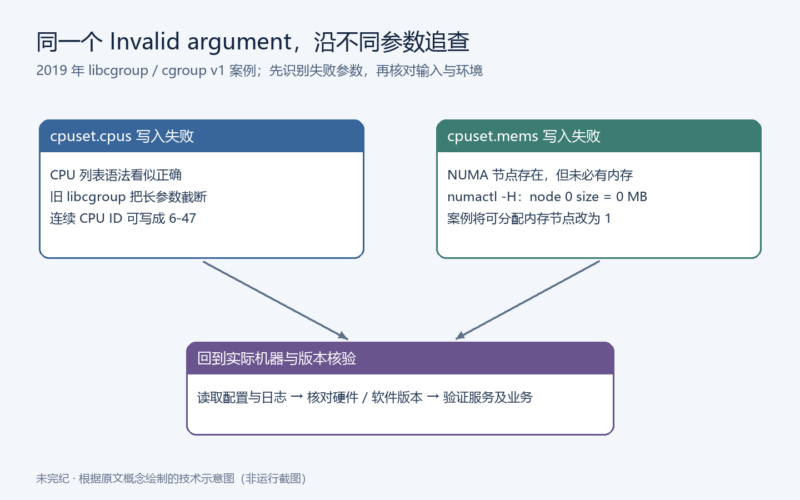



本文合并整理 Yiran’s Blog 的《记一次 libcgroup 配置失败》(2019-04-11)和《记一次 libcgroup 配置失败(二)》(2019-12-25)。保留原作者叙述、配置和日志;“编者核查”单独标出。原页未见独立个人署名,作者归属保留为 Yiran’s Blog。
适用边界:这是 CentOS / RHEL 系列旧版 libcgroup 与 cgroup v1 的历史排障记录。2026 年阅读时应先确认机器使用的 cgroup 版本、软件包修订和 NUMA 拓扑,不能直接套用到 cgroup v2。下文成功状态来自原作者日志,本文未在本机复现。
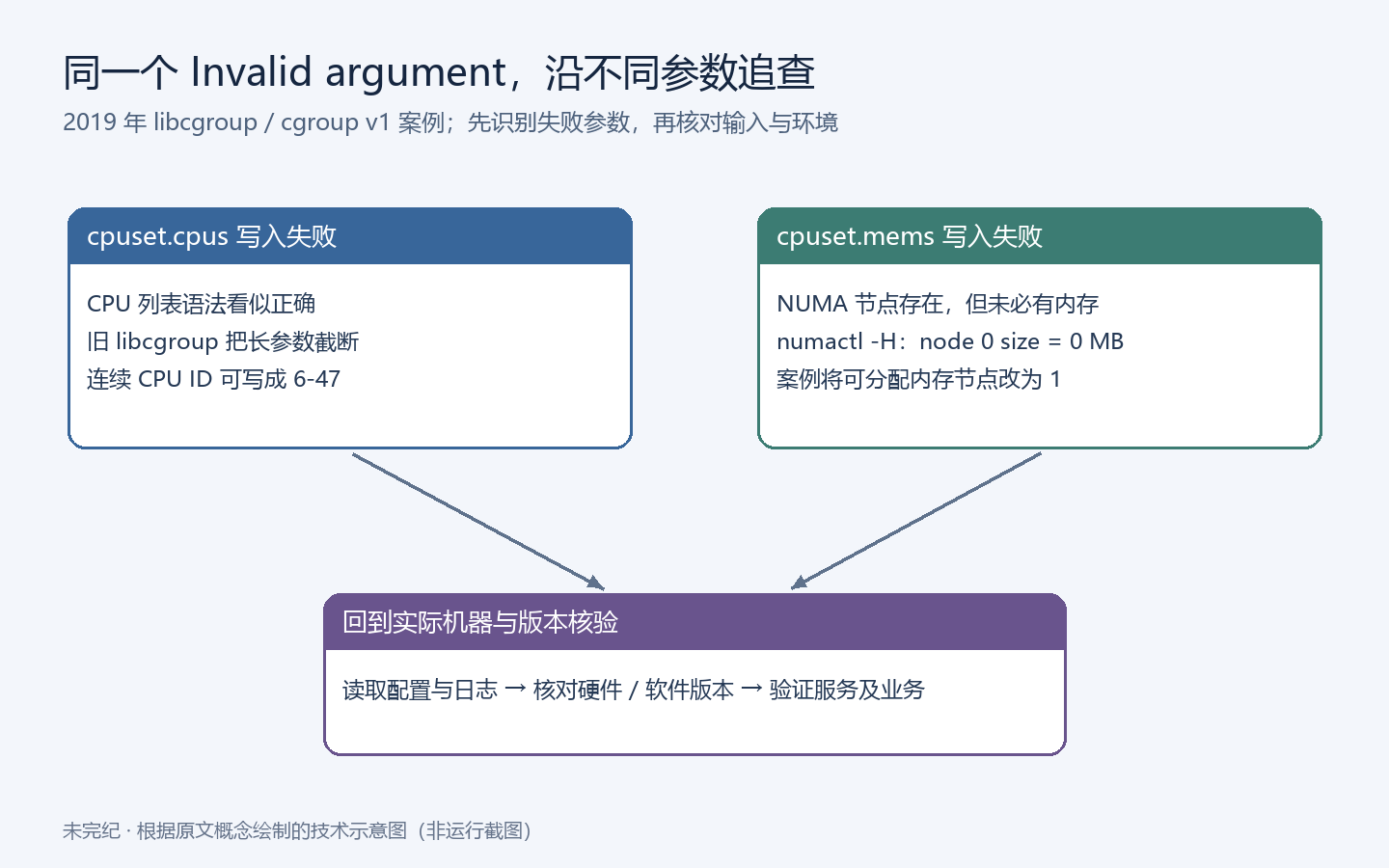
第一篇:CPU 列表过长,旧版 libcgroup 截断参数
cgroup 配置失败解决方案
看过之前博客的同学应该知道,我一直使用的 libcgroup 来进行 cgroup 配置,简单方便。
最近遇到了一个报错,很坑,记录一下。
报错
接到反馈说有个环境在产品升级之后, cgconfig.service 无法启动,当时的配置如下:
[root@yiran-test 21:31:59 ~]$cat /etc/cgconfig.conf
# yiran cgroups configuration

group . {
    cpuset {
        cpuset.memory_pressure_enabled = "1";
    }
}

group yiran {
    cpuset {
        cpuset.cpus = "0,1,2,3,4,5";
        cpuset.mems = "0-1";
        cpuset.cpu_exclusive = "1";
        cpuset.mem_hardwall = "1";
    }
}

group yiran/bb-main {
    cpuset {
        cpuset.cpus = "0";
        cpuset.mems = "0-1";
        cpuset.cpu_exclusive = "1";
        cpuset.mem_hardwall = "1";
    }
}

group yiran/bb-io {
    cpuset {
        cpuset.cpus = "1";
        cpuset.mems = "0-1";
        cpuset.cpu_exclusive = "1";
        cpuset.mem_hardwall = "1";
    }
}

group yiran/aa-main {
    cpuset {
        cpuset.cpus = "2";
        cpuset.mems = "0-1";
        cpuset.cpu_exclusive = "1";
        cpuset.mem_hardwall = "1";
    }
}

group yiran/others {
    cpuset {
        cpuset.cpus = "3";
        cpuset.mems = "0-1";
        cpuset.cpu_exclusive = "1";
        cpuset.mem_hardwall = "1";
    }
}


group yiran/app {
    cpuset {
        cpuset.cpus = "4,5";
        cpuset.mems = "0-1";
        cpuset.cpu_exclusive = "0";
        cpuset.mem_hardwall = "1";
    }
}

group qemu {
    cpuset {
        cpuset.cpus = "6,7,8,9,10,11,12,13,14,15,16,17,18,19,20,21,22,23,24,25,26,27,28,29,30,31,32,33,34,35,36,37,38,39,40,41,42,43,44,45,46,47";
        cpuset.mems = "0-1";
        cpuset.cpu_exclusive = "0";
        cpuset.mem_hardwall = "1";
    }
}
乍一看,配置文件看上去是正确的,除了最后一个组的 cpuset.cpus 配置略长,但是也没错,按道理应该服务正常启动才对,尝试重启服务查看服务报错信息:
[root@yiran-test 21:33:55 ~]$systemctl restart cgred
[root@yiran-test 21:33:59 ~]$systemctl restart cgconfig
Job for cgconfig.service failed because the control process exited with error code. See "systemctl status cgconfig.service" and "journalctl -xe" for details.
[root@yiran-test 21:34:05 ~]$systemctl status cgconfig
● cgconfig.service - Control Group configuration service
   Loaded: loaded (/usr/lib/systemd/system/cgconfig.service; enabled; vendor preset: disabled)
   Active: failed (Result: exit-code) since 四 2019-04-11 21:34:05 CST; 4s ago
  Process: 6744 ExecStop=/usr/sbin/cgclear -l /etc/cgconfig.conf -L /etc/cgconfig.d -e (code=exited, status=3)
  Process: 11465 ExecStart=/usr/sbin/cgconfigparser -l /etc/cgconfig.conf -L /etc/cgconfig.d -s 1664 (code=exited, status=109)
 Main PID: 11465 (code=exited, status=109)

4月 11 21:34:05 yiran-test systemd[1]: Starting Control Group configuration service...
4月 11 21:34:05 yiran-test cgconfigparser[11465]: /usr/sbin/cgconfigparser; error loading /etc/cgconfig.conf: Failed to remove a non-empty group
4月 11 21:34:05 yiran-test cgconfigparser[11465]: Error: failed to set /sys/fs/cgroup/cpuset/qemu/cpuset.cpus: Invalid argument
4月 11 21:34:05 yiran-test systemd[1]: cgconfig.service: main process exited, code=exited, status=109/n/a
4月 11 21:34:05 yiran-test systemd[1]: Failed to start Control Group configuration service.
4月 11 21:34:05 yiran-test systemd[1]: Unit cgconfig.service entered failed state.
4月 11 21:34:05 yiran-test systemd[1]: cgconfig.service failed.
发现在重启 cgconfig 时报错,报错信息如下:
4月 11 21:34:05 yiran-test cgconfigparser[11465]: /usr/sbin/cgconfigparser; error loading /etc/cgconfig.conf: Failed to remove a non-empty group
4月 11 21:34:05 yiran-test cgconfigparser[11465]: Error: failed to set /sys/fs/cgroup/cpuset/qemu/cpuset.cpus: Invalid argument
第一行说移除一个非空的 cgroup 失败,下一条提示 /sys/fs/cgroup/cpuset/qemu/cpuset.cpus 也就是我们觉得略微异常的 cgroup 参数无效,可是参数明明是正确配置的,为啥就无效了呢?
调查
尝试修改 cpuset.cpus ,将其调整为:
[root@yiran-test 21:36:32 ~]$tail /etc/cgconfig.conf

group qemu {
    cpuset {
        cpuset.cpus = "6,7,8,9,10";
        cpuset.mems = "0-1";
        cpuset.cpu_exclusive = "0";
        cpuset.mem_hardwall = "1";
    }
}
重启 cgconfig 服务:
[root@yiran-test 21:36:36 ~]$systemctl restart cgred
[root@yiran-test 21:36:55 ~]$systemctl restart cgconfig
[root@yiran-test 21:37:00 ~]$systemctl status cgconfig
● cgconfig.service - Control Group configuration service
   Loaded: loaded (/usr/lib/systemd/system/cgconfig.service; enabled; vendor preset: disabled)
   Active: active (exited) since 四 2019-04-11 21:37:00 CST; 3s ago
  Process: 6744 ExecStop=/usr/sbin/cgclear -l /etc/cgconfig.conf -L /etc/cgconfig.d -e (code=exited, status=3)
  Process: 17491 ExecStart=/usr/sbin/cgconfigparser -l /etc/cgconfig.conf -L /etc/cgconfig.d -s 1664 (code=exited, status=0/SUCCESS)
 Main PID: 17491 (code=exited, status=0/SUCCESS)

4月 11 21:37:00 yiran-test systemd[1]: Starting Control Group configuration service...
4月 11 21:37:00 yiran-test systemd[1]: Started Control Group configuration service.
服务正常运行了,那么我推测可能是跟 cpuset.cpus 长度有关,这时候只能求助于 Google 啦。
很容易,我们找到了这个答案,RedHat 官方 KB 中的介绍:
Root Cause
Previously, the internal representation of a value of any cgroup subsystem parameter was limited to have the length of 100 characters at maximum. Consequently, the libcgroup library truncated the values longer than 100 characters before writing them to a file representing matching cgroup subsystem parameter in the kernel.
Resolution
The maximal length of values of cgroup subsystem parameters in libcgroup has been extended to 4096 characters. As a result, libcgroup now handles values of cgroup subsystem parameters with any length correctly. (BZ#1549175)
RHEL 6 https://access.redhat.com/downloads/content/rhel—6/x86_64/169/libcgroup/0.40.rc1-26.el6/src/fd431d51/package (or newer) via RHBA-2018:1861
RHEL 7 libcgroup-0.41-20.el7 (or newer) via RHBA-2018:3058
官方给出的解决方式是通过升级 libcgroup 来解决,但是我不想这么做。
为什么?要知道在生产环境中,我们想要进行第三方软件包的升级是要经过层层测试的,等到测试完成不知道什么时候了,所以我们需要一个快速折中方案。
解决方案
我们知道,libcgroup 只是作为一个配置 cgroup 软件的一种,最终操作的都是 cgroup 实际挂载点下的配置文件,比如 CentOS 默认的 /sys/fs/cgroup/ 。
那么我们来看下正常配置下 qemu 组中的 cpuset.cpus 配置长什么样:
[root@yiran-test 21:37:04 ~]$cat /sys/fs/cgroup/cpuset/qemu/cpuset.cpus
6-10
Ok,我们明明在 libcgroup 配置文件中写的是 6,7,8,9,10 ,在 cgroup 配置文件中就转换成了 6-10, 那么一切都简单了。
当我们配置 cgroup 如果 cpu processor id 是连续的,那么我们就可以通过 - 来连接起始和终止 id 就可以了,问题解决。
第一篇原文结语
libcgroup 作为 RedHat 官方指定的 cgroup 配置工具,没想到会出现这种问题,如果 cpuset.cpus 我们要设置非连续的 cpu processor id 的话,只能通过升级方式解决了。
第二篇:NUMA 节点有 CPU,却没有可用内存
背景
前几天同事找到我,说有一台服务器上的 cgroup 没有创建出来,导致其他程序出现了问题,记录一下。
现象
在我们的服务器上,通常会通过 libcgconfig 来进行 cgroup 的配置,供其他服务使用。结果发现对应的 cgroup 没有创建出来,于是查看 cgconfig.service 的状态,发现是异常退出的:
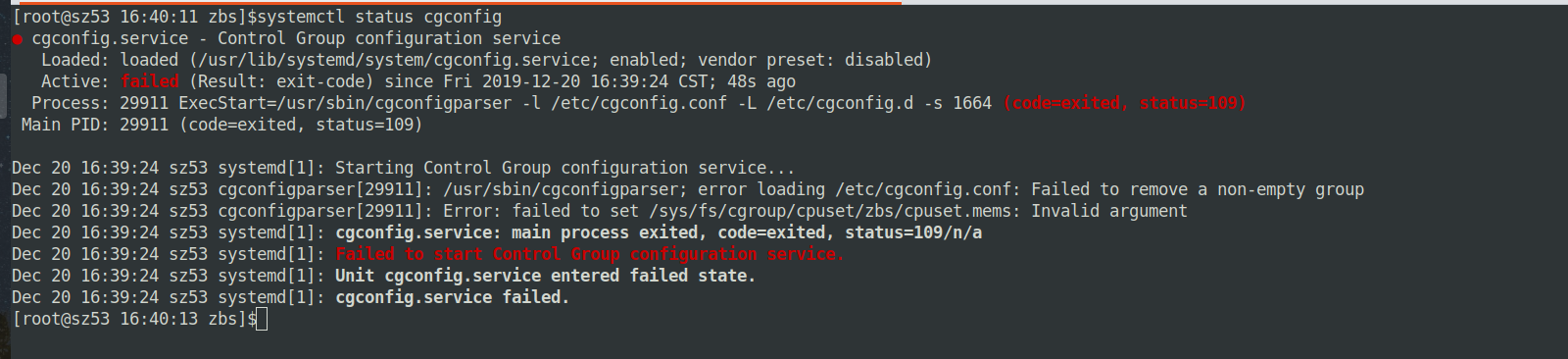
第二篇原文的失败现场:cgconfig.service 显示 failed,日志指出 cpuset.mems 参数无效。来源与归属:Yiran’s Blog;图像原样保存,不是本次运行结果。
报错信息比较重要的是这一条:
failed to set /sys/fs/cgroup/cpuset/zbs/cpuset.mems: Invalid argument。
调查
检查下 /etc/cgconfig.conf 中的配置是否正确:
group . {
    cpuset {
        cpuset.memory_pressure_enabled = "1";
    }
}

group zbs {
    cpu {
        cpu.rt_runtime_us = "950000";
        cpu.rt_period_us = "1000000";
    }
    cpuset {
        cpuset.cpus = "0,1,2,3,4,5";
        cpuset.mems = "0-1";
        cpuset.cpu_exclusive = "1";
        cpuset.mem_hardwall = "1";
    }
}

...
配置看上去没啥问题,这里的 cpuset.mems 指定的是 NUMA Node ID。
那么我们就来看看 NUMA 状态,使用 numactl 查看节点 NUMA 信息:
[root@node 21:53:25 ~]$numactl -H
available: 2 nodes (0-1)
node 0 cpus: 0 1 2 3 4 5 6 7 16 17 18 19 20 21 22 23
node 0 size: 0 MB
node 0 free: 0 MB
node 1 cpus: 8 9 10 11 12 13 14 15 24 25 26 27 28 29 30 31
node 1 size: 32654 MB
node 1 free: 10234 MB
node distances:
node   0   1
  0:  10  20
  1:  20  10
发现问题了,这个节点上有2个 CPU,但是其中的一个 CPU 上对应的节点内存出现了故障,导致 node0 对应的内存是 0MB。
解决
所以我们正确的姿势是将 cpuset.mems 从 0-1 改为 1 ,然后重启 cgconfig。
[root@node 22:09:43 ~]$systemctl status cgconfig
● cgconfig.service - Control Group configuration service
   Loaded: loaded (/usr/lib/systemd/system/cgconfig.service; enabled; vendor preset: disabled)
   Active: active (exited) since Fri 2019-12-20 16:41:24 CST; 5 days ago
 Main PID: 913 (code=exited, status=0/SUCCESS)
    Tasks: 0
   Memory: 0B
   CGroup: /system.slice/cgconfig.service

Dec 20 16:41:24 node systemd[1]: Starting Control Group configuration service...
Dec 20 16:41:24 node systemd[1]: Started Control Group configuration service.来源与转载说明
来源:记一次 libcgroup 配置失败;记一次 libcgroup 配置失败(二)。原站页脚 © 2026 Yiran’s Blog;原文未展示独立转载许可证。本文经授权整理,保留原站归属、引文链接和历史语境。










暂无评论内容