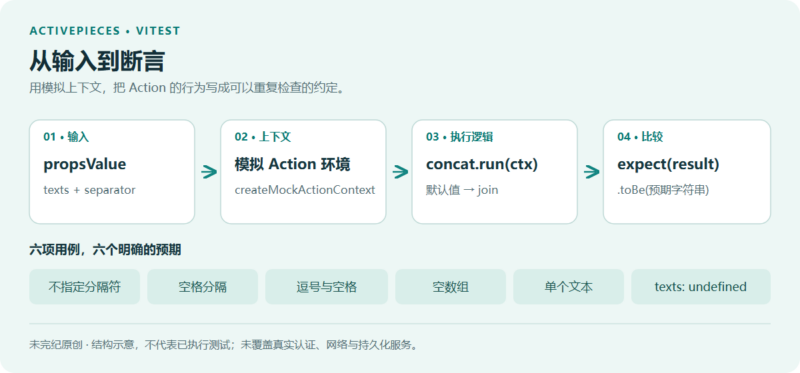



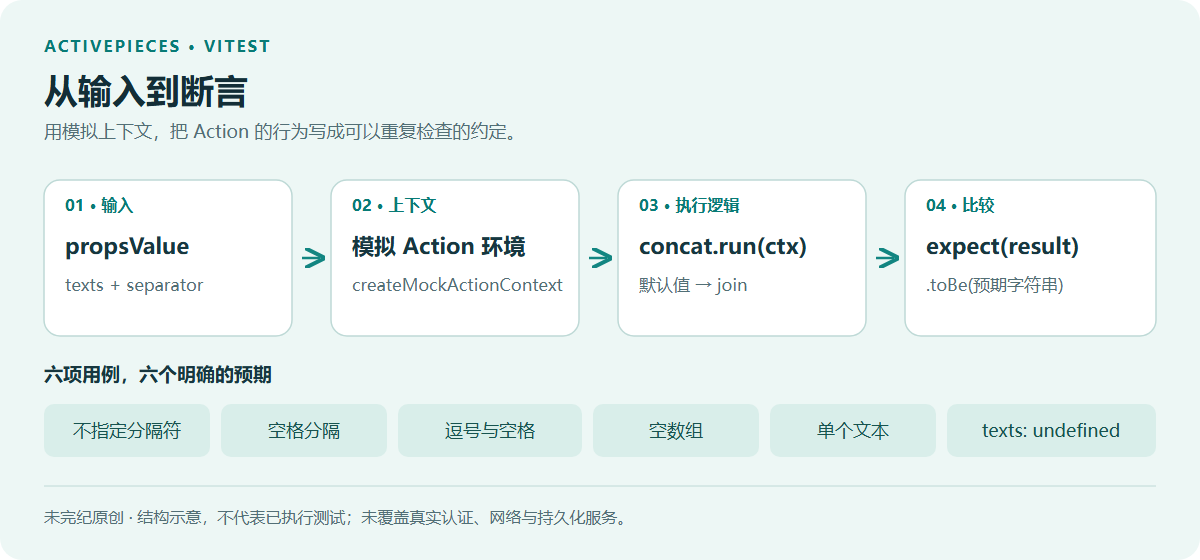
把输入放进模拟的 Action 上下文,直接调用扩展的 run 方法,再核对返回值。一个文本拼接动作,就能说明如何把正常输入和边界情况写成可重复检查的测试。
Activepieces 将扩展称为 Piece。官方并不强制每个 Piece 都编写单元测试,但对于逻辑较复杂的扩展,建议借助 Vitest 做验证。框架提供的 createMockActionContext 可以生成测试用上下文,让测试聚焦于 Action 接收什么输入、返回什么结果。
本文完整覆盖官方指南的四个步骤,并结合指南链接的 text-helper 测试说明实际用法。补充说明均根据同一仓库快照核对;文中的命令和测试代码未执行。
先确认适用环境和版本
以下目录和别名都以完整的 Activepieces monorepo 为前提。text-helper 位于 packages/pieces/core/text-helper,其内部依赖使用 workspace:*,因此不能只复制这个子目录到一个空项目里,就假定依赖可以独立解析。
官方开发环境文档列出的前提是 Node.js v22.15+ 或 v24,以及 npm v9+。当前开发脚本实际检查的是 Node 22 的 15 及以上次版本,或 Node 24;不应把 “22.15+” 理解成任意更高的大版本都已经得到支持。当前根 package.json 另有 packageManager: "bun@1.4.0"。这些信息分别描述入口工具和仓库依赖管理,不能据此把 workspace:* 当作普通 npm 版本号处理。
| 核对位置 | 核验到的内容 | 阅读时的处理 |
|---|---|---|
| 官方测试指南 | Vitest 3.0.8 |
保留为原文配置示例,说明其版本位置 |
| 当前 text-helper | Piece 0.6.6;Vitest 3.2.6 |
维护当前仓库时以该提交的实际依赖和锁文件为准 |
| 当前根 package.json | Vitest 3.2.6;Bun 1.4.0 |
不要为了照抄指南而主动降级当前工作区 |
第一步:在 Piece 中配置 Vitest
在 Piece 的 package.json 中将 vitest 加入开发依赖,并增加 test 脚本。官方指南给出的片段如下;这是需要合并进现有文件的配置片段,不是用来覆盖整个文件的完整清单:
{
  "scripts": {
    "build": "tsc -p tsconfig.lib.json && cp package.json dist/",
    "lint": "eslint 'src/**/*.ts'",
    "test": "vitest run"
  },
  "devDependencies": {
    "vitest": "3.0.8"
  }
}
test 脚本使用 vitest run 执行一次测试。片段中的 build 和 lint 仍承担原来的构建与代码检查职责。如果你在维护本文核验到的 text-helper,实际开发依赖已经是 "vitest": "3.2.6",不必把它改回指南中的 3.0.8。
build 脚本还包含 cp 和 &&,它沿用了仓库的 shell 写法。它不是跨所有 Windows shell 都可直接粘贴的通用命令;运行时应使用该仓库支持的开发环境。
第二步:让 Vitest 找到框架源码
在 Piece 根目录创建 vitest.config.ts。官方指南与当前 text-helper 文件使用相同的配置:
import path from 'path'
import { defineConfig } from 'vitest/config'

const repoRoot = path.resolve(__dirname, '../../../..')

export default defineConfig({
  test: {
    globals: true,
    environment: 'node',
  },
  resolve: {
    alias: {
      '@activepieces/shared': path.resolve(repoRoot, 'packages/core/shared/src/index.ts'),
      '@activepieces/pieces-framework': path.resolve(repoRoot, 'packages/pieces/framework/src/index.ts'),
      '@activepieces/pieces-common': path.resolve(repoRoot, 'packages/pieces/common/src/index.ts'),
    },
  },
})
environment: 'node' 指定测试运行环境;globals: true 使示例可以直接使用 describe、test 和 expect。这与 TypeScript 是否识别这些名称是两个层面的问题:后面的真实测试文件还通过 /// <reference types="vitest/globals" /> 引入对应类型。
三个别名把框架与公共包的导入映射到仓库中的 TypeScript 源码。对 packages/pieces/core/text-helper 而言,../../../.. 正好向上四层回到仓库根目录;如果你的 Piece 放在不同深度,需要重新核对这个相对路径。别名解决的是这些入口的解析问题,并不会自动补齐整个工作区的依赖。
第三步:构造上下文,调用 Action,再断言结果
在 Piece 根目录下建立 test/ 目录,并使用 .test.ts 文件存放测试。指南中的通用骨架如下:
import { createMockActionContext } from '@activepieces/pieces-framework';
import { myAction } from '../src/lib/actions/my-action';

describe('myAction', () => {
  test('does something', async () => {
    const ctx = createMockActionContext({
      propsValue: {
        inputField: 'test value',
      },
    });

    const result = await myAction.run(ctx);
    expect(result).toBe('expected output');
  });
});
这里的 myAction、inputField 和 expected output 都是占位示例。实际编写测试时,要换成你自己的 Action、属性字段与预期结果。测试的核心顺序不变:准备 propsValue,生成上下文,等待 run 返回,然后检查结果。
createMockActionContext 不是一个真实运行中的工作流。按已读取的辅助函数实现,它把传入属性放到 propsValue,将 auth 设为 undefined,并提供测试用的运行信息、文件返回值及其他简化接口。例如 store.get 总是返回 null,并不构成一个会保存数据的真实存储;connections.get 也返回 null。
因此,这个辅助函数很适合下面的字符串拼接例子,但不能把它的存在当作真实认证、存储、网络或工作流执行已经得到验证的证据。若 Action 内部直接调用 HTTP 客户端,也不会因为使用了这个上下文就自动被拦截。
把骨架换成真实的文本拼接测试
text-helper 的 concat Action 定义了两个输入:必填的 texts 数组,以及可选的 separator 文本。其执行逻辑只有一行:
run: async (ctx) => {
  return (ctx.propsValue.texts ?? []).join(ctx.propsValue.separator ?? '');
},这里有两处默认值:texts 为 null 或 undefined 时退回空数组;separator 为这两种值时退回空字符串。随后调用数组的 join 方法。这个 Action 本身不读取认证信息,也没有发起网络请求。以上是对完整实现的静态阅读结论。
指南所链接的 text-helper 测试目录包含多个 Action 的测试。本文聚焦其中 concat.test.ts 的六项用例,不将它们说成整个 Piece 的全部测试:
| 情况 | texts | separator | 预期结果 |
|---|---|---|---|
| 不提供分隔符 | ['hello', 'world'] |
undefined |
'helloworld' |
| 空格分隔 | ['hello', 'world'] |
' ' |
'hello world' |
| 逗号与空格分隔 | ['a', 'b', 'c'] |
', ' |
'a, b, c' |
| 空数组 | [] |
',' |
'' |
| 只有一个文本 | ['only'] |
',' |
'only' |
| 未提供文本 | undefined |
undefined |
'' |
下面保留仓库测试文件的完整代码,便于对照字段名、导入路径和预期值:
/// <reference types="vitest/globals" />

import { concat } from '../src/lib/actions/concat';
import { createMockActionContext } from '@activepieces/pieces-framework';

describe('concat action', () => {
  test('concatenates texts without separator', async () => {
    const ctx = createMockActionContext({
      propsValue: {
        texts: ['hello', 'world'],
        separator: undefined,
      },
    });
    const result = await concat.run(ctx);
    expect(result).toBe('helloworld');
  });

  test('concatenates texts with separator', async () => {
    const ctx = createMockActionContext({
      propsValue: {
        texts: ['hello', 'world'],
        separator: ' ',
      },
    });
    const result = await concat.run(ctx);
    expect(result).toBe('hello world');
  });

  test('concatenates with comma separator', async () => {
    const ctx = createMockActionContext({
      propsValue: {
        texts: ['a', 'b', 'c'],
        separator: ', ',
      },
    });
    const result = await concat.run(ctx);
    expect(result).toBe('a, b, c');
  });

  test('handles empty array', async () => {
    const ctx = createMockActionContext({
      propsValue: {
        texts: [],
        separator: ',',
      },
    });
    const result = await concat.run(ctx);
    expect(result).toBe('');
  });

  test('handles single text', async () => {
    const ctx = createMockActionContext({
      propsValue: {
        texts: ['only'],
        separator: ',',
      },
    });
    const result = await concat.run(ctx);
    expect(result).toBe('only');
  });

  test('handles null texts as empty array', async () => {
    const ctx = createMockActionContext({
      propsValue: {
        texts: undefined,
        separator: undefined,
      },
    });
    const result = await concat.run(ctx);
    expect(result).toBe('');
  });
});handles null texts as empty array,但代码实际传入 texts: undefined。因此,这组测试直接覆盖的是未提供文本的情况,并没有另写一项传入字面量 null 的断言。实现中的 ?? 同时处理两者,是从代码语义得出的结论,不能说成独立的 null 用例已实测。这些用例同时展示了正常路径和输入边界:分隔符应插在元素之间,空数组不应凭空产生分隔符,单个元素也不应在末尾多出一个逗号。虽然界面属性将 texts 标为必填,直接调用 run 仍能传入测试数据;对返回值的断言不等同于验证界面或工作流引擎对输入的校验规则。
第四步:运行测试时分清命令范围
官方指南提供了两种运行方式。第一种从仓库根目录按包名选择 Piece:
# Run tests for a specific piece
npx turbo test --filter=@activepieces/piece-text-helper
第二种先进入 Piece 目录,再直接运行 Vitest:
# Run tests directly from the piece directory
cd packages/pieces/core/text-helper
npx vitest run
两组命令是不同入口,通常选择其中一种;它们都没有把范围限定到 concat.test.ts 单个文件。当前Turbo 配置还将通用 test 任务设为依赖 build,因此第一种方式会纳入构建依赖关系,不能与“直接运行这六个内存字符串断言”画等号。
执行前需要已经具备完整、版本相符的工作区依赖。npx 在本地找不到对应工具时可能尝试获取包;照抄命令并不能保证使用的就是已核验版本。另需留意,官方开发环境的初始化脚本会检查并在缺失时尝试全局安装 Bun、Deno,更新 .env.dev,再安装工作区依赖。它属于环境准备流程,不是只读检查,也不是每次验证字符串逻辑都必须重新运行的步骤。
本文的验证边界:已逐项静态核对指南、配置、六项输入与预期输出,以及对应实现;没有执行安装、构建、npx、Vitest 或任何来源脚本,没有生成测试通过日志,也没有验证真实连接、API key 或云端 Webhook。
让测试说明你的行为约定
这个例子的价值并不在于拼接逻辑复杂,而在于每一项测试都写清楚了一条可观察的约定。扩展行为变化时,可以先检查哪条约定需要调整,再更新实现与用例。对于依赖认证、外部接口、持久化存储或暂停恢复的 Action,还需要针对这些依赖补充测试设计;六项字符串用例不会替你覆盖那些条件。
维护自己的 Piece 时,可以沿用本文的四步结构:配置本地测试工具,核对源码别名,用真实字段构造上下文,再把正常输入与边界输入的预期写进断言。版本、目录和运行范围也应作为测试说明的一部分一并保存,方便下一个维护者复现。
来源与许可
本文是对 Activepieces《Testing Pieces》的完整中文译写,保留其四个操作步骤与全部示例代码,并增加了当前仓库版本、真实拼接用例和静态审阅边界的说明。补充内容不是原文作者的新增陈述。原文与下列代码归 Activepieces 及其相应贡献者所有;原创配图由未完纪绘制。
- Activepieces 官方指南:Testing Pieces;对应固定提交源码。
- concat.test.ts 完整测试与concat.ts 完整实现。
- text-helper 的 package.json与vitest.config.ts。
- createMockActionContext 实现;开发环境要求。
- 根包配置、Turbo 任务配置与开发环境初始化脚本。
- 仓库根 LICENSE:例外目录和第三方组件遵循各自许可,其余适用内容使用 MIT Expat;本文涉及的指南、框架辅助函数和 core/text-helper 文件位于上述企业目录之外。
按上游要求,下面保留本次读取的根版权与许可声明。该声明中的企业目录例外和第三方组件条款同样予以保留:
Copyright (c) 2020-2024 Activepieces Inc.

Portions of this software are licensed as follows:

* All content that resides under the "packages/ee/" and "packages/server/api/src/app/ee" directory of this repository, if that directory exists, is licensed under the license defined in packages/ee/LICENSE
* All third party components incorporated into the Activepieces Inc Software are licensed under the original license provided by the owner of the applicable component.
* Content outside of the above mentioned directories or restrictions above is available under the "MIT Expat" license as defined below.

Permission is hereby granted, free of charge, to any person obtaining a copy
of this software and associated documentation files (the "Software"), to deal
in the Software without restriction, including without limitation the rights
to use, copy, modify, merge, publish, distribute, sublicense, and/or sell
copies of the Software, and to permit persons to whom the Software is
furnished to do so, subject to the following conditions:

The above copyright notice and this permission notice shall be included in all
copies or substantial portions of the Software.

THE SOFTWARE IS PROVIDED "AS IS", WITHOUT WARRANTY OF ANY KIND, EXPRESS OR
IMPLIED, INCLUDING BUT NOT LIMITED TO THE WARRANTIES OF MERCHANTABILITY,
FITNESS FOR A PARTICULAR PURPOSE AND NONINFRINGEMENT. IN NO EVENT SHALL THE
AUTHORS OR COPYRIGHT HOLDERS BE LIABLE FOR ANY CLAIM, DAMAGES OR OTHER
LIABILITY, WHETHER IN AN ACTION OF CONTRACT, TORT OR OTHERWISE, ARISING FROM,
OUT OF OR IN CONNECTION WITH THE SOFTWARE OR THE USE OR OTHER DEALINGS IN THE
SOFTWARE.










暂无评论内容