


多数应用依靠密码登录。数据库中应保存经过专门密码哈希算法处理的结果,不能保存明文。Symfony 的 PasswordHasher 组件提供密码哈希和验证工具,也支持在算法或参数变化后,逐步升级已经存储的密码。
本文依据 Symfony 8.1 官方文档完整翻译和整理,保留 YAML、PHP 配置及独立组件用法。该框架版本要求 PHP 8.4 或更高版本;具体算法还依赖运行环境支持。代码里的省略号、占位变量和未展示的业务方法仍是原文示意,不能直接当作完整应用执行。
首先确认 PasswordHasher 组件已安装:
$ composer require symfony/password-hasher配置密码哈希器
计算密码哈希前,通过 password_hashers 选择算法,也可以设置算法参数。下面给 AppEntityUser 及其子类配置默认 auto 哈希器,并给实现 PasswordAuthenticatedUserInterface 的对象配置带自定义成本的版本。
YAML 配置
# config/packages/security.yaml
security:
    # ...

    password_hashers:
        # auto hasher with default options for the User class (and children)
        App\Entity\User: 'auto'

        # auto hasher with custom options for all PasswordAuthenticatedUserInterface instances
        Symfony\Component\Security\Core\User\PasswordAuthenticatedUserInterface:
            algorithm: 'auto'
            cost:      15
PHP 配置
// config/packages/security.php
namespace Symfony\Component\DependencyInjection\Loader\Configurator;

use App\Entity\User;
use Symfony\Component\Security\Core\User\PasswordAuthenticatedUserInterface;

return App::config([
    'security' => [
        // ...

        'password_hashers' => [
            // auto hasher with default options for the User class (and children)
            User::class => 'auto',

            // auto hasher with custom options for all PasswordAuthenticatedUserInterface instances
            PasswordAuthenticatedUserInterface::class => [
                'algorithm' => 'auto',
                'cost' => 15,
            ],
        ],
    ],
]);
独立使用组件
use App\Entity\User;
use Symfony\Component\PasswordHasher\Hasher\PasswordHasherFactory;
use Symfony\Component\Security\Core\User\PasswordAuthenticatedUserInterface;

$passwordHasherFactory = new PasswordHasherFactory([
    // auto hasher with default options for the User class (and children)
    User::class => ['algorithm' => 'auto'],

    // auto hasher with custom options for all PasswordAuthenticatedUserInterface instances
    PasswordAuthenticatedUserInterface::class => [
        'algorithm' => 'auto',
        'cost' => 15,
    ],
]);
auto 会按当前环境和框架策略选择可用的密码哈希器。结合密码迁移机制,当后续 PHP 或 Symfony 引入新选择时,应用可以逐步更新已有密码。它并不意味着数据库中所有旧值会在配置改变的一刻自动变成新算法。
密码哈希有意消耗计算资源,以增加猜测密码的成本;同样,这也会让测试变慢。在测试环境中,可以降低哈希成本,加快与密码强度无关的功能测试:
# config/packages/security.yaml
when@test:
    security:
        # ...

        password_hashers:
            # Use your user class name here
            App\Entity\User:
                algorithm: auto
                cost: 4 # Lowest possible value for bcrypt
                time_cost: 3 # Lowest possible value for argon
                memory_cost: 10 # Lowest possible value for argon
// config/packages/security.php
namespace Symfony\Component\DependencyInjection\Loader\Configurator;
use App\Entity\User;
return App::config([
'when@test' => [
'security' => [
'password_hashers' => [
// Use your user class name here
User::class => [
'algorithm' => 'auto',
'cost' => 4, // Lowest possible value for bcrypt
'time_cost' => 3, // Lowest possible value for argon
'memory_cost' => 10, // Lowest possible value for argon
],
],
],
],
]);编辑补充:这些低成本参数严格限定在 test 环境。不能因为测试运行快,就把相同配置用于真实账号。相反,生产成本也不是越高越好:应同时考虑单次耗时、并发登录和服务器容量。
计算与验证密码哈希
配置完成后,通过 UserPasswordHasherInterface 操作与用户对象关联的密码。注册时取得明文、计算哈希,再把结果赋给用户实体;删除账号等敏感操作需要用户再次输入密码时,用验证方法检查,而不是把新算出的哈希与旧字符串直接比较。
在 Symfony 应用中使用
// src/Controller/RegistrationController.php
namespace App\Controller;

// ...
use Symfony\Component\HttpKernel\Exception\AccessDeniedHttpException;
use Symfony\Component\PasswordHasher\Hasher\UserPasswordHasherInterface;

class UserController extends AbstractController
{
    public function registration(UserPasswordHasherInterface $passwordHasher): Response
    {
        // ... e.g. get the user data from a registration form
        $user = new User(...);
        $plaintextPassword = ...;

        // hash the password (based on the security.yaml config for the $user class)
        $hashedPassword = $passwordHasher->hashPassword(
            $user,
            $plaintextPassword
        );
        $user->setPassword($hashedPassword);

        // ...
    }

    public function delete(UserPasswordHasherInterface $passwordHasher, UserInterface $user): void
    {
        // ... e.g. get the password from a "confirm deletion" dialog
        $plaintextPassword = ...;

        if (!$passwordHasher->isPasswordValid($user, $plaintextPassword)) {
            throw new AccessDeniedHttpException();
        }
    }
}
这里的 hashPassword($user, $plaintextPassword) 根据用户类型选择前面配置的哈希器;isPasswordValid 则验证提供的明文是否匹配已保存的密码。setPassword 只是示例中改变对象状态的步骤,注册流程还必须把对象持久化。
编辑核对:原文代码的路径注释写成 RegistrationController.php,类名却是 UserController。本文保留原样;整合到采用 PSR-4 的应用时,应让真实文件名、类名和命名空间对应一致。User、Response 等依赖、表单处理及返回值也需要在应用中补齐。
在框架之外使用
// ...
$passwordHasher = new UserPasswordHasher($passwordHasherFactory);

// Get the user password (e.g. from a registration form)
$user = new User(...);
$plaintextPassword = ...;

// hash the password (based on the password hasher factory config for the $user class)
$hashedPassword = $passwordHasher->hashPassword(
    $user,
    $plaintextPassword
);
$user->setPassword($hashedPassword);

// In another action (e.g. to confirm deletion), you can verify the password
$plaintextPassword = ...;
if (!$passwordHasher->isPasswordValid($user, $plaintextPassword)) {
    throw new \Exception('Bad credentials, cannot delete this user.');
}
独立用法用先前的 PasswordHasherFactory 创建 UserPasswordHasher,随后同样通过用户对象计算和校验。这里保留原文的上下文省略,需要在真实文件中补齐类导入、用户实现与存储流程。
处理忘记密码
使用 MakerBundle 和 SymfonyCastsResetPasswordBundle,可以生成忘记密码处理流程。先安装 bundle:
$ composer require symfonycasts/reset-password-bundle然后运行生成命令,按提示回答应用相关问题。完成后,命令会显示生成结果和仍需处理的步骤:
$ php bin/console make:reset-password可以传入 --with-uuid 或 --with-ulid,让生成实体使用 Symfony Uid 组件的 Uuid 或 Ulid 作为 id 类型,而不是整数。bundle 行为可通过 reset_password.yaml 调整,详细选项见其官方指南。安装依赖和运行生成器会改动项目文件,应按项目现有版本和配置整合;本次没有执行这些命令。
注入一个具名哈希器
有些哈希器不直接绑定用户类,例如专门用于密码恢复码或 API 令牌的哈希器:
# config/packages/security.yaml
security:
    password_hashers:
        recovery_code: 'auto'

    firewalls:
        main:
            # ...
此时不能仅依靠普通自动装配来猜测应使用哪一个哈希器。通过 #[Target] 指明配置键,并把参数类型声明为通用的 PasswordHasherInterface:
// src/Controller/HomepageController.php
namespace App\Controller;

use Symfony\Component\DependencyInjection\Attribute\Target;
use Symfony\Component\PasswordHasher\PasswordHasherInterface;

class HomepageController extends AbstractController
{
    public function __construct(
        #[Target('recovery_code')]
        private readonly PasswordHasherInterface $passwordHasher,
    ) {
    }

    #[Route('/')]
    public function index(): Response
    {
        $plaintextToken = 'some-secret-token';

        // Note: use hash(), not hashPassword(), as we are not using a UserInterface object
        $hashedToken = $this->passwordHasher->hash($plaintextToken);
    }
}
这里没有传入用户对象,因此调用的是 hash(),不是 hashPassword()。示例中的 some-secret-token 是演示字符串,不是应当复制使用的真实令牌;实际令牌的生成、交付与生命周期仍需由应用处理。
让旧密码逐步迁移
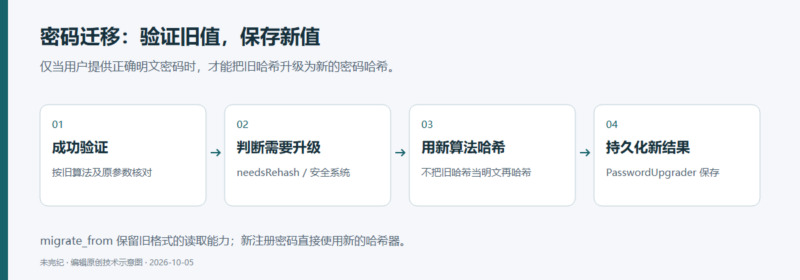
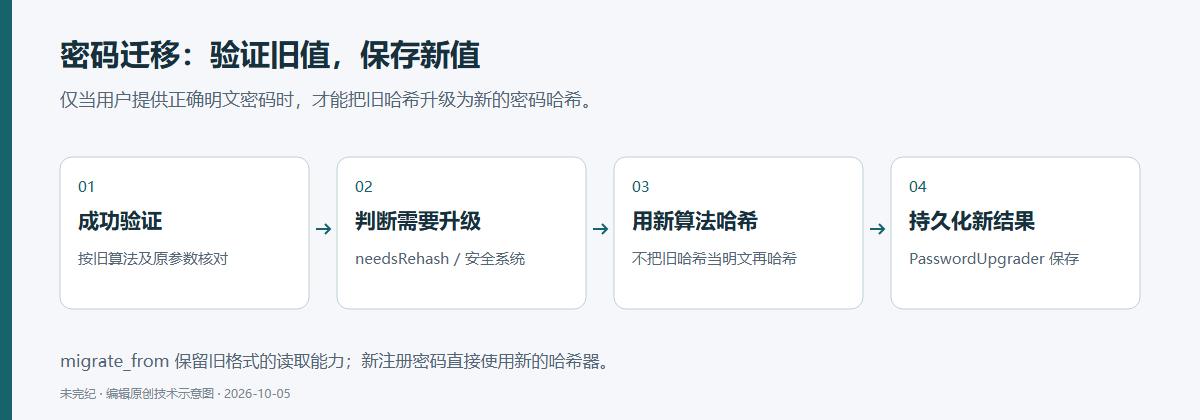
当更适合的密码哈希算法可用时,应让新密码使用新算法,并在用户成功登录、应用拿到正确明文时升级旧密码。过程分成两件事:能读懂旧哈希,以及能把新哈希保存回去。migrate_from 解决前一部分,密码升级接口负责后一部分。
用 migrate_from 指定旧哈希器
保留旧哈希器,为它取一个名字,再定义新的哈希器。在新配置的 migrate_from 中列出旧名字。下面用 Sodium 作为新算法,并允许从默认 bcrypt 和名为 legacy 的旧配置迁入:
# config/packages/security.yaml
security:
    # ...

    password_hashers:
        # a hasher used in the past for some users
        legacy:
            algorithm: sha256
            encode_as_base64: false
            iterations: 1

        App\Entity\User:
            # the new hasher, along with its options
            algorithm: sodium
            migrate_from:
                - bcrypt # uses the "bcrypt" hasher with the default options
                - legacy # uses the "legacy" hasher configured above
// config/packages/security.php
namespace Symfony\Component\DependencyInjection\Loader\Configurator;
return App::config([
'security' => [
// ...
'password_hashers' => [
// a hasher used in the past for some users
'legacy' => [
'algorithm' => 'sha256',
'encode_as_base64' => false,
'iterations' => 1,
],
User::class => [
// the new hasher, along with its options
'algorithm' => 'sodium',
'migrate_from' => [
'bcrypt', // uses the "bcrypt" hasher with the default options
'legacy', // uses the "legacy" hasher configured above
],
],
],
],
]);独立组件的对应示例为:
// ...
$passwordHasherFactory = new PasswordHasherFactory([
    'legacy' => [
        'algorithm' => 'sha256',
        'encode_as_base64' => true,
        'iterations' => 1,
    ],

    User::class => [
        // the new hasher, along with its options
        'algorithm' => 'sodium',
        'migrate_from' => [
            'bcrypt', // uses the "bcrypt" hasher with the default options
            'legacy', // uses the "legacy" hasher configured above
        ],
    ],
]);必须注意原文差异:上面的 YAML 和 PHP 应用配置把 encode_as_base64 设为 false,独立示例却是 true。这两个值对应不同的旧哈希编码,不能认为它们可以互换。迁移前必须查清历史数据的算法、盐的处理、迭代次数和最终编码,并据此配置。本文保留差异,避免替读者猜测旧数据库的格式。
示例中的 SHA-256 加一次迭代只用于读取历史密码,不应继续用于新密码。新注册用户直接使用新的算法;已有用户成功登录时,Symfony 先用旧算法验证,再用新算法重新哈希,并通过后面的存储接口更新密码。
原文说明,auto、native、bcrypt 和 argon 哈希器还会自动启用针对 PBKDF2 与消息摘要哈希的迁移支持;两者分别使用 PHP 的 hash_pbkdf2 和 hash,算法由 hash_algorithm 指定。除原文针对 auto 的说明外,建议优先用明确的 migrate_from 配置,而不是依赖 hash_algorithm 来表达迁移关系。
让新哈希真正写回存储
成功登录后,Security 系统会判断密码是否需要更好的算法或参数,并使用已经验证的明文计算新哈希。如果使用自定义 authenticator,需要在安全 passport 中使用 PasswordCredentials,才能参与相应流程。
要完成升级,还必须告诉框架怎样保存新的哈希。仅修改配置、但没有实现持久化,不能完成整个迁移。
Doctrine 实体用户提供器
在 UserRepository 上实现 PasswordUpgraderInterface。下面的方法先更新用户对象,再把变化刷新到数据库:
// src/Repository/UserRepository.php
namespace App\Repository;

// ...
use Symfony\Component\Security\Core\User\PasswordAuthenticatedUserInterface;
use Symfony\Component\Security\Core\User\PasswordUpgraderInterface;

class UserRepository extends EntityRepository implements PasswordUpgraderInterface
{
    // ...

    public function upgradePassword(PasswordAuthenticatedUserInterface $user, string $newHashedPassword): void
    {
        // set the new hashed password on the User object
        $user->setPassword($newHashedPassword);

        // execute the queries on the database
        $this->getEntityManager()->flush();
    }
}编辑补充:接口参数是 PasswordAuthenticatedUserInterface,而 setPassword 是示例中具体用户类的方法;真实仓库需要约束并检查它接受的用户类型。数据库事务、失败处理及实体是否处于管理状态,也应按应用自己的 Doctrine 使用方式确定。
自定义用户提供器
如果用户来自自定义提供器,就在该提供器上实现同一接口:
// src/Security/UserProvider.php
namespace App\Security;

// ...
use Symfony\Component\Security\Core\User\PasswordAuthenticatedUserInterface;
use Symfony\Component\Security\Core\User\PasswordUpgraderInterface;

class UserProvider implements UserProviderInterface, PasswordUpgraderInterface
{
    // ...

    public function upgradePassword(PasswordAuthenticatedUserInterface $user, string $newHashedPassword): void
    {
        // set the new hashed password on the User object
        $user->setPassword($newHashedPassword);

        // ... store the new password
    }
}
代码中的“store the new password”仍是必须完成的业务工作,例如更新外部存储或相应数据库记录。不要把这一注释当成框架已经替应用保存。
如果只在 Symfony 应用之外使用 PasswordHasher 组件,需要自己调用 PasswordHasherInterface::needsRehash() 判断,再用 hash() 重新计算,并完成存储。升级所需的明文应来自已通过验证的输入,而不是从旧哈希中“解密”获得。
从自定义哈希器触发迁移
自定义哈希器可以在 needsRehash() 中返回 true,表示当前哈希已经过时,需要升级:
// src/Security/CustomPasswordHasher.php
namespace App\Security;

// ...
use Symfony\Component\PasswordHasher\PasswordHasherInterface;

class CustomPasswordHasher implements PasswordHasherInterface
{
    // ...

    public function needsRehash(string $hashedPassword): bool
    {
        // check whether the current password is hashed using an outdated hasher
        $hashIsOutdated = ...;

        return $hashIsOutdated;
    }
}
这里的 $hashIsOutdated 是占位逻辑,实际判断应依据哈希格式、算法与参数。并非每次无条件返回 true 才更安全;无必要的重哈希也会增加写入和计算开销。
按用户动态选择哈希器
通常可以给某个用户类统一配置哈希器。另一种做法是定义具名哈希器,再按用户情况动态选择。原文以管理员使用成本更高的 auto 哈希器为例,创建名为 harsh 的配置:
# config/packages/security.yaml
security:
    # ...
    password_hashers:
        harsh:
            algorithm: auto
            cost: 15
// config/packages/security.php
namespace Symfony\Component\DependencyInjection\Loader\Configurator;
return App::config([
'security' => [
// ...
'password_hashers' => [
'harsh' => [
'algorithm' => 'auto',
'cost' => 15,
],
],
],
]);use Symfony\Component\PasswordHasher\Hasher\PasswordHasherFactory;
$passwordHasherFactory = new PasswordHasherFactory([
// ...
'harsh' => [
'algorithm' => 'auto',
'cost' => 15
],
]);要让用户对象选择它,用户类还需实现 PasswordHasherAwareInterface。其 getPasswordHasherName() 方法返回要用的名字;返回 null 则继续使用默认配置:
// src/Entity/User.php
namespace App\Entity;

use Symfony\Component\PasswordHasher\Hasher\PasswordHasherAwareInterface;
use Symfony\Component\Security\Core\User\PasswordAuthenticatedUserInterface;
use Symfony\Component\Security\Core\User\UserInterface;

class User implements
    UserInterface,
    PasswordAuthenticatedUserInterface,
    PasswordHasherAwareInterface
{
    // ...

    public function getPasswordHasherName(): ?string
    {
        if ($this->isAdmin()) {
            return 'harsh';
        }

        return null; // use the default hasher
    }
}迁移时不需要这样返回旧哈希器名称。旧算法的读取由 migrate_from 决定;动态选择接口用于选定当前应使用的哈希器。较高的 cost 会消耗更多资源,应评估认证容量,不能只凭管理员身份就无限提高成本。
如果具名哈希器来自自己的 PasswordHasherInterface 实现,要先注册相应服务,再通过 id 引用:
# config/packages/security.yaml
security:
    # ...
    password_hashers:
        App\Entity\User:
            id: 'App\Security\Hasher\MyCustomPasswordHasher'
// config/packages/security.php
namespace Symfony\Component\DependencyInjection\Loader\Configurator;
use App\Security\Hasher\MyCustomPasswordHasher;
return App::config([
'security' => [
// ...
'password_hashers' => [
'App\Entity\User' => [
'id' => MyCustomPasswordHasher::class,
],
],
],
]);这样就从服务 AppSecurityHasherMyCustomPasswordHasher 创建名为 AppEntityUser 的哈希器。类名、服务 id 和实际自动装配规则必须一致。
不依赖用户对象,对字符串做哈希
PasswordHasherFactory 可以定义多个哈希器,按名字取出后直接计算字符串哈希,并验证输入是否匹配:
use Symfony\Component\PasswordHasher\Hasher\PasswordHasherFactory;

// configure different hashers via the factory
$factory = new PasswordHasherFactory([
    'common' => ['algorithm' => 'bcrypt'],
    'sodium' => ['algorithm' => 'sodium'],
]);

// retrieve the hasher using bcrypt
$hasher = $factory->getPasswordHasher('common');
$hash = $hasher->hash('plain');

// verify that a given string matches the hash calculated above
$hasher->verify($hash, 'invalid'); // false
$hasher->verify($hash, 'plain'); // true
示例取出的 common 使用 bcrypt;verify($hash, 'invalid') 为 false,而原字符串 plain 能通过验证。工厂中的另一个 Sodium 配置只是另一个可选择的哈希器。示例字符串没有秘密强度含义。
支持的算法及其边界
auto
文档快照说明,auto 当前选择 bcrypt;将来 PHP 或 Symfony 增加新哈希器时,选择可能发生变化。这意味着存储的哈希长度也可能变化,因此要为数据库列预留空间,原文建议 varchar(255)。
bcrypt
bcrypt 哈希字符串长60个字符,其中包括为每个新密码自动生成的盐,因此不需要应用另行管理盐。文档列出的配置项是整数 cost,范围4至31,默认13。每增加1,计算工作量大致翻倍,这允许随着计算能力提升而调整成本。
即使数据库中已有采用旧成本计算的密码,也可以调整配置。新密码使用新成本,旧哈希仍能按其内嵌参数验证,再结合迁移流程逐步升级。为了加快测试,可以仅在测试环境把成本降到最低4;不要让这一配置泄漏到生产。
Sodium
Sodium 哈希器使用 Argon2 密钥派生函数,依赖 PHP 环境中的 libsodium 支持。原文所述的哈希长度为96个字符,但算法参数也保存在结果中,未来长度可能变化,因此同样需要预留存储空间。盐也会随哈希自动生成并保存在结果里,不需要另设一列手工管理。
PBKDF2
这份 Symfony 文档不再推荐为新的密码配置 PBKDF2,并建议仍使用它的旧应用升级到 Sodium 或 bcrypt。这是该框架文档在当前组件语境中的迁移建议,不应扩展成对所有协议中 PBKDF2 用途的无条件判断。
确实需要时,再实现自定义哈希器
自定义类必须实现 PasswordHasherInterface;若历史算法使用独立盐,可以实现 LegacyPasswordHasherInterface。hash() 与 verify() 都必须限制输入长度,原文给出的上限为4096,并指向 CVE-2013-5750 的背景。可复用 CheckPasswordLengthTrait::isPasswordTooLong(),不要自行删掉这道检查。
// src/Security/Hasher/CustomVerySecureHasher.php
namespace App\Security\Hasher;

use Symfony\Component\PasswordHasher\Exception\InvalidPasswordException;
use Symfony\Component\PasswordHasher\Hasher\CheckPasswordLengthTrait;
use Symfony\Component\PasswordHasher\PasswordHasherInterface;

class CustomVerySecureHasher implements PasswordHasherInterface
{
    use CheckPasswordLengthTrait;

    public function hash(string $plainPassword): string
    {
        if ($this->isPasswordTooLong($plainPassword)) {
            throw new InvalidPasswordException();
        }

        // ... hash the plain password in a secure way

        return $hashedPassword;
    }

    public function verify(string $hashedPassword, string $plainPassword): bool
    {
        if ('' === $plainPassword || $this->isPasswordTooLong($plainPassword)) {
            return false;
        }

        // ... validate if the password equals the user's password in a secure way

        return $passwordIsValid;
    }

    public function needsRehash(string $hashedPassword): bool
    {
        // Check if a password hash would benefit from rehashing
        return $needsRehash;
    }
}这个类保留了算法部分的占位注释:$hashedPassword、$passwordIsValid 和 $needsRehash 还没有实际定义。它仅展示接口形状和长度检查,绝不意味着已经实现了安全密码算法。验证空字符串或超长输入时应按示例拒绝,真正的比较与算法实现需要使用适当的安全机制。
原文随后通过 id 指定自定义服务:
# config/packages/security.yaml
security:
    # ...
    password_hashers:
        App\Entity\User:
            # the service ID of your custom hasher (the FQCN using the default services.yaml)
            id: 'App\Security\Hasher\MyCustomPasswordHasher'
// config/packages/security.php
namespace Symfony\Component\DependencyInjection\Loader\Configurator;
use App\Security\Hasher\MyCustomPasswordHasher;
return App::config([
'security' => [
// ...
'password_hashers' => [
'App\Entity\User' => [
// the service ID of your custom hasher (the FQCN using the default services.yaml)
'id' => MyCustomPasswordHasher::class,
],
],
],
]);编辑核对:上一个示例的类名是 CustomVerySecureHasher,这里却引用 MyCustomPasswordHasher。如果按前面的类名创建文件,直接复制这份配置会指向另一个并不存在的服务。以下只修正名字,使其与前一个示例一致,不补写或声称审核通过了自定义算法:
# 编辑修正版:仅统一示例服务名称
security:
    password_hashers:
        App\Entity\User:
            id: 'App\Security\Hasher\CustomVerySecureHasher'
无论选用内置还是自定义哈希器,都需要在隔离的目标环境验证旧账号仍能登录、升级后新哈希确实持久化、失败时不会破坏原凭据,并检查资源消耗。本文只作静态阅读和配置对照,没有安装依赖、运行 PHP、连接数据库或尝试认证;静态检查无发现也不等于不存在漏洞。
来源与许可
原文由 Symfony 文档贡献者维护:Password Hashing and Verification,8.1文档源文件。原文明确声明正文和代码示例均采用 Creative Commons Attribution-ShareAlike 3.0;本中文翻译、编辑修改和原创配图延续 CC BY-SA 3.0,修改日期为2026年10月5日。保留署名、原文链接与许可链接,新增核对说明和命名修正已明确标注,不暗示 Symfony 对本稿的背书。










暂无评论内容