


git rerere 的名字来自 “reuse recorded resolution”,也就是重用已记录的解决方案。它让 Git 记住某段冲突是如何解决的;下一次出现相同文本冲突时,可以复用该结果。
它适合几种场景。长期维护的主题分支需要反复确认能否干净地合并,但又不希望留下大量中间合并提交。启用 rerere 后,可以偶尔试着合并、解决冲突,再退出这次合并;以后遇到已记录的相同冲突时,可以减少重复操作。反复变基时也有相同好处。若先合并并解决了冲突,随后决定改为变基,也不必重新处理每处已记录的文本冲突。
另一个场景是把多个开发中的主题分支临时合并到可测试的提交上,就像 Git 项目自身经常做的。如果测试失败,可以退回合并前、排除造成失败的主题分支,然后重新合并,而不用重复解决所有相同冲突。
启用 rerere
原例使用全局配置:
$ git config --global rerere.enabled true也可以在特定仓库中创建 .git/rr-cache 目录来开启,但配置选项更清楚。全局配置会影响其他仓库。
记录第一次冲突
假设 hello.rb 最初如下:
#! /usr/bin/env ruby

def hello
  puts 'hello world'
end
在一条分支里把 “hello” 改为 “hola”,在另一条里把 “world” 改为 “mundo”。
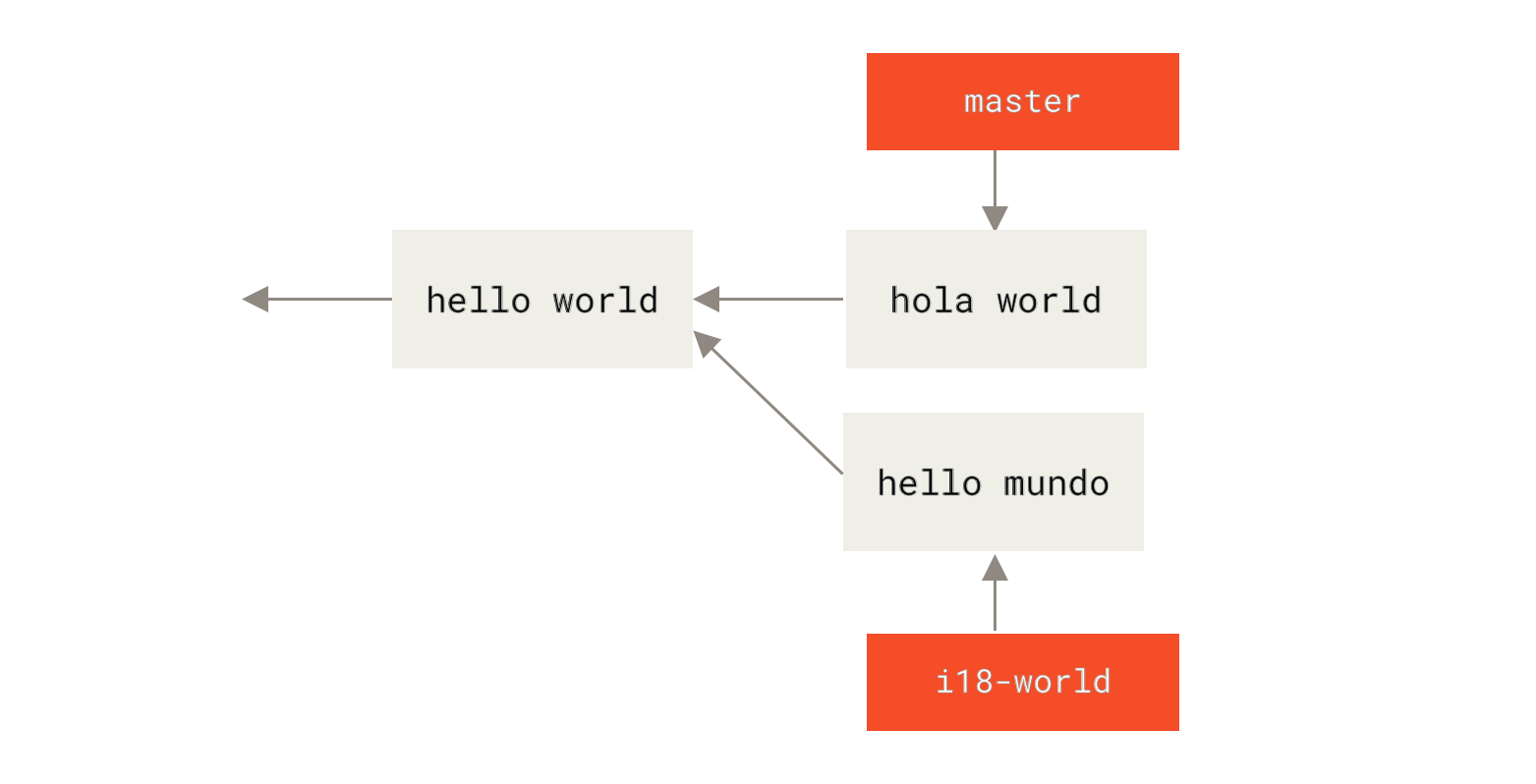
合并时,两处修改发生在同一行,于是出现冲突:
$ git merge i18n-world
Auto-merging hello.rb
CONFLICT (content): Merge conflict in hello.rb
Recorded preimage for 'hello.rb'
Automatic merge failed; fix conflicts and then commit the result.
除了通常的合并失败信息,还多出 Recorded preimage:rerere 已记录解决前的冲突形态。此时仍可照常用 git status 查看未合并文件:
$ git status
# On branch master
# Unmerged paths:
#   (use "git reset HEAD <file>..." to unstage)
#   (use "git add <file>..." to mark resolution)
#
#	both modified:      hello.rb
#
git rerere status 会列出已记录冲突状态的文件:
$ git rerere status
hello.rb
git rerere diff 显示已记录的冲突原貌与当前文件之间的差异:
$ git rerere diff
--- a/hello.rb
+++ b/hello.rb
@@ -1,11 +1,11 @@
 #! /usr/bin/env ruby

 def hello
-<<<<<<<
-  puts 'hello mundo'
-=======
+<<<<<<< HEAD
   puts 'hola world'
->>>>>>>
+=======
+  puts 'hello mundo'
+>>>>>>> i18n-world
 end
与 rerere 本身无关,git ls-files -u 还可以列出未合并文件的共同祖先和两侧版本:
$ git ls-files -u
100644 39804c942a9c1f2c03dc7c5ebcd7f3e3a6b97519 1	hello.rb
100644 a440db6e8d1fd76ad438a49025a9ad9ce746f581 2	hello.rb
100644 54336ba847c3758ab604876419607e9443848474 3	hello.rb
现在把该行改为 puts 'hola mundo' 来解决冲突,再查看 rerere 将记住的变化:
$ git rerere diff
--- a/hello.rb
+++ b/hello.rb
@@ -1,11 +1,7 @@
 #! /usr/bin/env ruby

 def hello
-<<<<<<<
-  puts 'hello mundo'
-=======
-  puts 'hola world'
->>>>>>>
+  puts 'hola mundo'
 end
Git 记录的对应关系是:一侧为 “hello mundo”、另一侧为 “hola world” 的这段文本冲突,最终被解决为 “hola mundo”。
把文件标记为已解决并提交:
$ git add hello.rb
$ git commit
Recorded resolution for 'hello.rb'.
[master 68e16e5] Merge branch 'i18n'
提交输出中的 Recorded resolution 表示解决结果也已记录。
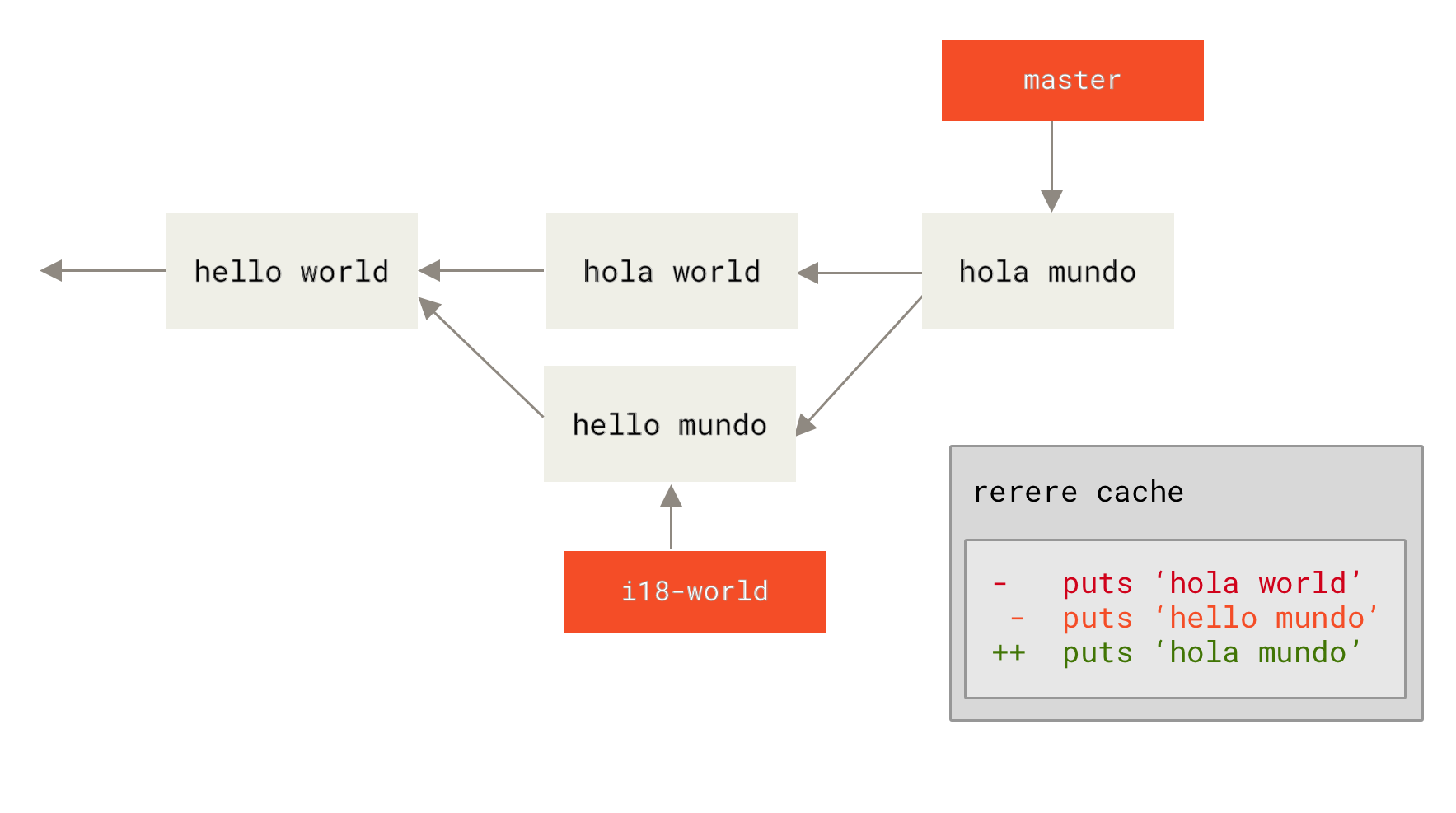
在变基中复用结果
下面撤销这次合并,再改为把主题分支变基到 master 上。原例使用 重置:
$ git reset --hard HEAD^
HEAD is now at ad63f15 i18n the hello
--hard 会改动工作区与索引,这只是原书演示步骤。练习前应保存已有工作,并确认要重置的提交。
合并撤销后,切换到主题分支,再执行变基:
$ git checkout i18n-world
Switched to branch 'i18n-world'

$ git rebase master
First, rewinding head to replay your work on top of it...
Applying: i18n one word
Using index info to reconstruct a base tree...
Falling back to patching base and 3-way merge...
Auto-merging hello.rb
CONFLICT (content): Merge conflict in hello.rb
Resolved 'hello.rb' using previous resolution.
Failed to merge in the changes.
Patch failed at 0001 i18n one word
原例再次遇到同样的文本冲突,却出现 using previous resolution,表示已应用记录的结果。打开文件,可以看到没有冲突标记:
#! /usr/bin/env ruby

def hello
  puts 'hola mundo'
end
git diff 显示自动复用如何把两侧内容统一为结果:
$ git diff
diff --cc hello.rb
index a440db6,54336ba..0000000
--- a/hello.rb
+++ b/hello.rb
@@@ -1,7 -1,7 +1,7 @@@
  #! /usr/bin/env ruby

  def hello
-   puts 'hola world'
 -  puts 'hello mundo'
++  puts 'hola mundo'
  end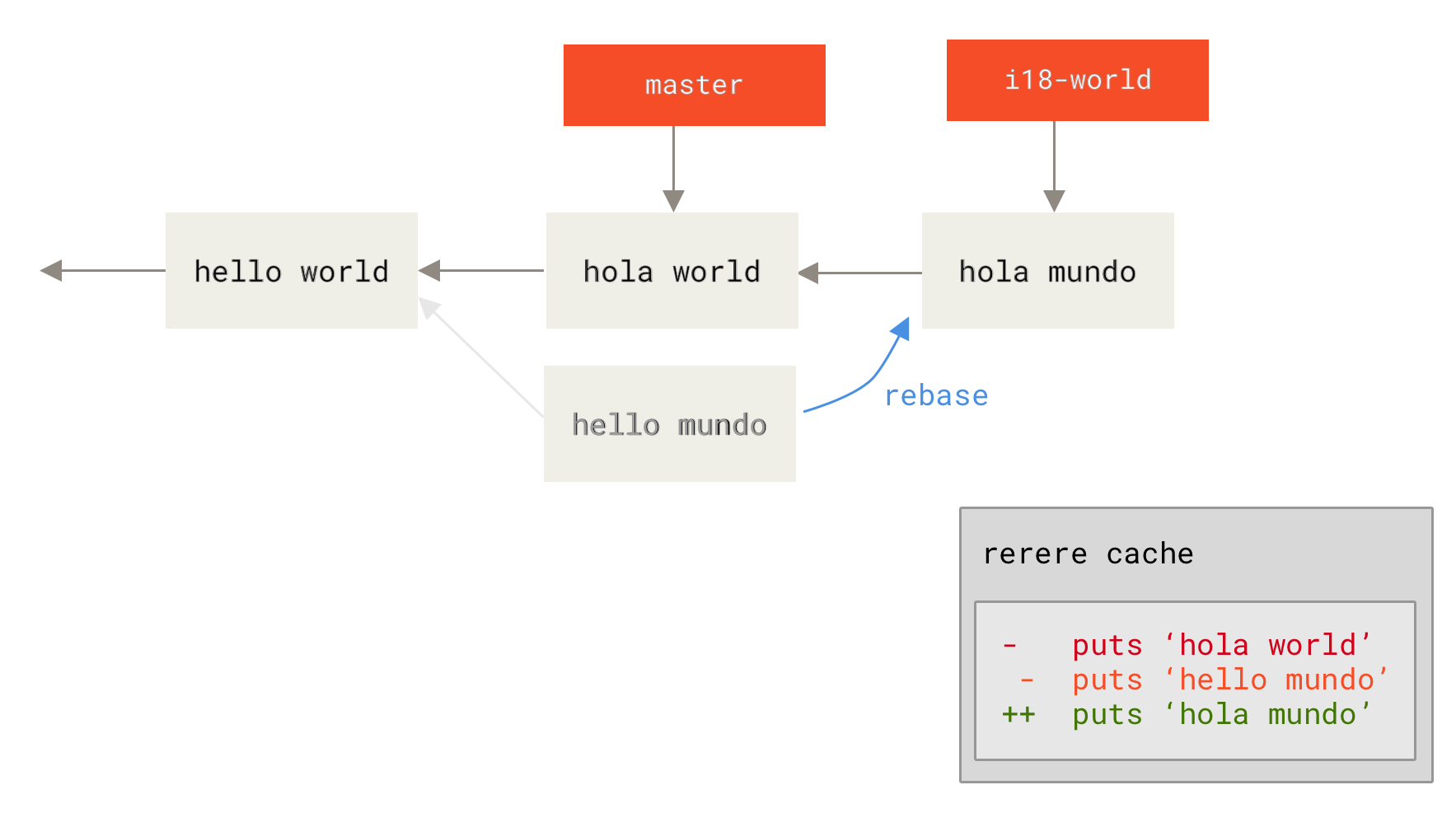
也可以恢复冲突标记,以观察处理过程。相关示例见高级合并:
$ git checkout --conflict=merge hello.rb
$ cat hello.rb
#! /usr/bin/env ruby

def hello
<<<<<<< ours
  puts 'hola world'
=======
  puts 'hello mundo'
>>>>>>> theirs
end
此时再次运行 git rerere,就会根据缓存重新应用解决结果:
$ git rerere
Resolved 'hello.rb' using previous resolution.
$ cat hello.rb
#! /usr/bin/env ruby

def hello
  puts 'hola mundo'
end
文件冲突已按记录重新解决,随后暂存文件并继续变基:
$ git add hello.rb
$ git rebase --continue
Applying: i18n one word
如果经常重新合并,想让主题分支持续跟上 master 又不留下大量合并提交,或经常变基,rerere 可以减少重复解决相同文本冲突的工作。缓存匹配和应用成功不代表业务逻辑正确,仍需检查差异、运行项目测试并确认暂存内容。
作者:Scott Chacon、Ben Straub;中文原文由 Pro Git 中文社区翻译。来源:Pro Git 第二版 7.9 Rerere。本稿依据官方中文版本完整整理正文、保留代码和三幅示意图,并加入标明的使用提示。依照全书声明采用 CC BY-NC-SA 3.0:署名、非商业、相同方式共享。











暂无评论内容