


用 TwsTester 检查 Spark 有状态处理逻辑
来源:Apache Spark 官方 TransformWithState 指南及其链接的 Python 伴随示例。维护方为 Apache Software Foundation,原页未确认个人作者。本稿按 2026-10-05 显示为 Spark 4.2.0 的文档翻译整理,重点是状态处理器的内存单元测试;配套 TwsTester 源码标注 versionadded:: 4.2.0,不能把这些 API 当成所有 Spark 4.x 都已提供。
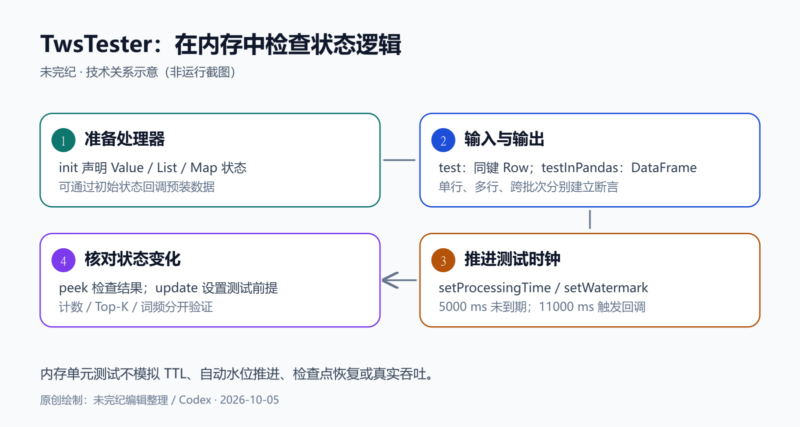
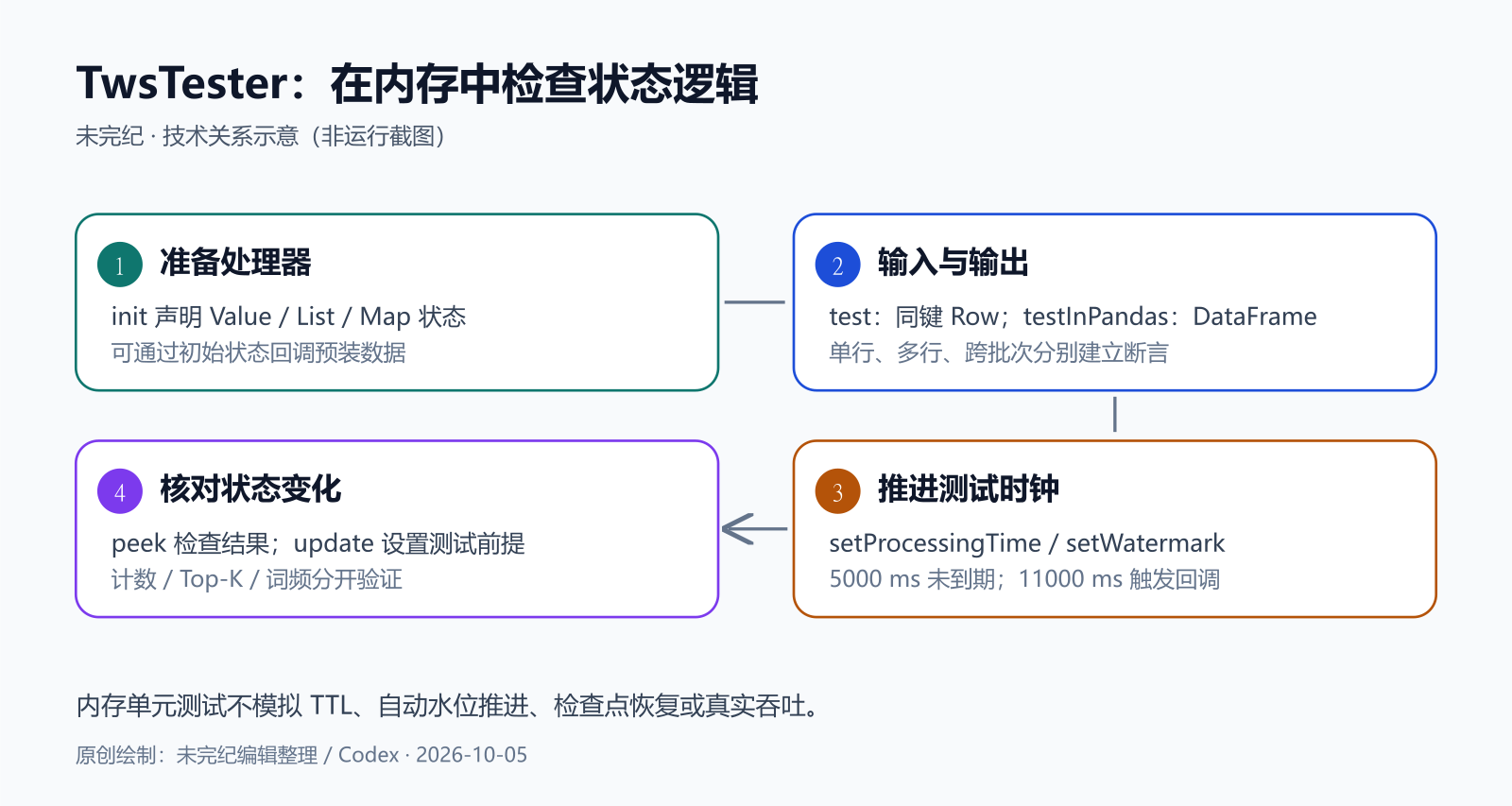
流式程序的错误经常藏在“上一批状态是什么、这次输入之后变成什么”之间。为了验证一个计数器、Top-K 列表或会话超时处理器,没有必要每次都启动真实流式查询。TwsTester 为 StatefulProcessor 提供一个内存中的运行外壳,让测试直接注入输入和初始状态、检查输出,并手动推进时间。
先弄清 StatefulProcessor 的生命周期
TransformWithState 自 Spark 4.0 起提供任意有状态处理能力,是 Scala mapGroupsWithState/flatMapGroupsWithState 和 Python applyInPandasWithState 的新一代替代方向。它采用对象式处理器定义,支持复合状态、定时器及 TTL。Scala、Java 和 Python 均有接口;Python 的 transformWithStateInPandas 使用 Pandas,transformWithState 使用 Row。大量分组键场景中,Row 路径可能减少 Pandas 转换成本,仍需实际测量。
一个查询通常指定处理器、输出模式、时间模式以及可选初始状态。处理器在 init 中通过 handle 声明状态变量,在 handleInputRows 中处理属于一个分组键的输入,在 handleExpiredTimer 中处理到期定时器,在 handleInitialState 中读取初始批状态,并可通过 close 做清理。真实查询中初始状态在输入之前处理,每个查询生命周期只加载一次。
状态变量名在处理器中必须唯一。ValueState 保存一个结构化值;ListState 适合追加与遍历;MapState 适合按用户键查找。状态编码器或 schema 描述其存储形状;Python 示例即使只有一个字段,也以 (value,) 这样的元组读写。定时器可按分组键注册、列出和删除;不能在 init 注册定时器,也不能在到期回调中假装有当前输入行可用。
原指南前半部分的停机探测器解释了“记录最新时间—取消旧定时器—注册新定时器—到期输出间隔”的思路。其查询片段包含省略号,且示例时间模式与所用处理时间定时器需进一步配齐;本稿不把它改写成已经可运行的流式应用。下面主线采用已核对定义与断言的四个伴随处理器。
准备四个处理器定义
官方指南里的类并不是从 pyspark.sql.streaming 自动导出的类。必须先取用随文 helper中的定义。为了让文章可独立阅读,下面保留这四个类的实现,补上所需导入。文件遵循 ASF 的 Apache License 2.0。原 helper 与 TwsTester 源码按 Spark v4.2.0 标签随文提供。两份完整源文件位于同一个源码压缩包根目录:helper_pandas_transform_with_state.py(ZIP 内)、tws_tester.py(ZIP 内),也可直接下载源码包。包内还包含 README、Spark LICENSE 和 NOTICE。Apache LICENSE/NOTICE 全文见随文文件 LICENSE 与 NOTICE。这里仅做静态核验,未导入或执行这些代码。
from typing import Iterator, Optional
import pandas as pd
from pyspark.sql.streaming import StatefulProcessor, StatefulProcessorHandle, TwsTester
from pyspark.sql.types import (
    Row, StructType, StructField, IntegerType, DoubleType, LongType,
)
第一个处理器维护每个键的累计输入行数。初始值来自 initial_count;没有状态时从 0 开始。Pandas 模式会计算所有输入 DataFrame 的行数,Row 模式会消费传入迭代器中的所有行。
class RunningCountStatefulProcessor(StatefulProcessor):
    state_schema = StructType([StructField("value", IntegerType(), True)])

    def __init__(self, use_pandas=True, ttl_duration_ms: Optional[int] = None):
        self.use_pandas = use_pandas
        self.ttl_duration_ms = ttl_duration_ms

    def init(self, handle) -> None:
        self.handle = handle
        self.count = handle.getValueState("count", self.state_schema, self.ttl_duration_ms)

    def handleInitialState(self, key, initialState, timerValues) -> None:
        if self.use_pandas:
            self.count.update((initialState.at[0, "initial_count"],))
        else:
            self.count.update((initialState.initial_count,))

    def handleInputRows(self, key, rows, timerValues) -> Iterator[pd.DataFrame | Row]:
        count = self.count.get()[0] if self.count.exists() else 0
        if self.use_pandas:
            count += sum(1 for row_df in rows for row in row_df.iterrows())
            self.count.update((count,))
            yield pd.DataFrame({"key": [key[0]], "count": [count]})
        else:
            count += sum(1 for row in rows)
            self.count.update((count,))
            yield Row(key=key[0], count=count)
第二个处理器将已有分数与新分数合并,降序排序后只保留 K 个。此例保存分数而不保存项目标识,所以不能凭它返回“哪一个项目”进入 Top-K;同分排序及空值策略也没有作为业务规则定义。
class TopKProcessor(StatefulProcessor):
    state_schema = StructType([StructField("score", DoubleType(), True)])

    def __init__(self, k: int, use_pandas: bool = False, ttl_duration_ms: Optional[int] = None):
        self.k = k
        self.use_pandas = use_pandas
        self.ttl_duration_ms = ttl_duration_ms

    def init(self, handle: StatefulProcessorHandle) -> None:
        self.topk = handle.getListState("topK", self.state_schema, self.ttl_duration_ms)

    def handleInputRows(self, key, rows, timerValues) -> Iterator[pd.DataFrame | Row]:
        scores = [score_tuple[0] for score_tuple in self.topk.get()]
        if self.use_pandas:
            scores.extend([row.score for row_df in rows for _, row in row_df.iterrows()])
        else:
            scores.extend([row.score for row in rows])

        top_k_scores = sorted(scores, reverse=True)[: self.k]
        self.topk.put([(score,) for score in top_k_scores])
        if self.use_pandas:
            yield pd.DataFrame({"key": [key[0]] * len(top_k_scores), "score": top_k_scores})
        else:
            for score in top_k_scores:
                yield Row(key=key[0], score=score)
第三个处理器用 MapState 保存一个分组键内部的词频。外层分组键与内层单词键不同:user1 是测试器的分组键,("hello",) 是 MapState 中的键。它每处理一个词便输出该词更新后的计数。
class RowWordFrequencyProcessor(StatefulProcessor):
    def __init__(self, ttl_duration_ms: Optional[int] = None):
        self.ttl_duration_ms = ttl_duration_ms

    def init(self, handle: StatefulProcessorHandle) -> None:
        self.freq_state = handle.getMapState(
            "frequencies", "key string", "value long", self.ttl_duration_ms
        )

    def handleInputRows(self, key, rows, timerValues) -> Iterator[Row]:
        for row in rows:
            word = row.word
            current_count = (
                self.freq_state.getValue((word,))[0] if self.freq_state.containsKey((word,)) else 0
            )
            updated_count = current_count + 1
            self.freq_state.updateValue((word,), (updated_count,))
            yield Row(key=key[0], word=word, count=updated_count)
第四个处理器使用处理时间维护 10 秒超时。每次收到输入,如果已有上一次时间,就删除旧定时器;随后保存当前处理时间并注册新的 current_time + 10000 定时器。到期时清除状态并输出 session-expired。这里的时间单位是毫秒,超时基于处理时间,不是输入内容里的事件时间。
class SessionTimeoutProcessor(StatefulProcessor):
    """
    Processor that registers a processing time timer on first input and emits a message on expiry.
    Uses a 10-second timeout.
    """

    def __init__(self, use_pandas: bool = False):
        self.use_pandas = use_pandas

    def init(self, handle: StatefulProcessorHandle) -> None:
        state_schema = StructType([StructField("lastSeen", LongType(), True)])
        self.handle = handle
        self.last_seen_state = handle.getValueState("lastSeen", state_schema)

    def handleInputRows(self, key, rows, timerValues) -> Iterator:
        current_time = timerValues.getCurrentProcessingTimeInMs()

        # Clear any existing timer if we have previous state
        if self.last_seen_state.exists():
            old_timer_time = (
                self.last_seen_state.get()[0] + 10000
            )  # old timeout was 10s after last seen
            self.handle.deleteTimer(old_timer_time)

        # Update last seen time and register new timer
        self.last_seen_state.update((current_time,))
        self.handle.registerTimer(current_time + 10000)  # 10 second timeout

        if self.use_pandas:
            results = []
            for row_df in rows:
                for _, row in row_df.iterrows():
                    results.append({"key": key[0], "result": f"received:{row.value}"})
            if results:
                yield pd.DataFrame(results)
        else:
            for row in rows:
                yield Row(key=key[0], result=f"received:{row.value}")

    def handleExpiredTimer(self, key, timerValues, expiredTimerInfo) -> Iterator:
        self.last_seen_state.clear()
        if self.use_pandas:
            yield pd.DataFrame({"key": [key[0]], "result": ["session-expired"]})
        else:
            yield Row(key=key[0], result="session-expired")
从输入输出断言开始
每个独立场景创建自己的处理器与 tester,避免前一场景状态污染后一场景。test 一次接收同一个键的多行;testInPandas 接收这个键的 DataFrame。测试器会把键按处理器回调约定包装为元组,因此实现里用 key[0] 取得这里的单字段键。
processor = RunningCountStatefulProcessor(use_pandas=False)
tester = TwsTester(processor)
result = tester.test("key1", [Row(value="a"), Row(value="b")])
assert result == [Row(key="key1", count=2)]

processor = RunningCountStatefulProcessor(use_pandas=True)
tester = TwsTester(processor)
result_df = tester.testInPandas("key1", pd.DataFrame({"value": ["a", "b"]}))
assert result_df["key"].tolist() == ["key1"]
assert result_df["count"].tolist() == [2]
这些是官方示例的预期断言,本文没有实际运行后得到它们。第一条断言同时检查输出键和计数;只检查“有输出”会遗漏分组键错误或重复处理等问题。Pandas 断言把列转成列表,避免把整个 DataFrame 的相等比较误当作单个布尔值。
注入初始状态和观察状态
tester = TwsTester(
    RunningCountStatefulProcessor(use_pandas=False),
    initialStateRow=[
        ("a", Row(initial_count=10)),
        ("b", Row(initial_count=20)),
    ],
)
assert tester.test("a", [Row(value="x")]) == [Row(key="a", count=11)]

tester = TwsTester(
    RunningCountStatefulProcessor(use_pandas=True),
    initialStatePandas=[
        ("a", pd.DataFrame({"initial_count": [10]})),
        ("b", pd.DataFrame({"initial_count": [20]})),
    ],
)
result_df = tester.testInPandas("a", pd.DataFrame({"value": ["x"]}))
assert result_df.set_index("key")["count"]["a"] == 11

tester = TwsTester(RunningCountStatefulProcessor(use_pandas=False))
tester.test("key1", [Row(value="a"), Row(value="b")])
assert tester.peekValueState("count", "key1") == (2,)
assert tester.peekValueState("count", "key3") is None

tester.updateValueState("count", "foo", (100,))
tester.test("foo", [Row(value="a")])
assert tester.peekValueState("count", "foo") == (101,)
构造器中的 initialStateRow 与 initialStatePandas 不能同时指定。初始状态会经过处理器自己的 handleInitialState,适合测试初始化业务逻辑。相反,updateValueState 直接写入指定状态,适合搭建某个中间状态的测试前提,两者不等价。
peekValueState 返回状态元组;对应分组键没有值时返回 None。状态名需要已在 init 中声明,不能仅靠 update 给处理器添加任意新名字。单字段值 (100,) 后面的逗号不可省略,否则只是一个整数括号表达式。
检查 ListState 和 MapState
tester = TwsTester(TopKProcessor(k=3, use_pandas=False))
tester.updateListState("topK", "key1", [(10.0,), (5.0,)])
tester.test("key1", [Row(score=7.0)])
assert tester.peekListState("topK", "key1") == [(10.0,), (7.0,), (5.0,)]

tester = TwsTester(RowWordFrequencyProcessor())
tester.updateMapState(
    "frequencies", "user1",
    {("hello",): (5,), ("world",): (3,)},
)
tester.test("user1", [Row(word="hello"), Row(word="spark")])
state = tester.peekMapState("frequencies", "user1")
assert state[("hello",)] == (6,)
assert state[("spark",)] == (1,)
Top-K 的例子检查排序和保留规则;词频例子检查已有键累加与新键建立。实际业务测试还应覆盖状态不存在、空输入、重复词、跨键隔离及业务规定的边界值。原 helper 的计数 schema 使用 IntegerType;如果计数可能超出其范围,应在生产 schema 与测试中明确数值类型,不能因为 Python 整数任意精度就忽略 Spark 存储类型。
单步、逐行与批次模拟
如果想把状态变换理解为 state_out = f(state_in, input),可直接设置状态、处理一行,再读回状态。下面的函数只适用于该计数器:若实际处理器还包含其他状态或定时器,仅覆盖一个 ValueState 并不能重置整个业务上下文。
tester = TwsTester(RunningCountStatefulProcessor(use_pandas=False))

def step_function(key: str, input_row: str, state_in: int) -> int:
    tester.updateValueState("count", key, (state_in,))
    tester.test(key, [Row(value=input_row)])
    return tester.peekValueState("count", key)[0]

assert step_function("key1", "a", 10) == 11
逐行处理会多次调用 handleInputRows,而批次模拟会把同键多行合并成一次调用。对于本例,两者最终计数相同,但输出次数不同;其他有状态逻辑也可能依赖批次边界,测试应明确自己在模拟哪一种输入形式。
tester = TwsTester(RunningCountStatefulProcessor(use_pandas=False))

def test_row_by_row(input_rows):
    return [
        output
        for row in input_rows
        for output in tester.test(row["key"], [row])
    ]

output = test_row_by_row([
    Row(key="k1", value="a"),
    Row(key="k2", value="b"),
    Row(key="k1", value="c"),
])
assert output == [
    Row(key="k1", count=1),
    Row(key="k2", count=1),
    Row(key="k1", count=2),
]
按批测试前,先排序再用 itertools.groupby 分组。直接对未排序列表使用 groupby 只会合并相邻的同键记录,可能把一个键拆成几组。这个排序只是本地测试辅助逻辑,不是 Spark 分区调度与输出顺序的承诺。
from itertools import groupby

tester = TwsTester(RunningCountStatefulProcessor(use_pandas=False))

def testBatch(input: list[Row], key_column_name: str = "key") -> list[Row]:
    result: list[Row] = []
    sorted_input = sorted(input, key=lambda row: row[key_column_name])
    for key, rows in groupby(sorted_input, key=lambda row: row[key_column_name]):
        result += tester.test(key, list(rows))
    return result

batch1 = testBatch([
    Row(key="key1", value="a"),
    Row(key="key2", value="b"),
    Row(key="key1", value="c"),
])
assert batch1 == [Row(key="key1", count=2), Row(key="key2", count=1)]
batch2 = testBatch([Row(key="key1", value="c"), Row(key="key1", value="d")])
assert batch2 == [Row(key="key1", count=4)]
手动推进时间,验证到期回调
tester = TwsTester(
    SessionTimeoutProcessor(use_pandas=False),
    timeMode="ProcessingTime",
)
result1 = tester.test("key1", [Row(value="hello")])
assert result1 == [Row(key="key1", result="received:hello")]

assert tester.setProcessingTime(5000) == []
assert tester.setProcessingTime(11000) == [
    Row(key="key1", result="session-expired"),
]
测试器的起始处理时间为 0,第一条输入注册 10000 毫秒的定时器。推进到 5000 毫秒不会触发;推进到 11000 毫秒则触发到期回调。这种做法无需真的等待 11 秒,也不会把机器快慢引入断言。
对事件时间逻辑,应使用 timeMode="EventTime",通过 setWatermark 手动推进水位,并按当前 API 提供 eventTimeExtractor 从输入提取毫秒时间。这里的会话处理器调用的是 getCurrentProcessingTimeInMs,不能仅替换 mode 字符串就把它变成事件时间处理器。官方 Scala 示例的超时输出带有 @10000,Python helper 输出只有 session-expired;断言必须与各自实现一致。
状态演化与真实查询中还要验证的内容
原指南还说明了 TransformWithState 的状态演化。可以在后续运行中添加或移除状态变量;移除时在 init 调用 deleteIfExists 通知引擎清理旧状态。单个状态变量内部的字段演化需要 Avro 编码:
spark.conf.set("spark.sql.streaming.stateStore.encodingFormat", "avro")按照相应 Avro 规则,可添加、删除、重排字段及扩大字段类型,不能直接重命名字段或缩窄类型。演化仅支持状态的 value 侧,不支持 key 侧。读取状态数据源时,每次可用 stateVarName 选择一个变量;读取定时器使用 readRegisteredTimers=true。复合值可以展开成列,也可以以数组或映射形式保留。
这些引擎行为不因内存测试通过就被验证。TwsTester 不执行 TTL 驱逐;即使状态设置了 TTL,测试器中的值仍会保留。它不根据输入事件自动计算和传播水位,水位必须由测试手工设置;也不能替代检查点、重启恢复、状态编码兼容、分区与并行执行、吞吐和真实外部输入输出的集成测试。
本次仅检查正文、四个 helper 和 TwsTester 相关接口,没有启动 Spark、执行断言或创建服务。示例状态写入是本地内存测试 API,并非对真实检查点的修改;其中没有发现硬编码秘密、动态代码执行或生产删除操作,但这不构成无漏洞保证。业务若引入来自外部的数据,还须明确 schema、容量、异常值和日志中的敏感信息处理。
归属与许可:Apache Software Foundation 及贡献者,代码按 Apache License 2.0 提供,相关 LICENSE/NOTICE 随附。本文译写与配图依据另行授权制作;原创技术图另行署名。官方 latest 与仓库 master 会变化,复现应固定文档、PySpark 与 helper 的一致版本。








暂无评论内容