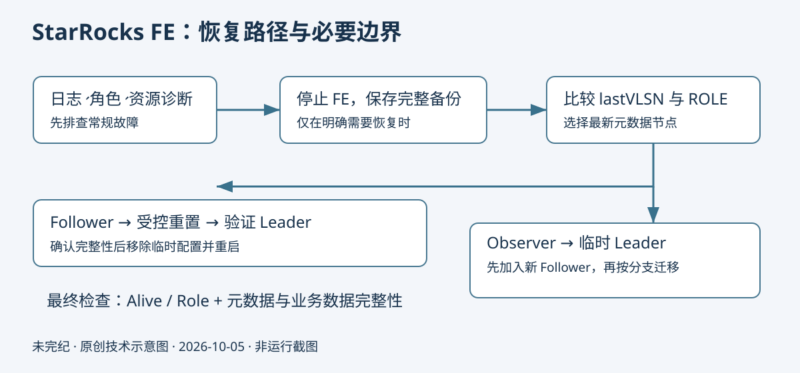



来源与署名:StarRocks 文档维护方;未完纪核查整理(原页未署个人作者)。原文:恢复元数据 | StarRocks Stable-3.5。本文由未完纪核查整理;技术核对日期为 2026 年 10 月 5 日。
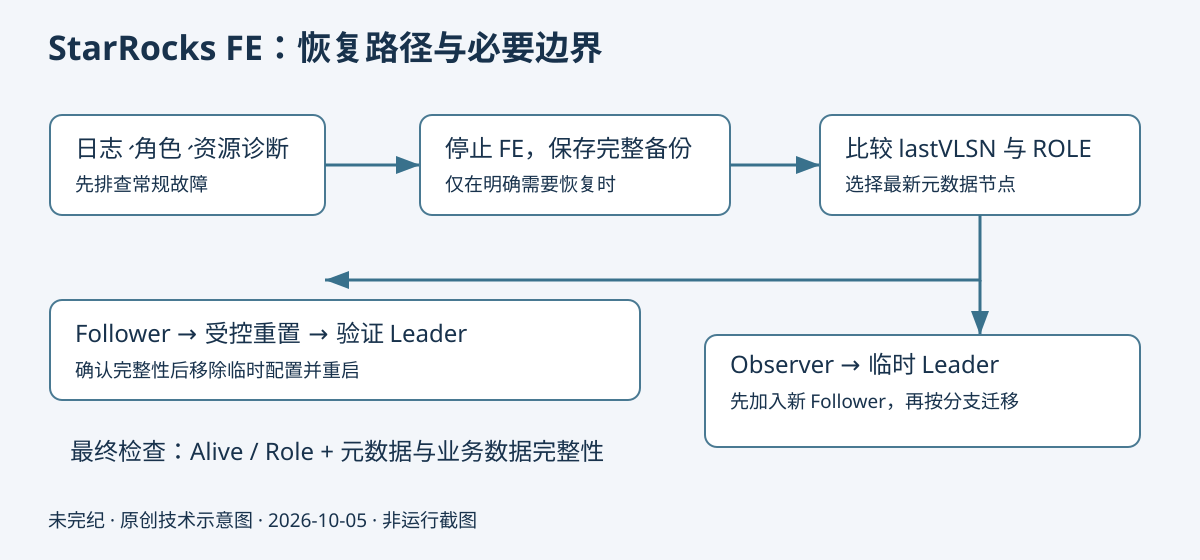
阅读范围:本文依据 StarRocks 官方中文文档 Stable-3.5 整理,保留“启动失败—无法服务—最终应急—备份恢复”的完整诊断路径和代码。来源页面同时说明若干旧版本差异,不能把旧版本开关直接套用于 3.5。以下日志和输出均为原文示例,本次未连接集群、未执行命令、未验证恢复成功。
操作边界:本文面向能够确认拓扑、备份完整性及可恢复性的运维人员。重置选举组、清空 meta_dir、跳过 journal 和忽略未知操作类型都可能导致不可恢复的数据或元数据损失。先保存所有 FE 节点的完整元数据备份、配置、日志与角色信息,在隔离副本中演练,并由了解该集群的技术人员审阅。源文的“清除目录”是破坏性恢复步骤,本文不补充可一键执行的递归删除命令。
编辑核对:先诊断,再决定是否进入应急恢复
- Leader 本身属于参与选举的 Follower;Observer 不计入多数派。源文写 1 + (Follower 节点数/2),应按整数多数派理解为 floor(N/2)+1。不要用所有 FE(含 Observer)的总数计算。
- ROLE 的 name 示例为 IP_edit_log_port_时间戳:IP 是第一个下划线之前,端口是第一与第二个下划线之间。编辑在此明确原文“第二个下划线之前”的指代。
- jstat 的 O 是老年代占用指标,高占用是调查内存压力的线索,单次百分比不能独立证明内存不足;还应结合持续 GC、停顿、堆设置与 OutOfMemoryError。原文诊断条件须结合实际日志使用。
- BDBJE jar 名和目录必须取自实际发行包;源文 18.3.16.jar 示例不能作为任意版本的替换指令。VLSN bug、v7.3.7/v18.3.*混用及v3.0升级说明属于历史兼容性背景。
- SHOW FRONTENDS 中 Alive=true 和 Role=LEADER/FOLLOWER 是角色与存活检查,不能代替表数据、元数据完整性和业务读写验收。所有重建过程只针对已确认的故障与选定备份。
官方正文:故障识别与恢复分支
版本:Stable-3.5
本文介绍在 FE 节点遇到不同异常时如何恢复 StarRocks 集群中的元数据。
通常情况下,只有在出现以下情况时,可能需要进行元数据恢复:
请排查您所遇到的问题,并按照对应解决方案进行操作。建议按照文中推荐的操作执行。
FE 节点无法启动
如果元数据损坏或在回滚后与集群不兼容,可能导致 FE 节点无法启动。
回滚后的元数据不兼容
当降级 StarRocks 集群后,FE 节点有可能因为与降级前版本元数据不兼容而无法启动。
如果在降级集群时遇到以下异常,可以确定出现了此问题:
UNKNOWN Operation Type xxx您可以按照以下步骤恢复元数据并启动 FE 节点:
-
停止所有 FE 节点。
-
备份所有 FE 节点的元数据目录
meta_dir。 -
在所有 FE 节点的配置文件 fe.conf 中添加配置
metadata_ignore_unknown_operation_type = true。 -
启动所有 FE 节点,并检查数据和元数据是否完整。
-
如果数据和元数据都完整,请执行以下语句为元数据创建镜像文件:
ALTER SYSTEM CREATE IMAGE; -
在新的镜像文件传输到所有 FE 节点的目录 meta/image 之后,需要从所有 FE 节点的配置文件中移除配置项
metadata_ignore_unknown_operation_type= true,并重新启动 FE 节点。
元数据损坏
BDBJE 或 StarRocks 的元数据损坏都会导致 FE 节点无法重新启动。
BDBJE 元数据损坏
VLSN Bug
根据以下 Error Message 识别 VLSN Bug:
recoveryTracker should overlap or follow on disk last
VLSN of 6,684,650 recoveryFirst= 6,684,652
UNEXPECTED_STATE_FATAL: Unexpected internal state, unable to continue.
Environment is invalid and must be closed.
按照以下步骤来解决此问题:
-
清除报错 FE 节点的元数据目录
meta_dir。 -
使用 Leader FE 节点作为 Helper 重新启动当前 FE 节点。
# 将 <leader_ip> 替换为 Leader FE 节点的 IP 地址(priority_networks),
# 并将 <leader_edit_log_port>(默认:9010)替换为 Leader FE 节点的 edit_log_port。
./fe/bin/start_fe.sh --helper <leader_ip>:<leader_edit_log_port> --daemon
提示
- 该 Bug 已在 StarRocks v3.1 中修复。您可以通过将集群升级到 v3.1 及以上版本避免此问题。
- 如果超过半数的 FE 节点遇到了此问题,则此解决方案不适用,必须按照 最终应急方案 中提供的说明来解决此问题。
RollbackException
根据以下 Error Message 识别该问题:
must rollback 1 total commits(1 of which were durable) to the earliest point indicated by transaction id=-14752149 time=2022-01-12 14:36:28.21 vlsn=28,069,415 lsn=0x1174/0x16e durable=false in order to rejoin the replication group. All existing ReplicatedEnvironment handles must be closed and reinstantiated. Log files were truncated to file 0x4467, offset 0x269, vlsn 28,069,413 HARD_RECOVERY: Rolled back past transaction commit or abort. Must run recovery by re-opening Environment handles Environment is invalid and must be closed.导致此问题原因是,Leader FE 节点在写入 BDBJE 元数据后挂起,未能将元数据同步到其他 Follower FE 节点。重新启动后,原 Leader 节点变为 Follower,导致元数据损坏。
要解决此问题,只需要重新启动报错节点,从而清除脏数据。
ReplicaWriteException
根据 FE 日志 fe.log 中的关键字 removeReplicaDb 来识别此问题。
Caused by: com.sleepycat.je.rep.ReplicaWriteException: (JE 18.3.16) Problem closing transaction 25000090. The current state is:REPLICA. The node transitioned to this state at:Fri Feb 23 01:31:00 UTC 2024 Problem seen replaying entry NameLN_TX/14 vlsn=1,902,818,939 isReplicated="1"  txn=-953505106 dbop=REMOVE Originally thrown by HA thread: REPLICA 10.233.132.23_9010_1684154162022(6)
        at com.sleepycat.je.rep.txn.ReadonlyTxn.disallowReplicaWrite(ReadonlyTxn.java:114) ~[starrocks-bdb-je-18.3.16.jar:?]
        at com.sleepycat.je.dbi.DbTree.checkReplicaWrite(DbTree.java:880) ~[starrocks-bdb-je-18.3.16.jar:?]
        at com.sleepycat.je.dbi.DbTree.doCreateDb(DbTree.java:579) ~[starrocks-bdb-je-18.3.16.jar:?]
        at com.sleepycat.je.dbi.DbTree.createInternalDb(DbTree.java:507) ~[starrocks-bdb-je-18.3.16.jar:?]
        at com.sleepycat.je.cleaner.ExtinctionScanner.openDb(ExtinctionScanner.java:357) ~[starrocks-bdb-je-18.3.16.jar:?]
        at com.sleepycat.je.cleaner.ExtinctionScanner.prepareForDbExtinction(ExtinctionScanner.java:1703) ~[starrocks-bdb-je-18.3.16.jar:?]
        at com.sleepycat.je.dbi.DbTree.doRemoveDb(DbTree.java:1208) ~[starrocks-bdb-je-18.3.16.jar:?]
        at com.sleepycat.je.dbi.DbTree.removeReplicaDb(DbTree.java:1261) ~[starrocks-bdb-je-18.3.16.jar:?]
        at com.sleepycat.je.rep.impl.node.Replay.applyNameLN(Replay.java:996) ~[starrocks-bdb-je-18.3.16.jar:?]
        at com.sleepycat.je.rep.impl.node.Replay.replayEntry(Replay.java:722) ~[starrocks-bdb-je-18.3.16.jar:?]
        at com.sleepycat.je.rep.impl.node.Replica$ReplayThread.run(Replica.java:1225) ~[starrocks-bdb-je-18.3.16.jar:?]
导致此问题原因是当前 FE 节点的 BDBJE 版本(v18.3.*)与 Leader FE 节点的版本(v7.3.7)不匹配。
按照以下步骤来解决此问题:
-
删除报错的 Follower 或 Observer 节点。
-- 如需删除 Follower 节点,请将 <follower_host> 替换为 Follower 节点的 IP 地址(priority_networks), -- 并将 <follower_edit_log_port>(默认值:9010)替换为 Follower 节点的 edit_log_port。 ALTER SYSTEM DROP FOLLOWER "<follower_host>:<follower_edit_log_port>"; -- 如需删除 Observer 节点,请将 <observer_host> 替换为 Observer 节点的 IP 地址(priority_networks), -- 并将 <observer_edit_log_port>(默认值:9010)替换为 Observer 节点的 edit_log_port。 ALTER SYSTEM DROP OBSERVER "<observer_host>:<observer_edit_log_port>"; -
将报错节点重新添加到集群中。
-- 添加 Follower 节点。 ALTER SYSTEM ADD FOLLOWER "<follower_host>:<follower_edit_log_port>"; -- 添加 Observer 节点。 ALTER SYSTEM ADD OBSERVER "<observer_host>:<observer_edit_log_port>"; -
清除报错节点的元数据目录
meta_dir。 -
使用 Leader FE 节点作为 Helper 重新启动报错节点。
# 将 <leader_ip> 替换为 Leader FE 节点的 IP 地址(priority_networks), # 并将 <leader_edit_log_port>(默认:9010)替换为 Leader FE 节点的 edit_log_port。 ./fe/bin/start_fe.sh --helper <leader_ip>:<leader_edit_log_port> --daemon -
在报错节点健康状态恢复后,需要将集群中的 BDBJE 软件包升级到 starrocks-bdb-je-18.3.16.jar(或将 StarRocks 集群升级到 v3.0 或更高版本)。此操作需要按照先 Follower,后 Leader 的顺序进行。
InsufficientLogException
根据以下 Error Message 识别该问题:
xxx INSUFFICIENT_LOG: Log files at this node are obsolete. Environment is invalid and must be closed.此问题原因是 Follower 节点需要进行全量元数据同步。以下情况可能导致该问题:
- Follower 节点的元数据落后于 Leader 节点,但 Leader 节点已经进行元数据 CheckPoint。Follower 节点无法对其元数据执行增量更新,因此需要进行元数据全量同步。
- 原 Leader 节点写入元数据并 CheckPoint,但在挂起之前未能将元数据同步到 Follower 节点。重新启动后,原 Leader 节点变为 Follower 节点。由于有脏元数据已经 CheckPoint,该节点无法对其元数据执行增量删除,因此需要进行元数据全量同步。
请注意,当新的 Follower 节点加入集群时,会抛出此异常。在这种情况下,无需采取任何操作。如果已有的 Follower 节点或 Leader 节点抛出此异常,则只需重新启动该节点。
HANDSHAKE_ERROR: Error during the handshake between two nodes
根据以下 Error Message 识别该问题:
2023-11-13 21:51:55,271 WARN (replayer|82) [BDBJournalCursor.wrapDatabaseException():97] failed to get DB names for 1 times!Got EnvironmentFailureExce
com.sleepycat.je.EnvironmentFailureException: (JE 18.3.16) Environment must be closed, caused by: com.sleepycat.je.EnvironmentFailureException: Environment invalid because of previous exception: (JE 18.3.16) 10.26.5.115_9010_1697071897979(1):/data1/meta/bdb A replica with the name: 10.26.5.115_9010_1697071897979(1) is already active with the Feeder:null HANDSHAKE_ERROR: Error during the handshake between two nodes. Some validity or compatibility check failed, preventing further communication between the nodes. Environment is invalid and must be closed.
        at com.sleepycat.je.EnvironmentFailureException.wrapSelf(EnvironmentFailureException.java:230) ~[starrocks-bdb-je-18.3.16.jar:?]
        at com.sleepycat.je.dbi.EnvironmentImpl.checkIfInvalid(EnvironmentImpl.java:1835) ~[starrocks-bdb-je-18.3.16.jar:?]
        at com.sleepycat.je.dbi.EnvironmentImpl.checkOpen(EnvironmentImpl.java:1844) ~[starrocks-bdb-je-18.3.16.jar:?]
        at com.sleepycat.je.Environment.checkOpen(Environment.java:2697) ~[starrocks-bdb-je-18.3.16.jar:?]
        at com.sleepycat.je.Environment.getDatabaseNames(Environment.java:2455) ~[starrocks-bdb-je-18.3.16.jar:?]
        at com.starrocks.journal.bdbje.BDBEnvironment.getDatabaseNamesWithPrefix(BDBEnvironment.java:478) ~[starrocks-fe.jar:?]
        at com.starrocks.journal.bdbje.BDBJournalCursor.refresh(BDBJournalCursor.java:177) ~[starrocks-fe.jar:?]
        at com.starrocks.server.GlobalStateMgr$5.runOneCycle(GlobalStateMgr.java:2148) ~[starrocks-fe.jar:?]
        at com.starrocks.common.util.Daemon.run(Daemon.java:115) ~[starrocks-fe.jar:?]
        at com.starrocks.server.GlobalStateMgr$5.run(GlobalStateMgr.java:2216) ~[starrocks-fe.jar:?]
Caused by: com.sleepycat.je.EnvironmentFailureException: Environment invalid because of previous exception: (JE 18.3.16) 10.26.5.115_9010_1697071897979(1):/data1/meta/bdb A replica with the name: 10.26.5.115_9010_1697071897979(1) is already active with the Feeder:null HANDSHAKE_ERROR: Error during the handshake between two nodes. Some validity or compatibility check failed, preventing further communication between the nodes. Environment is invalid and must be closed. Originally thrown by HA thread: UNKNOWN 10.26.5.115_9010_1697071897979(1) Originally thrown by HA thread: UNKNOWN 10.26.5.115_9010_1697071897979(1)
        at com.sleepycat.je.rep.stream.ReplicaFeederHandshake.negotiateProtocol(ReplicaFeederHandshake.java:198) ~[starrocks-bdb-je-18.3.16.jar:?]
        at com.sleepycat.je.rep.stream.ReplicaFeederHandshake.execute(ReplicaFeederHandshake.java:250) ~[starrocks-bdb-je-18.3.16.jar:?]
        at com.sleepycat.je.rep.impl.node.Replica.initReplicaLoop(Replica.java:709) ~[starrocks-bdb-je-18.3.16.jar:?]
        at com.sleepycat.je.rep.impl.node.Replica.runReplicaLoopInternal(Replica.java:485) ~[starrocks-bdb-je-18.3.16.jar:?]
        at com.sleepycat.je.rep.impl.node.Replica.runReplicaLoop(Replica.java:412) ~[starrocks-bdb-je-18.3.16.jar:?]
        at com.sleepycat.je.rep.impl.node.RepNode.run(RepNode.java:1869) ~[starrocks-bdb-je-18.3.16.jar:?]
导致此问题原因是,Leader 节点挂起后,剩余的 Follower 节点尝试选举新的 Leader 节点,此时原 Leader 节点重新上线。Follower 节点将尝试与原始 Leader 节点建立新连接。但是,由于旧有连接仍然存在,Leader 节点将拒绝连接请求。一旦请求被拒绝,Follower 节点会将环境设置为 Invalid 并抛出此异常。
要解决此问题,可以增加 JVM 内存大小或使用 G1 GC 算法。
DatabaseNotFoundException
根据以下 Error Message 识别该问题:
2024-01-05 12:47:21,087 INFO (main|1) [BDBEnvironment.ensureHelperInLocal():340] skip check local environment because helper node and local node are identical.
2024-01-05 12:47:21,339 ERROR (MASTER 172.17.0.1_9112_1704430041062(-1)|1) [StarRocksFE.start():186] StarRocksFE start failed
com.sleepycat.je.DatabaseNotFoundException: (JE 18.3.16) _jeRepGroupDB
        at com.sleepycat.je.rep.impl.RepImpl.openGroupDb(RepImpl.java:1974) ~[starrocks-bdb-je-18.3.16.jar:?]
        at com.sleepycat.je.rep.impl.RepImpl.getGroupDb(RepImpl.java:1912) ~[starrocks-bdb-je-18.3.16.jar:?]
        at com.sleepycat.je.rep.impl.RepGroupDB.reinitFirstNode(RepGroupDB.java:1439) ~[starrocks-bdb-je-18.3.16.jar:?]
        at com.sleepycat.je.rep.impl.node.RepNode.reinitSelfElect(RepNode.java:1686) ~[starrocks-bdb-je-18.3.16.jar:?]
        at com.sleepycat.je.rep.impl.node.RepNode.startup(RepNode.java:874) ~[starrocks-bdb-je-18.3.16.jar:?]
        at com.sleepycat.je.rep.impl.node.RepNode.joinGroup(RepNode.java:2153) ~[starrocks-bdb-je-18.3.16.jar:?]
        at com.sleepycat.je.rep.impl.RepImpl.joinGroup(RepImpl.java:618) ~[starrocks-bdb-je-18.3.16.jar:?]
        at com.sleepycat.je.rep.ReplicatedEnvironment.joinGroup(ReplicatedEnvironment.java:558) ~[starrocks-bdb-je-18.3.16.jar:?]
        at com.sleepycat.je.rep.ReplicatedEnvironment.<init>(ReplicatedEnvironment.java:619) ~[starrocks-bdb-je-18.3.16.jar:?]
        at com.sleepycat.je.rep.ReplicatedEnvironment.<init>(ReplicatedEnvironment.java:464) ~[starrocks-bdb-je-18.3.16.jar:?]
        at com.sleepycat.je.rep.ReplicatedEnvironment.<init>(ReplicatedEnvironment.java:538) ~[starrocks-bdb-je-18.3.16.jar:?]
        at com.sleepycat.je.rep.util.DbResetRepGroup.reset(DbResetRepGroup.java:262) ~[starrocks-bdb-je-18.3.16.jar:?]
        at com.starrocks.journal.bdbje.BDBEnvironment.initConfigs(BDBEnvironment.java:188) ~[starrocks-fe.jar:?]
        at com.starrocks.journal.bdbje.BDBEnvironment.setup(BDBEnvironment.java:174) ~[starrocks-fe.jar:?]
        at com.starrocks.journal.bdbje.BDBEnvironment.initBDBEnvironment(BDBEnvironment.java:153) ~[starrocks-fe.jar:?]
        at com.starrocks.journal.JournalFactory.create(JournalFactory.java:31) ~[starrocks-fe.jar:?]
        at com.starrocks.server.GlobalStateMgr.initJournal(GlobalStateMgr.java:1201) ~[starrocks-fe.jar:?]
        at com.starrocks.server.GlobalStateMgr.initialize(GlobalStateMgr.java:1150) ~[starrocks-fe.jar:?]
        at com.starrocks.StarRocksFE.start(StarRocksFE.java:129) ~[starrocks-fe.jar:?]
        at com.starrocks.StarRocksFE.main(StarRocksFE.java:83) ~[starrocks-fe.jar:?]
在 FE 配置文件 fe.conf 中添加配置 metadata_failure_recovery = true 后会出现此问题。
要解决此问题,需要删除该配置并重新启动节点。
StarRocks 元数据损坏
您可以根据以下两种 Error Message 识别 StarRocks 元数据损坏问题:
failed to load journal type xxx或
catch exception when replayingwarning
在执行以下操作恢复元数据之前,强烈建议您在 StarRocks 社区中寻求技术专家的帮助,因为该解决方案有可能导致数据丢失。
按照以下步骤来解决此问题:
忽略错误 Journal ID(首选)
-
关闭所有 FE 节点。
-
备份所有 FE 节点的元数据目录。
-
在日志中找到出错的 Journal ID。以下日志中的
xxx代表错误的 Journal ID。got interrupt exception or inconsistent exception when replay journal xxx, will exit -
在所有的 fe.conf 中添加配置,并重新启动 FE。
metadata_journal_skip_bad_journal_ids=xxx -
如果仍然无法启动,需要再次通过第 3 步找到新的失败的 Journal ID,并添加到 fe.conf 中。先前配置的仍然要保留,然后再重启。
metadata_journal_skip_bad_journal_ids=xxx,yyy -
通过以上步骤如果仍然不能启动,或者失败的 Journal ID 太多,需要按以下 Recover Mode 恢复。
Recovery Mode
-
停止所有 FE 节点。
-
备份所有 FE 节点的元数据目录
meta_dir。 -
在所有 FE 节点的配置文件 fe.conf 中添加配置
metadata_enable_recovery_mode = true。注意,此模式下禁止写入数据。 -
启动所有 FE 节点,并查询集群中的表,检查数据是否完整。
如果在查询这些表时返回以下错误,则必须等待元数据恢复完成:
ERROR 1064 (HY000): capture_consistent_versions error: version already been compacted.从 Leader FE 节点执行以下语句查看元数据恢复的进度:
SHOW PROC '/meta_recovery';该语句将显示无法恢复的分区。您可以按照其中返回的建议来恢复这些分区。如果没有返回任何内容,则表示恢复成功。
-
如果数据和元数据都完整,请执行以下语句为元数据创建镜像文件:
ALTER SYSTEM CREATE IMAGE; -
在新的镜像文件传输到所有 FE 节点的目录 meta/image 之后,可以从所有 FE 节点的配置文件中移除配置项
metadata_enable_recovery_mode = true,并重新启动 FE 节点。
FE 节点无法提供服务
当 Follower FE 节点无法选举 Leader 时, FE 将无法提供服务。当此问题发生时,以下日志记录可能会重复出现:
wait globalStateMgr to be ready. FE type: INIT. is ready: false多种异常都有可能导致此问题。强烈建议按照以下部分逐步排查问题。使用错误的解决方案会使问题恶化,并可能导致数据丢失。
1. 多数 Follower 节点未启动
如果大多数 Follower 节点未运行, FE 节点组将无法提供服务。此处“大多数”指 1 + (Follower 节点数/2)。请注意,Leader FE 节点本身也是一个 Follower 节点,但 Observer 节点不是 Follower 节点。
-
从 fe/meta/image/ROLE 文件中查看每个 FE 节点的角色:
cat fe/meta/image/ROLE #Fri Jan 19 20:03:14 CST 2024 role=FOLLOWER hostType=IP name=172.26.92.154_9312_1705568349984 -
从 BDBJE 日志中查看 Follower 节点的总数:
grep "Current group size" fe/meta/bdb/je.info.0
# 以下示例输出表明集群中有三个 Follower 节点。
2024-01-24 08:21:44.754 UTC INFO [172.26.92.139_29917_1698226672727] Current group size: 3
要解决此问题,需要启动集群中的所有 Follower 节点。如果无法重新启动,请参阅最终应急方案。
2. 节点 IP 变更
如果 FE 节点未配置 priority_networks,则在重新启动时系统会随机选择一个可用的 IP 地址。如果 BDBJE 元数据中记录的 IP 地址与启动节点时使用的 IP 地址不同, FE 节点将无法提供服务。
-
从 fe/meta/image/ROLE 文件中查看 BDBJE 元数据中记录的 IP 地址:
cat fe/meta/image/ROLE
#Fri Jan 19 20:03:14 CST 2024
role=FOLLOWER
hostType=IP
name=172.26.92.154_9312_1705568349984
第一个下划线之前的值是 BDBJE 元数据中记录的 IP 地址。
-
从 FE 日志中查看用于启动节点的 IP 地址:
grep "IP:" fe/log/fe.log
2024-02-06 14:33:58,211 INFO (main|1) [FrontendOptions.initAddrUseIp():249] Use IP init local addr, IP: /172.17.0.1
2024-02-06 14:34:27,689 INFO (main|1) [FrontendOptions.initAddrUseIp():249] Use IP init local addr, IP: /172.17.0.1
要解决此问题,需要将节点 fe.conf 中的 priority_networks 设置为 fe/meta/image/ROLE 中记录的 IP 地址,并重新启动节点。
3. 节点间的系统时钟未同步
通过在 fe.out、fe.log 或 fe/meta//bdb/je.info.0 中查找以下 Error Message 识别该问题:
com.sleepycat.je.EnvironmentFailureException: (JE 7.3.7) Environment must be closed, caused by: com.sleepycat.je.EnvironmentFailureException: Environment invalid because of previous exception: (JE 7.3.7) 172.26.92.139_29917_1631006307557(2180):xxx Clock delta: 11020 ms. between Feeder: 172.26.92.154_29917_1641969377236 and this Replica exceeds max permissible delta: 5000 ms. HANDSHAKE_ERROR: Error during the handshake between two nodes. Some validity or compatibility check failed, preventing further communication between the nodes. Environment is invalid and must be closed. fetchRoot of 0x1278/0x1fcbb8 state=0 expires=never要解决此问题,需要同步节点间的系统时钟。
4. 磁盘空间不足
将 StarRocks 升级到 v3.0 或更高版本,或将 BDBJE 升级到 v18 或更高版本后,如果 meta_dir 所在的磁盘可用空间小于 5 GB,则节点可能无法启动。
您可以从目录 fe/lib 下的 .jar 包查看 BDBJE 版本。
要解决此问题,可以扩容磁盘,或为 FE 元数据分配一个容量更大的专用磁盘。
5. edit_log_port 变更
如果 BDBJE 元数据中记录的 edit_log_port 与 fe.conf 中配置的不同, FE 节点将无法提供服务。
从 fe/meta/image/ROLE 文件中查看 BDBJE 元数据中记录的 edit_log_port:
cat fe/meta/image/ROLE
#Fri Jan 19 20:03:14 CST 2024
role=FOLLOWER
hostType=IP
name=172.26.92.154_9312_1705568349984
第二个下划线之前的值是 BDBJE 元数据中记录的 edit_log_port。
要解决此问题,需要将节点 fe.conf 中的 edit_log_port 设置为 fe/meta/image/ROLE 中记录的 edit_log_port,并重新启动节点。
6. JVM 内存不足
使用 jstat 命令查看JVM内存使用情况:
jstat -gcutil pid 1000 1000
  S0     S1     E      O      M     CCS    YGC     YGCT    FGC    FGCT     GCT
  0.00 100.00  27.78  95.45  97.77  94.45     24    0.226     1    0.065    0.291
  0.00 100.00  44.44  95.45  97.77  94.45     24    0.226     1    0.065    0.291
  0.00 100.00  55.56  95.45  97.77  94.45     24    0.226     1    0.065    0.291
  0.00 100.00  72.22  95.45  97.77  94.45     24    0.226     1    0.065    0.291
  0.00 100.00  88.89  95.45  97.77  94.45     24    0.226     1    0.065    0.291
  0.00 100.00   5.26  98.88  97.80  94.45     25    0.231     1    0.065    0.297
  0.00 100.00  21.05  98.88  97.80  94.45     25    0.231     1    0.065    0.297
  0.00 100.00  31.58  98.88  97.80  94.45     25    0.231     1    0.065    0.297
  0.00 100.00  47.37  98.88  97.80  94.45     25    0.231     1    0.065    0.297
  0.00 100.00  63.16  98.88  97.80  94.45     25    0.231     1    0.065    0.297
  0.00 100.00  73.68  98.88  97.80  94.45     25    0.231     1    0.065    0.297
如果字段 O 中显示的百分比较高,则表示 JVM 内存大小不足。
要解决此问题,必须增大 JVM 内存。
7. Latch timeout. com.sleepycat.je.log.LogbufferPool_FullLatch
根据以下 Error Message 识别该问题:
Environment invalid because of previous exception: xxx Latch timeout. com.sleepycat.je.log.LogbufferPool_FullLatch xxx'
        at com.sleepycat.je.EnvironmentFailureException.unexpectedState(EnvironmentFailureException.java:459)
        at com.sleepycat.je.latch.LatchSupport.handleTimeout(LatchSupport.java:211)
        at com.sleepycat.je.latch.LatchWithStatsImpl.acquireExclusive(LatchWithStatsImpl.java:87)
        at com.sleepycat.je.log.LogBufferPool.bumpCurrent(LogBufferPool.java:527)
        at com.sleepycat.je.log.LogManager.flushInternal(LogManager.java:1373)
        at com.sleepycat.je.log.LogManager.flushNoSync(LogManager.java:1337)
        at com.sleepycat.je.log.LogFlusher$FlushTask.run(LogFlusher.java:232)
        at java.util.TimerThread.mainLoop(Timer.java:555)
        at java.util.TimerThread.run(Timer.java:505)
当 FE 节点的本地磁盘压力过大时会出现此问题。
要解决此问题,可以为 FE 元数据路径分配一个专用磁盘,或者将当前磁盘替换为高性能磁盘。
8. InsufficientReplicasException
根据以下 Error Message 识别该问题:
com.sleepycat.je.rep.InsufficientReplicasException: (JE 7.3.7) Commit policy: SIMPLE_MAJORITY required 1 replica. But none were active with this master.当 Leader FE 节点或 Follower FE 节点使用过多内存资源而导致 Full GC 时,会出现此问题。
要解决此问题,可以增加 JVM 内存大小或使用 G1 GC 算法。
9. UnknownMasterException
根据以下 Error Message 识别该问题:
com.sleepycat.je.rep.UnknownMasterException: (JE 18.3.16) Could not determine master from helpers at:[/xxx.xxx.xxx.xxx:9010, /xxx.xxx.xxx.xxx:9010]
        at com.sleepycat.je.rep.elections.Learner.findMaster(Learner.java:443) ~[starrocks-bdb-je-18.3.16.jar:?]
        at com.sleepycat.je.rep.util.ReplicationGroupAdmin.getMasterSocket(ReplicationGroupAdmin.java:186) ~[starrocks-bdb-je-18.3.16.jar:?]
        at com.sleepycat.je.rep.util.ReplicationGroupAdmin.doMessageExchange(ReplicationGroupAdmin.java:607) ~[starrocks-bdb-je-18.3.16.jar:?]
        at com.sleepycat.je.rep.util.ReplicationGroupAdmin.getGroup(ReplicationGroupAdmin.java:406) ~[starrocks-bdb-je-18.3.16.jar:?]
        at com.starrocks.ha.BDBHA.getElectableNodes(BDBHA.java:178) ~[starrocks-fe.jar:?]
        at com.starrocks.common.proc.FrontendsProcNode.getFrontendsInfo(FrontendsProcNode.java:96) ~[starrocks-fe.jar:?]
        at com.starrocks.common.proc.FrontendsProcNode.fetchResult(FrontendsProcNode.java:80) ~[starrocks-fe.jar:?]
        at com.starrocks.sql.ast.ShowProcStmt.getMetaData(ShowProcStmt.java:74) ~[starrocks-fe.jar:?]
        at com.starrocks.qe.ShowExecutor.handleShowProc(ShowExecutor.java:872) ~[starrocks-fe.jar:?]
        at com.starrocks.qe.ShowExecutor.execute(ShowExecutor.java:286) ~[starrocks-fe.jar:?]
        at com.starrocks.qe.StmtExecutor.handleShow(StmtExecutor.java:1574) ~[starrocks-fe.jar:?]
        at com.starrocks.qe.StmtExecutor.execute(StmtExecutor.java:688) ~[starrocks-fe.jar:?]
        at com.starrocks.qe.ConnectProcessor.handleQuery(ConnectProcessor.java:336) ~[starrocks-fe.jar:?]
        at com.starrocks.qe.ConnectProcessor.dispatch(ConnectProcessor.java:530) ~[starrocks-fe.jar:?]
        at com.starrocks.qe.ConnectProcessor.processOnce(ConnectProcessor.java:838) ~[starrocks-fe.jar:?]
        at com.starrocks.mysql.nio.ReadListener.lambda$handleEvent$0(ReadListener.java:69) ~[starrocks-fe.jar:?]
        at java.util.concurrent.ThreadPoolExecutor.runWorker(ThreadPoolExecutor.java:1128) ~[?:?]
        at java.util.concurrent.ThreadPoolExecutor$Worker.run(ThreadPoolExecutor.java:628) ~[?:?]
        at java.lang.Thread.run(Thread.java:829) ~[?:?]
执行 SHOW FRONTENDS 的时候发现找不到 Leader FE 节点,原因有多种:
- 发现有超过半数以上的FE发生了 Full GC,并且时间都很长。
- 日志中有
java.lang.OutOfMemoryError: Java heap space关键字。
可以断定是内存不足,需要调大 JVM 的内存。
10. 最终应急方案
warning
只有在前述情况都不适用的情况下,才建议尝试以下解决方案,作为最终应急方案。
此解决方案旨在处理极端情况,包括:
- 多数 Follower 节点无法启动。
- 由于 BDBJE 的 Bug 导致 Follower 节点无法选举 Leader。
- 前述章节提及以外的其他异常。
按照以下步骤恢复元数据:
-
停止所有 FE 节点。
-
备份所有 FE 节点的元数据目录
meta_dir。 -
查看拥有最新元数据的节点。您需要在所有 FE 节点的服务器上运行以下命令。
# 需要在命令中指定节点实际使用的 .jar 包名,因为该包会根据 StarRocks 版本不同而变化。
java -jar fe/lib/starrocks-bdb-je-18.3.16.jar DbPrintLog -h meta/bdb/ -vd
示例输出:
<DbPrintLog> file 0x3b numRepRecords = 24479 firstVLSN = 1,434,126 lastVLSN = 1,458,604 file 0x3c numRepRecords = 22541 firstVLSN = 1,458,605 lastVLSN = 1,481,145 file 0x3d numRepRecords = 25176 firstVLSN = 1,481,146 lastVLSN = 1,506,321 ...... file 0x74 numRepRecords = 26903 firstVLSN = 2,927,458 lastVLSN = 2,954,360 file 0x75 numRepRecords = 26496 firstVLSN = 2,954,361 lastVLSN = 2,980,856 file 0x76 numRepRecords = 18727 firstVLSN = 2,980,857 lastVLSN = 2,999,583 ... 0 files at end First file: 0x3b Last file: 0x76 </DbPrintLog>lastVLSN值最大的节点具有最新的元数据。 -
从 fe/meta/image/ROLE 文件中查看元数据最新的 FE 节点的角色(Follower 或 Observer)。
cat fe/meta/image/ROLE
#Fri Jan 19 20:03:14 CST 2024
role=FOLLOWER
hostType=IP
name=172.26.92.154_9312_1705568349984
如果有多个元数据最新的节点,建议优先选择一个 Follower 节点继续下述步骤。如果有多个 Follower 节点元数据最新,可以选择其中一个继续。
-
根据上一步中选择的 FE 节点的角色,执行相应的操作。
- 从 Follower 节点恢复
- 从 Observer 节点恢复
如果元数据最新的节点为 Follower,则执行以下操作:
-
在 fe.conf 中添加以下配置:
bdbje_reset_election_group = true -
启动该节点,并检查数据和元数据是否完整。
-
查看当前节点是否为 Leader 节点。
SHOW FRONTENDS;- 如果字段
Alive为true,说明该 FE 节点正常启动并加入集群。 - 如果字段
Role为LEADER,说明该 FE 节点为 Leader FE 节点。
- 如果字段
-
如果数据和元数据完整,且该节点的角色是 Leader,可以删除之前添加的配置并重新启动节点。
如果元数据最新的节点为 Observer,则执行以下操作:
-
在 fe/meta/image/ROLE 文件中将 FE 节点的角色从
OBSERVER更改为FOLLOWER。 -
在 fe.conf 中添加以下配置:
bdbje_reset_election_group = true -
启动该节点,并检查数据和元数据是否完整。
-
查看当前节点是否为 Leader 节点。
SHOW FRONTENDS;- 如果字段
Alive为true,说明该 FE 节点正常启动并加入集群。 - 如果字段
Role为LEADER,说明该 FE 节点为 Leader FE 节点。
- 如果字段
-
如果数据和元数据完整,且该节点的角色是 Leader,可以删除之前添加的配置。但不要重新启动该节点。
-
向集群添加一个新的 Follower 节点(基于新的服务器)。
ALTER SYSTEM ADD FOLLOWER "<new_follower_host>:<new_follower_edit_log_port>"; -
使用临时 Leader FE 节点作为 Helper,在新服务器上启动新 FE 节点。
# 将 <leader_ip> 替换为 Leader FE 节点的 IP 地址(priority_networks), # 并将 <leader_edit_log_port>(默认:9010)替换为 Leader FE 节点的 edit_log_port。 ./fe/bin/start_fe.sh --helper <leader_ip>:<leader_edit_log_port> --daemon -
新的 FE 节点成功启动后,检查两个 FE 节点的状态和角色:
SHOW FRONTENDS;- 如果字段
Alive为true,说明该 FE 节点正常启动并加入集群。 - 如果字段
Role为FOLLOWER,说明该 FE 节点是 Follower FE 节点。 - 如果字段
Role为LEADER,说明该 FE 节点为 Leader FE 节点。
- 如果字段
-
如果新的 Follower 节点在集群中成功运行,就可以停止所有节点。
-
仅在新的 Follower 节点的 fe.conf 中添加以下配置:
-
StarRocks v2.5、v3.0、v3.1.9 及之前小版本和 v3.2.4 及之前小版本:
metadata_failure_recovery = true -
StarRocks v3.1.10 及之后小版本、v3.2.5 及之后小版本和 v3.3 及之后版本:
bdbje_reset_election_group = true
-
-
启动新的 Follower 节点,并检查数据和元数据是否完整。
-
查看当前节点是否为 Leader 节点。
SHOW FRONTENDS;- 如果字段
Alive为true,说明该 FE 节点正常启动并加入集群。 - 如果字段
Role为LEADER,说明该 FE 节点为 Leader FE 节点。
- 如果字段
-
如果数据和元数据完整,且该节点的角色是 Leader,可以删除之前添加的配置并重新启动节点。
-
将需要重新添加回集群的 FE 节点的元数据目录
meta_dir清除。 -
使用新 Leader FE 节点作为 Helper 启动 Follower 节点。
# 将 <leader_ip> 替换为 Leader FE 节点的 IP 地址(priority_networks), # 并将 <leader_edit_log_port>(默认:9010)替换为 Leader FE 节点的 edit_log_port。 ./fe/bin/start_fe.sh --helper <leader_ip>:<leader_edit_log_port> --daemon -
将 Follower 节点重新添加至集群。
ALTER SYSTEM ADD FOLLOWER "<new_follower_host>:<new_follower_edit_log_port>";
当所有节点都重新添加到集群后,元数据恢复成功。
基于备份在新 FE 节点恢复元数据
如果要使用元数据备份启动新的 FE 节点,请按照以下步骤操作:
-
将备份的元数据路径
meta_dir复制至新的 FE 节点。 -
在该 FE 节点的配置文件中添加配置项
bdbje_reset_election_group为true。bdbje_reset_election_group = true -
启动该 FE 节点。
./fe/bin/start_fe.sh -
查看当前节点是否为 Leader 节点。
SHOW FRONTENDS;如果字段
Role为LEADER,说明该 FE 节点为 Leader FE 节点。确保返回的是当前 FE 节点的 IP 地址。 -
如果数据和元数据完整,且该节点的角色是 Leader 后,需要删除之前添加的配置项
bdbje_reset_election_group并重新启动节点。 -
现在,您已成功通过元数据备份启动了新的 Leader FE 节点。您可以使用新 Leader FE 节点作为 Helper 添加 Follower 节点。
# 将 <leader_ip> 替换为 Leader FE 节点的 IP 地址(priority_networks),
# 并将 <leader_edit_log_port>(默认:9010)替换为 Leader FE 节点的 edit_log_port。
./fe/bin/start_fe.sh --helper <leader_ip>:<leader_edit_log_port> --daemon
元数据恢复相关配置
提示
元数据恢复完成后,必须删除以下配置。
恢复后的收尾与证据留存
源文要求恢复完成后移除 bdbje_reset_election_group、metadata_enable_recovery_mode、metadata_ignore_unknown_operation_type。本文保留各分支的重启顺序,尤其是 Observer 转临时 Leader 后,首次移除配置时不要立即重启;必须先按该分支加入新的 Follower,再继续后续步骤。metadata_journal_skip_bad_journal_ids 也应作为事故期间的例外配置单独登记,由技术人员核对后续处理,不应无记录长期遗留。
建议在事故记录中保存:原始错误及时间、所有 FE 角色、实际版本与 JAR、各节点 lastVLSN、选择恢复节点的依据、备份路径与校验结果、配置差异、恢复后的 SHOW FRONTENDS 和业务核验结果。这是编辑补充的记录建议,不是已经完成的测试报告。
原文版权:© 2023 StarRocks, Inc.;维护方为 StarRocks 文档团队,原页未署个人作者。本稿由未完纪整理,保留官方技术正文与代码,补充操作风险、版本边界及收尾检查,调整排版与失效章节锚点。配图为未完纪原创技术示意图(2026-10-05),不是官方截图或实际运行记录。
上游版权与许可声明
本文所依据的官方文档源文件位于 StarRocks 源仓库。以下完整保留该仓库的 LICENSE.txt 与 NOTICE.txt 声明;其中上游软件组件声明不表示本文分发这些组件。未完纪的整理、补充和原创示意图不代表 StarRocks 或上游贡献者背书。
LICENSE.txt
Copyright 2021-present StarRocks, Inc. All rights reserved.

                                 Apache License
                           Version 2.0, January 2004
                        http://www.apache.org/licenses/

   TERMS AND CONDITIONS FOR USE, REPRODUCTION, AND DISTRIBUTION

   1. Definitions.

      "License" shall mean the terms and conditions for use, reproduction,
      and distribution as defined by Sections 1 through 9 of this document.

      "Licensor" shall mean the copyright owner or entity authorized by
      the copyright owner that is granting the License.

      "Legal Entity" shall mean the union of the acting entity and all
      other entities that control, are controlled by, or are under common
      control with that entity. For the purposes of this definition,
      "control" means (i) the power, direct or indirect, to cause the
      direction or management of such entity, whether by contract or
      otherwise, or (ii) ownership of fifty percent (50%) or more of the
      outstanding shares, or (iii) beneficial ownership of such entity.

      "You" (or "Your") shall mean an individual or Legal Entity
      exercising permissions granted by this License.

      "Source" form shall mean the preferred form for making modifications,
      including but not limited to software source code, documentation
      source, and configuration files.

      "Object" form shall mean any form resulting from mechanical
      transformation or translation of a Source form, including but
      not limited to compiled object code, generated documentation,
      and conversions to other media types.

      "Work" shall mean the work of authorship, whether in Source or
      Object form, made available under the License, as indicated by a
      copyright notice that is included in or attached to the work
      (an example is provided in the Appendix below).

      "Derivative Works" shall mean any work, whether in Source or Object
      form, that is based on (or derived from) the Work and for which the
      editorial revisions, annotations, elaborations, or other modifications
      represent, as a whole, an original work of authorship. For the purposes
      of this License, Derivative Works shall not include works that remain
      separable from, or merely link (or bind by name) to the interfaces of,
      the Work and Derivative Works thereof.

      "Contribution" shall mean any work of authorship, including
      the original version of the Work and any modifications or additions
      to that Work or Derivative Works thereof, that is intentionally
      submitted to Licensor for inclusion in the Work by the copyright owner
      or by an individual or Legal Entity authorized to submit on behalf of
      the copyright owner. For the purposes of this definition, "submitted"
      means any form of electronic, verbal, or written communication sent
      to the Licensor or its representatives, including but not limited to
      communication on electronic mailing lists, source code control systems,
      and issue tracking systems that are managed by, or on behalf of, the
      Licensor for the purpose of discussing and improving the Work, but
      excluding communication that is conspicuously marked or otherwise
      designated in writing by the copyright owner as "Not a Contribution."

      "Contributor" shall mean Licensor and any individual or Legal Entity
      on behalf of whom a Contribution has been received by Licensor and
      subsequently incorporated within the Work.

   2. Grant of Copyright License. Subject to the terms and conditions of
      this License, each Contributor hereby grants to You a perpetual,
      worldwide, non-exclusive, no-charge, royalty-free, irrevocable
      copyright license to reproduce, prepare Derivative Works of,
      publicly display, publicly perform, sublicense, and distribute the
      Work and such Derivative Works in Source or Object form.

   3. Grant of Patent License. Subject to the terms and conditions of
      this License, each Contributor hereby grants to You a perpetual,
      worldwide, non-exclusive, no-charge, royalty-free, irrevocable
      (except as stated in this section) patent license to make, have made,
      use, offer to sell, sell, import, and otherwise transfer the Work,
      where such license applies only to those patent claims licensable
      by such Contributor that are necessarily infringed by their
      Contribution(s) alone or by combination of their Contribution(s)
      with the Work to which such Contribution(s) was submitted. If You
      institute patent litigation against any entity (including a
      cross-claim or counterclaim in a lawsuit) alleging that the Work
      or a Contribution incorporated within the Work constitutes direct
      or contributory patent infringement, then any patent licenses
      granted to You under this License for that Work shall terminate
      as of the date such litigation is filed.

   4. Redistribution. You may reproduce and distribute copies of the
      Work or Derivative Works thereof in any medium, with or without
      modifications, and in Source or Object form, provided that You
      meet the following conditions:

      (a) You must give any other recipients of the Work or
          Derivative Works a copy of this License; and

      (b) You must cause any modified files to carry prominent notices
          stating that You changed the files; and

      (c) You must retain, in the Source form of any Derivative Works
          that You distribute, all copyright, patent, trademark, and
          attribution notices from the Source form of the Work,
          excluding those notices that do not pertain to any part of
          the Derivative Works; and

      (d) If the Work includes a "NOTICE" text file as part of its
          distribution, then any Derivative Works that You distribute must
          include a readable copy of the attribution notices contained
          within such NOTICE file, excluding those notices that do not
          pertain to any part of the Derivative Works, in at least one
          of the following places: within a NOTICE text file distributed
          as part of the Derivative Works; within the Source form or
          documentation, if provided along with the Derivative Works; or,
          within a display generated by the Derivative Works, if and
          wherever such third-party notices normally appear. The contents
          of the NOTICE file are for informational purposes only and
          do not modify the License. You may add Your own attribution
          notices within Derivative Works that You distribute, alongside
          or as an addendum to the NOTICE text from the Work, provided
          that such additional attribution notices cannot be construed
          as modifying the License.

      You may add Your own copyright statement to Your modifications and
      may provide additional or different license terms and conditions
      for use, reproduction, or distribution of Your modifications, or
      for any such Derivative Works as a whole, provided Your use,
      reproduction, and distribution of the Work otherwise complies with
      the conditions stated in this License.

   5. Submission of Contributions. Unless You explicitly state otherwise,
      any Contribution intentionally submitted for inclusion in the Work
      by You to the Licensor shall be under the terms and conditions of
      this License, without any additional terms or conditions.
      Notwithstanding the above, nothing herein shall supersede or modify
      the terms of any separate license agreement you may have executed
      with Licensor regarding such Contributions.

   6. Trademarks. This License does not grant permission to use the trade
      names, trademarks, service marks, or product names of the Licensor,
      except as required for reasonable and customary use in describing the
      origin of the Work and reproducing the content of the NOTICE file.

   7. Disclaimer of Warranty. Unless required by applicable law or
      agreed to in writing, Licensor provides the Work (and each
      Contributor provides its Contributions) on an "AS IS" BASIS,
      WITHOUT WARRANTIES OR CONDITIONS OF ANY KIND, either express or
      implied, including, without limitation, any warranties or conditions
      of TITLE, NON-INFRINGEMENT, MERCHANTABILITY, or FITNESS FOR A
      PARTICULAR PURPOSE. You are solely responsible for determining the
      appropriateness of using or redistributing the Work and assume any
      risks associated with Your exercise of permissions under this License.

   8. Limitation of Liability. In no event and under no legal theory,
      whether in tort (including negligence), contract, or otherwise,
      unless required by applicable law (such as deliberate and grossly
      negligent acts) or agreed to in writing, shall any Contributor be
      liable to You for damages, including any direct, indirect, special,
      incidental, or consequential damages of any character arising as a
      result of this License or out of the use or inability to use the
      Work (including but not limited to damages for loss of goodwill,
      work stoppage, computer failure or malfunction, or any and all
      other commercial damages or losses), even if such Contributor
      has been advised of the possibility of such damages.

   9. Accepting Warranty or Additional Liability. While redistributing
      the Work or Derivative Works thereof, You may choose to offer,
      and charge a fee for, acceptance of support, warranty, indemnity,
      or other liability obligations and/or rights consistent with this
      License. However, in accepting such obligations, You may act only
      on Your own behalf and on Your sole responsibility, not on behalf
      of any other Contributor, and only if You agree to indemnify,
      defend, and hold each Contributor harmless for any liability
      incurred by, or claims asserted against, such Contributor by reason
      of your accepting any such warranty or additional liability.

   END OF TERMS AND CONDITIONS
NOTICE.txt
StarRocks

Copyright 2021-present, StarRocks Inc.

This product includes H3, Copyright 2017-2021 Uber Technologies, Inc.,
licensed under the Apache License, Version 2.0.

---------------------------
apache-doris-incubating NOTICE
---------------------------
Apache Doris (incubating)
Copyright 2018-2021 The Apache Software Foundation

This product includes software developed at
The Apache Software Foundation (http://www.apache.org/).

Based on source code originally developed by
Baidu (http://www.baidu.com/).


---------------------------
apache-impala NOTICE
---------------------------
Apache Impala
Copyright 2019 The Apache Software Foundation

This product includes software developed at
The Apache Software Foundation (http://www.apache.org/).

Portions of this software were developed at
Cloudera, Inc (http://www.cloudera.com/).

This product includes software developed by the OpenSSL
Project for use in the OpenSSL Toolkit (http://www.openssl.org/)

This product includes cryptographic software written by Eric Young
(eay@cryptsoft.com).  This product includes software written by Tim
Hudson (tjh@cryptsoft.com).

This product includes software developed by the University of Chicago,
as Operator of Argonne National Laboratory.
Copyright (C) 1999 University of Chicago. All rights reserved.

---------------------------
apache-kudu NOTICE
---------------------------
Apache Kudu
Copyright 2016 The Apache Software Foundation

This product includes software developed at
The Apache Software Foundation (http://www.apache.org/).

Portions of this software were developed at
Cloudera, Inc (http://www.cloudera.com/).

This product includes software developed by the OpenSSL
Project for use in the OpenSSL Toolkit (http://www.openssl.org/)

This product includes cryptographic software written by Eric Young
(eay@cryptsoft.com).  This product includes software written by Tim
Hudson (tjh@cryptsoft.com).










暂无评论内容