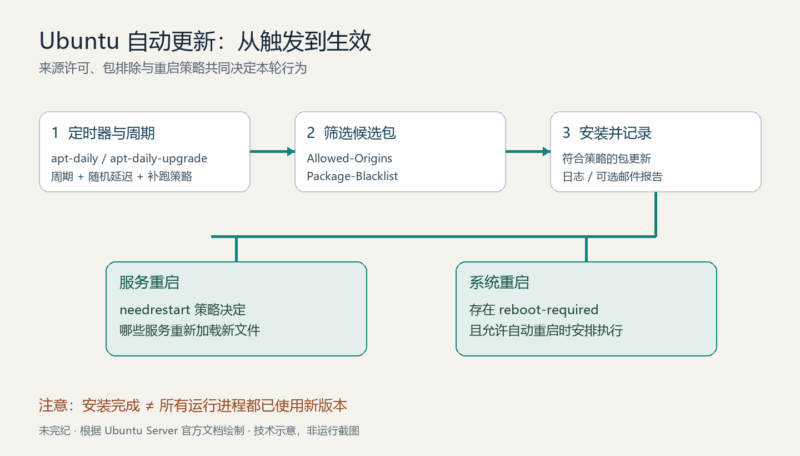



原文:Automatic updates,作者为 Canonical / Ubuntu Server documentation contributors。本文依据 2026 年 10 月 5 日读取的官方全文翻译整理;页面显示最后更新于 2026 年 7 月 15 日,这不是首次发表日期。原文示例日志来自 2025 年的 Ubuntu 24.04(noble)环境,均不是本次运行结果。
Ubuntu 默认通过 unattended-upgrades 安装安全更新,无须用户逐次确认。它也可以安装其他类型的更新,排除指定软件包,并在确有需要时安排重启。把这些功能组合起来,才能同时考虑补丁及时性和服务可用性。仅仅添加一个软件仓库,不会使它自动进入无人值守更新范围。仓库是否被 APT 配置和是否被自动更新策略允许,是两个不同条件。
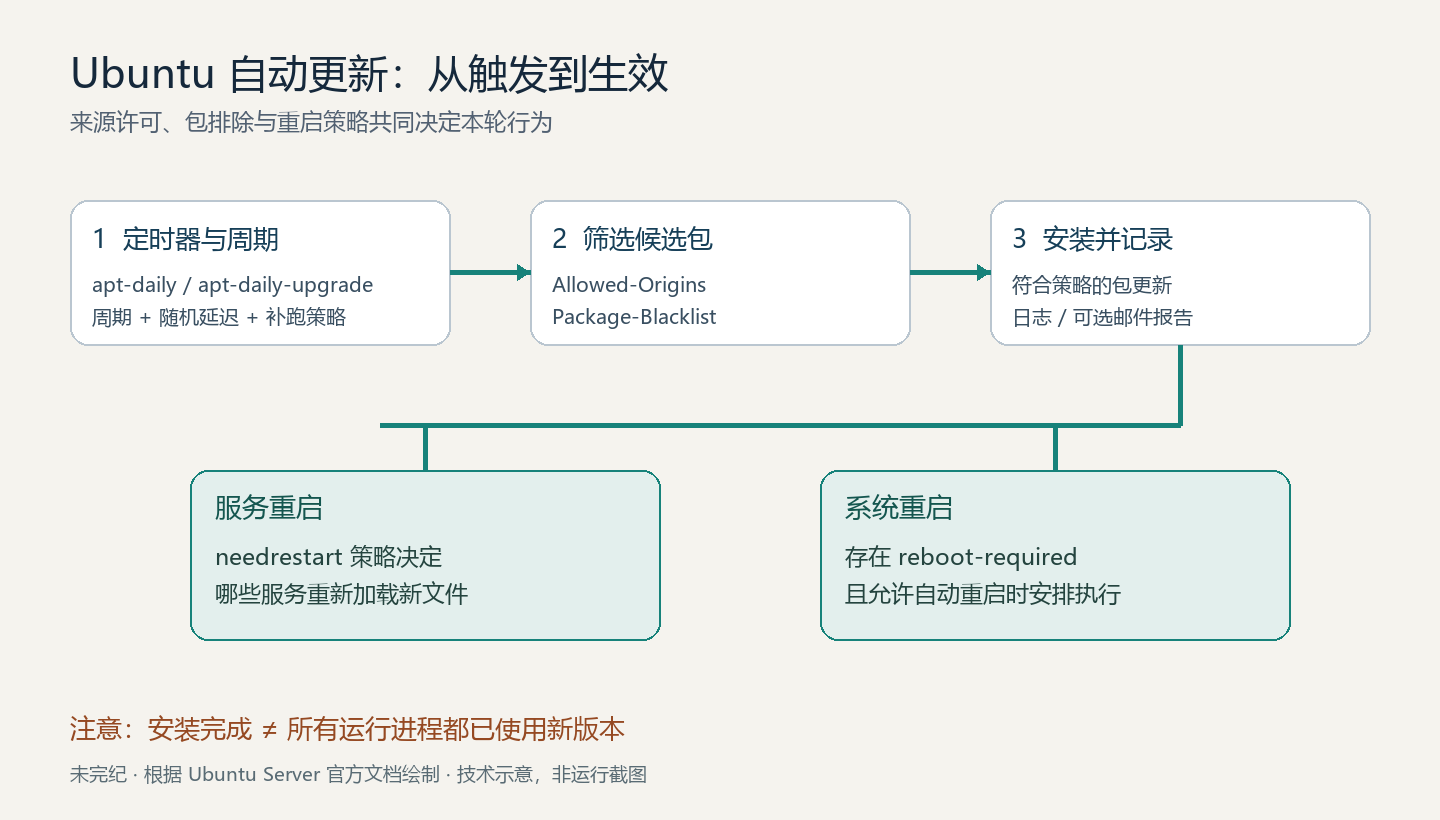
配置文件各管什么
这个软件包通常已随系统安装。如果确实缺失,原文给出的安装命令是:
sudo apt install unattended-upgrades安装后会启用自动安全更新,系统已具备的扩展安全维护(ESM)来源也在默认策略之内,通常每天运行一次。安装是会改变系统状态的操作,不能把它当成只读检查。
/etc/apt/apt.conf.d/50unattended-upgrades:配置更新来源、排除包、通知和重启等行为。/etc/apt/apt.conf.d/20auto-upgrades:决定是否执行自动更新以及周期。/var/log/unattended-upgrades:保存每次运行的详细日志。
启用、停用与启动时补跑
无人值守更新先刷新软件包索引,了解仓库的最新状态,再检查并安装符合策略的更新。这两个步骤分别由 Update-Package-Lists 和 Unattended-Upgrade 控制,写在 20auto-upgrades 中:
APT::Periodic::Update-Package-Lists "1";
APT::Periodic::Unattended-Upgrade "1";值以天为单位:1 是每天,2 是每两天,0 则停用对应动作。若需要关闭这两项功能,原文给出的配置如下。关闭后必须另有明确的补丁维护机制,否则系统会持续暴露于已修复的问题。
APT::Periodic::Update-Package-Lists "0";
APT::Periodic::Unattended-Upgrade "0";
apt-daily.timer 和 apt-daily-upgrade.timer 在计划时间再加随机延迟后触发服务,由服务执行 /usr/lib/apt/apt.systemd.daily。因此,“每天”不等于每天固定在同一分钟安装更新。
机器关机时错过的定时任务,可能在下次启动后补跑,仍受 RandomizedDelaySec 影响。这有利于及时补丁维护,但也会让刚启动的虚拟机忙于更新,其他包操作必须等待锁释放。对于只短暂启动的镜像或大批停机实例,可以分别对这两个 timer 使用 systemctl edit <timer_unit>,加入:
[Timer]
Persistent=false
这样只在下一次计划时间触发,不再补跑关机期间错过的任务。它改变的是补跑行为,不是禁止正常计划任务。修改前要接受补丁可能进一步延后的后果;更多语义见 systemd.timer(5)。不要通过删除 APT 锁文件强行绕过正在进行的更新。最后一句为编者安全补充。
明确允许从哪些仓库更新
50unattended-upgrades 中的 Allowed-Origins 列表决定来源。官方默认示例如下,${distro_id} 和 ${distro_codename} 是配置变量,应保留给工具解析;不要把配置文本直接粘贴成 shell 命令。
Unattended-Upgrade::Allowed-Origins {
    "${distro_id}:${distro_codename}";
    "${distro_id}:${distro_codename}-security";
    // Extended Security Maintenance; doesn't necessarily exist for
    // every release and this system may not have it installed, but if
    // available, the policy for updates is such that unattended-upgrades
    // should also install from here by default.
    "${distro_id}ESMApps:${distro_codename}-apps-security";
    "${distro_id}ESM:${distro_codename}-infra-security";
//  "${distro_id}:${distro_codename}-updates";
//  "${distro_id}:${distro_codename}-proposed";
//  "${distro_id}:${distro_codename}-backports";
};
// 表示注释。默认启用发行版基础来源、安全更新来源,以及可用时的两类 ESM 安全更新来源;-updates、-proposed 和 -backports 行处于注释状态。若要让普通的非安全更新也自动安装,只取消 -updates 一行的注释:
Unattended-Upgrade::Allowed-Origins {
    "${distro_id}:${distro_codename}";
    "${distro_id}:${distro_codename}-security";
    // Extended Security Maintenance; doesn't necessarily exist for
    // every release and this system may not have it installed, but if
    // available, the policy for updates is such that unattended-upgrades
    // should also install from here by default.
    "${distro_id}ESMApps:${distro_codename}-apps-security";
    "${distro_id}ESM:${distro_codename}-infra-security";
    "${distro_id}:${distro_codename}-updates";
//  "${distro_id}:${distro_codename}-proposed";
//  "${distro_id}:${distro_codename}-backports";
};
这不等于同时启用 proposed 或 backports。Origin 是仓库元数据里的标准字段,默认只配置官方 Ubuntu 来源;其他仓库需要单独加入允许列表。有关官方仓库分区的定义,可查阅 Ubuntu Project 的 package archive 说明。
把 PPA 纳入自动更新
Launchpad PPA 常写成 ppa:<user>/<name>。原文以 ppa:canonical-server/server-backports 为例;它的 Origin 是 LP-PPA-canonical-server-server-backports,常见格式为 LP-PPA-<user>-<name>。实际配置必须以该仓库的元数据为准,不能只靠拆分连字符猜测。下面沿用上节已启用普通更新的示例:
Unattended-Upgrade::Allowed-Origins {
    "${distro_id}:${distro_codename}";
    "${distro_id}:${distro_codename}-security";
    // Extended Security Maintenance; doesn't necessarily exist for
    // every release and this system may not have it installed, but if
    // available, the policy for updates is such that unattended-upgrades
    // should also install from here by default.
    "${distro_id}ESMApps:${distro_codename}-apps-security";
    "${distro_id}ESM:${distro_codename}-infra-security";
    "${distro_id}:${distro_codename}-updates";
//  "${distro_id}:${distro_codename}-proposed";
//  "${distro_id}:${distro_codename}-backports";
    "LP-PPA-canonical-server-server-backports:${distro_codename}";
};
这是文档演示仓库,不是对任意生产主机的安装建议。允许来源会扩大自动安装的信任范围,必须先核对仓库维护者、发行版、签名和包来源。原文中的运行日志显示该 Origin 已进入允许列表,并明确处于 dry-run 模式:
2025-03-13 22:44:29,802 INFO Starting unattended upgrades script
2025-03-13 22:44:29,803 INFO Allowed origins are: o=Ubuntu,a=noble, o=Ubuntu,a=noble-security, o=UbuntuESMApps,a=noble-apps-security, o=UbuntuESM,a=noble-infra-security, o=LP-PPA-canonical-server-server-backports,a=noble
2025-03-13 22:44:29,803 INFO Initial blacklist:
2025-03-13 22:44:29,803 INFO Initial whitelist (not strict):
2025-03-13 22:44:33,029 INFO Option --dry-run given, *not* performing real actions
2025-03-13 22:44:33,029 INFO Packages that will be upgraded: ibverbs-providers libibverbs1 rdma-core
2025-03-13 22:44:33,029 INFO Writing dpkg log to /var/log/unattended-upgrades/unattended-upgrades-dpkg.log
2025-03-13 22:44:34,421 INFO All upgrades installed
2025-03-13 22:44:34,855 INFO The list of kept packages can't be calculated in dry-run mode.
正确的 Origin 可在仓库的 InRelease(旧格式为 Release)文件中查到。运行过 apt update 的系统,也能在 /var/lib/apt/lists/ 里找到本地缓存。原文给出的 noble 路径是:
/var/lib/apt/lists/ppa.launchpadcontent.net_canonical-server_server-backports_ubuntu_dists_noble_InRelease以下是原文截取的仓库元数据,不是完整签名文件,不能拿来替代签名验证:
-----BEGIN PGP SIGNED MESSAGE-----
Hash: SHA512

Origin: LP-PPA-canonical-server-server-backports
Label: Server Team Backports
Suite: noble
Version: 24.04
Codename: noble
Date: Tue, 03 Dec 2024  6:00:43 UTC
Architectures: amd64 arm64 armhf i386 ppc64el riscv64 s390x
Components: main
Description: Ubuntu Noble 24.04
(...)
排除特定软件包
Unattended-Upgrade::Package-Blacklist 接受 Python 正则表达式列表。候选包名匹配其中任意一条,就不会自动升级。排除一个包也可能阻止依赖它的其他包升级。下面保留原文的三种匹配意图,但为列表闭合补上 APT 配置语法中的分号;这是本译稿的明确修正,未在 APT 中执行验证。
以 linux- 开头的包全部排除:
Unattended-Upgrade::Package-Blacklist {
    "linux-";
};
只排除 libc6 和 libc-bin:
Unattended-Upgrade::Package-Blacklist {
    "libc6$";
    "libc-bin$";
};
$ 匹配名称末尾。工具的匹配行为相当于从包名起始位置开始,因此 libc6$ 不会匹配 glibc6。上一段也可以合并为:
Unattended-Upgrade::Package-Blacklist {
    "libc(6|-bin)$";
};
可读性比正则的“技巧性”更重要。这里的内核和 libc 仅用于解释匹配方式,长期排除它们会漏掉关键安全修复;应记录原因、负责人、有效期和手动更新安排。后一句为编者补充。
把更新结果发到邮箱
除日志外,还可以在 50unattended-upgrades 中配置邮件报告。Unattended-Upgrade::Mail "user@example.com"; 设置收件地址;值为空或未配置时不发邮件,这是默认行为。示例邮箱不是实际收件人。
Unattended-Upgrade::MailReport "on-change"; 决定发送时机:always 每次都发,only-on-error 只在出错时发,on-change 只在安装了更新时发,默认采用最后一种。发送还需要单独配置能把邮件提交给邮件服务器的客户端;原文以 ssmtp(8) 等轻量客户端为例,没有提供完整邮件系统部署教程。
没有更新也没有错误的报告
下面是原文报告样本,只有选择 always 才会发出。其含义是没有可无人值守升级的包,也没有待执行的自动移除操作:
Subject: unattended-upgrades result for <hostname>: SUCCESS

Unattended upgrade result: No packages found that can be upgraded
 unattended and no pending auto-removals

Unattended-upgrades log:
Starting unattended upgrades script
Allowed origins are: o=Ubuntu,a=noble, o=Ubuntu,a=noble-security,
 o=UbuntuESMApps,a=noble-apps-security,
 o=UbuntuESM,a=noble-infra-security, o=Ubuntu,a=noble,
 o=Ubuntu,a=noble-security, o=UbuntuESMApps,a=noble-apps-security,
 o=UbuntuESM,a=noble-infra-security
Initial blacklist:
Initial whitelist (not strict):
No packages found that can be upgraded unattended and no pending auto-removals
安装了更新且没有错误的报告
默认的 on-change 会发送这类报告。样本中更新的是 linux-firmware,随后重新生成 initramfs,并报告内核、微码、服务、容器、用户会话和虚拟机的重启状态。所有包版本与主机名均是原文历史样本:
Subject: unattended-upgrades result for nuc1: SUCCESS

Unattended upgrade result: All upgrades installed

Packages that were upgraded:
 linux-firmware

Package installation log:
Log started: 2025-03-13  06:19:10
Preparing to unpack
 .../linux-firmware_20240318.git3b128b60-0ubuntu2.10_amd64.deb ...
Unpacking linux-firmware (20240318.git3b128b60-0ubuntu2.10) over
 (20240318.git3b128b60-0ubuntu2.9) ...
Setting up linux-firmware (20240318.git3b128b60-0ubuntu2.10) ...
Processing triggers for initramfs-tools (0.142ubuntu25.5) ...
update-initramfs: Generating /boot/initrd.img-6.8.0-55-generic

Running kernel seems to be up-to-date.

The processor microcode seems to be up-to-date.

No services need to be restarted.

No containers need to be restarted.

No user sessions are running outdated binaries.

No VM guests are running outdated hypervisor (qemu) binaries on this host.
Log ended: 2025-03-13  06:19:26


Unattended-upgrades log:
Starting unattended upgrades script
Allowed origins are: o=Ubuntu,a=noble, o=Ubuntu,a=noble-security,
 o=UbuntuESMApps,a=noble-apps-security,
 o=UbuntuESM,a=noble-infra-security, o=Ubuntu,a=noble,
 o=Ubuntu,a=noble-security, o=UbuntuESMApps,a=noble-apps-security,
 o=UbuntuESM,a=noble-infra-security
Initial blacklist:
Initial whitelist (not strict):
Packages that will be upgraded: linux-firmware
Writing dpkg log to /var/log/unattended-upgrades/unattended-upgrades-dpkg.log
All upgrades installed
系统重启是一项单独的策略
某些更新必须重启系统才能完全生效。Ubuntu 可以通过相应机制标记重启需求,unattended-upgrades 再依配置决定是否重启。服务是否还能恢复、远程主机是否会失联,都必须在启用前考虑。三项配置的含义是:
Unattended-Upgrade::Automatic-Reboot "false";:默认不自动重启。设为true后,若本轮更新请求重启,会在更新结束后无需再次确认地执行。Unattended-Upgrade::Automatic-Reboot-WithUsers "true";:开启自动重启时,默认即使有人登录也可以重启;只有第一项开启时才有实际作用。Unattended-Upgrade::Automatic-Reboot-Time "now";:默认立即重启,也可指定hh:mm或相对分钟数+m。值原样传给 shutdown;钟表时间按系统本地时区解释。
取消已安排的重启及时间格式详见 shutdown(8)。下面是原文的历史日志:20:43 开始安装,检测到 /var/run/reboot-required 后按配置安排到 20:45。日志中的 shutdown -c 是原文提示,不是本次执行记录。
2025-03-13 20:43:25,923 INFO Starting unattended upgrades script
2025-03-13 20:43:25,924 INFO Allowed origins are: o=Ubuntu,a=noble, o=Ubuntu,a=noble-security, o=UbuntuESMApps,a=noble-apps-security, o=UbuntuESM,a=noble-infra-security
2025-03-13 20:43:25,924 INFO Initial blacklist:
2025-03-13 20:43:25,924 INFO Initial whitelist (not strict):
2025-03-13 20:43:29,082 INFO Packages that will be upgraded: libc6 python3-jinja2
2025-03-13 20:43:29,082 INFO Writing dpkg log to /var/log/unattended-upgrades/unattended-upgrades-dpkg.log
2025-03-13 20:43:39,532 INFO All upgrades installed
2025-03-13 20:43:40,201 WARNING Found /var/run/reboot-required, rebooting
2025-03-13 20:43:40,207 WARNING Shutdown msg: b"Reboot scheduled for Thu 2025-03-13 20:45:00 UTC, use 'shutdown -c' to cancel."
服务重启与整机重启并不相同
更新共享库后,已运行的服务仍可能使用内存中的旧版本,必须重启服务才能加载新文件。这由更新后调用的 needrestart 处理。官方说明指出,从 Ubuntu 24.04 LTS 开始,needrestart 默认自动重启受影响的服务。它不会无差别重启所有服务;/etc/needrestart/needrestart.conf 里有预设的排除名单,例如显示管理器。
生产系统可能还需要排除自己的关键服务。应在 /etc/needrestart/conf.d/ 增加配置文件,而非直接修改主配置文件。$nrconf{restart} 为 'a' 表示自动重启,'l' 表示只列出需要重启的服务;$nrconf{override_rc} 把服务名映射到布尔值,值为 0 的关键服务不自动重启。原文示例:
$nrconf{override_rc} = {
    qr(^whatever-critical-service\.service$) => 0,
};
这里的服务名是示例,必须替换成实际 unit 名。排除重启意味着进程会继续使用旧代码,需安排维护窗口手动重启;它不等于补丁已经对运行中的服务完全生效。该示例整体赋值给映射,部署前还应核对本机已有规则及文件加载顺序,以免覆盖其他自定义排除项;这是静态审查补充,未在目标机验证。
什么时候需要限制或关闭自动更新
从新镜像重建的系统
有些云实例和容器不在运行中更新,而是从新基础镜像部署,再销毁旧实例。这类精简系统可能没有自更新工具。改变的只是更新方式,风险仍然存在:新镜像未构建并替换旧实例之前,旧软件依然在运行。
更新前后需要人工步骤
Ubuntu 的更新通常很少需要人工干预,至多可能需要重启;但第三方应用可能在升级前后有无法安全自动化的步骤。此时可考虑停用无人值守更新。不过,如果问题仅集中在已知的几个包,优先仅排除这些包,让其他部分继续获得更新。
个别系统无法接受立即变更
更新运行中的系统有风险,不更新安全补丁也有风险。Ubuntu 默认选择自动应用安全更新,因为通常后者更大;特定关键系统可能需要不同的决策。若关键应用依赖某些库,限制这些库的自动升级通常比完全停用更有针对性。也可以使用下节的有限延期功能,在最终仍会更新的前提下留出缓冲。
大规模主机管理
无人值守更新可以安装补丁和发报告,但并不能替代整个机群的管理平台。大规模环境往往还需要:统计多少系统已更新、落后多少天、已知漏洞暴露多久;按系统设置不同维护窗口;先向少量金丝雀主机发布,再逐步扩大范围。原文举出的 Ubuntu 机群管理方案是 Landscape。
允许用户在有限时间内延期
官方文档注明,从 Ubuntu 25.04 起,管理员可以允许用户将自动更新推迟有限天数。文档首段曾写作 Unattended-Update::Postpone-For-Days,但后续说明和配置示例一致使用 Unattended-Upgrade::Postpone-For-Days;本文采用后者并在此标出源文拼写差异。旧版本不应假定支持这个选项,应以已安装版本的文档和配置为准。
工具仍按管理员设定的周期检查更新;发现更新后,会提示活动用户选择立即更新或延期。如果最多允许延期三天,在 50unattended-upgrades 中配置:
Unattended-Upgrade::Postpone-For-Days "3";延期额度耗尽后,下一次运行会直接应用更新,不再询问。设为 0 可关闭这项功能。Unattended-Upgrade::Postpone-Wait-Time 以秒为单位控制收到提示后可申请延期的时间;超时未收到申请,就照常更新。
管理员可通过 polkit 针对 com.ubuntu.UnattendedUpgrade.Pending.Postpone 动作设置授权规则;默认允许活动会话中的用户申请。具体规则参见 polkit 文档。
Ubuntu Desktop 由 update-notifier 显示通知和延期选项;更新进行时,托盘图标提醒用户哪些关键活动可能受影响。Ubuntu Server 等其他环境可自行实现客户端,监听系统总线上的 AboutToStart 信号,并调用 Postpone()。接口定义位于 /usr/share/dbus-1/interfaces/com.ubuntu.UnattendedUpgrade.Pending.xml。这段是接口说明,没有附带可直接部署的服务端实现。
预演配置并读懂结果
无需等到下一次计划任务,也能检查部分配置行为。-v 输出更详细的信息,--dry-run 模拟将采取的升级动作。原文在加入 PPA 的 Origin 后,使用以下命令和输出验证匹配关系。本稿没有运行该命令;下面完全是原文示例。
sudo unattended-upgrade -v --dry-run

Starting unattended upgrades script
Allowed origins are: o=Ubuntu,a=noble, o=Ubuntu,a=noble-security, o=UbuntuESMApps,a=noble-apps-security, o=UbuntuESM,a=noble-infra-security, o=LP-PPA-canonical-server-server-backports,a=noble
Initial blacklist:
Initial whitelist (not strict):
Option --dry-run given, *not* performing real actions
Packages that will be upgraded: rdma-core
Writing dpkg log to /var/log/unattended-upgrades/unattended-upgrades-dpkg.log
/usr/bin/unattended-upgrade:567: DeprecationWarning: This process (pid=1213) is multi-threaded, use of fork() may lead to deadlocks in the child.
  pid = os.fork()
/usr/bin/dpkg --status-fd 10 --no-triggers --unpack --auto-deconfigure /var/cache/apt/archives/rdma-core_52.0-2ubuntu1~backport24.04.202410192216~ubuntu24.04.1_amd64.deb
/usr/bin/dpkg --status-fd 10 --configure --pending
All upgrades installed
The list of kept packages can't be calculated in dry-run mode.
重点看两处:允许列表含 o=LP-PPA-canonical-server-server-backports,a=noble;rdma-core 被列为将更新的包。输出里虽然有 All upgrades installed 和 dpkg 命令,但同一记录已明确标记 dry-run,不能据此宣称实际安装成功。示例还包含关于多线程进程中 fork() 的 DeprecationWarning,以及 dry-run 无法计算保留包列表的提示,应保留这些限制。
原文接着用 APT 的策略查询核对该包:
apt-cache policy rdma-core

rdma-core:
  Installed: 50.0-2build2
  Candidate: 52.0-2ubuntu1~backport24.04.202410192216~ubuntu24.04.1
  Version table:
     52.0-2ubuntu1~backport24.04.202410192216~ubuntu24.04.1 500
        500 https://ppa.launchpadcontent.net/canonical-server/server-backports/ubuntu noble/main amd64 Packages
 *** 50.0-2build2 500
        500 http://br.archive.ubuntu.com/ubuntu noble/main amd64 Packages
        100 /var/lib/dpkg/status
历史样本里,已安装版本为 50.0-2build2,候选版本来自 PPA,优先级为 500,因此在示例环境下一次实际运行将考虑升级到候选版本。实际候选版本还取决于目标机当时的软件源、索引和 APT 策略,不能照搬这个结果。去掉 --dry-run 就会真正安装更新,不能把它当作同等安全的诊断命令。即使保留 dry-run,仍可能读取系统状态、获取锁并写日志;它不是针对任意生产环境的“零副作用”承诺。
本稿的核对范围与来源
本次只对文档、配置语法和命令作用做静态审查,没有安装软件、更新系统、发邮件、修改 timer、重启服务或重启主机。未发现硬编码凭证或明显的外部输入命令注入链路;这不代表工具或目标系统不存在漏洞。实际部署还需针对使用的 Ubuntu 与软件包版本核对配置,并在有备份、维护窗口和回退安排的环境验证。
来源与署名:Canonical / Ubuntu Server documentation contributors,Automatic updates(源页页脚 © 2026)。原文与日志归原作者所有;中文翻译、结构整理、安全注和示意图由未完纪制作,非 Canonical 官方译本。该页未直接列出文章专用许可证,本稿不擅自把其他仓库许可证套用于本文;保留原作者版权及源链接。









暂无评论内容