


从链接到餐馆详情页:配置、实现并验证 Android App Links
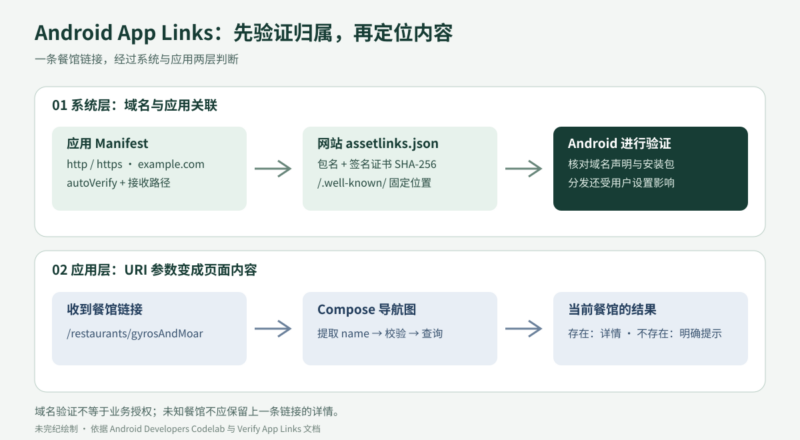
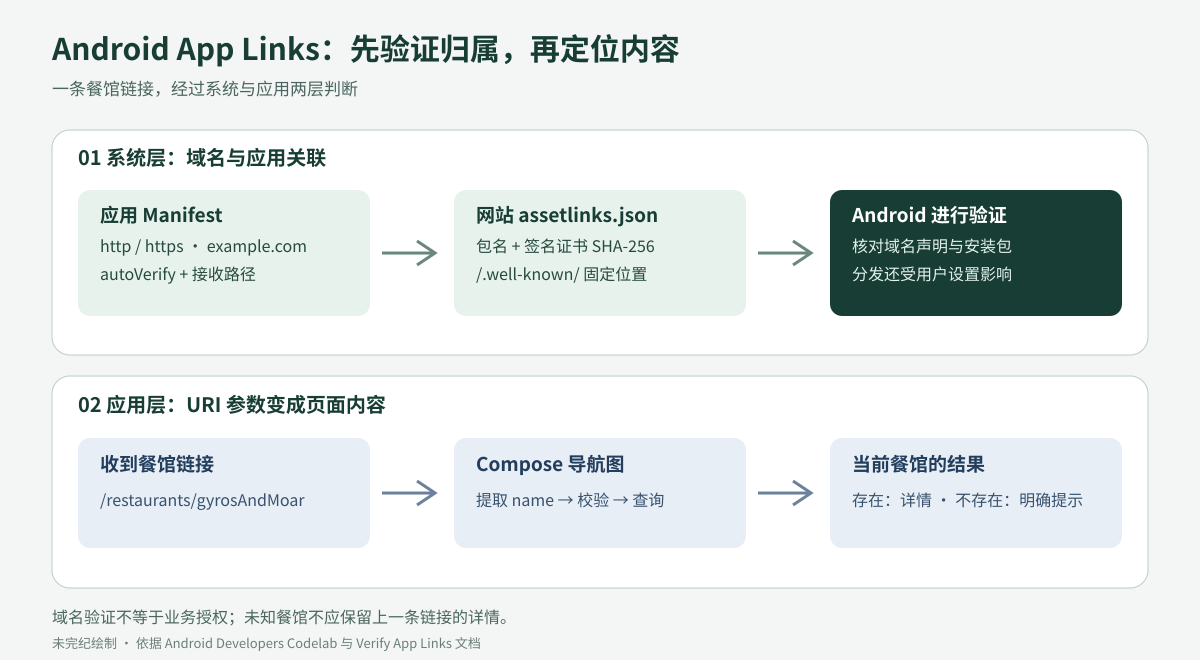
一条餐馆链接既要能在浏览器中打开,也要在安装了应用的设备上进入正确的详情页。Android App Links 把网站域名、应用签名和应用内导航连接起来。本文沿用 Android Developers 的餐馆示例,完整介绍 URL 设计、Manifest 配置、网站关联、Compose 实现,以及设备与 Play Console 中的验证流程。
原文:Google Android Developers 课程与文档贡献者(页面无个人署名),Configure, implement, and verify Android App Links。中文翻译与技术整理:未完纪。本文是带勘误的完整教学改写;代码按原教程的 Compose Material 2 技术路线组织,并明确标出调整。资料核对日期:2026-10-05。
1. 开始之前:深链接、网页链接和 App Links
用户点击链接,是为了直接到达想看的内容。Android 中可以把相关链接分成三类:深链接是指向应用内部位置的 URI,scheme 可以自定义;网页链接使用 http 或 https;Android App Links 则是经过网站关联验证的网页链接。应用在 Intent filter 中声明 android:autoVerify="true",表示请求系统验证,添加这一属性本身并不等于验证已经成功。
App Links 从 Android 6.0(API 23)开始提供。系统通过网站公开声明确认某个包名和签名证书有权处理这个域名的链接,减少其他应用冒领同一链接的机会。用户的默认打开设置仍然会影响最终去向;域名验证也不负责登录、订单权限或其他业务授权。受保护的内容必须继续检查访问者身份。
本教程面向同时维护网站与 Android 应用的开发者。你需要了解 Android 开发、Jetpack Compose 导航,以及 ADB 的 activity manager 和 package manager。准备一个能托管 Digital Asset Links 文件的域名;Google Play Console 开发者账号是可选项,用于检查正式签名构建。教程只介绍 Android 端,配套网站作为已有资源使用。
原文使用 sabs-deeplinks-test.web.app 演示。练习时应将它替换成自己的域名,不能把示例站点当成可由你发布关联文件的站点。
2. 建立示例项目
- 在 Android Studio 中选择 File → New → New Project。原教程选择 Empty Compose Activity;新版 IDE 中名称可能不同,选择相应的 Compose 空项目模板。
- 将项目命名为 Deep Links Basics,使用 Kotlin,示例包名为
com.devrel.deeplinksbasics。原教程的最低 SDK 是 API 21,这是当时 Compose 的最低要求;当前项目以实际依赖所要求的最低版本为准。 - 完成创建后运行空项目,确认能看到最初的问候界面,再添加链接配置。
配套仓库提供完整解答:
git clone https://github.com/android/deep-links进入 deep-links-introduction/solution。也可以从仓库下载 ZIP。后文按步骤说明需要添加的文件;模板生成的主题、资源以及 Gradle 其余配置可以对照配套项目查看。
3. 先设计适合深链接的 URL
好的 URL 能直接表达业务对象,也让 Android 的匹配规则容易维护。这里借用 REST 常见的资源命名方式设计链接,但并不实现 Web API。餐馆应用可以采用以下结构:
| 路径 | 含义 |
|---|---|
/restaurants |
餐馆列表 |
/restaurants/:restaurantName |
某家餐馆的详情 |
/restaurants/:restaurantName/orders |
某家餐馆的订单集合 |
/restaurants/:restaurantName/orders/:orderNumber |
某一订单 |
/restaurants/:restaurantName/orders/latest |
最新订单 |
如果餐馆页面叫作 /pawtato-3140-Skinner-Hollow-Road、/rawrbucha-2064-carriage-lane 和 /pizzabus-1447-davis-avenue,它们没有共同的业务前缀。为捕获这些页面而接管整个站点,会连 /deliveries、/admin 和应用不认识的路径也一起纳入。把餐馆页面放在 /restaurants/ 之下,就能更清楚地限定接收范围。
设计时让 URL 围绕餐馆、订单、顾客等业务实体展开,用复数表示集合,用嵌套表达关系。比如 /restaurants/1/orders 比把动作塞进路径更容易理解。原文用 GET /restaurants/pawtato、POST /restaurants、DELETE /restaurants 和 PUT /restaurants/pawtato 说明资源名与 HTTP 动词可以分离;这些只是命名示意,不是本教程要实现或执行的接口。
还要区分“字符串前缀”和“目录边界”:pathPrefix="/restaurants" 也会匹配 /restaurants-old。如果只需要列表及其子路径,可以组合精确路径 /restaurants 与前缀 /restaurants/。最终还要让应用内路由明确处理不存在的资源。
4. 理解 Manifest 的 data 匹配规则
AndroidManifest.xml 向构建工具、Android 系统和 Google Play 描述应用。接收外部链接的 Intent filter 通常由 <action>、<category> 和 <data> 组成,其中 data 描述 URI 的各部分:
<scheme>://<host>:<port>[<path>|<pathPrefix>|<pathPattern>|<pathAdvancedPattern>|<pathSuffix>]同一 filter 中的多个 data 元素会合并形成匹配组合,而不是逐行代表互不相干的完整 URL。例如:
<intent-filter>
    <action android:name="android.intent.action.VIEW" />
    <category android:name="android.intent.category.BROWSABLE" />
    <category android:name="android.intent.category.DEFAULT" />
    <data android:scheme="http" />
    <data android:scheme="https" />
    <data android:host="example.com" />
    <data android:path="/restaurants" />
    <data android:pathPrefix="/restaurants/orders" />
</intent-filter>
这个 filter 同时接受 HTTP 和 HTTPS,路径可以精确等于 /restaurants,也可以以 /restaurants/orders 开头。如果 scheme、host 之间必须保持特定配对,应写成独立 filter。没有 scheme 时其他 URI 属性不起作用;没有 host 时,port 与路径属性也会被忽略。scheme 和 host 在 Android 匹配中区分大小写,建议统一小写。见 data 元素参考。
| 属性 | 适用版本与匹配方式 | 例子 |
|---|---|---|
path |
API 1 起,完整路径精确匹配。 | /restaurants/pawtato 不匹配少了 s 的 /restaurant/pawtato。 |
pathPrefix |
API 1 起,匹配路径开头。 | /restaurants/ 接受其下的餐馆路径。 |
pathSuffix |
API 31 起,匹配路径结尾,值不必以斜杠开头。 | tato 可以匹配 /restaurants/pawtato。 |
pathPattern |
API 1 起,简单通配模式,不是完整正则表达式。 | /restaurants/.* 能接受已知或未知的餐馆名字。 |
pathAdvancedPattern |
API 31 起,支持更丰富的类正则模式,匹配不回溯。 | /restaurants/[a-zA-Z]+/orders/[0-9]{3} 表示非空字母餐馆名和恰好三位订单号。 |
pathPattern 中,点表示一个任意字符,星号重复前一个字符,.* 表示任意长度的字符序列。例如 /restaurants/piz*abus 中 z 可以重复,因此会匹配 pizzabus、pizzzabus,也会匹配 pizabus。不要把简单模式匹配当成任意正则表达式来使用。
pathAdvancedPattern 支持 .、字符集合 [...](包括 ^ 排除)、重复零次或多次的 *、一次或多次的 +,以及次数范围 {...}。{3} 是恰好三次;一到三次应写 {1,3}。原教程把属性写成了 pathAdvancePattern,并把三位误述为“最多三位”,此处已纠正。XML 与模式本身都使用反斜杠转义时,需要考虑双重转义。
这里讨论的路径属性不匹配查询参数或片段,但参数仍保留在 Intent 的 URI 中。较新的 Android 另有查询参数和片段匹配能力,不能据此假定旧系统也会处理这些条件。传统深链接仍应在应用内解析、校验真正使用的输入。
5. 先试通自定义 scheme 和网页链接
自定义 scheme 深链接
自定义 scheme 很容易配置,但缺乏网站关联带来的域名归属证明。其他应用也能声明同一个 scheme。它不能像普通 HTTP 页面那样提供通用的浏览器内容回退;浏览器是否允许唤起应用还受其策略影响。
以 food://restaurants/keybabs 为例,scheme 是 food,host 是 restaurants,path 是 /keybabs。原文只声明 scheme 和 /restaurants/keybabs 路径,既遗漏 host,也混淆了 URI 的组成。本例改成:
<intent-filter>
    <action android:name="android.intent.action.VIEW" />
    <category android:name="android.intent.category.BROWSABLE" />
    <category android:name="android.intent.category.DEFAULT" />
    <data android:scheme="food"
          android:host="restaurants"
          android:path="/keybabs" />
</intent-filter>
把它加到可接收外部链接的 Activity 内。面向要求显式声明导出属性的项目,应为该 Activity 配置 android:exported="true"。先在 onCreate() 中读取 Intent,再把 action 与 data 显示在 Compose 界面中,便于观察:
val action: String? = intent?.action
val data: android.net.Uri? = intent?.data
setContent {
    DeepLinksBasicsTheme {
        Surface(
            modifier = Modifier.fillMaxSize(),
            color = MaterialTheme.colors.background
        ) {
            Column {
                Text("Hello Android!")
                Text("Action: " + action)
                Text("Data: " + data)
            }
        }
    }
}
下面的命令会在所连接的测试设备上发出 VIEW Intent 并启动相应界面;本次整理没有执行它:
adb shell am start -W -a android.intent.action.VIEW -d "food://restaurants/keybabs"如果配置和设备解析结果符合预期,应用会启动,页面会显示收到的 action 与 URI。这只能证明某次 Intent 的接收结果,尚未涉及网站关联。
网页链接
网页链接改用 HTTP 或 HTTPS。为避免 scheme 与 host 的意外组合,使用另一个 filter,而不与 food scheme 混在一起。以下统一使用复数 orders,纠正原教程示例中的 order/orders 不一致:
<intent-filter>
    <action android:name="android.intent.action.VIEW" />
    <category android:name="android.intent.category.BROWSABLE" />
    <category android:name="android.intent.category.DEFAULT" />
    <data android:scheme="http" />
    <data android:scheme="https" />
    <data android:host="example.com" />
    <data android:path="/restaurants/keybabs/orders/latest.html" />
</intent-filter>
重新部署更新后的应用,再用同类命令检查:
adb shell am start -W -a android.intent.action.VIEW -d "https://example.com/restaurants/keybabs/orders/latest.html"在 Android 12 及更高版本上,通用网页 Intent 只有在应用获准处理该域名时才会进入应用,否则通常进入默认浏览器;较早版本可能出现应用选择对话框。原教程的“网页链接总会打开浏览器”过于绝对,应把系统版本、域名批准状态和用户设置一起考虑。参见 创建深链接。
6. 把网页链接升级为 Android App Links
配置分两边完成:应用声明自己希望接收哪些链接,网站公开声明认可哪个应用。系统核对成功后,匹配的链接才具备经过验证的 App Links 关联。
6.1 更新 Manifest
替换前面的练习 filter,为 HTTP、HTTPS 和自有域名添加验证请求。下面的路径限制接受餐馆列表及其子路径,不会仅因字符串前缀而接收 /restaurants-old:
<activity
    android:name=".MainActivity"
    android:exported="true">
    <!-- 保留模板已有的 MAIN / LAUNCHER filter。 -->
    <intent-filter android:autoVerify="true">
        <action android:name="android.intent.action.VIEW" />
        <category android:name="android.intent.category.BROWSABLE" />
        <category android:name="android.intent.category.DEFAULT" />
        <data android:scheme="http" />
        <data android:scheme="https" />
        <data android:host="example.com" />
        <data android:path="/restaurants" />
        <data android:pathPrefix="/restaurants/" />
    </intent-filter>
</activity>
安装或更新时,系统会尝试核对相关域名。这是异步过程,网络和缓存会影响结果。不要在同一个可验证 filter 中放入 food 等自定义 scheme。若多个 Activity 同时声明相同 App Link,也不能保证会进入哪一个 Activity。见 App Links 的 Intent filter 配置。
6.2 在网站发布 Digital Asset Links 声明
Digital Asset Links(DAL)以可验证的声明描述网站与应用的关系。在网站根域对应的固定位置发布 assetlinks.json:
https://example.com/.well-known/assetlinks.json路径必须是 /.well-known/assetlinks.json。原文 Debug Configuration 一处漏写了 known 最后的 n,不能照抄为 /.well-know/。
[
  {
    "relation": ["delegate_permission/common.handle_all_urls"],
    "target": {
      "namespace": "android_app",
      "package_name": "com.devrel.deeplinksbasics",
      "sha256_cert_fingerprints": [
        "REPLACE_WITH_THE_INSTALLED_APP_SIGNING_CERTIFICATE_SHA256"
      ]
    }
  }
]
这段 JSON 是结构模板,指纹占位符不是有效指纹。relation 指定被声明的关联关系;target 指定目标资产,Android 应用使用 namespace: android_app。package_name 必须对应实际构建的 application ID;sha256_cert_fingerprints 必须对应设备上所安装构建的签名证书。一个文件可以包含多个声明,一个应用也可以列出多个签名指纹。多个明确的子域名分别参与验证时,应在各自的主机上提供关联文件。
关联文件包含公开的包名与证书指纹,不需要、也不应包含私钥、keystore 密码或其他秘密。这个声明赋予的是链接处理关系,不能替代应用的身份验证和权限控制。结构与签名说明见 网站关联与动态规则配置。
6.3 使用调试构建的签名指纹
Android Studio 首次运行项目时通常会使用调试证书签名,默认调试 keystore 位于用户目录的 .android/debug.keystore。原教程在 Run Anything 中运行 gradle signingReport;使用项目自带的 Gradle Wrapper 更容易对应正确的 Gradle 版本:
# Windows PowerShell,在项目目录执行:
.\gradlew.bat signingReport

# macOS / Linux,在项目目录执行:
./gradlew signingReport
在输出中找到实际安装的 debug 变体,复制 SHA-256 指纹到关联文件。调试证书只用于开发环境;不要把调试签名构建作为正式发布构建。对生产域名增加调试签名,也意味着信任对应的调试证书,应使用受控的测试域名和测试构建管理这类关联。
原文随后通过卸载并重新运行应用触发验证:在模拟器上长按应用图标,进入 App Info,卸载,再选择 app 运行配置重新安装。卸载会移除该应用的本地数据,仅应在可清理的测试设备上这样做。注意重新选择 app 配置,避免重复运行 signingReport。Android 12 及更高版本也可使用后面的手动验证命令。
关联准备完成后,可在测试设备上发送:
adb shell am start -W -a android.intent.action.VIEW -d "https://example.com/restaurants/"若系统验证、用户设置和过滤规则都符合预期,应由应用接收该链接。此时页面暂时只显示 Intent 信息,接下来还要实现具体内容导航。
6.4 生成发布构建并处理 Play App Signing
原教程接着演示正式签名流程:在 Android Studio 选择 Build → Generate Signed Bundle / APK;通过 Play 分发时选择 Android App Bundle,直接安装到设备时选择合适的 APK。已有应用应使用自己的既有签名流程,不应为了跟随教程随意重建签名密钥。
- 对全新的练习应用,可以在签名向导中创建 keystore,例如
basics-keystore.jks,设置路径、别名、密码以及证书信息。 - 按所用工具链要求配置 keystore 与 key 的密码,选择 release 构建变体。原教程界面要求匹配的密码,并展示导出加密密钥的选项;这些具体选项会随 Android Studio 和 Play App Signing 接入方式变化。
- 生成发布产物后,妥善管理密钥和凭据。签名细节以 应用签名文档 和 Play App Signing 说明 为准。
启用 Play App Signing 后,Google 管理向用户分发应用所用的签名密钥。上传包的证书与最终安装包的签名证书可能不同。DAL 要匹配的是设备安装构建的应用签名证书指纹,不能直接把上传密钥的指纹当作答案。
原教程使用 Play Console 的内部测试流程:创建名为 Deep Links Basics 的练习应用,选择应用类型与收费方式并完成声明,进入 Testing → Internal testing 创建版本,上传 app-release.aab,保存并审查,再发布到内部测试轨道。本文只说明这一流程,没有创建应用、上传产物或发布版本。原文让读者忽略警告,但实际操作时应逐条判断签名、权限和发布要求,不能通用地忽略。
接着在 Deep links 面板中选择域名,查看域名验证问题和建议的 DAL 内容。也可以在 Play Console 的 App signing 页面获取对应的证书信息。复制正确的应用签名指纹,更新网站的关联文件,再使用 Recheck verification 检查。原教程建议等待最多五分钟;这不是所有设备和缓存条件下的时限承诺。
6.5 检查从 Play 获取的构建
原教程从 Releases overview 打开刚上传版本的详情,再进入 App Bundle 的 Downloads,下载已签名的 universal APK。测试安装前,若设备上的同包名应用使用不同签名,需要先移除已有构建;这同样会清除本地应用数据。然后把下载的 APK 拖入模拟器安装。虽然原文个别地方称它为 bundle,这一步安装的是 APK,不是 AAB。
让测试设备联网,再按下一节的命令重新验证。输出中的目标域名应为 verified。若出现 legacy_failure,它只表示旧验证器拒绝了该域名,不提供具体原因;可先核对包名、安装包签名、关联文件路径与内容,再检查网络和验证是否完成。不能据此断定一定是指纹错误。
7. 用 Compose 实现餐馆列表、详情和链接路由
Manifest 决定系统是否把链接交给应用;Compose 的导航图决定应用接到链接后显示什么。下面保留原文的数据层、仓库、ViewModel、卡片、网格和导航分层。为避免把原示例的空值与旧状态问题带入译文,详情状态和路由参数处理做了少量修订,具体差异在本节说明。
7.1 依赖和应用入口
原教程在项目级 build.gradle 的 buildscript 中加入 Hilt 插件:
buildscript {
    dependencies {
        classpath "com.google.dagger:hilt-android-gradle-plugin:2.43"
    }
}
模块级配置片段如下。这些是原文版本的增量配置,不是完整构建文件:
plugins {
    id 'kotlin-kapt'
    id 'dagger.hilt.android.plugin'
}

dependencies {
    implementation 'androidx.compose.material:material:1.2.1'
    implementation 'androidx.lifecycle:lifecycle-viewmodel-ktx:2.5.1'
    implementation 'androidx.lifecycle:lifecycle-viewmodel-compose:2.5.1'
    implementation 'androidx.hilt:hilt-navigation-compose:1.0.0'
    implementation 'com.google.dagger:hilt-android:2.43'
    kapt 'com.google.dagger:hilt-compiler:2.43'
}
项目还需要 Navigation Compose 和模板中已有的 Compose 依赖。原教程主要列出新增依赖,因此不能把上述片段单独当作可编译项目。新建项目应在同一兼容版本集合中配置 Kotlin、Android Gradle Plugin、Compose 和 Hilt,而不是只升级其中一项。后文 UI 使用 Material 2 的 Card、TopAppBar、h6 与 caption,不能不加调整地混入 Material 3。
创建 Hilt 的 Application 入口,并在 Manifest 的 application 元素中设置 android:name=".DeepLinksBasicsApplication":
package com.devrel.deeplinksbasics

import android.app.Application
import dagger.hilt.android.HiltAndroidApp

@HiltAndroidApp
class DeepLinksBasicsApplication : Application()
7.2 餐馆数据、数据源和仓库
在 data 包中创建 Restaurant.kt。模型包含餐馆标识、名字、地址、菜品类型、网站链接和图片资源:
package com.devrel.deeplinksbasics.data

import androidx.annotation.DrawableRes
import androidx.compose.runtime.Immutable

@Immutable
data class Restaurant(
    val id: Int = -1,
    val name: String = "",
    val address: String = "",
    val type: String = "",
    val website: String = "",
    @DrawableRes val drawable: Int = -1
)
原配套 ZIP 提供十张餐馆图片,也可以使用自己的图片。将图片导入 drawable 资源目录,并让资源名与代码中的 restaurant1 到 restaurant10 一致。本文配图是流程示意,不替代应用运行时所需的餐馆图片。
RestaurantLocalDataSource.kt 保留十家示例餐馆。为减少重复域名,本版把站点根地址集中到一个字段,数据仍对应原示例;英文名称和地址保留原样:
package com.devrel.deeplinksbasics.data

import com.devrel.deeplinksbasics.R
import javax.inject.Inject
import javax.inject.Singleton

@Singleton
class RestaurantLocalDataSource @Inject constructor() {
    private val root = "https://example.com/restaurants/"
    val restaurantList = listOf(
        Restaurant(1, "Pawtato",
            "3140 Skinner Hollow Road, Medford, Oregon 97501",
            "Potato and gnochi", root + "pawtato/", R.drawable.restaurant1),
        Restaurant(2, "Rawrbucha",
            "2064 Carriage Lane, Mansfield, Ohio 44907",
            "Kombucha", root + "rawrbucha/", R.drawable.restaurant2),
        Restaurant(3, "Pizzabus",
            "1447 Davis Avenue, Petaluma, California 94952",
            "Pizza", root + "pizzabus/", R.drawable.restaurant3),
        Restaurant(4, "Keybabs",
            "3708 Pinnickinnick Street, Perth Amboy, New Jersey 08861",
            "Kebabs", root + "keybabs/", R.drawable.restaurant4),
        Restaurant(5, "BBQ",
            "998 Newton Street, Saint Cloud, Minnesota 56301",
            "BBQ", root + "bbq/", R.drawable.restaurant5),
        Restaurant(6, "Salades",
            "4522 Rockford Mountain Lane, Oshkosh, Wisconsin 54901",
            "salads", root + "salades/", R.drawable.restaurant6),
        Restaurant(7, "Gyros and moar",
            "1993 Bird Spring Lane, Houston, Texas 77077",
            "Gyro", root + "gyrosAndMoar/", R.drawable.restaurant7),
        Restaurant(8, "Peruvian ceviche",
            "2125 Deer Ridge Drive, Newark, New Jersey 07102",
            "seafood", root + "peruvianCeviche/", R.drawable.restaurant8),
        Restaurant(9, "Vegan burgers",
            "594 Warner Street, Casper, Wyoming 82601",
            "vegan", root + "veganBurgers/", R.drawable.restaurant9),
        Restaurant(10, "Taquitos",
            "1654 Hart Country Lane, Blue Ridge, Georgia 30513",
            "mexican", root + "taquitos/", R.drawable.restaurant10)
    )
}
仓库向 UI 提供餐馆列表,并按名字查找餐馆。原文会移除空白再转成小写,使 gyrosAndMoar 能匹配 Gyros and moar。这里保留这一教学规则,增加基本输入边界,并明确使用不依赖设备语言的大小写转换。正式业务更适合使用稳定的 ID 或明确的 slug,而不是把显示名当作唯一标识。
package com.devrel.deeplinksbasics.data

import java.util.Locale
import javax.inject.Inject

class RestaurantRepository @Inject constructor(
    private val source: RestaurantLocalDataSource
) {
    val restaurants: List<Restaurant> = source.restaurantList

    private fun normalized(value: String) =
        value.filterNot { it.isWhitespace() }.lowercase(Locale.ROOT)

    fun getRestaurantByName(name: String): Restaurant? {
        if (name.isBlank() || name.length > 100 ||
            name.any { it.isISOControl() || it == '/' || it == '?' || it == '#' }) {
            return null
        }
        val key = normalized(name)
        return restaurants.find { normalized(it.name) == key }
    }
}
7.3 让详情状态对应当前路由
原文用 MutableStateFlow<Restaurant?> 保存选中餐馆,只在查找成功时更新。这会产生一个容易忽略的问题:先打开有效餐馆,再打开未知名称时,原来的餐馆可能仍留在状态里。早期导航片段还使用 selectedRestaurant!!,在状态尚未准备好时存在空指针风险。
以下修订保留 ViewModel 与 StateFlow 的教学结构,但把“当前请求名字”和“查找结果”作为同一个状态发布。查找失败也覆盖旧值;本地内存查找无需启动协程:
package com.devrel.deeplinksbasics.ui.restaurant

import androidx.lifecycle.ViewModel
import com.devrel.deeplinksbasics.data.Restaurant
import com.devrel.deeplinksbasics.data.RestaurantRepository
import dagger.hilt.android.lifecycle.HiltViewModel
import kotlinx.coroutines.flow.MutableStateFlow
import kotlinx.coroutines.flow.StateFlow
import javax.inject.Inject

data class RestaurantSelection(
    val requestedName: String,
    val restaurant: Restaurant?
)

@HiltViewModel
class RestaurantViewModel @Inject constructor(
    private val repository: RestaurantRepository
) : ViewModel() {
    val restaurants: List<Restaurant> = repository.restaurants
    private val _selection = MutableStateFlow<RestaurantSelection?>(null)
    val selection: StateFlow<RestaurantSelection?> = _selection

    fun updateSelectedRestaurantByName(name: String) {
        _selection.value = RestaurantSelection(
            requestedName = name,
            restaurant = repository.getRestaurantByName(name)
        )
    }
}
如果未来改成网络请求,还需处理加载、错误、请求取消和返回次序。现在的状态只服务于教程中同步的本地列表,不代表完整的生产数据架构。
7.4 实现详情卡片、列表卡片与网格
UI 层有三个主要组合函数。详情页显示餐馆名字、菜品类型、地址、可复制的网站链接和图片,同时处理工具栏返回与系统返回。列表卡片展示名字、地址和图片;网格以自适应列宽排列卡片,点击后导航到对应名字。
下面把原文的三个 UI 文件合并展示为 RestaurantViews.kt,也可以分别放回 RestaurantCardDetails.kt、RestaurantCell.kt 和 RestaurantGrid.kt。为缩短重复导入,示例使用同包通配导入;代码仍使用 Material 2。点击图标改用 IconButton,字符串改为中文:
package com.devrel.deeplinksbasics.ui

import androidx.activity.compose.BackHandler
import androidx.compose.foundation.Image
import androidx.compose.foundation.clickable
import androidx.compose.foundation.layout.*
import androidx.compose.foundation.lazy.grid.GridCells
import androidx.compose.foundation.lazy.grid.LazyVerticalGrid
import androidx.compose.foundation.lazy.grid.items
import androidx.compose.foundation.shape.RoundedCornerShape
import androidx.compose.foundation.text.selection.SelectionContainer
import androidx.compose.material.*
import androidx.compose.material.icons.Icons
import androidx.compose.material.icons.filled.ArrowBack
import androidx.compose.runtime.Composable
import androidx.compose.ui.Modifier
import androidx.compose.ui.graphics.Color
import androidx.compose.ui.res.painterResource
import androidx.compose.ui.text.font.FontWeight
import androidx.compose.ui.unit.dp
import com.devrel.deeplinksbasics.data.Restaurant

@Composable
fun RestaurantCardDetails(restaurant: Restaurant, onBack: () -> Unit) {
    BackHandler(onBack = onBack)
    Scaffold(
        topBar = {
            TopAppBar(
                title = { Text(restaurant.name) },
                navigationIcon = {
                    IconButton(onClick = onBack) {
                        Icon(Icons.Default.ArrowBack, contentDescription = "返回")
                    }
                },
                backgroundColor = Color.Transparent,
                elevation = 0.dp
            )
        }
    ) { paddingValues ->
        Card(
            modifier = Modifier.padding(paddingValues).fillMaxWidth(),
            elevation = 2.dp,
            shape = RoundedCornerShape(8.dp)
        ) {
            Column(Modifier.padding(16.dp).fillMaxWidth()) {
                Text(restaurant.name, style = MaterialTheme.typography.h6)
                Text(restaurant.type, style = MaterialTheme.typography.caption)
                Text(restaurant.address, style = MaterialTheme.typography.caption)
                SelectionContainer {
                    Text(restaurant.website, style = MaterialTheme.typography.caption)
                }
                Image(
                    painter = painterResource(restaurant.drawable),
                    contentDescription = restaurant.name
                )
            }
        }
    }
}

@Composable
fun RestaurantCell(restaurant: Restaurant) {
    Card(
        modifier = Modifier.padding(8.dp).fillMaxWidth(),
        elevation = 2.dp,
        shape = RoundedCornerShape(8.dp)
    ) {
        Column(Modifier.padding(16.dp).fillMaxWidth()) {
            Text(restaurant.name, style = MaterialTheme.typography.h6)
            Text(restaurant.address, style = MaterialTheme.typography.caption)
            Image(
                painter = painterResource(restaurant.drawable),
                contentDescription = restaurant.name
            )
        }
    }
}

@Composable
fun RestaurantGrid(
    restaurants: List<Restaurant>,
    navigateToRestaurant: (String) -> Unit
) {
    Scaffold(
        topBar = {
            TopAppBar(
                title = { Text("餐馆", fontWeight = FontWeight.Bold) },
                backgroundColor = Color.Transparent,
                elevation = 0.dp
            )
        }
    ) { paddingValues ->
        LazyVerticalGrid(
            columns = GridCells.Adaptive(minSize = 200.dp),
            modifier = Modifier.padding(paddingValues)
        ) {
            items(items = restaurants, key = { it.id }) { restaurant ->
                Column(
                    Modifier.fillMaxWidth().clickable {
                        navigateToRestaurant(restaurant.name)
                    }
                ) {
                    RestaurantCell(restaurant)
                }
            }
        }
    }
}
原网格在点击时既更新选中状态又导航;本版只负责导航,详情页统一根据路由参数更新状态。这样,应用内点击和外部链接进入详情页会经过同一条处理路径。
7.5 管理应用内导航
创建 RestaurantAppState.kt,定义列表路由与带 name 参数的详情路由。原文直接拼接名字;这里先调用 Uri.encode(),避免空格或保留字符破坏路由结构。编码不等于校验,仓库仍要判断名字是否有效。
package com.devrel.deeplinksbasics.ui

import android.net.Uri
import androidx.compose.runtime.Composable
import androidx.compose.runtime.remember
import androidx.navigation.NavHostController
import androidx.navigation.compose.rememberNavController

sealed class Screen(val route: String) {
    object Grid : Screen("restaurants")
    object Name : Screen("restaurants/{name}") {
        fun createRoute(name: String) = "restaurants/" + Uri.encode(name)
    }
}

@Composable
fun rememberRestaurantAppState(
    navController: NavHostController = rememberNavController()
): RestaurantAppState = remember(navController) {
    RestaurantAppState(navController)
}

class RestaurantAppState(val navController: NavHostController) {
    fun navigateToRestaurant(name: String) {
        navController.navigate(Screen.Name.createRoute(name))
    }

    fun navigateBack() {
        if (!navController.popBackStack()) {
            navController.navigate(Screen.Grid.route) {
                launchSingleTop = true
            }
        }
    }
}
原文先建立普通 NavHost,再给详情目的地补充 deepLinks。下面直接展示合并后的 RestaurantApp.kt,它同时处理列表与详情,并为示例中有、无尾斜杠的链接建立一致的模式。HTTP 与 HTTPS 都在 Manifest 中声明,因此这里也同时列出两者:
package com.devrel.deeplinksbasics.ui

import androidx.compose.foundation.layout.Column
import androidx.compose.foundation.layout.padding
import androidx.compose.material.Button
import androidx.compose.material.Text
import androidx.compose.runtime.Composable
import androidx.compose.runtime.LaunchedEffect
import androidx.compose.runtime.collectAsState
import androidx.compose.runtime.getValue
import androidx.compose.ui.Modifier
import androidx.compose.ui.unit.dp
import androidx.lifecycle.viewmodel.compose.viewModel
import androidx.navigation.NavType
import androidx.navigation.compose.NavHost
import androidx.navigation.compose.composable
import androidx.navigation.navArgument
import androidx.navigation.navDeepLink
import com.devrel.deeplinksbasics.ui.restaurant.RestaurantViewModel

private const val WEB_HOST = "example.com"

@Composable
fun RestaurantApp(
    viewModel: RestaurantViewModel = viewModel(),
    appState: RestaurantAppState = rememberRestaurantAppState()
) {
    val selection by viewModel.selection.collectAsState()
    val roots = listOf("https://" + WEB_HOST, "http://" + WEB_HOST)

    NavHost(
        navController = appState.navController,
        startDestination = Screen.Grid.route
    ) {
        composable(
            route = Screen.Grid.route,
            deepLinks = roots.flatMap { root ->
                listOf(
                    navDeepLink { uriPattern = root + "/restaurants" },
                    navDeepLink { uriPattern = root + "/restaurants/" }
                )
            }
        ) {
            RestaurantGrid(
                restaurants = viewModel.restaurants,
                navigateToRestaurant = appState::navigateToRestaurant
            )
        }

        composable(
            route = Screen.Name.route,
            deepLinks = roots.flatMap { root ->
                listOf(
                    navDeepLink { uriPattern = root + "/restaurants/{name}" },
                    navDeepLink { uriPattern = root + "/restaurants/{name}/" }
                )
            },
            arguments = listOf(
                navArgument("name") { type = NavType.StringType }
            )
        ) { entry ->
            val name = entry.arguments?.getString("name").orEmpty()
            LaunchedEffect(name) {
                viewModel.updateSelectedRestaurantByName(name)
            }
            val current = selection?.takeIf { it.requestedName == name }
            when {
                current == null -> Text("正在读取餐馆信息")
                current.restaurant == null -> {
                    Column(Modifier.padding(16.dp)) {
                        Text("找不到这家餐馆")
                        Button(onClick = appState::navigateBack) {
                            Text("返回餐馆列表")
                        }
                    }
                }
                else -> RestaurantCardDetails(
                    restaurant = current.restaurant,
                    onBack = appState::navigateBack
                )
            }
        }
    }
}
NavHost 会把传入 Intent 的 URI 与导航目的地的 deepLinks 模式匹配。{name} 提取餐馆名,navArgument 将其声明为字符串;原文解释里偶尔称它为 id,实际代码参数名是 name。LaunchedEffect(name) 在名字变化时更新选中状态。UI 只展示与当前名字一致的结果,避免状态切换时短暂显示上一个餐馆。未知名字显示明确的不存在状态,而不是空白页或上次结果。
这只是餐馆详情的路由。前面介绍的订单 URL 用于解释设计,本文没有实现订单页面,不能因为 Manifest 能接收其前缀就声称订单链接已工作。真实应用需要为每种受支持资源增加明确路由,并为其他路径提供可理解的回退。
7.6 连接 MainActivity
用应用界面替换最初显示 Intent 的调试页面。在 MainActivity.kt 上添加 Hilt 的入口注解:
package com.devrel.deeplinksbasics

import android.os.Bundle
import androidx.activity.ComponentActivity
import androidx.activity.compose.setContent
import androidx.compose.foundation.layout.fillMaxSize
import androidx.compose.material.MaterialTheme
import androidx.compose.material.Surface
import androidx.compose.ui.Modifier
import com.devrel.deeplinksbasics.ui.RestaurantApp
import com.devrel.deeplinksbasics.ui.theme.DeepLinksBasicsTheme
import dagger.hilt.android.AndroidEntryPoint

@AndroidEntryPoint
class MainActivity : ComponentActivity() {
    override fun onCreate(savedInstanceState: Bundle?) {
        super.onCreate(savedInstanceState)
        setContent {
            DeepLinksBasicsTheme {
                Surface(
                    modifier = Modifier.fillMaxSize(),
                    color = MaterialTheme.colors.background
                ) {
                    RestaurantApp()
                }
            }
        }
    }
}
确保主题类名与项目模板生成的名称一致。保持原教程的默认 Activity 启动方式;如果改成会复用现有 Activity 的 launchMode,还需要核对新 Intent 的交付和导航处理,不应假设每次都会重新执行 onCreate()。
在设备上运行应用后,先从网格打开任意餐馆,再检查返回行为。随后使用外部链接进入详情,例如:
adb shell am start -W -a android.intent.action.VIEW -d "https://example.com/restaurants/gyrosAndMoar"预期显示 Gyros and moar 的详情。这里的“预期”是根据代码和教程得到的验证目标,不是本次整理的运行记录。
8. 分别验证域名关联和页面路由
原文先检查安装构建的域名验证结果,再通过 ADB 启动具体链接。实际排查也应把这两个问题分开:系统是否认可应用处理该域名,以及应用能否把 URI 送到正确的内容页。
8.1 Android 12 及更高版本的手动验证
测试设备必须联网。面向 Android 12 及以上的应用会使用更新后的域名验证流程;在 Android 12 及以上设备上测试较低 targetSdk 的应用时,官方文档还提供兼容性开关:
adb shell am compat enable 175408749 com.devrel.deeplinksbasics此命令修改该测试包的兼容性行为,只在需要检查旧 targetSdk 场景时使用。下面第一条命令重置测试包的 App Links 状态,随后触发重新验证,最后读取状态:
adb shell pm set-app-links --package com.devrel.deeplinksbasics 0 all
adb shell pm verify-app-links --re-verify com.devrel.deeplinksbasics
adb shell pm get-app-links com.devrel.deeplinksbasics
重置会改变测试设备上该包的链接状态;先记录你需要保留的设置。重新验证是异步请求,应等待验证代理完成后再读取结果。以下只是输出形状示例:
com.devrel.deeplinksbasics:
    ...
    Domain verification state:
      example.com: verified
verified 表示该域名验证成功;none 可能意味着尚未得到结果;legacy_failure 不包含具体失败原因。强制批准、迁移和系统配置等状态也不能混称为本次网络验证通过。需要同时查看用户选择时,可读取:
adb shell pm get-app-links --user cur com.devrel.deeplinksbasicsAndroid 11 及以下的验证要求与 Android 12 以后不同:旧版本通常要求 Manifest 中涉及的所有主机都有匹配的 DAL 文件;新版本可以逐个主机验证。不要只在一台较新设备上成功后,就推断所有版本都会得到同样结果。完整状态说明参见 验证 App Links。
8.2 用真实链接检查端到端结果
发出不限定包名的通用网页 Intent,才能观察系统真正把链接交给谁。指定包名的测试可用于单独排查应用处理能力,但不能证明系统默认分发已经正确。
adb shell am start -W -a android.intent.action.VIEW -c android.intent.category.BROWSABLE -d "https://example.com/restaurants"
adb shell am start -W -a android.intent.action.VIEW -c android.intent.category.BROWSABLE -d "https://example.com/restaurants/gyrosAndMoar"
adb shell am start -W -a android.intent.action.VIEW -c android.intent.category.BROWSABLE -d "https://example.com/restaurants/does-not-exist"| 检查项 | 应观察什么 |
|---|---|
| 列表地址 | 在已验证且允许打开链接的设备上进入网格;有无尾斜杠结果一致。 |
| 已知餐馆 | 冷启动和从已有应用状态进入时,均显示 URI 指定的餐馆。 |
| 未知餐馆 | 显示“找不到这家餐馆”,不保留前一次详情。 |
| 编码与输入边界 | 空格、大小写、过长值、保留字符及非法值按设计处理。 |
| 不支持的路径 | 不误称为已实现页面,并提供明确回退;尤其检查订单路径和类似前缀。 |
| 签名与系统差异 | 分别检查 debug、正式签名、Play 分发构建,以及目标 Android 版本与用户设置。 |
上述命令都只用于检查或启动页面,本文没有执行。若扩展到订单、支付或后台操作,链接处理代码应先校验资源与权限,避免仅凭来自外部的参数执行敏感动作。
8.3 在 Play Console 查看 Deep links 面板
原教程最后回到 Play Developer Console 的 Deep links 面板。该面板可以按应用版本查看 Manifest 中声明的域名、网页链接与自定义链接,并提示关联文件的配置问题。用它核对实际上传版本,避免只检查本地源码却忽略发布产物不同。
设备验证结果与控制台检查结果也可能有时间差。现行验证文档说明,Android 15 及以上会周期性重新验证;Android 14 及以下通常在安装或更新时读取变更。服务器缓存仍可能让重新安装后看到旧文件,因此“五分钟内成功”不能作为普遍保证。本文保留传统静态 Manifest 的教学路线;Android 15 以上的 Dynamic App Links 是另一个扩展主题,其服务器规则不能扩大 Manifest 已声明的范围。
9. 完成这一条链路
至此,餐馆示例具备了完整的实现路径:用清楚的 URL 表达资源,在 Manifest 中声明接收范围,让网站把域名与应用包名及签名关联起来,再用 Compose 导航提取名字、查找数据并显示详情。域名验证、系统分发和页面内容是连续但独立的环节,排错时分别观察它们,比只问“链接为什么打不开”更有效。
原教程的总结是完成第一个 Android App Links 应用。本译文的完成范围则是完整教学稿与静态技术审查;实际应用是否在你的设备和签名环境下通过,需要执行前面的验证步骤才能确定。
Apache License 2.0
本文的 Android 文档与代码示例采用 Apache License 2.0;完整许可文本如下。
                                 Apache License
                           Version 2.0, January 2004
                        http://www.apache.org/licenses/

   TERMS AND CONDITIONS FOR USE, REPRODUCTION, AND DISTRIBUTION

   1. Definitions.

      "License" shall mean the terms and conditions for use, reproduction,
      and distribution as defined by Sections 1 through 9 of this document.

      "Licensor" shall mean the copyright owner or entity authorized by
      the copyright owner that is granting the License.

      "Legal Entity" shall mean the union of the acting entity and all
      other entities that control, are controlled by, or are under common
      control with that entity. For the purposes of this definition,
      "control" means (i) the power, direct or indirect, to cause the
      direction or management of such entity, whether by contract or
      otherwise, or (ii) ownership of fifty percent (50%) or more of the
      outstanding shares, or (iii) beneficial ownership of such entity.

      "You" (or "Your") shall mean an individual or Legal Entity
      exercising permissions granted by this License.

      "Source" form shall mean the preferred form for making modifications,
      including but not limited to software source code, documentation
      source, and configuration files.

      "Object" form shall mean any form resulting from mechanical
      transformation or translation of a Source form, including but
      not limited to compiled object code, generated documentation,
      and conversions to other media types.

      "Work" shall mean the work of authorship, whether in Source or
      Object form, made available under the License, as indicated by a
      copyright notice that is included in or attached to the work
      (an example is provided in the Appendix below).

      "Derivative Works" shall mean any work, whether in Source or Object
      form, that is based on (or derived from) the Work and for which the
      editorial revisions, annotations, elaborations, or other modifications
      represent, as a whole, an original work of authorship. For the purposes
      of this License, Derivative Works shall not include works that remain
      separable from, or merely link (or bind by name) to the interfaces of,
      the Work and Derivative Works thereof.

      "Contribution" shall mean any work of authorship, including
      the original version of the Work and any modifications or additions
      to that Work or Derivative Works thereof, that is intentionally
      submitted to Licensor for inclusion in the Work by the copyright owner
      or by an individual or Legal Entity authorized to submit on behalf of
      the copyright owner. For the purposes of this definition, "submitted"
      means any form of electronic, verbal, or written communication sent
      to the Licensor or its representatives, including but not limited to
      communication on electronic mailing lists, source code control systems,
      and issue tracking systems that are managed by, or on behalf of, the
      Licensor for the purpose of discussing and improving the Work, but
      excluding communication that is conspicuously marked or otherwise
      designated in writing by the copyright owner as "Not a Contribution."

      "Contributor" shall mean Licensor and any individual or Legal Entity
      on behalf of whom a Contribution has been received by Licensor and
      subsequently incorporated within the Work.

   2. Grant of Copyright License. Subject to the terms and conditions of
      this License, each Contributor hereby grants to You a perpetual,
      worldwide, non-exclusive, no-charge, royalty-free, irrevocable
      copyright license to reproduce, prepare Derivative Works of,
      publicly display, publicly perform, sublicense, and distribute the
      Work and such Derivative Works in Source or Object form.

   3. Grant of Patent License. Subject to the terms and conditions of
      this License, each Contributor hereby grants to You a perpetual,
      worldwide, non-exclusive, no-charge, royalty-free, irrevocable
      (except as stated in this section) patent license to make, have made,
      use, offer to sell, sell, import, and otherwise transfer the Work,
      where such license applies only to those patent claims licensable
      by such Contributor that are necessarily infringed by their
      Contribution(s) alone or by combination of their Contribution(s)
      with the Work to which such Contribution(s) was submitted. If You
      institute patent litigation against any entity (including a
      cross-claim or counterclaim in a lawsuit) alleging that the Work
      or a Contribution incorporated within the Work constitutes direct
      or contributory patent infringement, then any patent licenses
      granted to You under this License for that Work shall terminate
      as of the date such litigation is filed.

   4. Redistribution. You may reproduce and distribute copies of the
      Work or Derivative Works thereof in any medium, with or without
      modifications, and in Source or Object form, provided that You
      meet the following conditions:

      (a) You must give any other recipients of the Work or
          Derivative Works a copy of this License; and

      (b) You must cause any modified files to carry prominent notices
          stating that You changed the files; and

      (c) You must retain, in the Source form of any Derivative Works
          that You distribute, all copyright, patent, trademark, and
          attribution notices from the Source form of the Work,
          excluding those notices that do not pertain to any part of
          the Derivative Works; and

      (d) If the Work includes a "NOTICE" text file as part of its
          distribution, then any Derivative Works that You distribute must
          include a readable copy of the attribution notices contained
          within such NOTICE file, excluding those notices that do not
          pertain to any part of the Derivative Works, in at least one
          of the following places: within a NOTICE text file distributed
          as part of the Derivative Works; within the Source form or
          documentation, if provided along with the Derivative Works; or,
          within a display generated by the Derivative Works, if and
          wherever such third-party notices normally appear. The contents
          of the NOTICE file are for informational purposes only and
          do not modify the License. You may add Your own attribution
          notices within Derivative Works that You distribute, alongside
          or as an addendum to the NOTICE text from the Work, provided
          that such additional attribution notices cannot be construed
          as modifying the License.

      You may add Your own copyright statement to Your modifications and
      may provide additional or different license terms and conditions
      for use, reproduction, or distribution of Your modifications, or
      for any such Derivative Works as a whole, provided Your use,
      reproduction, and distribution of the Work otherwise complies with
      the conditions stated in this License.

   5. Submission of Contributions. Unless You explicitly state otherwise,
      any Contribution intentionally submitted for inclusion in the Work
      by You to the Licensor shall be under the terms and conditions of
      this License, without any additional terms or conditions.
      Notwithstanding the above, nothing herein shall supersede or modify
      the terms of any separate license agreement you may have executed
      with Licensor regarding such Contributions.

   6. Trademarks. This License does not grant permission to use the trade
      names, trademarks, service marks, or product names of the Licensor,
      except as required for reasonable and customary use in describing the
      origin of the Work and reproducing the content of the NOTICE file.

   7. Disclaimer of Warranty. Unless required by applicable law or
      agreed to in writing, Licensor provides the Work (and each
      Contributor provides its Contributions) on an "AS IS" BASIS,
      WITHOUT WARRANTIES OR CONDITIONS OF ANY KIND, either express or
      implied, including, without limitation, any warranties or conditions
      of TITLE, NON-INFRINGEMENT, MERCHANTABILITY, or FITNESS FOR A
      PARTICULAR PURPOSE. You are solely responsible for determining the
      appropriateness of using or redistributing the Work and assume any
      risks associated with Your exercise of permissions under this License.

   8. Limitation of Liability. In no event and under no legal theory,
      whether in tort (including negligence), contract, or otherwise,
      unless required by applicable law (such as deliberate and grossly
      negligent acts) or agreed to in writing, shall any Contributor be
      liable to You for damages, including any direct, indirect, special,
      incidental, or consequential damages of any character arising as a
      result of this License or out of the use or inability to use the
      Work (including but not limited to damages for loss of goodwill,
      work stoppage, computer failure or malfunction, or any and all
      other commercial damages or losses), even if such Contributor
      has been advised of the possibility of such damages.

   9. Accepting Warranty or Additional Liability. While redistributing
      the Work or Derivative Works thereof, You may choose to offer,
      and charge a fee for, acceptance of support, warranty, indemnity,
      or other liability obligations and/or rights consistent with this
      License. However, in accepting such obligations, You may act only
      on Your own behalf and on Your sole responsibility, not on behalf
      of any other Contributor, and only if You agree to indemnify,
      defend, and hold each Contributor harmless for any liability
      incurred by, or claims asserted against, such Contributor by reason
      of your accepting any such warranty or additional liability.

   END OF TERMS AND CONDITIONS

   APPENDIX: How to apply the Apache License to your work.

      To apply the Apache License to your work, attach the following
      boilerplate notice, with the fields enclosed by brackets "[]"
      replaced with your own identifying information. (Don't include
      the brackets!)  The text should be enclosed in the appropriate
      comment syntax for the file format. We also recommend that a
      file or class name and description of purpose be included on the
      same "printed page" as the copyright notice for easier
      identification within third-party archives.

   Copyright [yyyy] [name of copyright owner]

   Licensed under the Apache License, Version 2.0 (the "License");
   you may not use this file except in compliance with the License.
   You may obtain a copy of the License at

       http://www.apache.org/licenses/LICENSE-2.0

   Unless required by applicable law or agreed to in writing, software
   distributed under the License is distributed on an "AS IS" BASIS,
   WITHOUT WARRANTIES OR CONDITIONS OF ANY KIND, either express or implied.
   See the License for the specific language governing permissions and
   limitations under the License.








暂无评论内容